1. Einleitung
This manual provides detailed instructions for the installation, operation, maintenance, and troubleshooting of the DALY Smart Battery Management System (BMS) for Li-ion 3S 12V 100A battery packs. The DALY Smart BMS is designed to protect and manage lithium batteries, ensuring their safe and efficient operation. It features a programmable Bluetooth module for monitoring and parameter adjustment via a mobile application.
2. Sicherheitshinweise
Working with lithium batteries and Battery Management Systems requires careful attention to safety. Failure to follow these instructions can result in serious injury, property damage, or damage to the BMS and battery pack.
- Professionelle Installation empfohlen: Installation should be performed by qualified personnel with experience in battery systems and electrical wiring.
- Elektrische Gefahr: Battery packs can store significant energy. Always disconnect the battery pack from any loads or chargers before working on the BMS.
- Kurzschlussschutz: Ensure all wiring is correctly insulated and connections are secure to prevent short circuits.
- Richtige Polarität: Double-check all positive and negative connections before applying power. Incorrect polarity can severely damage the BMS and battery.
- Belüftung: Ensure adequate ventilation around the battery pack and BMS, especially for models with cooling fans.
- Temperatur: Operate the BMS and battery within specified temperature ranges. Avoid extreme heat or cold.
- Wasser und Feuchtigkeit: Keep the BMS and battery away from water and high humidity to prevent electrical hazards and damage.
3. Produktmerkmale
Das DALY Smart BMS bietet fortschrittliche Funktionen für ein umfassendes Batteriemanagement:
- High Current Support: Supports up to 100A continuous discharge and 50A charge current, suitable for demanding applications.
- Programmable Protection: Features programmable temperature, over-charge, over-discharge, and over-current protection limits.
- Bandtage Auswuchten: Enthält Voltage balancing to maintain cell health and extend battery lifespan.
- Bluetooth-Konnektivität: Integrated Bluetooth module for wireless monitoring and parameter adjustment via iOS and Android mobile applications.
- SOC-Berechnung: Präzise Berechnung des Ladezustands (SOC) mit automatischer Lernfunktion.
- Gängige Hafenkonstruktion: Utilizes a common port for both charging and discharging.
- Lüfter: Equipped with a cooling fan for enhanced thermal management during high current operation.
4. Produktüberschreitungview
The DALY Smart BMS is a compact and robust unit designed for efficient battery management.

Figure 1: DALY Smart BMS with labeled functional interfaces including NTC, UART, Bluetooth, CAN/RS485, Key switch, and Soft switch.

Abbildung 2: Überview of the 12 protection functions integrated into the DALY Smart BMS, including over-charge, over-discharge, over-current, short-circuit, over-voltage, Ausgleichsfunktion, NTC-Temperaturschutz, wasserdicht, feuchtigkeitsbeständig, feuerfest und staubdicht.

Abbildung 3: Explosionsdarstellung view detailing the internal structure of the DALY Smart BMS, highlighting components such as the two-wheel style heatsinks, wave style heatsink, high current board with thick copper port, BMS PCBA, thermally conductive silica gel, and pure aluminum heatsink.
5. Packungsinhalt
Überprüfen Sie, ob alle Artikel im Paket vorhanden sind:
- Smart BMS Unit (1)
- Balancerkabel (1 Satz)
- Bluetooth Module (1)
- UART Cable (for PC connection) (1)
- English Version Wiring Manual (1)

Figure 4: Typical package contents for the DALY Smart BMS.
6. Installation und Verkabelung
Proper wiring is critical for the safe and correct operation of the BMS. Refer to the wiring diagram and follow these steps carefully.
Benötigtes Werkzeug:
- Soldering machine (recommended 662 °F/350°C)
- Schere
- Doppelseitiges Klebeband
- Zinndraht
- Multimeter
Verdrahtungsschritte:
- Akku vorbereiten: Ensure your Li-ion 3S 12V battery pack is assembled and cells are balanced.
- Balancerleitungen anschließen: Carefully connect the balance wires to each cell in the correct sequence, starting from the negative terminal (B-) of the first cell.
- Hauptstromkabel anschließen: Connect the main negative (B-) and positive (P+) wires from the battery pack to the corresponding terminals on the BMS.
- Verbraucher/Ladegerät anschließen: Connect your load and charger to the common port (P-) of the BMS.
- Connect BMS Balance Port: WICHTIG: Before connecting the balance wires to the BMS connection port, ensure the white end of the balance wires is disconnected from the BMS. Only after all black and red main wires are welded to the battery pack, connect the balance wires to the BMS port.
- BMS aktivieren: Plug in the NTC temperature sensor and Bluetooth module. Press the button on the Bluetooth module to activate the Smart BMS.
- Überprüfen Sie die Verbindungen: Verwenden Sie ein Multimeter, um die Lautstärke zu messentage between adjacent balance cables. This voltage should be approximately the nominal voltage of a single cell string.
Notiz: Keep the BMS red cooling surface side uncovered to ensure proper heat dissipation. Use DALY matching balance wires (regular length 450 mm / 17.72 inch).

Figure 5: Wiring diagram for connecting the DALY Smart BMS to a battery pack, motor, and charger. Ensure correct polarity and sequence for balance wires.
7. Operating Instructions (Bluetooth App & PC Software)
The DALY Smart BMS can be monitored and configured using a mobile application or PC software via Bluetooth or UART connection.
7.1 Mobile App Setup and Usage:
- Lade App herunter: Suchen nach Suchen Sie im Huawei App Store oder Apple App Store nach „Smart BMS“ und laden Sie die Anwendung herunter.
- Verbindung zum Gebäudeleitsystem herstellen: Open the Smart BMS APP and connect to the corresponding Bluetooth device name (e.g., DL-XXXXXXXX).
- Anfangskonfiguration: For the first power-on, the battery capacity must be set to the actual capacity of your battery pack. The initial password for parameter settings is 123456. Failure to set the correct capacity will result in inaccurate SOC readings.
- Monitorparameter: The app displays real-time battery parameters such as total voltage, Strom, einzelne Zellvolumentages, temperature, and SOC.
- Einstellungen anpassen: Navigate to the "Parameter Settings" section to adjust protection thresholds for over-charge, over-discharge, over-current, and temperature.
- Automatische Kalibrierung: The BMS automatically calibrates when the battery is charged until the voltage reaches a high level 2 alarm.
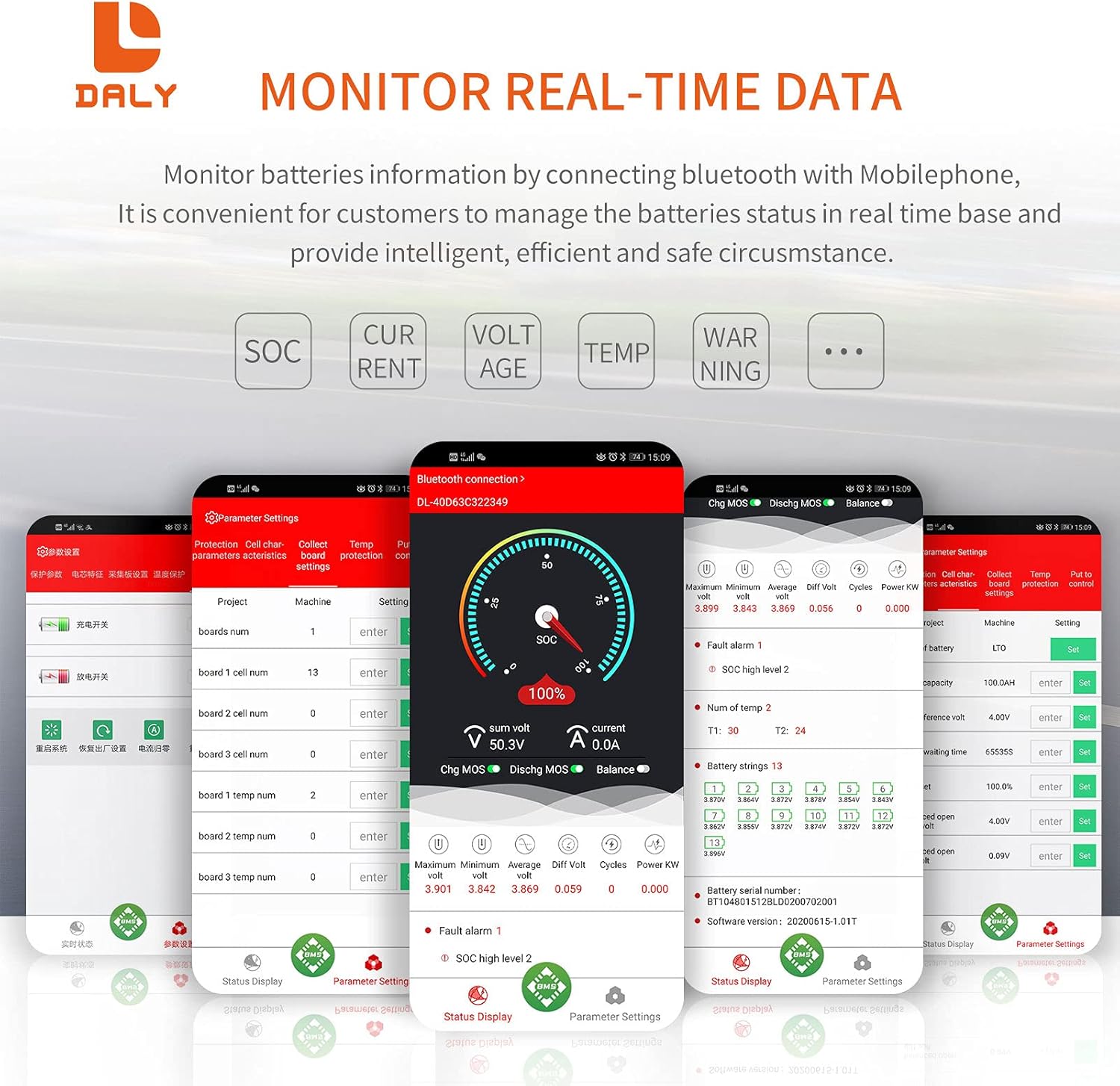
Figure 6: Smart BMS mobile application interface for monitoring battery data and adjusting parameters.
7.2 PC Software Usage:
Connect the BMS to a computer using the provided UART cable. Open the host computer software to view detailed battery status and configure advanced parameters. The PC software provides a comprehensive interface for data logging and fine-tuning BMS settings.
7.3 Instructional Video:
Video 1: An official DALY video demonstrating the connection process and basic operation of the Smart BMS with the mobile application, including viewing battery parameters and initial setup.
8. Wartung
Regelmäßige Wartung trägt dazu bei, die Langlebigkeit und optimale Leistung Ihres DALY Smart BMS und Akkus zu gewährleisten.
- Regelmäßige Überwachung: Überprüfen Sie regelmäßig die Batterieparameter über die mobile App oder die PC-Software, um etwaige Anomalien frühzeitig zu erkennen.
- Sauberkeit: Keep the BMS unit clean and free from dust and debris, especially around the cooling fan and heatsinks, to ensure efficient heat dissipation.
- Verbindungsintegrität: Periodically inspect all wiring connections for tightness and corrosion. Loose connections can lead to resistance, heat buildup, and performance issues.
- Firmware-Updates: Überprüfen Sie den DALY website or app for any available firmware updates for your BMS model.
9. Fehlerbehebung
In diesem Abschnitt werden häufig auftretende Probleme behandelt, die bei Ihrem DALY Smart BMS auftreten können.
| Problem | Mögliche Ursache | Lösung |
|---|---|---|
| BMS not activating / no power output | Bluetooth module button not pressed; incorrect wiring; battery voltage zu niedrig. | Press the button on the Bluetooth module. Verify all wiring connections, especially B- and P+. Check battery voltage; if too low, charge the battery. |
| Bluetooth-App stellt keine Verbindung her | Bluetooth module not activated; out of range; app issues. | Ensure the Bluetooth module button is pressed. Move closer to the BMS. Restart the app or phone. Check app permissions. |
| Inaccurate SOC reading | Incorrect battery capacity set in app; BMS not calibrated. | Set the correct battery capacity in the app (initial password: 123456). Fully charge the battery to allow the BMS to calibrate. |
| BMS shuts down randomly | Protection triggered (over-current, over-voltage, unter-voltage, temperature); loose connection. | Check app for fault messages. Identify and resolve the cause of the protection trigger. Inspect all connections. Reset the BMS by disconnecting and reconnecting the main power. |
| Zellen nicht effektiv im Gleichgewicht | Significant cell mismatch; low balance current. | Ensure cells are closely matched before assembly. Allow sufficient time for balancing, especially during charging. For severe imbalances, external balancing may be required. |
10. Spezifikationen
Key technical specifications for the DALY Smart BMS Li-ion 3S 12V 100A:
- Produktabmessungen: 7.24 x 2.56 x 1.3 Zoll
- Artikelgewicht: 1.5 Pfund
- Marke: DALY
- Konnektivitätstechnologie: Bluetooth
- Energiequelle: Batteriebetrieben
- Drahtloser Kommunikationsstandard: Bluetooth
- Kompatible Geräte: Mobiltelefone
- Entladestrom: Up to 100A continuous
- Ladestrom: Up to 50A continuous
- Over-discharge Current: 150A ± 15A (Can be set)
- Überladestrom: 150A ± 15A (Can be set)
- Überladung Voltage: 4.25V ± 0.05V (any string, can be set)
- Tiefentladung Voltage: 2.7V ± 0.1V (any string, can be set)
- Ladevolumentage: 12.6V (Can be set)

Abbildung 7: Lüfterspezifikationen und physikalische Abmessungen des DALY Smart BMS.
11. Garantie und Support
For warranty information, technical support, or assistance with your DALY Smart BMS, please contact the seller, DalyElec, directly through your purchase platform. Ensure you have your product model and purchase details available when contacting support.


