Einführung
Thank you for choosing the Edifier Hecate GM3 True Wireless Earbuds. These earbuds are designed to provide an immersive audio experience, especially for gaming, with features like low latency, specialized sound effects, and comfortable wear. This manual will guide you through the setup, operation, and maintenance of your GM3 earbuds to ensure optimal performance.

Image: Hecate GM3 True Wireless Low-latency Gaming Earbuds. This image displays the product branding and highlights its gaming focus.
Packungsinhalt
Bitte überprüfen Sie den Packungsinhalt, um sicherzustellen, dass alle Artikel vorhanden sind:
- Hecate GM3 True Wireless Earbuds (Left and Right)
- Ladeetui
- USB-Ladekabel
- Ohrstöpsel (verschiedene Größen)
- Benutzerhandbuch (dieses Dokument)

Image: The Hecate GM3 True Wireless Earbuds shown inside their charging case, with the case lid open revealing the earbuds and the illuminated indicator lights.
Aufstellen
1. Aufladen der Ohrhörer und des Ladecase
Vor der ersten Benutzung wird empfohlen, die Ohrhörer und das Ladecase vollständig aufzuladen.
- Legen Sie die Ohrhörer in das Ladecase. Achten Sie darauf, dass sie richtig sitzen.
- Verbinden Sie das USB-Ladekabel mit dem Ladeanschluss am Gehäuse und mit einer Stromquelle (z. B. USB-Netzteil, USB-Anschluss am Computer).
- The indicator lights on the charging case will show the charging status. Once fully charged, the lights may change or turn off.
A single charge provides approximately 4.5 hours of playback, and the charging case provides an additional 15 hours, totaling up to 19.5 hours of battery life.

Image: Visual representation of the Hecate GM3's battery life, showing 15 hours from the charging case and 4.5 hours from a single earbud charge.
2. Bluetooth-Kopplung
The GM3 earbuds feature automatic pairing for convenience.
- Öffnen Sie das Ladecase. Die Ohrhörer schalten sich automatisch ein und wechseln in den Kopplungsmodus.
- Aktivieren Sie auf Ihrem Gerät (Smartphone, Tablet, Computer) Bluetooth und suchen Sie nach verfügbaren Geräten.
- Select "Hecate GM3" from the list of found devices to connect.
- Sobald die Verbindung hergestellt ist, hören Sie eine akustische Benachrichtigung, und die Ohrhörer sind einsatzbereit.
Die Ohrhörer nutzen Bluetooth 5.2 für eine stabile und effiziente Verbindung.
Bedienungsanleitung
Touch-Bedienelemente
The Hecate GM3 earbuds are equipped with touch-sensitive controls for easy management of audio playback and calls. The touch-control ring is vacuum plated for precise and easy interaction.
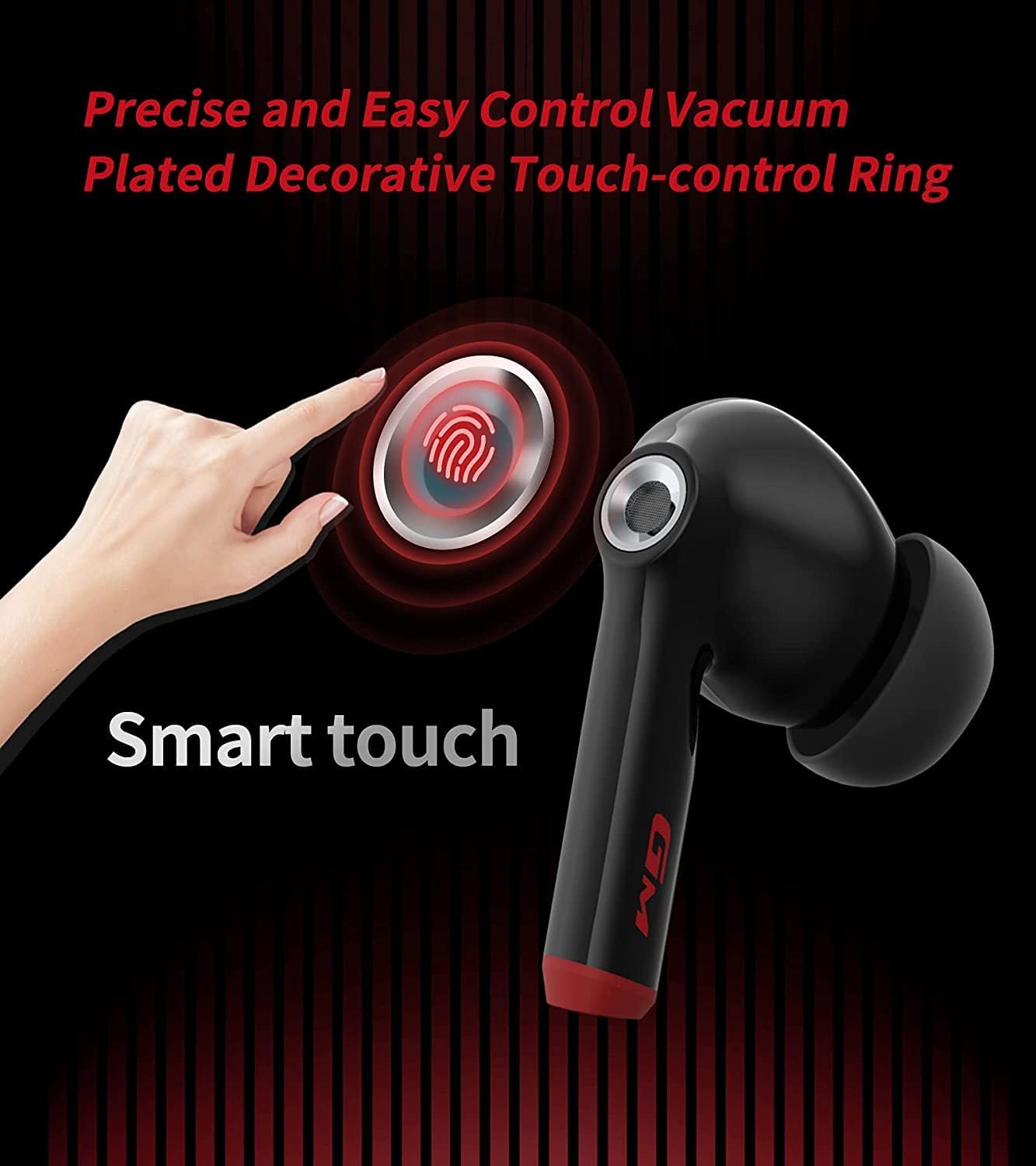
Image: A close-up of the Hecate GM3 earbud highlighting the "Smart touch" area, indicating the location of the touch-control ring.
| Aktion | Linker Ohrhörer (L) | Rechter Ohrhörer (R) |
|---|---|---|
| Abspielen/Pause | Einmaliges Tippen | Einmaliges Tippen |
| Nächster Titel | Doppeltippen | Doppeltippen |
| Vorheriger Titel | Dreifach tippen | Dreifach tippen |
| Anruf annehmen/beenden | Einmaliges Tippen | Einmaliges Tippen |
| Anruf ablehnen | Gedrückt halten (2 s) | Gedrückt halten (2 s) |
| Spiel-/Musikmodus umschalten | Gedrückt halten (3 s) | Gedrückt halten (3 s) |
Game Mode and Low Latency
The GM3 earbuds offer a dedicated Game Mode to enhance your gaming experience by reducing audio latency to as low as 60ms. This ensures a more synchronized audio-visual experience, crucial for competitive gaming.
- To activate Game Mode, press and hold the touch control area on either earbud for 3 seconds. You will hear an audio prompt indicating the mode change.
- In Game Mode, the earbuds prioritize low latency, making footsteps and gunfire sounds more distinct and positionable.
- To switch back to Music Mode for enhanced HiFi audio, repeat the same action.

Image: An illustration showing the Hecate GM3 earbuds and charging case next to a smartphone displaying a game, emphasizing the 60ms imperceptible latency and the Game/Music Mode feature.

Image: The Hecate GM3 earbuds and case with a graphic illustrating enhanced positional audio, highlighting the ability to hear detailed sounds like gunshots, footsteps, and explosions in gaming.

Image: The Hecate GM3 earbuds positioned above a portable gaming console, illustrating the enhanced footstep and gunfire sound effects for gaming.
Smart Noise Cancelling for Calls
The GM3 earbuds incorporate smart noise cancelling technology to ensure smooth and clear calls, reducing background noise for better communication.

Image: A user wearing a Hecate GM3 earbud, with a graphic illustrating the reduction of sound waves "Before" and "After" noise cancellation, indicating clearer calls.
Wartung
Reinigung
Regelmäßige Reinigung trägt dazu bei, die Leistungsfähigkeit und Lebensdauer Ihrer Ohrhörer zu erhalten:
- Verwenden Sie ein weiches, trockenes, fusselfreies Tuch, um die Ohrhörer und das Ladecase abzuwischen.
- Bei Ohrstöpseln diese von den Ohrhörern abnehmen und gegebenenfalls mit einer milden Seifenlösung reinigen, anschließend gründlich abspülen und vollständig trocknen lassen, bevor sie wieder angebracht werden.
- Verwenden Sie keine Scheuermittel, Alkohol oder chemische Lösungsmittel.
Wasserbeständigkeit (IP55)
The Hecate GM3 earbuds are rated IP55 for dust and water resistance. This means they are protected against limited dust ingress and low-pressure water jets from any direction. They are suitable for use during workouts or in light rain, but are not designed for submersion in water.
- Die Ohrhörer dürfen nicht absichtlich in Wasser eingetaucht werden.
- Um Beschädigungen der Ladekontakte zu vermeiden, stellen Sie sicher, dass die Ohrhörer trocken sind, bevor Sie sie wieder in das Ladecase legen.

Image: A close-up of a Hecate GM3 earbud with water splashing around it, visually representing its IP55 water resistance rating.
Lagerung
Bewahren Sie die Ohrhörer bei Nichtgebrauch im Ladecase auf, um sie zu schützen und geladen zu halten. Lagern Sie sie an einem kühlen, trockenen Ort und schützen Sie sie vor extremen Temperaturen.
Fehlerbehebung
If you encounter any issues with your Hecate GM3 earbuds, please refer to the following common solutions:
| Problem | Mögliche Lösung |
|---|---|
| Ohrhörer verbinden sich nicht/koppeln nicht |
|
| Nur ein Ohrhörer gibt Ton wieder |
|
| Geringe Lautstärke oder schlechte Klangqualität |
|
| Ladeetui lädt nicht |
|
Technische Daten
Key technical specifications for the Hecate GM3 True Wireless Earbuds:
- Modell: GM3
- Konnektivität: Kabellos (Bluetooth 5.2)
- Geringe Latenz: As low as 60ms (Game Mode)
- Membran: 10mm composite bio-cellulose diaphragm
- Akkulaufzeit: Approx. 4.5 hours (earbuds), 15 hours (charging case) - Total 19.5 hours
- Wasserbeständigkeit: IP55 (Dust and Water Proof)
- Steuerung: Touch-fähig
- Enthaltene Komponenten: Kabelloses Ladecase
- Material: Plastik
- Produktabmessungen: 4 x 5 x 3 cm; 109 g
- Akku-Typ: Lithium-Polymer (im Lieferumfang enthalten)

Bild: Ein überview graphic detailing key features of the Hecate GM3, including 60ms latency, H+ Game Sound Effects, 10mm Biologic Diaphragm, Ergonomic Design, 19.5h Playback, IP55 rating, Vacuum Plated Touch-control Ring, and Dual Mode (Music/Game).

Image: A cutaway diagram of the Hecate GM3 earbud, highlighting the 10mm composite biologic diaphragm and its internal components responsible for sound production.
Garantie und Support
Edifier products are designed for reliability and performance. For warranty information and support, please refer to the official Edifier webBesuchen Sie die Website oder kontaktieren Sie den Kundenservice. Bewahren Sie Ihren Kaufbeleg als Kaufnachweis für Garantieansprüche auf.
For further assistance or specific inquiries, please visit the Edifier Store auf Amazon or the official Edifier support channels.


