Einführung
The Altec Lansing HydraBlast is a robust and versatile wireless portable Bluetooth speaker designed for various environments, from outdoor parties to everyday use. It features IP67 Everything Proof protection, ensuring it is waterproof, shockproof, snowproof, and dustproof. With a long-lasting battery, built-in phone charging capabilities, and dynamic LED lights, the HydraBlast delivers powerful audio and convenience wherever you go.

Abbildung 1: Vorderseite view of the Altec Lansing HydraBlast speaker in Royal Blue.
Lieferumfang
- Altec Lansing HydraBlast Bluetooth Speaker
- USB-C-Ladekabel
- Karabinerhaken
- Benutzerhandbuch (dieses Dokument)
Produkteigenschaften
- Bold Bass and Clear Audio: Experience HD audio with immersive bass for a rich listening experience.
- IP67 Alles bewiesen: Designed to be waterproof, shockproof, snowproof, and dustproof, making it suitable for any environment.

Figure 2: The HydraBlast speaker demonstrating its water resistance.
- 20 Stunden Spielzeit: Genießen Sie längere Musikwiedergabe mit nur einer Akkuladung.
- Built-in Phone Charger: Features both wireless (Qi) charging and wired USB-C output to charge your devices.

Figure 3: Wireless charging a smartphone on the speaker's top surface.
- LED-Lichtmodi: Multiple LED light modes to enhance your listening experience and create a party atmosphere.

Figure 4: The speaker features 11 distinct LED light modes, including strobe effects.
- Tragbares Design: Lightweight and includes a built-in carabiner hook for easy transport and attachment.

Figure 5: The included carabiner clip allows for easy portability, attaching to bags or gear.
- Bluetooth 5.0: Bietet eine stabile drahtlose Verbindung bis zu einer Entfernung von 100 Metern.
- Echtes kabelloses Pairing: Connect two HydraBlast speakers for a stereo sound experience.
Kontrollen überview

Figure 6: Top panel controls of the HydraBlast speaker.
- Ein- / Ausschalter: Zum Ein- oder Ausschalten des Lautsprechers drücken und halten.
- Link-Schaltfläche: Used for True Wireless Pairing with another HydraBlast speaker.
- Schaltfläche zum Ändern der Farbe: Durchläuft verschiedene LED-Lichtmodi.
- Wireless Qi Charger: Integrated charging pad for compatible devices.
- Lautstärke verringern / Vorheriger Titel (-): Kurzes Drücken verringert die Lautstärke, langes Drücken springt zum vorherigen Titel.
- Voice Assistant / Answer Calls Button: Activates voice assistant or answers/ends calls.
- Lautstärke erhöhen / Nächster Titel Taste (+): Kurz drücken für Lautstärke erhöhen, lang drücken für nächsten Titel.
Aufstellen
1. Erstes Aufladen
Before first use, fully charge your HydraBlast speaker. Locate the USB-C charging port on the side of the speaker (protected by a waterproof flap). Connect the provided USB-C cable to the speaker and the other end to a USB power adapter (not included) or a computer's USB port. The charging indicator light will show charging status.
2. Bluetooth-Kopplung
- Stellen Sie sicher, dass der Lautsprecher ausgeschaltet ist.
- Halten Sie die Ein-/Ausschalten button until you hear an audible prompt and the Bluetooth indicator light begins to flash, indicating pairing mode.
- Navigieren Sie auf Ihrem Smartphone oder Bluetooth-fähigen Gerät zu den Bluetooth-Einstellungen.
- Select "Altec Lansing HydraBlast" from the list of available devices.
- Once connected, you will hear a confirmation tone, and the Bluetooth indicator light will become solid.
3. True Wireless Pairing (Pairing Two Speakers)
To achieve a stereo sound experience, you can pair two HydraBlast speakers together:
- Ensure both HydraBlast speakers are powered on and not connected to any other Bluetooth devices.
- On one speaker (this will be your primary speaker), press the Link button. The speaker will enter True Wireless Pairing mode.
- On the second speaker, also press the Link Taste.
- Die beiden Lautsprecher verbinden sich automatisch miteinander. Nach erfolgreicher Verbindung hören Sie einen Bestätigungston.
- Now, connect your Bluetooth device to the primary speaker as described in the "Bluetooth Pairing" section above. Audio will play through both speakers in stereo.
Bedienungsanleitung
Audio wiedergeben
- After successful Bluetooth pairing, open your preferred music application on your device and begin playback.
- Verwenden Sie die Lauter (+) Und Lautstärke runter (-) buttons on the speaker to adjust the volume.
- Drücken Sie lange die Lauter (+) button for the next track, and long press the Lautstärke runter (-) Taste für den vorherigen Titel.
Anrufe verwalten
- Wenn ein Anruf eingeht, drücken Sie die Voice Assistant / Answer Calls Schaltfläche zum Antworten.
- Um einen Anruf zu beenden, drücken Sie dieselbe Taste erneut.
- Um einen eingehenden Anruf abzulehnen, halten Sie die Voice Assistant / Answer Calls Taste.
Using LED Light Modes
Drücken Sie die Farbänderung button to cycle through the available LED light modes. Continue pressing until you find your desired light pattern or turn the lights off.
Aufladen externer Geräte
- Kabelloses Laden: Place your Qi-compatible smartphone or device on the designated wireless charging area on top of the speaker. Ensure proper alignment for charging to begin.
- Kabelgebundenes Laden: Open the waterproof flap on the side of the speaker to access the USB-A output port. Connect your device's charging cable to this port to charge it.
Wartung
- Reinigung: Verwenden Sie ein weiches,amp Verwenden Sie ein Tuch, um die Außenseite des Lautsprechers zu reinigen. Vermeiden Sie die Verwendung von scharfen Chemikalien oder Scheuermitteln.
- Wasserbeständigkeit: While the speaker is IP67 rated, ensure the charging port flap is securely closed before exposing it to water or dust. Do not submerge the speaker for extended periods or at depths greater than 1 meter.
- Lagerung: Bewahren Sie den Lautsprecher bei Nichtgebrauch an einem kühlen, trockenen Ort auf. Vermeiden Sie extreme Temperaturen.
- Batteriepflege: For optimal battery life, avoid fully discharging the speaker frequently. Charge it regularly, even if not in constant use.
Fehlerbehebung
| Problem | Mögliche Ursache/Lösung |
|---|---|
| Der Lautsprecher lässt sich nicht einschalten. | Battery may be depleted. Connect to a power source using the USB-C cable and charge for at least 30 minutes before attempting to power on again. |
| Kopplung via Bluetooth nicht möglich. |
|
| Kein Ton oder geringe Lautstärke. |
|
| Kabelloses Laden funktioniert nicht. |
|
| Klangverzerrung. |
|
Technische Daten
| Besonderheit | Detail |
|---|---|
| Marke | Altec Lansing |
| Modellname | HydraBlast (IMW1300-RYB-STK-2) |
| Konnektivitätstechnologie | Bluetooth, USB |
| Drahtlose Kommunikationstechnologie | Bluetooth 5.0 |
| Bluetooth-Reichweite | 100 Fuß |
| Lautsprechertyp | Im Freien |
| Besonderheit | Portable, Waterproof, Built-in Phone Charger, LED Lights |
| Wasserbeständigkeit | IP67 (Waterproof, Shockproof, Snowproof, Dustproof) |
| Akkulaufzeit | Bis zu 20 Stunden |
| Stromquelle | Batteriebetrieben |
| Ladeanschluss | USB-C |
| Audioausgabemodus | Stereo |
| Maximale Lautsprecherausgangsleistung | 6 Watt |
| Technische Daten | 8.7"T x 4.4"B x 5.5"H |
| Artikelgewicht | 1.9 Pfund |
| Material | Durable Plastic / Rubberized Plastic |
| Im Lieferumfang enthaltene Komponenten | Bluetooth-Lautsprecher |
| UPC | 021331023704 |
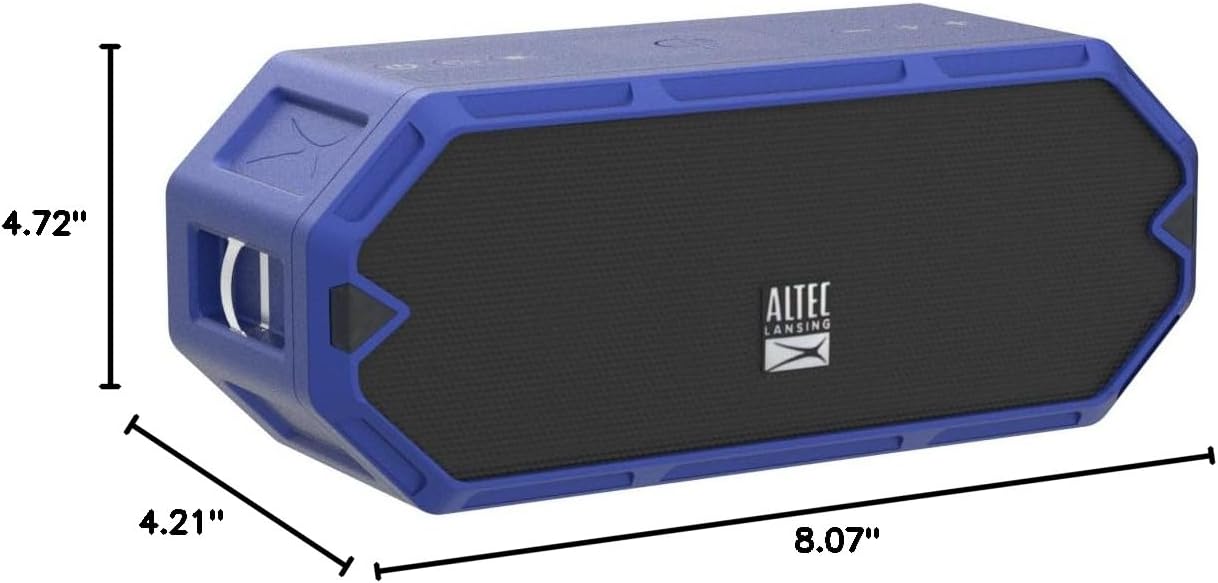
Figure 7: Dimensions of the HydraBlast speaker.
Garantie und Support
The Altec Lansing HydraBlast speaker comes with a Limited Warranty. For specific warranty terms, conditions, and duration, please refer to the warranty card included with your product or visit the official Altec Lansing webWebsite.
For technical support, troubleshooting assistance, or warranty claims, please contact Altec Lansing Customer Service:
- WebWebsite: alteclansing.com/support
- Telefon: Siehe Produktverpackung oder webWebsite für regionale Kontaktnummern.
Please have your product model number (IMW1300-RYB-STK-2) and proof of purchase ready when contacting support.


