1. Einleitung
Thank you for choosing the iPega PG-9076 Wireless Bluetooth Gamepad. This versatile controller is designed to provide an immersive gaming experience across multiple platforms. It supports both Bluetooth and 2.4GHz wireless connections, making it compatible with Android smartphones, tablets, Smart TVs, TV boxes, and Windows PCs (XP/7/8/10).
Please read this manual carefully before using the product to ensure proper operation and to maximize your gaming enjoyment.
2. Packungsinhalt
- 1 x iPega PG-9076 Wireless Bluetooth Gamepad
- 1 x USB-Ladekabel
- 1 x 2.4-GHz-Funkempfänger (USB-Dongle)
- 1 x Benutzerhandbuch
3. Produktüberschreitungview
Familiarize yourself with the layout and functions of your gamepad.

Abbildung 3.1: Von oben nach unten view of the iPega PG-9076 Gamepad. This image displays the directional pad (D-pad) on the left, two analog joysticks, action buttons (A, B, X, Y) on the right, and central function buttons including TURBO, START, SELECT, NEW, iCADE, and ANDROID mode buttons.
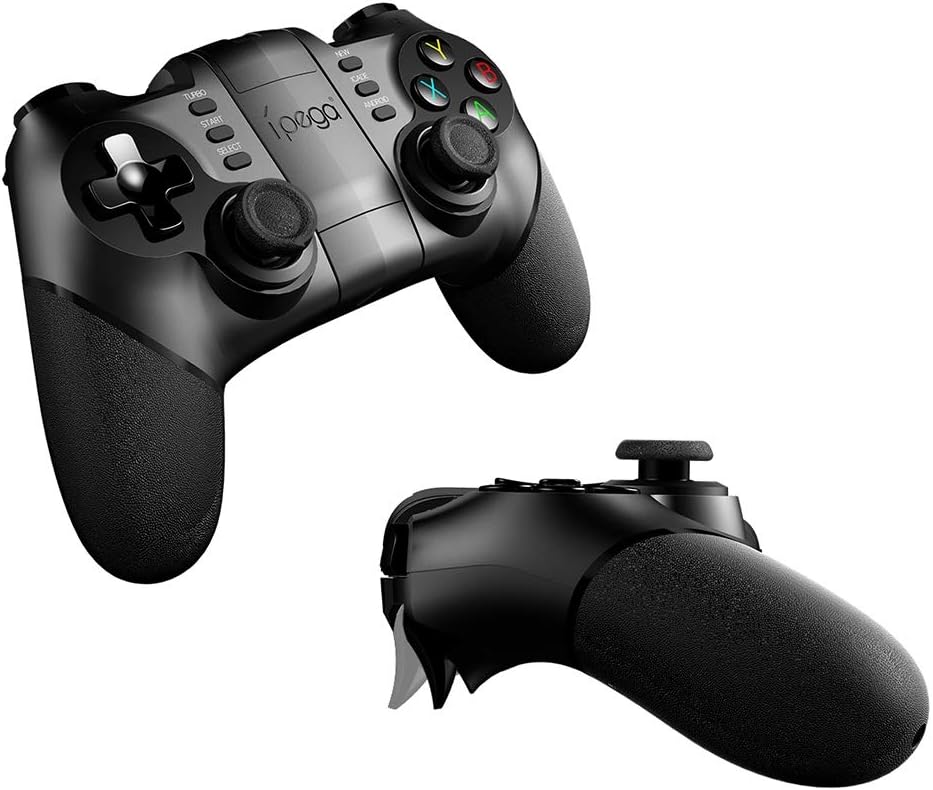
Abbildung 3.2: Abgewinkelt view of the iPega PG-9076 Gamepad. This perspective emphasizes the ergonomic grips and the overall shape of the controller, designed for comfortable handling during extended gaming sessions.
- Steuerkreuz: Steuerkreuz für präzise Bewegungen.
- Linker/Rechter Analogstick: Für 360-Grad-Bewegungen und Kamerasteuerung.
- Aktionsschaltflächen (A, B, X, Y): Für Aktionen im Spiel.
- L1/L2/R1/R2 Triggers/Shoulder Buttons: Located on the top of the gamepad.
- START/SELECT-Tasten: Standardmäßige Spielsteuerungsknöpfe.
- TURBO-Taste: Activates continuous firing for assigned buttons.
- Mode Buttons (NEW, iCADE, ANDROID): Dient zum Umschalten zwischen verschiedenen Betriebsmodi.
- Home "Button: Central button for system functions.
- Telefonhalter: Integrated adjustable holder for smartphones.
4. Einrichtung
4.1. Aufladen des Gamepads
Before first use, fully charge the gamepad. Connect the supplied USB charging cable to the gamepad's charging port and the other end to a USB power source (e.g., computer USB port, USB wall adapter).
- The LED indicator will typically show charging status (e.g., red light on while charging, off when fully charged).
- Eine vollständige Aufladung dauert in der Regel etwa 2-3 Stunden.
4.2. Verbindungsmodi
The PG-9076 supports multiple connection modes for various devices.
4.2.1. Bluetooth Connection (for Android/iOS/Smart TV/TV Box)
- Ensure the gamepad is powered off.
- Halten Sie die ANDROID button (or relevant mode button for your device, e.g., iCADE for iOS if supported) and the HEIM button simultaneously until the LED indicator flashes rapidly. This puts the gamepad into pairing mode.
- On your device (smartphone, tablet, Smart TV, TV Box), go to Bluetooth settings and turn Bluetooth on.
- Suchen nach available devices. You should see "PG-9076" or a similar name appear in the list.
- Select "PG-9076" to pair. The LED indicator on the gamepad will become solid once successfully connected.
- For iOS devices, some games may require specific iCADE mode. Refer to game instructions.

Abbildung 4.1: The iPega PG-9076 Gamepad with a smartphone securely mounted in its integrated holder, ready for mobile gaming. This image demonstrates the convenience of playing on a phone with a physical controller.
4.2.2. 2.4G Wireless Connection (for PC/Smart TV/TV Box)
- Plug the 2.4G wireless receiver (USB dongle) into an available USB port on your PC, Smart TV, or TV Box.
- Ensure the gamepad is powered off.
- Halten Sie die NEU button (or a specific PC mode button if available) and the HEIM button simultaneously until the LED indicator flashes rapidly.
- The gamepad should automatically connect to the receiver. The LED indicator will become solid when connected.
- Your system may automatically install necessary drivers.

Abbildung 4.2: The iPega PG-9076 Gamepad with a smartphone attached, and the 2.4G USB wireless receiver prominently displayed in the foreground. This illustrates the wireless connectivity option for devices like PCs and TV boxes.
5. Bedienungsanleitung
5.1. Ein-/Ausschalten
- Einschalten: Drücken Sie die HEIM button. The gamepad will attempt to connect to the last paired device.
- Ausschalten: Halten Sie die HEIM button for approximately 3 seconds until the LED indicator turns off. The gamepad will also automatically power off after a period of inactivity.
5.2. Gamepad Modes
The PG-9076 supports different modes to ensure compatibility with various games and platforms. Switch modes by holding the corresponding button (e.g., ANDROID, NEW, iCADE) and then pressing the HOME button to power on.
- Android-Standardmodus: For most Android games.
- PC X-Input-Modus: For Windows PC games that support X-Input (common for modern PC games).
- iCADE Mode: For some older iOS games that specifically support iCADE protocol.
5.3. TURBO-Funktion
The TURBO function allows a button to continuously fire when held down, useful for certain games.
- Press the button you wish to set to TURBO (e.g., A button).
- While holding that button, press the TURBO button once. The LED indicator may flash to confirm.
- To cancel TURBO for that button, repeat the process.
6. Wartung
- Reinigung: Use a soft, dry cloth to clean the gamepad. Do not use harsh chemicals or abrasive cleaners.
- Lagerung: Bewahren Sie das Gamepad an einem kühlen, trockenen Ort fern von direkter Sonneneinstrahlung und extremen Temperaturen auf.
- Batteriepflege: To prolong battery life, avoid fully discharging the battery frequently. Charge the gamepad regularly, even if not in use for extended periods (e.g., once every three months).
- Vermeiden Sie Tropfen: Das Gamepad darf nicht fallen gelassen oder starken Stößen ausgesetzt werden, da dies die internen Komponenten beschädigen kann.
7. Fehlerbehebung
7.1. Gamepad Not Connecting
- Überprüfen Sie die Leistung: Stellen Sie sicher, dass das Gamepad aufgeladen und eingeschaltet ist.
- Richtiger Modus: Verify you are in the correct connection mode (Bluetooth for mobile/TV, 2.4G for PC with dongle).
- Reparatur: Delete the gamepad from your device's Bluetooth list and attempt to re-pair.
- Interferenz: Bewegen Sie sich näher an Ihr Gerät heran und entfernen Sie sich von anderen drahtlosen Geräten, die Störungen verursachen könnten.
- Dongle-Check: If using 2.4G, ensure the USB dongle is securely plugged in and recognized by your device.
7.2. Schaltflächen reagieren nicht
- Batteriestand: Low battery can cause erratic behavior. Charge the gamepad.
- Neustart: Power off the gamepad and your device, then restart both and try connecting again.
- Spielkompatibilität: Some games may not fully support external controllers or may require specific mapping. Check game settings.
7.3. Ladeprobleme
- Cable/Port: Versuchen Sie es mit einem anderen USB-Kabel oder Ladeanschluss.
- Energiequelle: Ensure the USB power source is functioning correctly.
8. Spezifikationen
| Besonderheit | Detail |
|---|---|
| Modell | PG-9076 |
| Konnektivität | Bluetooth, 2.4-GHz-Funk |
| Kompatibilität | Android (Phones, Tablets, Smart TV, TV Box), Windows (XP/7/8/10) |
| Abmessungen (Versand) | 17.8 x 13.4 x 6.8 cm |
| Gewicht (Versand) | 302 Gramm |
| Herstellerreferenz | 2724709426067 |
9. Garantie und Support
This product comes with a standard manufacturer's warranty. Please refer to the warranty card included in your package or contact your retailer for specific warranty terms and conditions.
For technical support or further assistance, please contact the customer service department of your place of purchase or visit the official iPega webSite für Supportressourcen.


