Einführung
This manual provides detailed instructions for the setup, operation, and maintenance of your Ipega PG-9089 Wireless Bluetooth Game Controller. Please read this manual carefully before use to ensure proper functionality and extend the product's lifespan. The Ipega PG-9089 is a versatile game controller designed for multi-platform compatibility, offering an enhanced gaming experience across various devices.
Produkt überview
The Ipega PG-9089 is a wireless Bluetooth game controller featuring an ergonomic design and broad compatibility. It includes an integrated extendable phone holder, making it convenient for mobile gaming on the go.
Hauptmerkmale:
- Wireless Bluetooth connectivity for seamless gaming.
- Compatible with Android, iOS, and PC devices.
- Integrated extendable phone holder for smartphones up to 6.2 inches.
- High sensitivity and accuracy buttons for precise control.
- Ergonomic design for comfortable extended gameplay sessions.

Abbildung 1: Front view of the Ipega PG-9089 Wireless Bluetooth Game Controller, showcasing its black and red design with dual analog sticks and face buttons.
Packungsinhalt
Bitte überprüfen Sie, ob Ihr Paket folgende Artikel enthält:
- 1 x Ipega PG-9089 Wireless Bluetooth Game Controller
- 1 x USB-Ladekabel
- 1 x Benutzerhandbuch
Einrichtung und Anschluss
Aufladen des Controllers
Before initial use, ensure the controller is fully charged. Connect the supplied USB charging cable to the controller's charging port and the other end to a standard USB power source (e.g., PC USB port, USB wall adapter). The charging indicator light will illuminate during charging and turn off once the battery is full.
Bluetooth-Kopplung
The PG-9089 supports various connection modes. Select the appropriate mode for your device.
Android-Geräteverbindung:
- Stellen Sie sicher, dass der Controller ausgeschaltet ist.
- Halten Sie die Ein Knopf + HOME-Taste simultaneously until the indicator light flashes rapidly. This signifies Android standard pairing mode.
- On your Android device, navigate to Bluetooth settings and search for available devices.
- Select "PG-9089" from the list to pair. The indicator light will become solid once connected.
iOS Device Connection:
- Stellen Sie sicher, dass der Controller ausgeschaltet ist.
- Halten Sie die Y-Taste + HOME-Taste simultaneously until the indicator light flashes rapidly. This signifies iOS standard pairing mode.
- On your iOS device, navigate to Bluetooth settings and search for available devices.
- Select "PG-9089" from the list to pair. The indicator light will become solid once connected.
PC (Windows) Connection:
Der Controller kann über Bluetooth oder ein USB-Kabel mit einem PC verbunden werden.
Bluetooth Connection (PC):
- Stellen Sie sicher, dass der Controller ausgeschaltet ist.
- Halten Sie die X-Schaltfläche + HOME-Taste simultaneously until the indicator light flashes rapidly. This puts the controller into PC X-Input mode.
- On your PC, go to Bluetooth settings and add a new device.
- Select "PG-9089" from the list to pair. The indicator light will become solid once connected.
Kabelverbindung (PC):
- Verbinden Sie den Controller mit Ihrem PC mithilfe des mitgelieferten USB-Kabels.
- The controller should be automatically recognized as a game controller.
Bedienungsanleitung
Tastenlayout
Familiarize yourself with the controller's button layout for optimal gameplay and function access.

Abbildung 2: Diagram illustrating the button layout of the Ipega PG-9089, including D-Pad, A/B/X/Y buttons, L1/L2, R1/R2, Home, Select, Start, Turbo, and analog sticks with L3/R3 functions.
Integrierter Telefonhalter
The controller features an extendable holder designed to securely mount your smartphone for mobile gaming.
- Gently pull the top part of the holder upwards to extend it.
- Carefully place your smartphone into the holder, ensuring it is securely seated. The holder supports phones up to 6.2 inches.

Abbildung 3: Seite view of the Ipega PG-9089 demonstrating the integrated extendable phone holder in use, securely holding a smartphone.
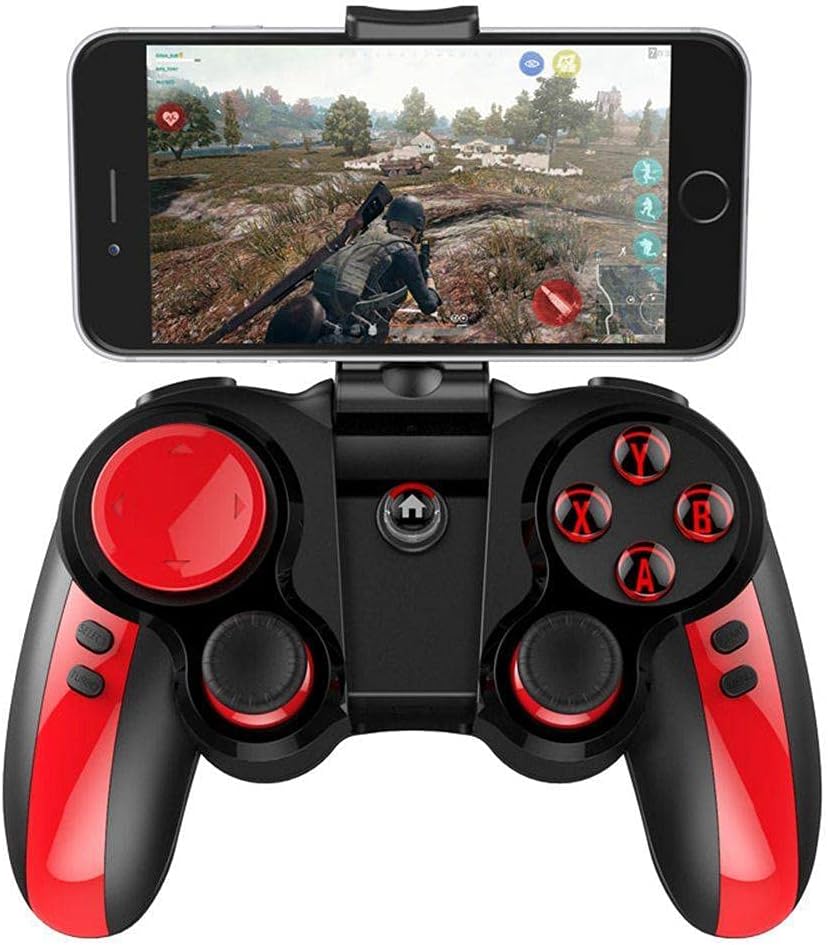
Abbildung 4: The Ipega PG-9089 controller with a smartphone mounted in its holder, displaying a game in progress, illustrating its practical application.
TURBO-Funktion
The TURBO function allows for rapid, continuous input of a button press, which can be beneficial in games requiring fast, repeated actions.
- Press the button you wish to set to TURBO (e.g., A, B, X, Y, L1, R1, L2, R2).
- While holding that button, press the TURBO-Taste once. The selected button will now continuously input as long as it is held down.
- To cancel the TURBO function for a specific button, repeat the process: press the button and then press the TURBO-Taste wieder.
Wartung
- Reinigen Sie den Controller regelmäßig mit einem weichen, trockenen Tuch. Verwenden Sie keine scharfen Chemikalien oder Scheuermittel.
- Vermeiden Sie es, den Controller extremen Temperaturen, direkter Sonneneinstrahlung oder hoher Luftfeuchtigkeit auszusetzen.
- Bewahren Sie den Controller an einem kühlen, trockenen Ort auf, wenn Sie ihn nicht verwenden.
- Versuchen Sie nicht, den Controller selbst zu zerlegen oder zu reparieren, da dies zum Verlust der Garantie und zu Schäden führen kann.
Fehlerbehebung
Controller verbindet sich nicht über Bluetooth:
- Stellen Sie sicher, dass der Controller vollständig aufgeladen ist.
- Stellen Sie sicher, dass Bluetooth auf Ihrem Gerät aktiviert ist.
- Make sure the controller is in the correct pairing mode for your device (Android, iOS, or PC).
- Try forgetting the device on your Bluetooth settings and re-pairing.
- Starten Sie sowohl den Controller als auch Ihr Gerät neu.
Tasten reagieren nicht:
- Überprüfen Sie, ob der Controller richtig angeschlossen ist.
- Ensure the game or application supports game controllers.
- Try resetting the controller (if a reset button is available, otherwise power cycle).
- Recharge the controller.
Das Telefon passt nicht in die Halterung:
- The holder supports phones up to 6.2 inches. Ensure your phone's size is within this limit.
- Entfernen Sie alle sperrigen Handyhüllen, die den korrekten Sitz behindern könnten.
Technische Daten
| Besonderheit | Detail |
|---|---|
| Modell | PG-9089 |
| Konnektivität | Bluetooth, USB Wired |
| Kompatibilität | Android, iOS, PC (Windows, Macintosh) |
| Phone Holder Support | Bis zu 6.2 Zoll |
| Farbe | Schwarz, Rot |
| Hersteller | IPEGA |
| Verpackungsabmessungen | 16.4 x 14 x 7 cm |
| Gewicht | 280 g |
Garantie und Support
For warranty information and technical support, please refer to the warranty card included with your product or visit the official Ipega webBewahren Sie Ihren Kaufbeleg als Kaufnachweis für eventuelle Garantieansprüche auf.
Hersteller: IPEGA
Modell: PG-9089
ASIN: B0997F4ZZH


