1. Einleitung
Thank you for choosing LAMA Bluetooth Sport Headphones. This manual provides essential information for setting up, operating, and maintaining your new headphones. Please read it carefully before use to ensure optimal performance and longevity of the product.

Image 1.1: LAMA Bluetooth Sport Headphones (Model LX02, A13-Nero).
2. Packungsinhalt
Bitte prüfen Sie das Paket auf folgende Artikel:
- LAMA Bluetooth Sport Headphones
- USB-Ladekabel (Typ-C)
- Multiple pairs of interchangeable ear tips (S/M/L)
- Bedienungsanleitung
3. Produktüberschreitungview
The LAMA Bluetooth Sport Headphones feature an ergonomic neckband design with in-ear earbuds, integrated controls, and a Type-C charging port.

Image 3.1: Control Panel Layout and Functions.
- Schaltertaste: Einschalten / Ausschalten.
- 'C'-Taste: Game/Music Mode Switch, Sound Effect Switch, Voice Assistant activation.
- Funktionstasten: Play/Pause, Answer/Hang Up Call, Redial, Reject Call.
- Lautstärketasten: Volume Up/Down, Previous/Next Song.

Image 3.2: Magnetic Earbud Design for secure storage.
4. Einrichtung
4.1 Erstaufladung
Before first use, fully charge the headphones. Connect the provided USB Type-C charging cable to the charging port on the control panel and a suitable USB power source. The battery indicator lights will show the charging status.
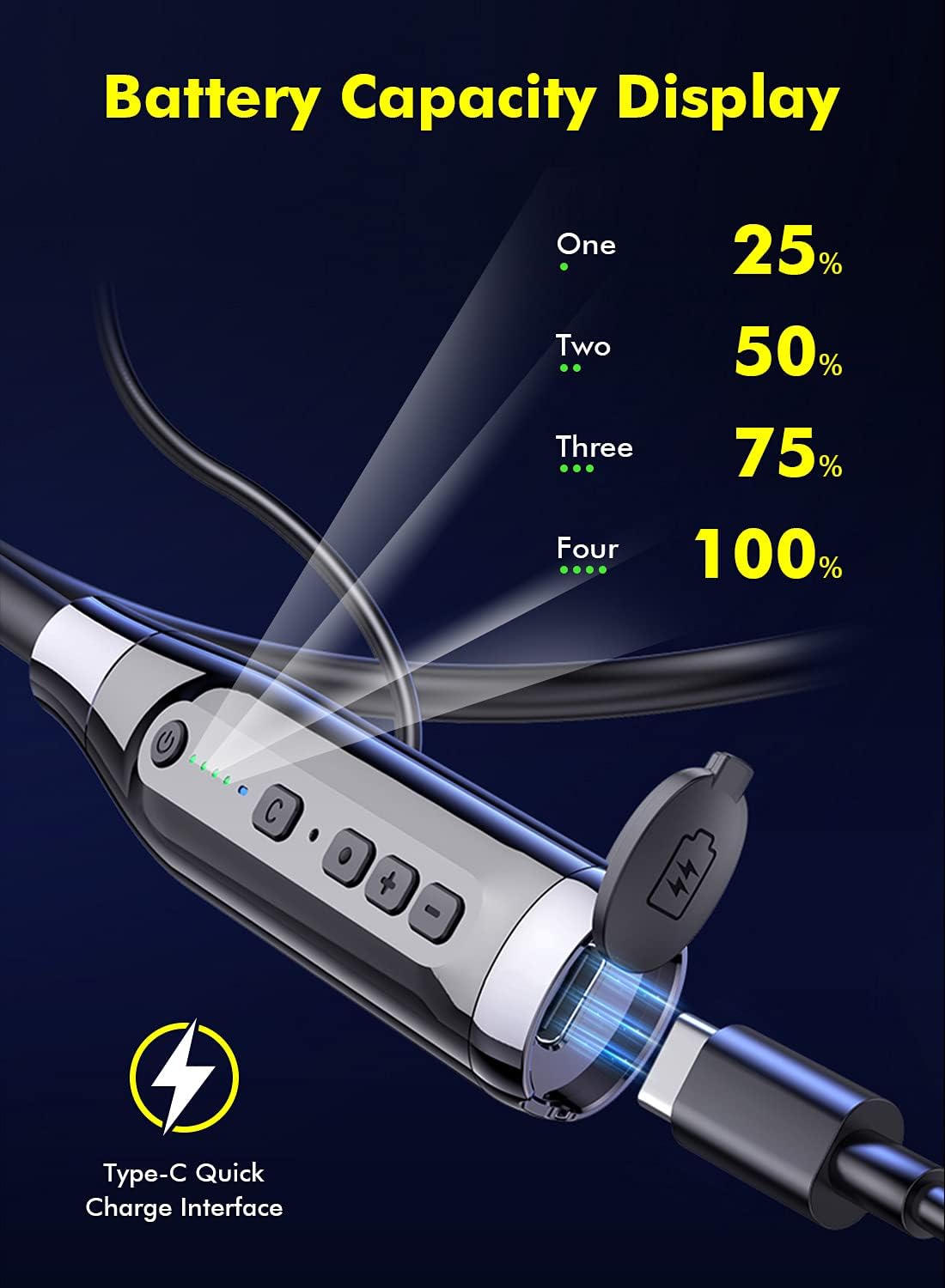
Image 4.1: Battery Capacity Display and Type-C Charging Port.
- Ladezeit: Ungefähr 2 Stunden für eine vollständige Ladung.
- Battery Life: Up to 100 hours of continuous play time on a full charge.
4.2 Ein-/Ausschalten
- Einschalten: Long press the Switch Button (1) for 2 seconds.
- Ausschalten: Long press the Switch Button (1) for 3 seconds.
4.3 Bluetooth-Kopplung
- Stellen Sie sicher, dass die Kopfhörer ausgeschaltet sind.
- Long press the Switch Button (1) for 2 seconds to power on. The LED indicator will flash, indicating pairing mode.
- Aktivieren Sie auf Ihrem Gerät (Smartphone, Tablet usw.) Bluetooth und suchen Sie nach verfügbaren Geräten.
- Select "LAMA LX02" (or similar name) from the list of found devices.
- Sobald die Verbindung hergestellt ist, hört die LED-Anzeige auf zu blinken und leuchtet durchgehend blau.
5. Bedienungsanleitung
5.1 Musikwiedergabe
- Abspielen/Pause: Single click the Function Key (3).
- Lautstärke erhöhen: Click the "+" Volume Key (4).
- Lautstärke runter: Click the "-" Volume Key (4).
- Nächstes Lied: Long press the "-" Volume Key (4).
- Vorheriges Lied: Long press the "+" Volume Key (4).
5.2 Anrufmanagement
- Anruf annehmen/beenden: Single click the Function Key (3).
- Anruf ablehnen: Long press the Function Key (3) for 1 second.
- Wahlwiederholung letzte Nummer: Double click the Function Key (3).
5.3 Sound Effect and Mode Switching

Image 5.1: Three Sound Effect Switches (Bass, Voice, 3D Balance).
- Switch Sound Effect (Bass/Voice/3D Balance): Double click the 'C' Key (2).
- Spiel-/Musikmodus umschalten: Single click the 'C' Key (2).

Image 5.2: Game/Music Mode with Low Latency Feature.
5.4 Sprachassistent
- Sprachassistent aktivieren (Siri, Google Assistant usw.): Long press the 'C' Key (2) for 1 second.
6. Wartung
6.1 Reinigung
- Wischen Sie die Kopfhörer mit einem weichen, trockenen Tuch ab.
- Keine Scheuer- oder Lösungsmittel verwenden.
- Reinigen Sie die Ohrstöpsel regelmäßig, um Ohrenschmalzablagerungen vorzubeugen, da diese die Klangqualität beeinträchtigen können.
6.2 Speicherung
- Bewahren Sie die Kopfhörer an einem kühlen, trockenen Ort fern von direkter Sonneneinstrahlung und extremen Temperaturen auf.
- The magnetic earbuds help prevent tangling and secure the headphones when not in use.
6.3 Wasserdichtigkeit (IPX5)
The headphones are rated IPX5 water-resistant, meaning they can withstand splashes and sweat. They are suitable for sports and outdoor activities.

Image 6.1: IPX5 Water Resistance for active use.
Wichtig: IPX5 rating does not mean the headphones are waterproof for submersion. Do not immerse them in water.
7. Fehlerbehebung
| Problem | Mögliche Ursache | Lösung |
|---|---|---|
| Die Kopfhörer lassen sich nicht einschalten. | Schwache Batterie. | Laden Sie die Kopfhörer vollständig auf. |
| Kopplung mit dem Gerät nicht möglich. | Bluetooth ist am Gerät deaktiviert; Kopfhörer befinden sich nicht im Kopplungsmodus; zu weit vom Gerät entfernt. | Ensure Bluetooth is enabled on your device. Put headphones in pairing mode. Move closer to the device (within 10 meters). |
| Kein Ton oder geringe Lautstärke. | Volume too low; headphones not connected; ear tips blocked. | Adjust volume on headphones and device. Reconnect headphones. Clean ear tips. |
| Die Klangqualität ist schlecht. | Poor connection; incorrect sound effect mode. | Ensure stable Bluetooth connection. Try switching sound effect modes (Bass, Voice, 3D Balance). |
| Mikrofon funktioniert nicht. | Mikrofon gesperrt; Geräteeinstellungen. | Ensure microphone is not covered. Check device's audio input settings. |
8. Spezifikationen
- Modell: LX02
- Marke: LAMA
- Konnektivität: Bluetooth 5.0
- Batteriekapazität: 1000 mAh
- Ladezeit: Ungefähr 2 Stunden
- Kontinuierliche Spielzeit: Bis zu 100 Stunden
- Ladeanschluss: USB Type-C (supports QC 3.0, QC2.0, QC1.0 fast charging protocols)
- Wasserbeständigkeit: IPX5
- Kontrollmethode: Sprach-, Tasten-
- Mikrofon: Integrated, Stereo technology
- Material: Plastik
- Gewicht: 200 g
- Zusätzliche Funktionen: Noise Cancellation, Lightweight, Magnetic Design, Multiple Sound Effects (Bass, Voice, 3D Balance), Game/Music Low Latency Mode.
9. Sicherheitshinweise
- Das Produkt darf nicht zerlegt oder verändert werden.
- Von extremen Temperaturen, hoher Luftfeuchtigkeit und ätzenden Substanzen fernhalten.
- Um Gehörschäden vorzubeugen, vermeiden Sie längeres Hören bei hoher Lautstärke.
- Do not use headphones while driving or in situations where you need to be aware of your surroundings.
- Batterien und elektronische Bauteile sind gemäß den örtlichen Vorschriften verantwortungsvoll zu entsorgen.
10. Garantie und Support
LAMA products come with a standard manufacturer's warranty. For detailed warranty information, product support, or service inquiries, please refer to the warranty card included in your package or visit the official LAMA webWebsite.
For customer service, please contact your retailer or the LAMA support team.


