Einführung
The Anova Precision Smart Oven is a versatile countertop appliance designed to bring professional-grade cooking capabilities to your home kitchen. It combines convection, steam, bake, broil, roast, and dehydrate functions, offering precise temperature control for a wide range of culinary tasks. This manual provides essential information for the safe and effective operation and maintenance of your Anova Precision Smart Oven.
For optimal performance and longevity, please read this manual thoroughly before first use and retain it for future reference.
Sicherheitshinweise
Beachten Sie beim Gebrauch elektrischer Geräte stets die grundlegenden Sicherheitsvorkehrungen, um das Risiko von Bränden, Stromschlägen und Verletzungen zu verringern.
- Berühren Sie keine heißen Oberflächen. Benutzen Sie Griffe oder Knöpfe.
- Um einen Stromschlag zu vermeiden, tauchen Sie das Kabel, den Stecker oder das Gerät nicht in Wasser oder andere Flüssigkeiten.
- Bei der Benutzung von Geräten durch oder in der Nähe von Kindern ist eine genaue Aufsicht erforderlich.
- Bei Nichtgebrauch und vor der Reinigung den Stecker aus der Steckdose ziehen. Vor dem Anbringen oder Abnehmen von Teilen abkühlen lassen.
- Betreiben Sie kein Gerät, dessen Kabel oder Stecker beschädigt ist, oder wenn das Gerät eine Fehlfunktion aufweist oder auf sonstige Weise beschädigt wurde.
- Die Verwendung von Zubehör, das vom Gerätehersteller nicht empfohlen wird, kann zu Verletzungen führen.
- Nicht im Freien verwenden.
- Lassen Sie das Kabel nicht über die Tisch- oder Thekenkante hängen oder heiße Oberflächen berühren.
- Nicht auf oder in die Nähe eines heißen Gas- oder Elektrobrenners oder in einen beheizten Ofen stellen.
- Beim Bewegen eines Geräts, das heißes Öl oder andere heiße Flüssigkeiten enthält, ist äußerste Vorsicht geboten.
- Das Gerät darf nur für den vorgesehenen Zweck verwendet werden.
Komponenten überview
Familiarize yourself with the main components of your Anova Precision Smart Oven:
- Backofeninnenraum: The main cooking chamber.
- Wassertank: Removable tank for steam generation. Located on the side.
- Bedienfeld: Digital display and knobs for setting temperature, time, and cooking modes.
- Lebensmittelsonde: Detachable probe for precise internal temperature monitoring.
- Removable Racks: Multiple racks for various cooking needs.
- Backform: Included pan for general baking and roasting.

Abbildung 1: Vorderseite view of the Anova Precision Smart Oven, showing the main oven cavity, control panel, and side-mounted water tank.

Abbildung 2: Innenraum view of the Anova Precision Smart Oven, illustrating the two removable racks and the included baking pan.

Figure 3: A user demonstrating the removal of the clear water tank from the side of the Anova Precision Smart Oven for refilling or cleaning.
Aufstellen
Auspacken und Aufstellen
- Nehmen Sie den Backofen und sämtliches Zubehör vorsichtig aus der Verpackung.
- Entfernen Sie jegliche Schutzfolien oder Verpackungsmaterialien vom Ofen.
- Place the oven on a stable, level, heat-resistant surface with adequate clearance from walls and other appliances for ventilation. Ensure at least 4 inches of space on all sides and above the oven.
- Stellen Sie sicher, dass die Steckdose leicht zugänglich ist.
Erstreinigung
- Vor dem ersten Gebrauch den Innen- und Außenbereich des Ofens mit einem Reinigungsmittel abwischen.amp Tuch.
- Wash the removable racks, baking pan, and water tank with warm, soapy water. Rinse thoroughly and dry completely.
Vorbereitung des Wassertanks
- Remove the water tank from its housing on the side of the oven.
- Fill the water tank with distilled water. Do not use tap water as it can lead to mineral buildup.
- Securely reinsert the water tank into its housing until it clicks into place.
Stromanschluss
Plug the oven into a grounded electrical outlet. The display will illuminate, indicating the oven is ready for use.
Bedienungsanleitung
Systemsteuerung überview
The Anova Precision Smart Oven features an intuitive control panel with a digital display and rotary knobs for setting cooking parameters. The display shows temperature, time, and current cooking mode.
Connecting to the Anova App
For enhanced control and access to a recipe library, download the Anova Oven app on your smartphone. Follow the in-app instructions to connect your oven via Wi-Fi.
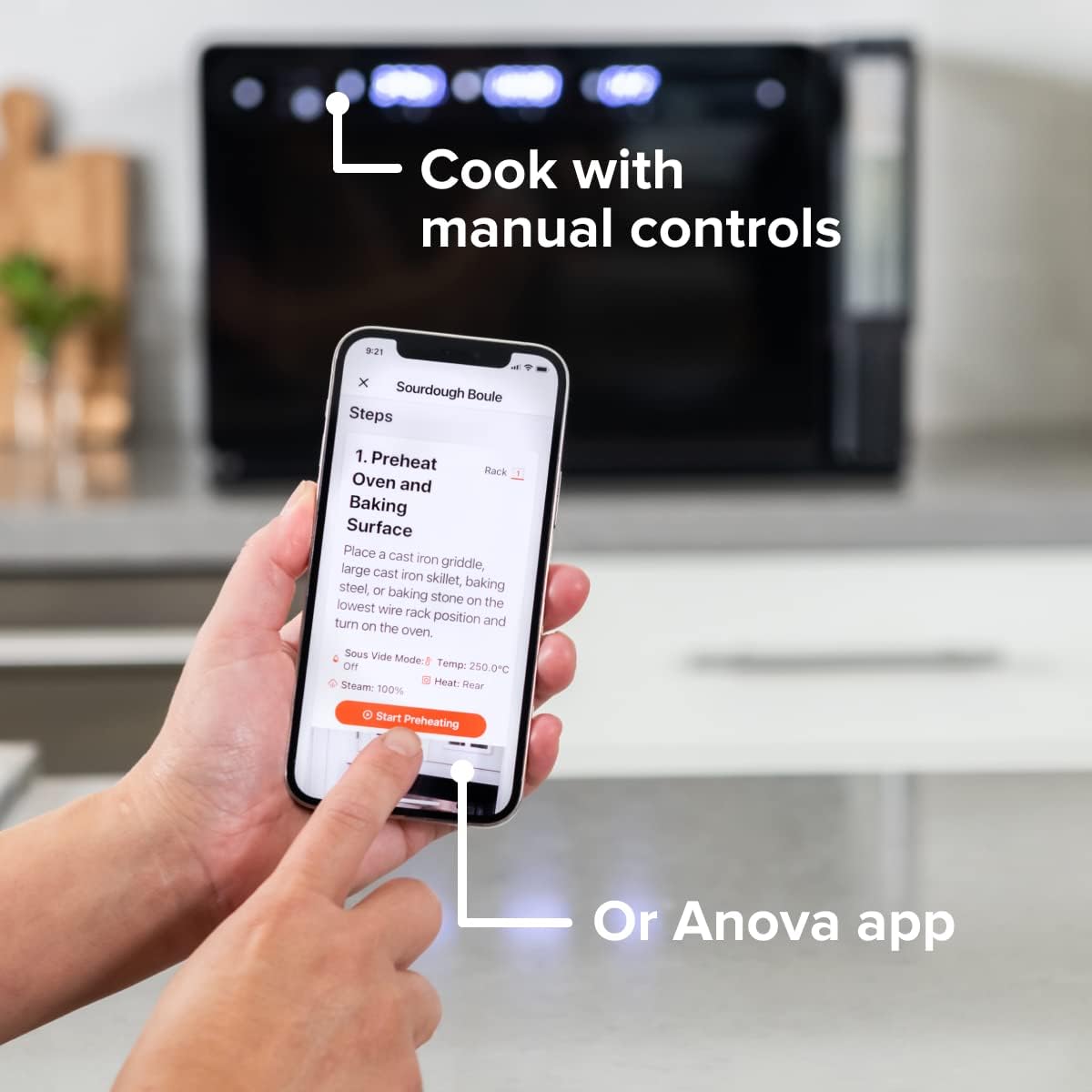
Figure 4: A user interacting with the Anova app on a smartphone, demonstrating remote control capabilities for the oven.
Basic Cooking Modes
The oven offers several cooking modes:
- Konvektion: Uses a fan to circulate hot air for even cooking and browning.
- Dampf: Injects steam into the oven cavity, ideal for baking bread, steaming vegetables, or sous vide style cooking.
- Combi (Convection + Steam): Combines hot air and steam for moist interiors and crispy exteriors.
- Backen Braten: Standard oven functions for baking and roasting.
- Grillen: Hohe Hitze durch das obere Heizelement zum scharfen Anbraten und Bräunen.
- Entwässern: Low heat and fan circulation for drying foods.
Setting a Program (Manual Control)
- Turn the mode knob to select your desired cooking mode.
- Adjust the temperature using the temperature knob.
- Stellen Sie die Garzeit mit dem Zeitknopf ein.
- Drücken Sie die Start/Pause-Taste, um mit dem Garen zu beginnen.
- To use the food probe, insert it into the thickest part of your food before starting. The oven will cook until the target internal temperature is reached.
Sous-Vide-Modus
The Anova Precision Oven can achieve sous vide style results without a water bath. Use the steam function and the food probe to cook food to a precise internal temperature, ensuring tenderness and juiciness.
Steam Injection for Baking
For perfect breads with crispy crusts and soft interiors, utilize the steam injection feature. Ensure the water tank is filled before starting a steam-assisted baking program.

Figure 5: Two loaves of freshly baked bread, showcasing the results of steam injection for a perfect crust and crumb. The Anova Precision Smart Oven is visible in the background.
Wartung und Reinigung
Regular cleaning and maintenance will ensure the longevity and optimal performance of your Anova Precision Smart Oven.
Tägliche Reinigung
- After each use, allow the oven to cool completely.
- Wischen Sie die Innen- und Außenflächen mit Ad abamp Mit einem Tuch und mildem Reinigungsmittel reinigen. Scheuermittel und Scheuerschwämme vermeiden.
- Remove and clean the racks and baking pan with warm, soapy water.
- Empty and rinse the water tank after each use, especially if using steam functions. Allow it to air dry before reinserting.
Descaling (Steam Function Users)
If you frequently use the steam function, mineral buildup may occur. The oven may indicate when descaling is needed. Refer to the Anova app or online resources for detailed descaling instructions using a descaling solution.
Lagerung
Wenn der Backofen längere Zeit nicht benutzt wird, stellen Sie sicher, dass er sauber und trocken ist. Bewahren Sie ihn an einem kühlen, trockenen Ort auf.
Fehlerbehebung
This section addresses common issues you might encounter with your Anova Precision Smart Oven.
| Problem | Mögliche Ursache | Lösung |
|---|---|---|
| Oven not turning on. | Nicht angeschlossen; Stromausfalltage; Schutzschalter ausgelöst. | Stellen Sie sicher, dass der Backofen fest an eine funktionierende Steckdose angeschlossen ist. Überprüfen Sie den Sicherungsautomaten im Haus. |
| Es wurde kein Dampf erzeugt. | Water tank empty or not properly seated; mineral buildup. | Fill water tank with distilled water and ensure it is correctly inserted. Perform descaling if necessary. |
| Das Essen gart nicht gleichmäßig. | Improper rack placement; overcrowding; fan obstruction. | Refer to recipe for recommended rack position. Avoid overcrowding the oven. Ensure nothing obstructs the convection fan. |
| Probleme mit der WLAN-Verbindung. | Falsches WLAN-Passwort; Router zu weit entfernt; Netzwerkstörungen. | Double-check Wi-Fi password. Move oven closer to router or use a Wi-Fi extender. Restart oven and router. |
If the problem persists after attempting these solutions, please contact Anova Customer Support.
Technische Daten
- Marke: Anova Kulinarik
- Modellname: Präzisionsofen
- Artikelmodellnummer: AN900-10
- Produktabmessungen: 18"T x 22"B x 14"H
- Artikelgewicht: 59 Pfund
- Farbe: Schwarz
- Steuerungstyp: Knopf
- Energiequelle: Elektrisch
- Enthaltene Komponenten: Water tank, pan, temp probe
- Besonderheit: Programmierbar
Garantie und Support
The Anova Precision Smart Oven comes with a manufacturer's warranty. Please refer to the warranty card included with your product or visit the official Anova Culinary webAuf der Webseite finden Sie die detaillierten Garantiebedingungen.
For technical support, troubleshooting assistance, or to inquire about replacement parts, please contact Anova Customer Support:
- Online-Hilfe: Besuchen Sie die Anova Culinary Store on Amazon oder ihr Beamter webWebsite.
- Benutzerhandbuch (PDF): Eine ausführliche Bedienungsanleitung steht zum Download bereit unter dieser Link.

Figure 6: The Anova Precision Smart Oven integrated with a smart home assistant (Alexa), demonstrating its connectivity features.


