1. Einleitung
Thank you for choosing the Benss Portable AM FM Radio, Model BD07. This compact and lightweight radio is designed for reliable reception of AM and FM broadcasts, offering clear audio through its built-in speaker or a connected headphone. Its battery-powered operation makes it ideal for both everyday listening and emergency situations. Please read this manual carefully to ensure proper use and maintenance of your device.
2. Produktüberschreitungview
Familiarize yourself with the components of your Benss Portable AM FM Radio.
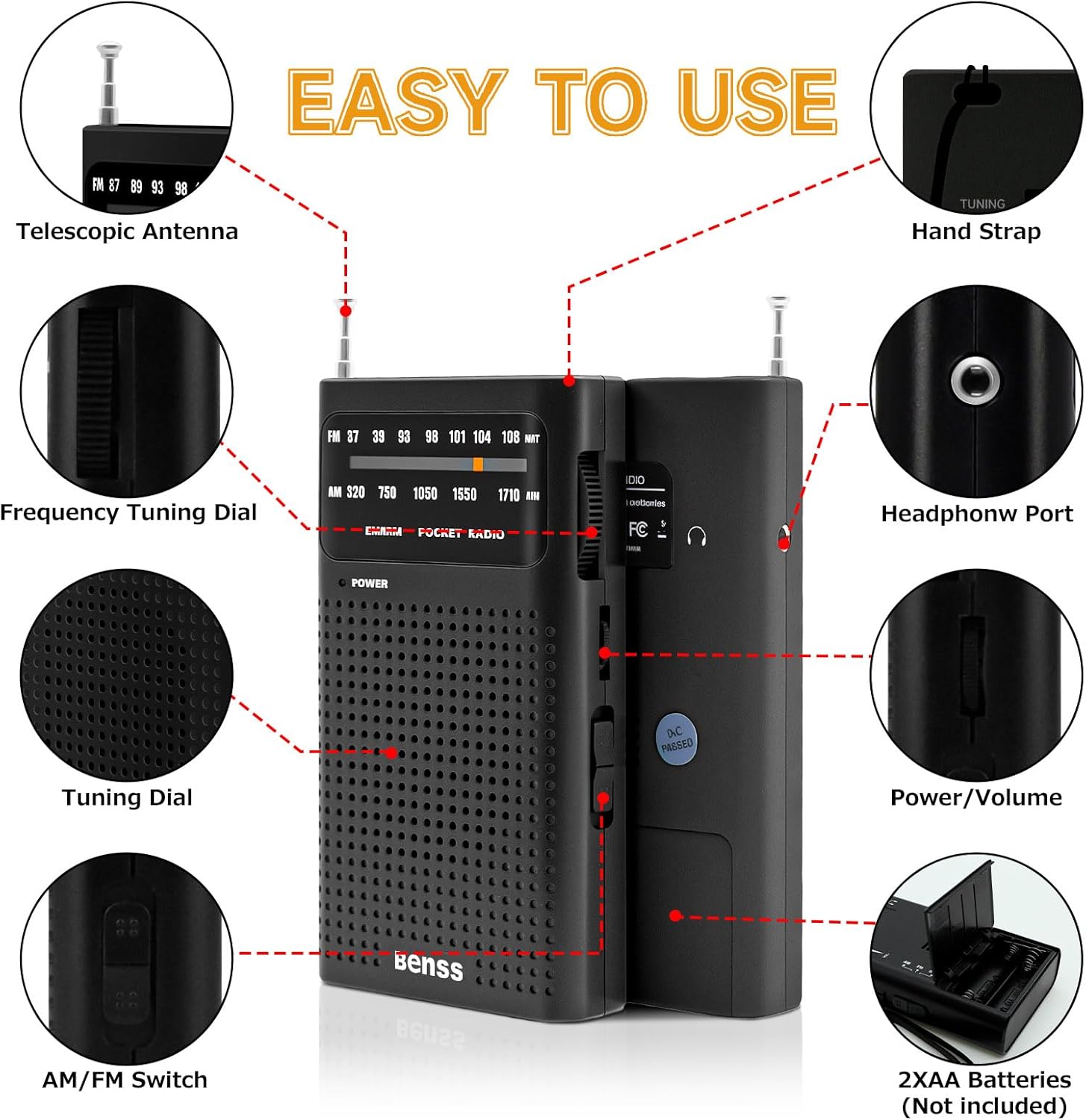
Bild 2.1: Labeled diagram showing the radio's components, including the telescopic antenna, tuning dials, AM/FM switch, headphone port, and battery compartment.
Schlüsselkomponenten:
- Teleskopantenne: Ausziehbar für verbesserten FM-Empfang.
- Frequency Tuning Dial: Dient zur Auswahl von Radiosendern.
- AM/FM-Umschalter: Toggles between AM and FM radio bands.
- Ein-/Ausschalter/Lautstärkeregler: Drehknopf zum Ein- und Ausschalten des Radios und zur Lautstärkeregelung.
- Kopfhöreranschluss (3.5 mm): Zum privaten Musikhören mit Kopfhörern.
- Batteriefach: Bietet Platz für zwei AA-Batterien.
- Handschlaufe: Zum bequemen Tragen.
3. Einrichtung
3.1 Einlegen der Batterie
The Benss Portable AM FM Radio operates on two AA batteries (not included).
- Suchen Sie die Abdeckung des Batteriefachs auf der Rückseite des Radios.
- Schieben Sie die Abdeckung in Pfeilrichtung auf.
- Legen Sie zwei AA-Batterien ein und achten Sie dabei auf die richtige Polarität (+ und -), die im Batteriefach markiert ist.
- Schließen Sie den Batteriefachdeckel fest.

Bild 3.1: Battery compartment on the back of the radio, open for AA battery insertion.
4. Bedienungsanleitung
4.1 Ein-/Ausschalter und Lautstärkeregelung
- Um das Radio einzuschalten ON, rotate the Power/Volume control knob clockwise until you hear a click and the power indicator light illuminates.
- Drehen Sie den Knopf im Uhrzeigersinn weiter, um die Lautstärke zu erhöhen.
- Um das Radio einzuschalten AUS, rotate the Power/Volume control knob counter-clockwise until it clicks and the power indicator light turns off.

Bild 4.1: Front view of the radio, highlighting the power indicator and tuning display.
4.2 Selecting AM or FM Band
Use the AM/FM switch located on the side of the radio to select your desired frequency band.

Bild 4.2: Seite view of the radio, illustrating the AM/FM band selection switch.
4.3 Sendersuche
- Extend the telescopic antenna for optimal FM reception. For AM reception, the internal antenna is generally sufficient, but rotating the radio may improve signal.
- Slowly rotate the Frequency Tuning Dial (located on the side) to scan for stations.
- Observe the tuning indicator in the display window to help pinpoint stations.
- Adjust the antenna position and radio orientation for the clearest sound.
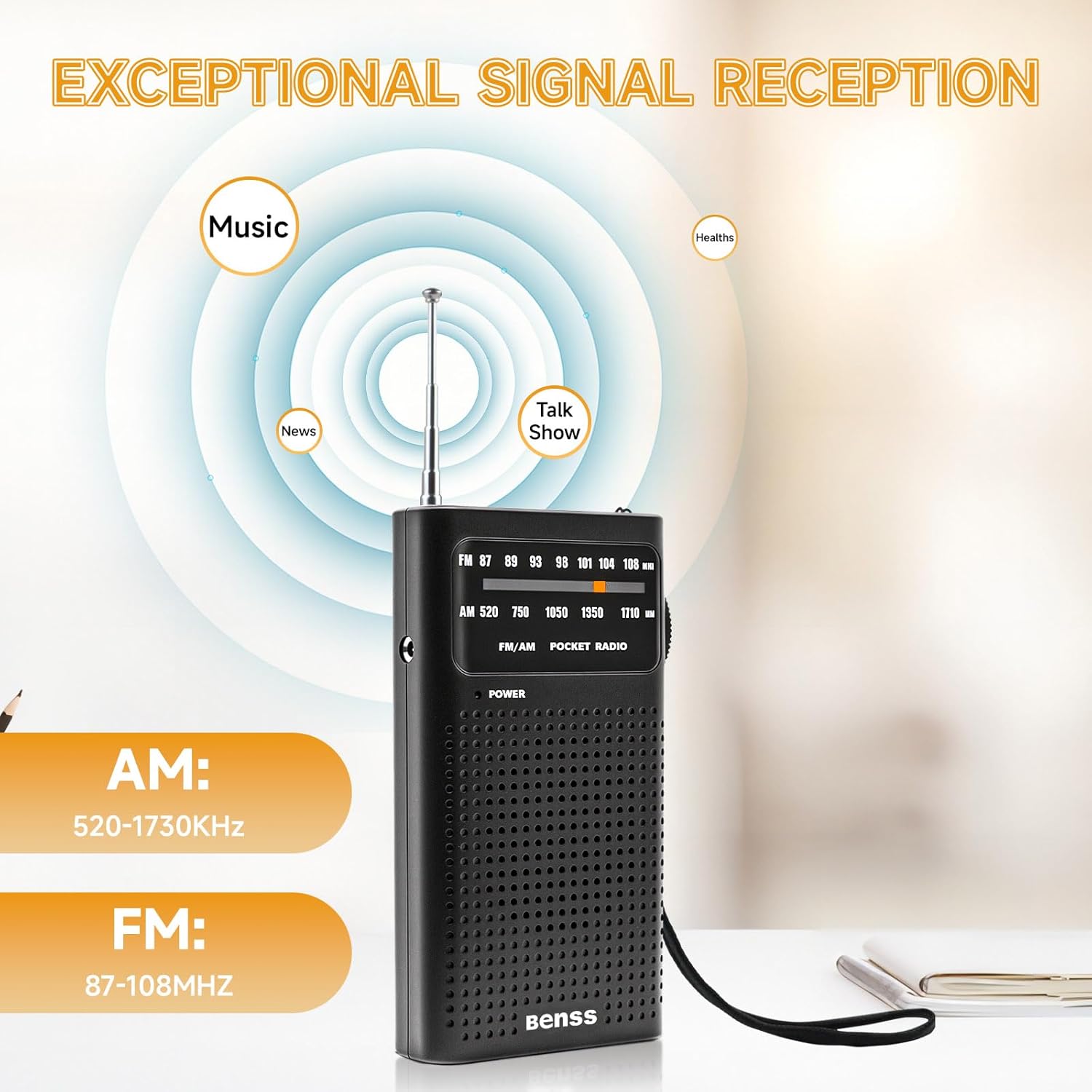
Bild 4.3: Radio displaying AM and FM frequency ranges, illustrating signal reception capabilities.
4.4 Kopfhörer verwenden
For private listening, plug any standard 3.5mm headphones into the headphone port located on the side of the radio. The built-in speaker will automatically mute when headphones are connected.

Bild 4.4: User enjoying the radio with headphones for private listening.
5. Wartung
5.1 Reinigung
- Wischen Sie das Radio mit einem weichen, trockenen Tuch ab.
- Do not use liquid cleaners, abrasive pads, or chemical solvents, as these can damage the surface.
5.2 Batteriepflege
- Um ein Auslaufen zu verhindern, entfernen Sie die Batterien, wenn das Radio längere Zeit nicht benutzt wird.
- Replace both batteries simultaneously; do not mix old and new batteries or different types of batteries.
5.3 Speicherung
- Bewahren Sie das Radio an einem kühlen, trockenen Ort fern von direkter Sonneneinstrahlung und extremen Temperaturen auf.
- Außerhalb der Reichweite von Kindern aufbewahren.
6. Fehlerbehebung
Sollten Sie Probleme mit Ihrem Funkgerät haben, beachten Sie bitte die folgenden häufig auftretenden Probleme und Lösungen:
| Problem | Mögliche Ursache | Lösung |
|---|---|---|
| Kein Strom | Die Batterien sind leer oder falsch eingelegt. | Batteriepolung prüfen; durch neue AA-Batterien ersetzen. |
| Schlechter Empfang / Rauschen | Schwaches Signal; Antenne nicht ausgefahren; Störungen. | Extend the telescopic antenna fully. Rotate the radio for better signal. Move away from electronic devices that may cause interference. |
| Kein Ton vom Lautsprecher | Lautstärke zu niedrig; Kopfhörer angeschlossen. | Lautstärke erhöhen. Kopfhörer gegebenenfalls abziehen. |
| Tuning difficulty | Feinabstimmung erforderlich. | Slowly adjust the tuning dial for precise station selection. |
7. Spezifikationen
Technical details for the Benss Portable AM FM Radio BD07:
| Besonderheit | Detail |
|---|---|
| Modellnummer | BD07 |
| Marke | Benss |
| Abmessungen (L x B x H) | 13 cm x 6 cm x 1 cm (ca. 5.1 x 2.4 x 0.4 Zoll) |
| Gewicht | 135 g (ca. 4.8 oz) |
| FM-Frequenzbereich | 87 - 108 MHz |
| AM Frequenzbereich | 520 - 1730 kHz |
| Stromquelle | 2 x AA-Batterien (nicht im Lieferumfang enthalten) |
| Audioausgang | Eingebauter Lautsprecher, 3.5-mm-Kopfhöreranschluss |
| Besondere Merkmale | Portable, Telescopic Antenna |
| Farbe | Schwarz |
8. Sicherheitshinweise
- Das Radio darf weder Wasser, Feuchtigkeit noch extremen Temperaturen ausgesetzt werden.
- Vermeiden Sie es, das Funkgerät fallen zu lassen oder starken Stößen auszusetzen.
- Do not attempt to disassemble or modify the radio. This will void any potential warranty and could cause damage.
- Entsorgen Sie gebrauchte Batterien verantwortungsvoll gemäß den örtlichen Vorschriften.
- Längeres Hören bei hoher Lautstärke kann zu Gehörschäden führen.
9. Garantie und Support
Specific warranty information for the Benss Portable AM FM Radio BD07 is not provided in this manual. For warranty details or technical support, please refer to the product packaging or contact the retailer where the product was purchased. You may also visit the official Benss webWebsite für weitere Unterstützung.


