Einführung
This manual provides comprehensive instructions for the assembly, operation, and maintenance of your Yaheetech Black Computer Desk (Model YA-00108010). Please read all instructions carefully before beginning assembly or use to ensure safe and proper functionality.
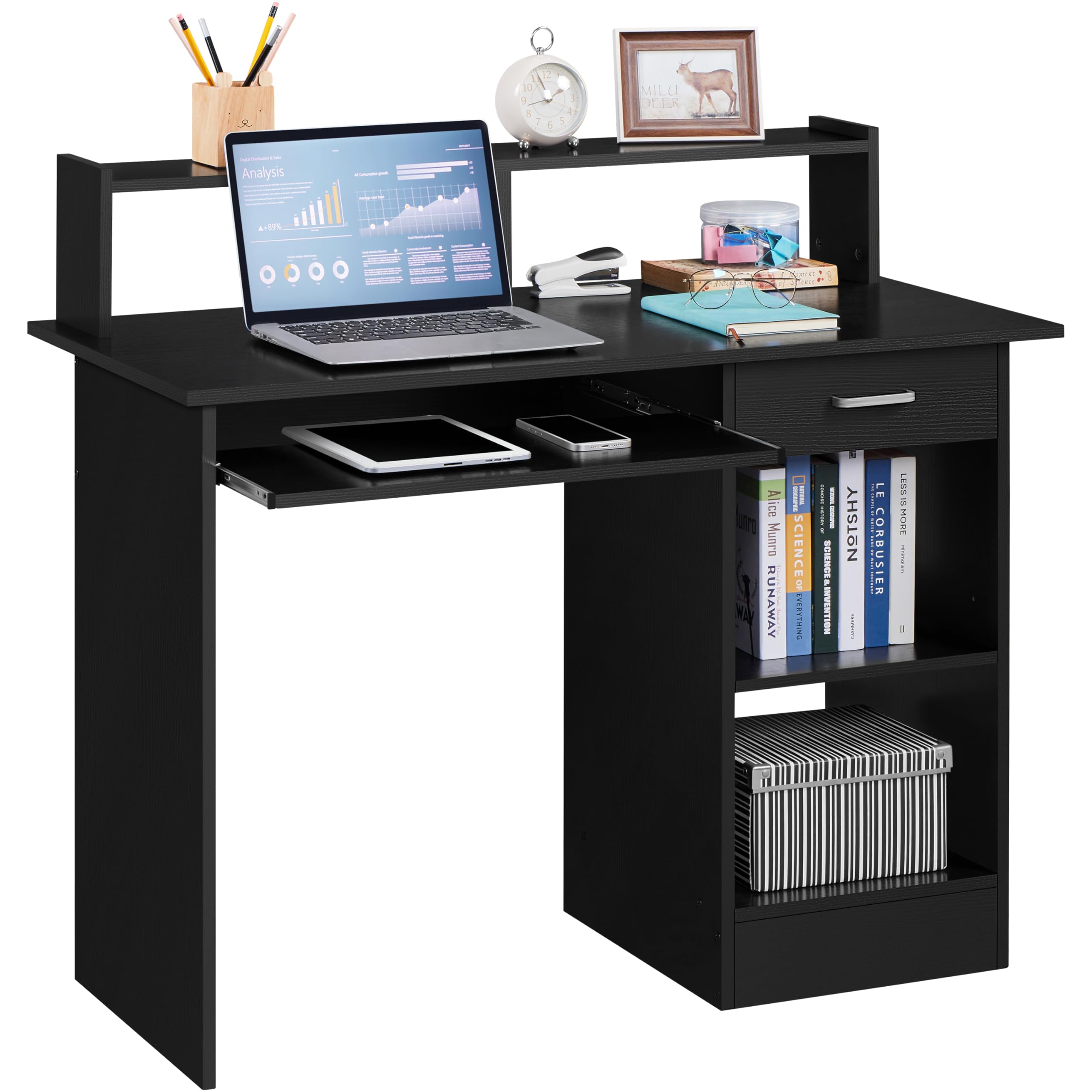
Figure 1: Yaheetech Black Computer Desk in a home office environment.
Sicherheitshinweise
To ensure your safety and prevent damage to the product, please observe the following:
- Do not sit on the desk. The desk is designed to support computer equipment and office supplies, not human weight.
- Ensure all screws and fasteners are securely tightened during assembly.
- Stellen Sie den Schreibtisch auf eine ebene, stabile Fläche, um ein Umkippen zu verhindern.
- Halten Sie Kleinteile während der Montage von Kindern fern.
Packungsinhalt
Before beginning assembly, verify that all components listed below are present. If any parts are missing or damaged, please contact customer support.
- All wooden panels (numbered 1-17)
- Hardware (screws, cam locks, dowels, drawer slides, handle)
- Assembly tools (screwdriver, Allen key - usually included or required)
Note: A detailed parts list with corresponding labels is typically included in the physical packaging.
Montageanleitung
Follow these steps carefully to assemble your Yaheetech Computer Desk. It is recommended to have a second person assist with certain steps.
- Schubladenschienen vorbereiten: Separate the inner (G-2) and outer (G-1) parts of the drawer slides. Attach the G-2 slides to the designated drawer side panel (Part 10) using screws.
- Schubladenschienen an den Seitenwänden befestigen: Secure the G-1 slides to the main desk side panels (Parts 7, 8, 9) where the drawer will be located.
- Schubladenkasten zusammenbauen: Connect the drawer side panels (Parts 15, 16, 17) and the drawer bottom (Part 1) using the provided fasteners.
- Install Drawer Handle: Attach the drawer handle (Part D) to the front of the assembled drawer box.
- Haupttischgestell zusammenbauen: Connect the main desk side panels (Parts 7, 8, 9) with the bottom panel (Part 13) and back panel (Part 14). Then, attach the top panel (Part 6).
- Attach Hutch: Secure the hutch components (Parts 2, 3, 4, 5) to the top panel of the desk.
- Schublade einbauen: Carefully align the assembled drawer with the slides on the desk frame and push it in until it clicks into place.
- Tastaturablage installieren: Attach the keyboard tray to its designated sliding mechanism under the main desk surface.
Video 1: Yaheetech Computer Desk Assembly Guide. This video demonstrates the step-by-step process of assembling the desk, including attaching drawer slides, constructing the drawer, and assembling the main frame and hutch.
Bedienungsanleitung
Sliding Keyboard Tray
The keyboard tray is designed for convenient storage and access to your keyboard and mouse. Gently pull the tray outwards to extend it for use, and push it inwards to retract it when not needed. The smooth-gliding mechanism ensures effortless movement.
Aufbewahrungsschublade
The integrated drawer provides a secure space for small office supplies, documents, or personal items. Pull the handle to open the drawer and push it back to close. The full-extension slides allow for easy access to the entire drawer contents.
Verstellbare Einlegeböden
The open storage compartment features an adjustable shelf. To change the shelf height, remove the shelf, reposition the shelf pins to your desired height, and then place the shelf back onto the pins. This allows for flexible storage of items of various sizes, such as books, CPU, or decorative items.

Figure 2: Key features of the desk, including the hutch, drawer, keyboard tray, and open storage.

Figure 3: The adjustable shelf in the storage compartment.
Video 2: Yaheetech Computer Desk Product Features. This video showcases the various functionalities and design elements of the desk, such as the keyboard tray, drawer, and storage shelves.
Wartung
Um das Aussehen und die Langlebigkeit Ihres Schreibtisches zu erhalten:
- Reinigen Sie die Schreibtischoberfläche mit einem weichen, fusselfreien Tuch.amp Tuch. Vermeiden Sie Scheuermittel oder aggressive Chemikalien.
- Verschüttete Flüssigkeiten sofort aufwischen, um Wasserschäden zu vermeiden.
- Regularly check all fasteners and tighten them if necessary to ensure stability.

Figure 4: The desk surface is designed to be water-resistant.
Fehlerbehebung
- Instabilität: Check that all screws and fasteners are securely tightened. Ensure the desk is placed on a level surface.
- Drawer/Keyboard Tray not sliding smoothly: Check the alignment of the slides and ensure no obstructions are present. Lubricate slides if necessary with a suitable product.
- Fehlende Teile: Refer to the package contents list and contact customer support if any parts were missing upon delivery.
Technische Daten
| Besonderheit | Detail |
|---|---|
| Farbe | Schwarz |
| Zusammengebaute Abmessungen (L x B x H) | 106 x 50 x 94 cm |
| Top Shelf Dimensions (L x W) | 99.5 x 14.5 cm |
| Innenmaße der Schublade (L x B x H) | 32.4 x 28.9 x 6.7 cm |
| Keyboard Tray Dimensions (L x W) | 58 x 23.5 cm |
| Adjustable Shelf Dimensions (L x W) | 34 x 39.6 cm |
| Verstellbare Regalhöhe | 17.8 cm, 24.2 cm, 30.6 cm |
| Plattendicke | 1.5 cm |
| Artikelgewicht | 26.4 kg |
| Versandgewicht | 28.5 kg |
| Material | Holzwerkstoff (MDF), Metall |
| Ausführung | Matt |
| Montage erforderlich | Ja |

Abbildung 5: Detaillierte Abmessungen des Schreibtisches.
Garantie und Support
This product is eligible for returns within 30 days of receipt. For specific warranty details or customer support, please refer to your purchase documentation or contact Yaheetech customer service. Please note that spare parts availability may vary.


