1. Einleitung
This manual provides essential instructions for the safe and efficient use of your Xiaomi Mi Portable Bluetooth Speaker. Please read this manual thoroughly before using the product and retain it for future reference. The speaker features high-quality sound, True Wireless Stereo (TWS) capability, Bluetooth 5.0 connectivity, and IPX7 waterproofing, making it suitable for various environments.

Bild: Abgewinkelt view of the Xiaomi Mi Portable Bluetooth Speaker, highlighting its compact design and control panel.
2. Packungsinhalt
Stellen Sie sicher, dass alle Artikel im Paket vorhanden sind:
- Xiaomi Mi Portable Bluetooth Speaker x1
- Charging Cable x1 (USB-C)
- Benutzerhandbuch x1
3. Produktmerkmale
- Hochwertiger Klang: Delivers clear and balanced audio.
- Echtes drahtloses Stereo (TWS): Connect two speakers for an immersive stereo experience.
- Bluetooth 5.0: Stabile und effiziente drahtlose Verbindung.
- IPX7 Wasserdicht: Schutz gegen Eintauchen in Wasser bis zu 1 Meter Tiefe für 30 Minuten.
- Lange Spielzeit: Approximately 13 hours of playback at 50% volume.
- Eingebautes Mikrofon: Für Freisprechanrufe.
- AUX-Eingang: Für kabelgebundene Audioverbindungen.
4. Bedienelemente und Anzeigen
Familiarize yourself with the speaker's control buttons and indicators:
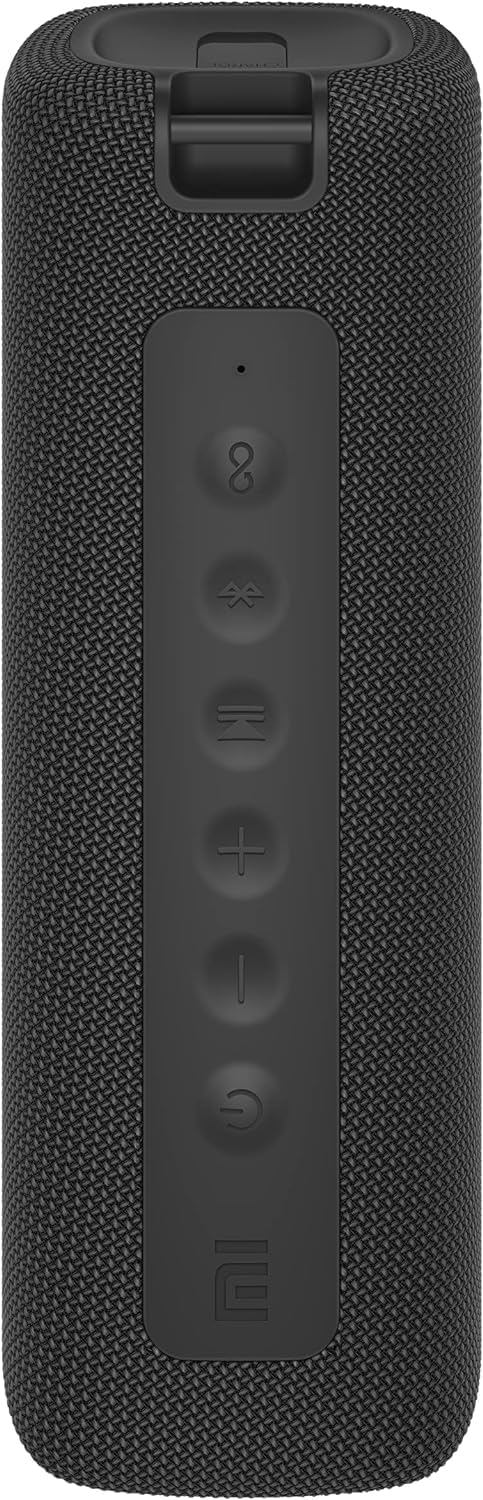
Bild: Vorderseite view of the speaker with clearly visible control buttons.
| Taste/Anzeige | Funktion |
|---|---|
| Netzschalter (⏻) | Zum Ein-/Ausschalten 2 Sekunden lang gedrückt halten. Kurzes Drücken zum Abspielen/Pausieren von Musik oder zum Annehmen/Beenden von Anrufen. |
| Lautstärke verringern (−) | Kurz drücken, um die Lautstärke zu verringern. Gedrückt halten, um zum vorherigen Titel zu springen. |
| Lautstärke erhöhen (+) | Kurz drücken, um die Lautstärke zu erhöhen. Gedrückt halten, um zum nächsten Titel zu gelangen. |
| Bluetooth-Taste (Ⓑ) | Drücken Sie kurz, um den Bluetooth-Pairing-Modus aufzurufen. |
| TWS-Taste (∞) | Press to initiate True Wireless Stereo pairing with another Mi Portable Bluetooth Speaker. |
| LED-Anzeige | Indicates power status, charging status, and Bluetooth pairing status. |
5. Einrichtung
5.1 Aufladen des Lautsprechers
- Schließen Sie das mitgelieferte USB-C-Ladekabel an den Ladeanschluss des Lautsprechers an.
- Connect the other end of the cable to a 5V 1A USB power adapter (not included) or a computer's USB port.
- Die LED-Anzeige zeigt den Ladestatus an (z. B. rot während des Ladevorgangs, aus, wenn der Akku vollständig geladen ist).
- Das vollständige Aufladen dauert ungefähr 4 Stunden.
5.2 Ein-/Ausschalten
- So schalten Sie das Gerät ein: Press and hold the Power button for 2 seconds. You will hear an audible prompt, and the LED indicator will light up.
- So schalten Sie das Gerät aus: Press and hold the Power button for 2 seconds. You will hear an audible prompt, and the LED indicator will turn off.
5.3 Bluetooth-Kopplung
- Ensure the speaker is powered on. The LED indicator will flash blue, indicating it's in pairing mode.
- Aktivieren Sie auf Ihrem Gerät (Smartphone, Tablet, Computer) Bluetooth und suchen Sie nach verfügbaren Geräten.
- Select "Mi Portable Bluetooth Speaker" from the list of devices.
- Sobald die Kopplung abgeschlossen ist, leuchtet die LED-Anzeige durchgehend blau und Sie hören einen Bestätigungston.
- Der Lautsprecher verbindet sich beim Einschalten automatisch mit dem zuletzt gekoppelten Gerät, sofern dieses sich in Reichweite befindet.
5.4 True Wireless Stereo (TWS) Kopplung
To pair two Xiaomi Mi Portable Bluetooth Speakers for stereo sound:
- Stellen Sie sicher, dass beide Lautsprecher eingeschaltet und nicht mit anderen Bluetooth-Geräten verbunden sind.
- Drücken Sie an einem Lautsprecher (dies ist der Hauptlautsprecher) kurz die TWS-Taste (∞). The LED indicator will flash.
- On the second speaker, short press the TWS button (∞).
- The two speakers will automatically connect to each other. You will hear a confirmation sound, and the LED indicators on both speakers will turn solid blue.
- Now, connect your device to the primary speaker via Bluetooth as described in section 5.3. The sound will play in stereo through both speakers.
5.5 AUX-Verbindung
Für kabelgebundene Audiowiedergabe:
- Connect a 3.5mm audio cable (not included) from your audio source to the AUX IN port on the speaker.
- Der Lautsprecher schaltet automatisch in den AUX-Modus.
- Control playback and volume from your audio source device.
6. Bedienungsanleitung
6.1 Musikwiedergabe
- Abspielen/Pause: Drücken Sie kurz die Einschalttaste.
- Lautstärke erhöhen: Drücken Sie kurz die Lautstärketaste nach oben (+) Taste.
- Lautstärke runter: Short press the Volume Down (−) Taste.
- Nächster Titel: Press and hold the Volume Up (+) Taste.
- Vorheriges Lied: Press and hold the Volume Down (−) Taste.
6.2 Anrufmanagement
- Anruf annehmen/beenden: Short press the Power button when a call comes in or during a call.
- Anruf ablehnen: Halten Sie die Ein-/Aus-Taste 2 Sekunden lang gedrückt, wenn ein Anruf eingeht.
7. Wartung
- Reinigung: Wischen Sie den Lautsprecher mit einem weichen, damp Tuch. Keine Scheuer- oder Lösungsmittel verwenden.
- Lagerung: Bewahren Sie den Lautsprecher an einem kühlen, trockenen Ort fern von direkter Sonneneinstrahlung und extremen Temperaturen auf.
- Wasserbeständigkeit: The speaker is IPX7 waterproof. Ensure the charging port cover is securely closed before exposure to water. Do not submerge the speaker for extended periods or beyond specified depths.
- Batteriepflege: Um die Akkulaufzeit zu verlängern, vermeiden Sie häufiges vollständiges Entladen des Lautsprechers. Laden Sie ihn regelmäßig auf, auch wenn er längere Zeit nicht benutzt wird.
8. Fehlerbehebung
| Problem | Mögliche Lösung |
|---|---|
| Der Lautsprecher lässt sich nicht einschalten. | Stellen Sie sicher, dass der Akku geladen ist. Schließen Sie das Gerät an eine Stromquelle an und versuchen Sie es erneut. |
| Kopplung via Bluetooth nicht möglich. |
|
| Kein Ton oder geringe Lautstärke. |
|
| TWS-Kopplung fehlgeschlagen. |
|
| Schlechte Tonqualität. |
|
9. Spezifikationen

Abbildung: Unten view of the speaker, displaying model number and certifications.
| Parameter | Wert |
|---|---|
| Modell | MDZ-36-DB |
| Technische Daten | W 213 x D 74 x H 74 mm (approx. 8 x 3 x 3 inches) |
| Konnektivität | Bluetooth 5.0, 3.5mm AUX IN |
| Nennleistung | 2 x 8W (insgesamt 16W) |
| Signal-Rausch-Verhältnis | ≥ 70 dB |
| TWS Connection Range | ≤ 5m |
| Wasserdichtigkeit | IPX7 |
| Akku-Typ | Lithium-Ionen, 3.7 V |
| Batteriekapazität | 2600 mAh |
| Akkuladezeit | Ca. 4 Stunden |
| Wiedergabezeit | Ca. 13 Stunden (bei 50 % Lautstärke) |
| Frequenzbereich | 80 Hz bis 20 kHz |
| Nennimpedanz | 4 Ω |
| Übertragungsdistanz | 15 m |
| Nenneingangsleistung | 5 V, 1 A |
| Artikelgewicht | 500 Gramm (1.1 Pfund) |
10. Garantie und Support
Detaillierte Garantieinformationen finden Sie auf der Ihrem Produkt beiliegenden Garantiekarte oder auf der offiziellen Xiaomi-Website. webWebsite.
If you encounter any issues not covered in this manual, please contact Xiaomi customer support or visit their official support channels for assistance.


