Einführung
This manual provides detailed instructions for the setup, operation, and maintenance of your Moultrie W800 All-Purpose Series A Trail Camera. Please read this guide thoroughly to ensure proper use and optimal performance of your device.
Produkt überview
The Moultrie W800 is a high-performance trail camera designed for capturing images and videos of wildlife. It features an Illumi-Night Sensor for clear nighttime captures and a robust design for outdoor use.
Hauptmerkmale:
- Captures 26 Megapixel images for high clarity.
- 70-foot flash and detection range.
- Fast 0.5 second trigger speed.
- Moultrie Smokescreen Camo Pattern for discreet placement.
Was ist in der Box:
- Moultrie W800 Trail Camera
- 8 AA-Batterien
- Befestigungsgurt

Image: Moultrie W800 Trail Camera in its retail packaging, showing the camera, batteries, and key features on the box.
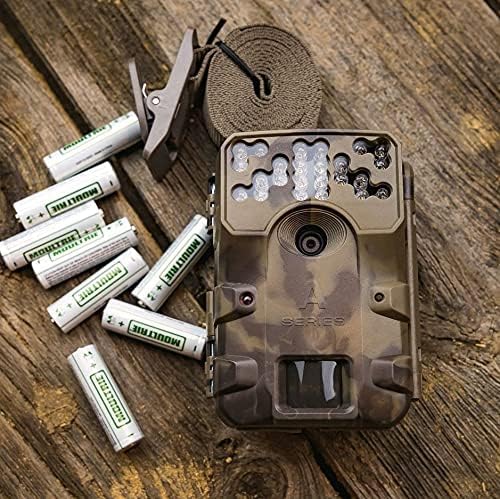
Image: The Moultrie W800 trail camera displayed with the included 8 AA batteries and a mounting strap, ready for setup.
Aufstellen
1. Einlegen der Batterie
- Öffnen Sie den Verschluss des Kameragehäuses.
- Insert 8 AA batteries into the battery compartment, ensuring correct polarity (+/-).
- Schließen Sie den Verschluss des Kameragehäuses sorgfältig.
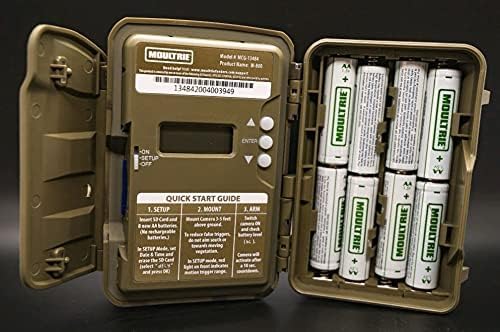
Image: An open Moultrie W800 camera, revealing the battery compartment on the right, the control panel with a small screen, and buttons on the left. This view is essential for battery and SD card installation.
2. Installation der SD-Karte
- Suchen Sie bei geöffnetem Kameragehäuse den SD-Kartensteckplatz.
- Schieben Sie eine Standard-SD-Karte (bis zu 32 GB) in den Steckplatz, bis sie hörbar einrastet. Achten Sie darauf, dass die Karte richtig herum eingelegt ist.
- It is recommended to format the SD card using the camera's menu settings before first use.
3. Montage der Kamera
- Select a suitable location, typically a tree or post, where the camera can capture the desired area.
- Mount the camera approximately 3-5 feet above the ground.
- Use the provided mounting strap to secure the camera firmly. Thread the strap through the camera's mounting slots and tighten it around the object.
- Angle the camera to avoid direct sunlight and to minimize false triggers from swaying branches.

Image: A Moultrie W800 trail camera, in its camouflage casing, securely mounted to a tree trunk using a strap, demonstrating a typical field setup.
Bedienungsanleitung
Grundlegende Bedienung
- Ein-/Ausschalten: Locate the power switch inside the camera housing. Slide it to the 'ON' position to power on the camera. Slide to 'OFF' to power off.
- Konfigurations-Modus: After powering on, the camera will typically enter 'SETUP' mode. In this mode, you can adjust settings such as date, time, photo/video mode, resolution, and trigger delay using the control buttons and display.
- Arming the Camera: Once settings are configured, slide the power switch to the 'ARM' position. The camera will initiate a countdown (e.g., 10 seconds) to allow you to leave the area without triggering a capture. After the countdown, the camera will be active and ready to detect motion.
- Status prüfen: The small display inside the camera housing provides status information, including battery level, SD card status, and current mode.
Wartung
- Reinigung: Periodically clean the camera lens and sensor window with a soft, lint-free cloth. Avoid abrasive materials or harsh chemicals.
- Batterieprüfung: Regularly check battery levels, especially before extended deployment. Replace all batteries simultaneously to ensure consistent power.
- SD-Kartenverwaltung: Format the SD card regularly to prevent data corruption and ensure optimal performance. Back up important images/videos before formatting.
- Housing Integrity: Ensure the camera housing latch is always securely closed to protect against moisture and dust.
Fehlerbehebung
- Camera not taking pictures:
- Check if the camera is in 'ARM' mode.
- Stellen Sie sicher, dass die SD-Karte ordnungsgemäß eingesetzt ist und über ausreichend freien Speicherplatz verfügt.
- Verify that batteries have adequate charge.
- Check camera settings for trigger delay or sensitivity.
- Formatieren Sie die SD-Karte.
- Schlechte Bildqualität:
- Reinigen Sie die Kameralinse und das Sensorfenster.
- Ensure the camera is mounted at the recommended height and angle.
- Prüfen Sie, ob sich Hindernisse vor der Kamera befinden.
- Kurze Akkulaufzeit:
- Use fresh, high-quality alkaline or lithium AA batteries.
- Extreme Temperaturen können die Batterieleistung beeinträchtigen.
- Frequent video recording or high trigger frequency can consume more power.
Technische Daten
Detailed technical specifications for the Moultrie W800 Trail Camera:
| Besonderheit | Spezifikation |
|---|---|
| Effektive Standbildauflösung | 26 Megapixel |
| Auslösegeschwindigkeit | 0.5 Sekunden |
| Blitzreichweite | 70 Fuß |
| Erfassungsbereich | 70 Fuß |
| Low-Light-Technologie | Illumi-Night Sensor (Night Color) |
| Auflösung der Videoaufnahme | 720p |
| Videoaufnahmeformat | MPEG-4 |
| Flash-Speichertyp | SD (bis zu 32 GB) |
| Stromquelle | 8 AA-Batterien |
| Konnektivitätstechnologie | Kabellos (Wi-Fi) |
| Kontrollmethode | App |
| Besondere Merkmale | Bewegungssensor, Nachtsicht |
| Internationale Schutzbewertung | IP54 |
| Artikelgewicht | 1.12 Pfund |
| Verpackungsabmessungen | 8.62 x 5.39 x 3.43 Zoll |
| UPC | 053695134840 |

Image: The back of the Moultrie W800 retail box, detailing performance specifications such as trigger speed, detection range, flash range, battery life, and SD card compatibility.
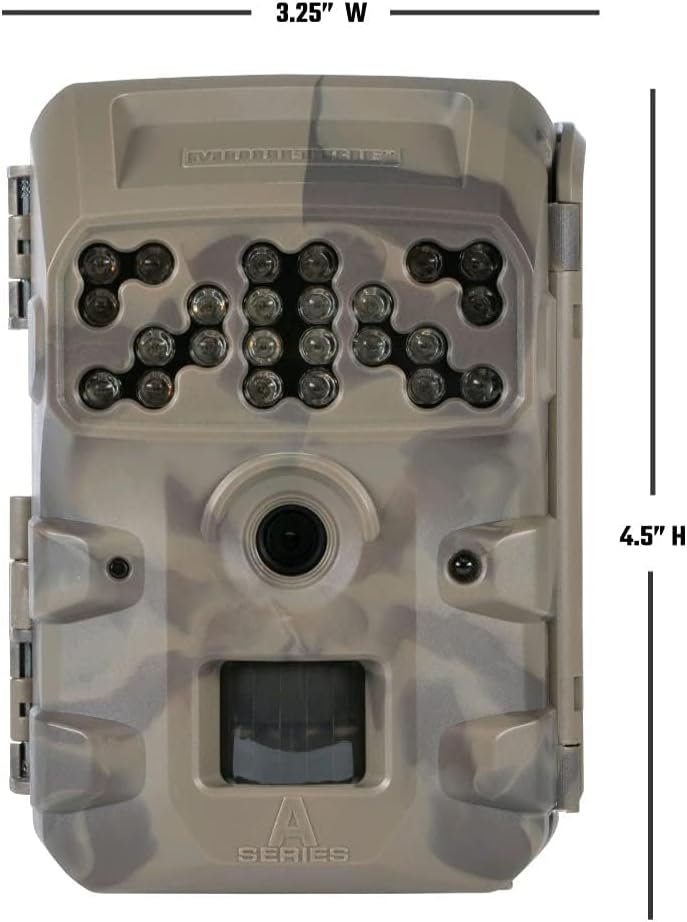
Bild: Vorderseite view of the Moultrie W800 trail camera with its dimensions clearly labeled: 3.25 inches wide and 4.5 inches high.
Garantie und Support
Garantieinformationen:
The Moultrie W800 Trail Camera comes with a 2 Jahr Garantie Die Garantie deckt Herstellungsfehler ab Kaufdatum ab. Bitte bewahren Sie Ihren Kaufbeleg für Garantieansprüche auf.
Kundendienst:
For technical assistance, troubleshooting, or warranty inquiries, please visit the official Moultrie support webWebsite:


