1. Einleitung
Welcome to the instruction manual for your Hyperkin Duke Wired Controller. This officially licensed controller is designed to provide a classic gaming experience with modern compatibility for Xbox Series X|S, Xbox One, and Windows 10 PCs. This special edition features an Xbox 20th Anniversary design.

Bild 1.1: Vorderseite view of the Hyperkin Duke Wired Controller, White 20th Anniversary Edition.
2. Packungsinhalt
Stellen Sie sicher, dass alle Artikel im Paket vorhanden sind:
- Hyperkin Duke Wired Controller (White)
- Detachable Type-C Braided Cable

Image 2.1: Hyperkin Duke Wired Controller product packaging.
3. Controller-Layout
Familiarize yourself with the controller's buttons and features:
- Linker und rechter Analogstick: Für präzise Bewegungs- und Kamerasteuerung.
- Steuerkreuz: Richtungseingang.
- A-, B-, X-, Y-Tasten: Standard-Aktionsschaltflächen.
- Linker und rechter Trigger (LT, RT): Pressure-sensitive for nuanced control.
- Linker und rechter Stoßfänger (LB, RB): Mirror the original black and white buttons for expanded functionality.
- Xbox-Taste: Features an animated original Xbox startup screen.
- Teilen Knopf: For capturing screenshots and video clips (functionality may vary by platform).
- View Taste: Greift auf Spielmenüs oder Systemfunktionen zu.
- Menü-Schaltfläche: Accesses game or app menus.
- 3.5-mm-Kopfhörerbuchse: Zum Anschluss kompatibler Headsets.

Bild 3.1: Vorderseite view of the controller highlighting the main controls.
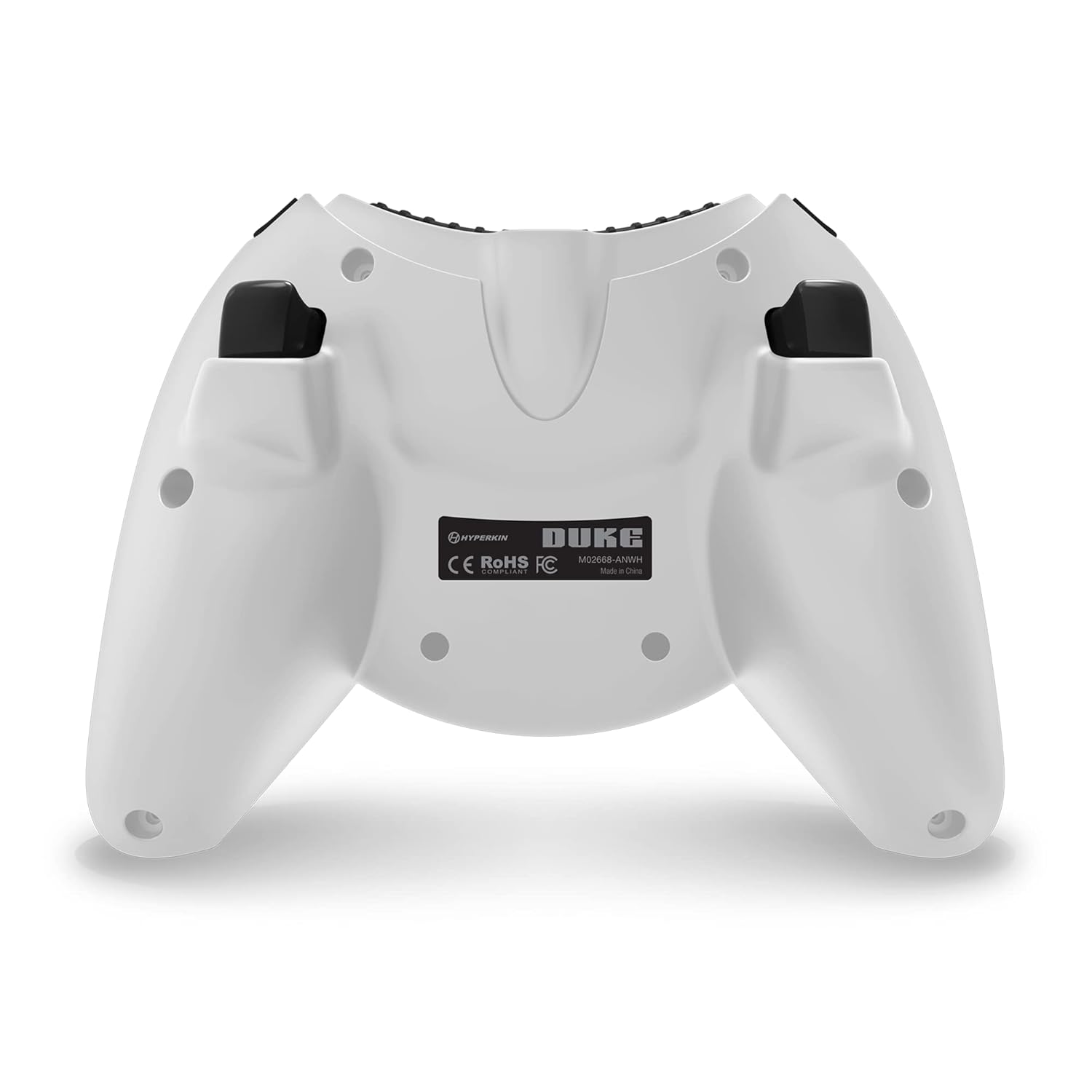
Abbildung 3.2: Rückseite view des Controllers.

Image 3.3: Detail of the Share button and detachable Type-C cable connection.
4. Einrichtung
The Hyperkin Duke Wired Controller is designed for simple plug-and-play functionality.
- Connect the detachable Type-C braided cable to the port on the top of the controller.
- Plug the USB-A end of the cable into an available USB port on your Xbox Series X|S, Xbox One console, or Windows 10 PC.
- The controller will automatically be detected and configured by your system. The Xbox button will illuminate, and the animated startup screen will play.
Video 4.1: This video demonstrates the animated Xbox button startup sequence on the Hyperkin Duke controller.
5. Bedienungsanleitung
Once connected, the controller functions similarly to standard Xbox controllers, with additional nostalgic elements.
- Spielen: Use the analog sticks for movement and camera control, the D-pad for directional input, and the A, B, X, Y buttons for in-game actions.
- Precision Triggers: The analog triggers (LT, RT) offer variable input, ideal for racing games or actions requiring precise pressure.
- Bumpers (LB, RB): These buttons provide additional input options, often used for secondary actions or menu navigation.
- Xbox-Taste: Press the Xbox button to access the console's guide menu or the PC's Xbox Game Bar. The animated startup screen will play upon connection or when the button is pressed.
- Teilen Knopf: Utilize the Share button to quickly capture and share your gameplay moments.
- Headset-Nutzung: Plug any compatible 3.5mm headset into the jack for in-game audio and voice chat.
- Vibrations-Feedback: The controller provides haptic feedback to enhance immersion during gameplay.
6. Wartung und Pflege
To ensure the longevity and optimal performance of your controller, follow these care guidelines:
- Reinigung: Use a soft, dry cloth to wipe down the controller. Avoid using abrasive cleaners, solvents, or harsh chemicals, as these can damage the surface and internal components.
- Lagerung: Lagern Sie den Controller an einem kühlen, trockenen Ort, geschützt vor direkter Sonneneinstrahlung, extremen Temperaturen und übermäßiger Luftfeuchtigkeit.
- Kabelpflege: Handle the detachable Type-C cable with care. Avoid sharp bends, kinks, or excessive pulling, which can damage the cable or the connector ports. Always grasp the connector head when plugging or unplugging.
- Vermeiden Sie Tropfen: Protect the controller from drops or impacts, as these can cause internal damage.
7. Fehlerbehebung
If you encounter issues with your Hyperkin Duke Wired Controller, refer to the following common solutions:
| Problem | Lösung |
|---|---|
| Controller reagiert nicht | Ensure the detachable Type-C cable is securely connected to both the controller and the console/PC. Try a different USB port on your system. Restart your console or PC. |
| Input issues (e.g., stick drift, unresponsive buttons) | For PC, try calibrating the controller through your operating system's game controller settings. Ensure no debris is obstructing buttons or sticks. If the issue persists, contact Hyperkin support. |
| Keine Vibrationsrückmeldung | Check in-game settings to ensure vibration is enabled. Verify that vibration settings are active in your console or PC's controller settings. |
| Kein Ton vom Headset | Ensure your 3.5mm headset is fully plugged into the controller's jack. Check your console or PC's audio settings to confirm the headset is selected as the output device. Test the headset with another device if possible. |
Video 7.1: This video demonstrates a potential issue with the left trigger on the controller. If you experience similar issues, refer to the troubleshooting table and contact support.
8. Spezifikationen
- Modellnummer: M02668-ANWH
- Kompatibilität: Xbox Series X|S, Xbox One, Windows 10 PCs
- Konnektivität: Wired (Detachable USB Type-C cable)
- Abmessungen: Ungefähr 6.5 x 5.25 x 3 Zoll (16.5 x 13.3 x 7.6 cm)
- Gewicht: Ungefähr 11.99 Unzen (340 Gramm)
- Merkmale: Precision analog triggers, vibration feedback, 3.5mm headset jack, Share button, animated Xbox button, 20th Anniversary design.
9. Garantie und Support
For detailed warranty information, product registration, and customer support, please visit the official Hyperkin webBesuchen Sie die Website oder kontaktieren Sie den Kundendienst. Bewahren Sie Ihren Kaufbeleg für Garantieansprüche auf.
Hyperkin Offiziell WebWebsite: www.hyperkin.com


