1. Einleitung
The AIYIMA DAC A6 is a high-fidelity Digital-to-Analog Converter (DAC) designed to enhance your audio experience. It features advanced decoding capabilities, multiple input options, and Bluetooth 5.0 for wireless audio streaming. This manual provides detailed instructions for setting up and operating your DAC A6.
2. Hauptmerkmale
- DSD512 32bit/768kHz USB Decoding: Supports high-resolution audio formats up to DSD512 and PCM 32bit/768kHz.
- ESS SABRE ES9038Q2M HiFi Decoding: Utilizes a high-performance ESS SABRE DAC chip for exceptional sound quality and low total harmonic distortion (THD).
- XMOS XU208 USB-Schnittstelle: Features the XMOS second-generation XU208 chip with a custom driver for Windows 7 and higher, ensuring optimal high-resolution audio support, including DSD Native.
- Bluetooth 5.0 with HD Transmission: Equipped with a CSR8675 Bluetooth chip, supporting LDAC, AAC, SBC, aptX, aptX-LL, and aptX-HD audio codecs for high-quality wireless streaming.
- Mehrere digitale Audioeingänge: Offers versatile connectivity with Bluetooth, PC-USB, Coaxial, and Optical inputs.
3. Packungsinhalt
Bitte kreuzen Sie das Kästchen für die folgenden Elemente an:
- AIYIMA DAC A6 Unit
- Fernbedienung x 1
- Netzteil (DC 12 V)
- USB-Kabel
- Bluetooth-Antenne
- Benutzerhandbuch (dieses Dokument)
4. Produktüberschreitungview
4.1 Frontplatte

Image: Front panel of the AIYIMA DAC A6, showing the OLED display, volume knob, power/mode button, and IR receiver.
- Power / Mode-Taste: Press to power on/off, short press to switch input modes.
- OLED-Anzeige: Zeigt den aktuellen Eingang s an.ampBildrate und Lautstärkepegel.
- Lautstärkeregler: Drehen, um die Lautstärke anzupassen.
- IR Empfänger: Für Fernsteuersignale.
4.2 Rückseite

Image: Rear panel of the AIYIMA DAC A6, showing DC 12V power input, RCA L/R outputs, Coaxial input, Optical input, PC-USB input, and RF antenna connector.
- DC-12-V-Eingang: Schließen Sie das mitgelieferte Netzteil an.
- RCA L/R-Ausgang: Verbinden mit einem ampVerstärker oder Aktivlautsprecher.
- Koaxialer Eingang: Digitaler Audioeingang.
- Optischer Eingang: Digitaler Audioeingang.
- PC-USB-Eingang: Schließen Sie einen Computer für USB-Audio an.
- HF-Antenne: Connect the Bluetooth antenna for wireless reception.
4.3-Fernbedienung
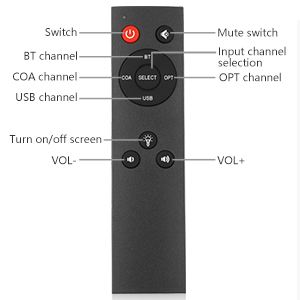
Image: Layout of the AIYIMA DAC A6 remote control, showing buttons for power, mute, input selection (BT, COA, OPT, USB), screen on/off, and volume up/down.
- Schalten: Einschalten / Ausschalten.
- Stumm: Audio stummschalten/Stummschaltung aufheben.
- Auswahl des Eingangskanals: Buttons for BT, COA, OPT, USB.
- Turn on/off screen: Toggles the OLED display.
- LAUTSTÄRKE+/-: Passt die Lautstärke an.
5. Einrichtungsanweisungen
- Bluetooth-Antenne anschließen: Screw the provided Bluetooth antenna into the RF connector on the rear panel.
- Audioausgang anschließen:
- For active speakers: Connect the RCA L/R OUTPUT of the DAC A6 directly to your active speakers using RCA cables.
- For passive speakers with an amplifier: Connect the RCA L/R OUTPUT of the DAC A6 to the input of your amplifier. Then, connect your passive speakers to the ampAusgang des Verstärkers.

Image: Diagram illustrating connection options for the DAC A6 to active speakers or an ampVerstärker mit passiven Lautsprechern.
- Audioeingang anschließen: Wählen Sie eine der folgenden Eingabemethoden:
- PC-USB: Connect a USB cable from your computer to the PC-USB input on the DAC A6.
- Koaxial: Connect a coaxial cable from your audio source to the COAX input.
- Optisch: Connect an optical cable from your audio source to the OPT input.
- Bluetooth: Stellen Sie sicher, dass die Bluetooth-Antenne angeschlossen ist.
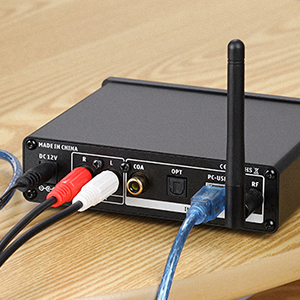
Image: Close-up of the PC-USB input on the DAC A6, showing a USB cable connected.
- Strom anschließen: Connect the DC 12V power adapter to the DAC A6 and then plug it into a power outlet.
5.1 PC-USB Driver Installation (Windows)
For Windows 7 or higher, a custom driver is required for optimal performance, especially for DSD Native playback. Please visit the AIYIMA official website to download the latest driver for the DAC A6.
6. Bedienungsanleitung
- Ein-/Ausschalten: Press the Power/Mode button on the front panel or the "Switch" button on the remote control.
- Eingabemodus auswählen:
- Short press the Power/Mode button on the front panel to cycle through inputs (Bluetooth, PC-USB, Coaxial, Optical).
- Alternatively, use the dedicated input buttons (BT, COA, OPT, USB) on the remote control.
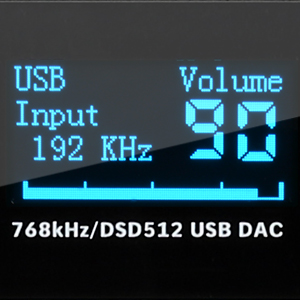
Image: Close-up of the power/mode button on the DAC A6.
- Lautstärke anpassen: Rotate the volume knob on the front panel or use the VOL+/- buttons on the remote control. The OLED display will show the current volume level.

Image: Close-up of the OLED display showing "USB Input 192 KHz Volume 90".
- Bluetooth-Pairing:
- Select Bluetooth input mode on the DAC A6. The OLED display will indicate "BT Input".
- On your mobile device, search for Bluetooth devices and select "BT HIFI AUDIO" to pair.
- Once connected, you can stream audio wirelessly to the DAC A6.

Image: A smartphone displaying Bluetooth settings, showing "BT HIFI AUDIO" as a discoverable device, next to the DAC A6.
- OLED Display Control: Use the "Turn on/off screen" button on the remote to toggle the OLED display.
6.1 Setting TV Optical/Coaxial Output
If there is no audio output when connecting your TV via optical or coaxial, you may need to adjust your TV's audio settings.
- Navigate to your TV's "System Settings" or press the remote control's [Settings] key.
- Find "Sound" or "Audio Output" settings and select "Optical Fiber" or "Coaxial Output".
- After setting, if there is still sound from the TV's internal speakers, adjust the TV volume to 0 using the TV remote control.
- Note: Some TVs may automatically disable internal speakers when external speakers are detected, resulting in no sound from the TV itself.
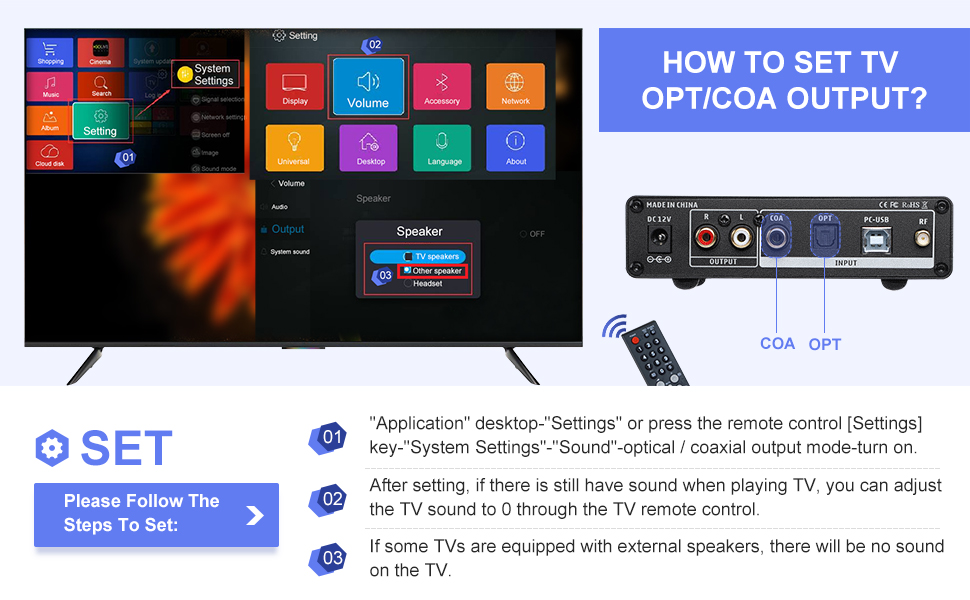
Image: A visual guide showing TV menu navigation to adjust sound output settings for optical/coaxial connections.
6.2 Videodemonstration
Video: An official product video demonstrating the AIYIMA DAC A6 Decoder Receiver in use, showcasing its connectivity and audio playback.
7. Spezifikationen
| Besonderheit | Spezifikation |
|---|---|
| Marke | AIYIMA |
| Modellnummer | DAC-A6 |
| Maximales Versorgungsvolumentage | 12 Volt |
| Schnittstellentyp | Coaxial, USB, Optical, Bluetooth |
| Anzahl der Kanäle | 2 |
| Technische Daten | 5.24 Zoll L x 4.92 Zoll B |
| Artikelgewicht | 1.54 Pfund |
| PC-USB Sampling-Rate | 32bit/768kHz, DSD512 |
| Bluetooth-Unterstützung | APT-X HD, APT-X LL, LDAC, AAC, SBC |
| Frequenzgang | 10Hz-40kHz (±3db) |
| Verzerrung | ≤ 0.0006 % |
Bild: Rückseite view of the DAC A6 with dimensions and a table of key specifications including input types, output, Bluetooth support, frequency response, distortion, net weight, PC-USB sampling rate, and working voltage.
8. Fehlerbehebung
- Keine Tonausgabe:
- Stellen Sie sicher, dass alle Kabel fest angeschlossen sind.
- Verify the correct input mode is selected on the DAC A6.
- Check the volume levels on both the DAC A6 and your connected ampVerstärker/Lautsprecher.
- If using TV optical/coaxial, ensure the TV's audio output settings are correctly configured (see "Setting TV Optical/Coaxial Output" section).
- For PC-USB, confirm the driver is installed and the DAC A6 is selected as the audio output device in your computer's sound settings.
- Intermittent Audio or Noise (PC-USB):
- Ensure the PC-USB driver is correctly installed and up to date, especially for Windows 11.
- Versuchen Sie es mit einem anderen USB-Anschluss oder einem anderen USB-Kabel.
- Minimize other USB devices connected to the computer.
- Probleme mit der Bluetooth-Verbindung:
- Stellen Sie sicher, dass die Bluetooth-Antenne fest angebracht ist.
- Verify the DAC A6 is in Bluetooth input mode.
- Delete "BT HIFI AUDIO" from your device's paired list and try pairing again.
- Ensure your device is within range of the DAC A6.
- Summen oder Brummen:
- This can sometimes be caused by electromagnetic interference. Try repositioning the DAC A6 unit, its power cable, and audio cables away from other electronic devices or power sources.
- Consider using shielded audio cables.
- If using a linear power supply, ensure it is properly grounded and positioned.
9. Garantie und Support
AIYIMA products are designed for reliability and performance. For warranty information, technical support, or service inquiries, please refer to the official AIYIMA webBesuchen Sie unsere Website oder kontaktieren Sie Ihren Händler vor Ort. Bewahren Sie Ihren Kaufbeleg als Kaufnachweis auf.
For further assistance, you may visit the AIYIMA store on Amazon: AIYIMA Store.


