1. Einführung und Endeview
This manual provides essential information for the installation, operation, and maintenance of your ZOTAC Gaming GeForce RTX 3070 Ti AMP Extreme Holo graphics card. Please read this manual thoroughly before installation and retain it for future reference.
The ZOTAC Gaming GeForce RTX 3070 Ti AMP Extreme Holo is built on the NVIDIA Ampere architecture, featuring enhanced RT Cores and Tensor Cores, new streaming multiprocessors, and superfast GDDR6X memory. It is designed to deliver high-fidelity gaming experiences.

Figure 1: ZOTAC Gaming GeForce RTX 3070 Ti AMP Extreme Holo Graphics Card, front view.
Hauptmerkmale:
- NVIDIA Ampere architecture, 2nd Gen Ray Tracing Cores, 3rd Gen Tensor Cores
- 8GB 256-bit GDDR6X memory, 19 Gbps, PCIE 4.0
- HoloBlack Design with SPECTRA 2.0 RGB Lighting
- IceStorm 2.0 Advanced Cooling with 3x 100mm fans, FREEZE Fan Stop, and Active Fan Control
- PowerBoost and Dual BIOS
- Metal RGB Lighted Backplate
- 8K Ready, 4 Display Ready, HDCP 2.3, VR Ready
- Boost Clock 1890 MHz
2. Einrichtung und Installation
Systemanforderungen:
- PCI Express 4.0 compliant motherboard with one x16 graphics slot.
- 750-watt power supply recommended.
- Minimum of 2 x 8-pin and 1 x 6-pin power connectors from the power supply.
- Windows 10 64-bit (build 2004 or later) operating system.
- Minimum 6.56 pounds of available space in your PC case.
- Dimensions: 355.9mm (Length) x 145.7mm (Height) x 59.7mm (Width, 3 slot).
Installationsschritte:
- Bereiten Sie Ihr System vor: Schalten Sie Ihren Computer aus und trennen Sie alle Kabel. Öffnen Sie das Computergehäuse.
- Suchen Sie den PCIe-Steckplatz: Suchen Sie einen freien PCI Express x16-Steckplatz auf Ihrem Motherboard.
- Remove existing graphics card (if any): Carefully remove any existing graphics card and its power connectors.
- Install the ZOTAC Gaming GeForce RTX 3070 Ti: Align the graphics card with the PCIe slot and press down firmly until it is securely seated. Ensure the retention clip on the motherboard clicks into place.
- Sichern Sie die Karte: Befestigen Sie die Grafikkarte mit Schrauben an den Erweiterungssteckplatzhalterungen des PC-Gehäuses.
- Strom anschließen: Connect the 2 x 8-pin and 1 x 6-pin power connectors from your power supply to the corresponding ports on the graphics card.
- Close the case and connect peripherals: Schließen Sie das Computergehäuse, schließen Sie alle Kabel wieder an und schalten Sie das System ein.
- Treiber installieren: Once your operating system loads, install the latest NVIDIA Game Ready Drivers or NVIDIA Studio Drivers from the official NVIDIA webWebsite.

Abbildung 2: Vorderseite view of the graphics card, highlighting the triple fan cooling system.
Anschließen von Displays:
The graphics card supports up to four simultaneous displays. It features:
- 3 x DisplayPort 1.4a (up to 7680x4320@60Hz)
- 1 x HDMI 2.1 (up to 7680x4320@60Hz)
Ensure you use compatible cables for your desired resolution and refresh rate. HDCP 2.3 is supported.

Figure 3: Display output ports on the graphics card, including DisplayPort and HDMI.
3. Bedienung Ihrer Grafikkarte
Software-Kompatibilität:
- Game Ready-Treiber und NVIDIA Studio-Treiber
- Microsoft DirectX 12 Ultimate, Vulkan RT-API
- OpenGL 4.6
Regularly update your graphics drivers to ensure optimal performance and compatibility with the latest games and applications.
RGB Lighting (SPECTRA 2.0):
The card features SPECTRA 2.0 RGB Lighting, which can be customized to match your system's aesthetic. This includes the HoloBlack design elements and the Metal RGB Lighted Backplate. An external LED strip can also be connected for synchronized lighting effects.

Abbildung 4: Schräg view of the graphics card showcasing its customizable RGB lighting.
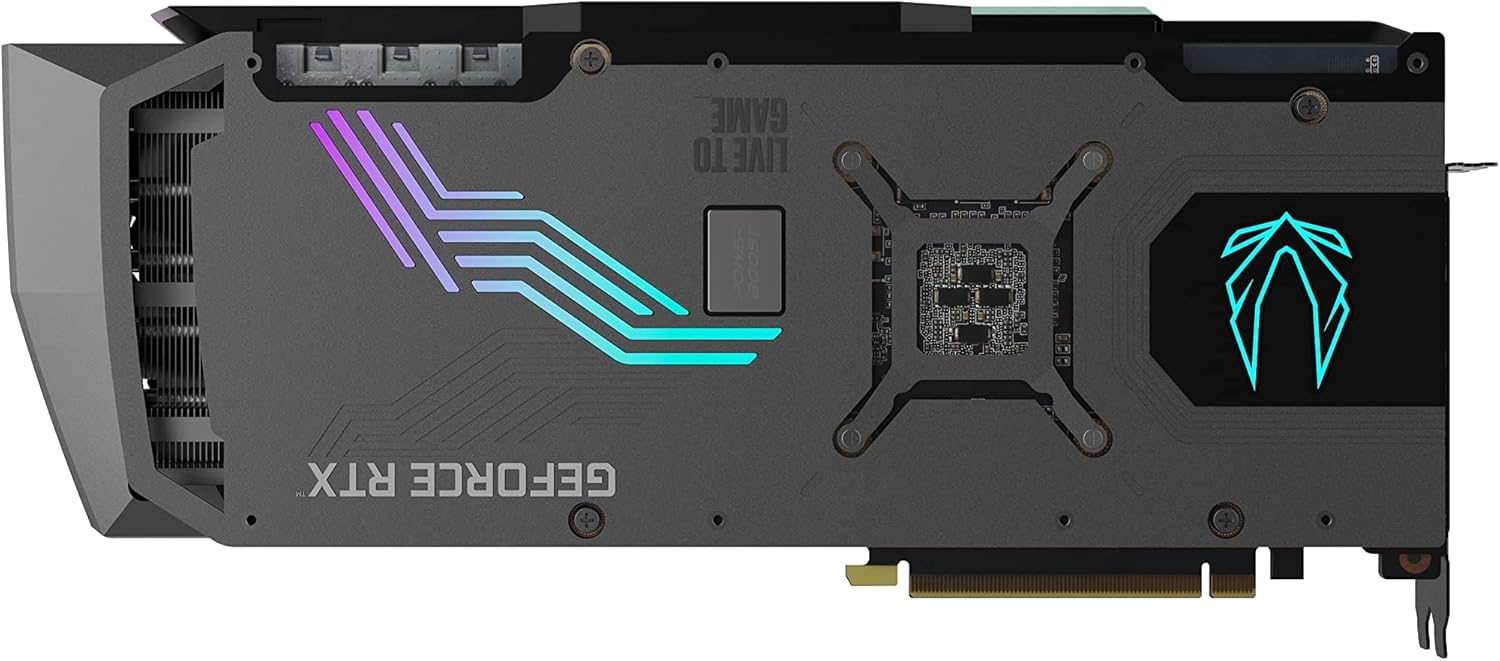
Abbildung 5: Rückseite view of the graphics card, highlighting the RGB lighted backplate.
4. Wartung
To ensure the longevity and optimal performance of your graphics card, regular maintenance is recommended.
Kühlsystem:
The IceStorm 2.0 Advanced Cooling system features three 100mm fans. Key cooling features include:
- Active Fan Control: Dynamically adjusts fan speeds based on GPU temperature.
- FREEZE Fan Stop: Fans will stop completely during low-load conditions to reduce noise and conserve power.
Periodically inspect the fans and heatsink for dust buildup. Use compressed air to gently clean any accumulated dust to maintain efficient cooling. Ensure adequate airflow within your PC case.
5. Fehlerbehebung
If you encounter issues with your graphics card, consider the following general troubleshooting steps:
- No display or black screen: Ensure all power cables are securely connected to the graphics card and the power supply. Verify that the display cable is properly connected to both the graphics card and the monitor. Try a different display output port or cable.
- Fahrerprobleme: Uninstall existing graphics drivers using a driver uninstaller utility, then download and install the latest drivers from the NVIDIA webWebsite.
- Leistungsprobleme: Check GPU temperatures using monitoring software. Ensure your PC case has good airflow. Verify that your power supply meets the recommended wattage.
- Systeminstabilität: Ensure your operating system is up to date. Check for any conflicting software or background processes.
For more detailed troubleshooting or persistent issues, please refer to the ZOTAC support webWebsite.
6. Spezifikationen
| Spezifikation | Wert |
|---|---|
| Grafikkarte | NVIDIA GeForce RTX 3070 Ti |
| CUDA-Kerne | 6144 |
| Videospeicher | 8 GB GDDR6X |
| Speicherbus | 256-Bit |
| Engine Boost Clock | 1890 MHz |
| Speichertakt | 19.0 Gbit/s |
| PCI Express | 4.0 |
| Maximale Bildschirmauflösung | 7680 x 4320 |
| Stromanschlüsse | 2 x 8-pin, 1 x 6-pin |
| Empfohlenes Netzteil | 750 Watt |
| Maximaler Stromverbrauch | 310 Watt |
| Abmessungen (Länge) | 355.9mm (14in) |
| Abmessungen (Höhe) | 145.7mm (5.7in) |
| Abmessungen (Breite) | 3 slot (59.7mm / 2.4in) |
| Artikelgewicht | 6.56 Pfund |
7. Lieferumfang
The following items are included with your ZOTAC Gaming GeForce RTX 3070 Ti AMP Extreme Holo graphics card:
- ZOTAC GAMING GeForce RTX 3070 Ti AMP Extreme Holo graphics card
- ZOTAC GAMING RGB GPU Support Bracket
- 3-poliges RGB-Header-Kabel
- Benutzerhandbuch (dieses Dokument)

Figure 6: Contents of the ZOTAC Gaming GeForce RTX 3070 Ti AMP Extreme Holo retail box.

Figure 7: The included ZOTAC Gaming RGB GPU Support Bracket.
8. Garantie und Support
For customer service, technical support, or general inquiries regarding your ZOTAC Gaming GeForce RTX 3070 Ti AMP Extreme Holo graphics card, please visit the dedicated support page on the official ZOTAC webWebsite.
Offizielle Unterstützung WebWebsite: www.zotac.com/support
Please retain your proof of purchase for warranty claims. Warranty terms and conditions are available on the ZOTAC support webWebsite.


