1. Einleitung
Thank you for choosing the Perel Radio-Controlled Wall Clock. This clock is designed for precise timekeeping, automatically synchronizing with the DCF77 atomic clock signal. It also features integrated analog displays for temperature and humidity, making it a versatile addition to any room.
1.1 Sicherheitshinweise
- Lesen Sie vor der Verwendung alle Anweisungen sorgfältig durch.
- Setzen Sie die Uhr keinen extremen Temperaturen, direkter Sonneneinstrahlung oder hoher Luftfeuchtigkeit aus.
- Use only the specified battery type (1 x AA, not included).
- Entsorgen Sie gebrauchte Batterien verantwortungsvoll gemäß den örtlichen Vorschriften.
- Außerhalb der Reichweite von Kindern aufbewahren.
2. Produktüberschreitungview
2.1 Hauptmerkmale
- Radio-Controlled (DCF77): Automatic time synchronization with the atomic clock in Frankfurt, Germany.
- Automatic Summer/Winter Time Adjustment: Seamless transition between daylight saving and standard time.
- Integriertes Thermometer: Analog display for room temperature.
- Integriertes Hygrometer: Analog display for air humidity.
- Großes, gut lesbares Display: 35.5 cm diameter with clear numbers.
- Zeitloses Design: Minimalist black dial with silver-grey aluminum frame.
2.2 Komponenten
Familiarize yourself with the clock's components:
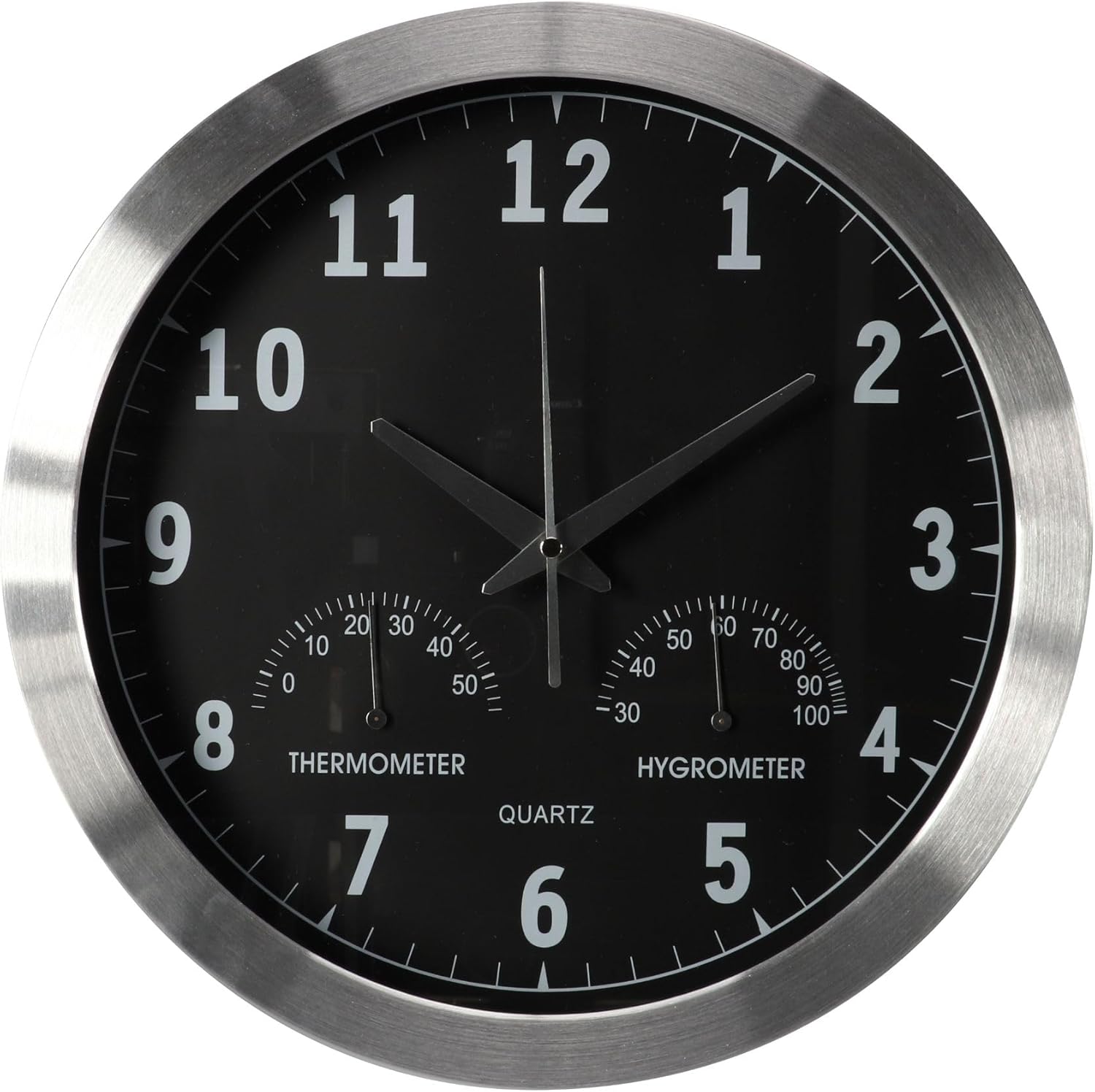
Abbildung 2.1: Vorderseite view of the Perel Radio-Controlled Wall Clock, showing the main clock face with hour, minute, and second hands, and the smaller thermometer and hygrometer dials at the bottom.

Abbildung 2.2: Zurück view of the clock, illustrating the battery compartment and control buttons. Key components are labeled:
- Manual Setting Button (SET)
- Reset Pinhole (RESET)
- Forced Reception Button (REC)
- Battery Compartment (1.5V AA/LR6/R6P)
- Safety Pin (for transport)
3. Einrichtung und Installation
3.1 Einlegen der Batterie
- Remove the battery compartment cover on the back of the clock.
- Insert one (1) AA 1.5V battery, ensuring the correct polarity (+/-).
- Bringen Sie die Abdeckung des Batteriefachs wieder an.
3.2 Initial Time Synchronization (DCF77)
After inserting the battery, the clock will automatically attempt to receive the DCF77 radio signal. The hands will move to the 12 o'clock position and then begin searching for the signal. This process can take several minutes, or up to 24 hours in areas with weak reception.
- Place the clock near a window or in an open area for best reception.
- Avoid placing it near electronic devices that may cause interference (e.g., TVs, computers, microwaves).
- Sobald das Signal empfangen wird, stellt sich die Uhr automatisch auf die richtige Zeit ein.
To manually initiate a signal search, press the 'REC' (Forced Reception) button on the back of the clock (see Figure 2.2).
3.3 Montage der Uhr
The clock features a central universal hanging system for easy installation.
- Choose a suitable location on a wall, ensuring it is sturdy enough to support the clock's weight (approx. 1.07 kg).
- Install a screw or hook into the wall at the desired height.
- Hängen Sie die Uhr mithilfe des Aufhängeschlitzes auf der Rückseite sicher auf.
4. Bedienung
4.1 Automatic Time Adjustment
The Perel Radio-Controlled Wall Clock automatically adjusts its time based on the DCF77 signal. This includes automatic switching between summer and winter time (Daylight Saving Time and Standard Time).

Figure 4.1: The clock automatically adjusts for summer and winter time changes via the DCF77 radio signal.
4.2 Ablesen des Displays
- Zeit: Read the time using the large hour, minute, and second hands on the main dial.
- Temperatur: The left small dial indicates the ambient temperature in degrees Celsius.
- Luftfeuchtigkeit: The right small dial indicates the relative air humidity in percentage (%).
4.3 Manual Time Setting (If Needed)
In rare cases where the DCF77 signal cannot be received (e.g., outside the reception range), you can manually set the time:
- Press and hold the 'SET' (Manual Setting) button on the back of the clock (see Figure 2.2).
- The hands will start to move. Release the button when the hands reach the desired time.
- Note: Manual setting will be overridden once the DCF77 signal is successfully received.
5. Wartung
5.1 Reinigung
- Wischen Sie die Oberfläche der Uhr mit einem weichen, trockenen Tuch ab.
- Verwenden Sie keine Scheuermittel, Lösungsmittel oder chemische Sprays, da diese die Oberfläche beschädigen können.
5.2 Batteriewechsel
When the clock hands stop moving or the time becomes inaccurate, it is likely time to replace the battery.
- Entfernen Sie die alte Batterie aus dem Fach.
- Insert a new AA 1.5V alkaline battery, observing polarity.
- The clock will automatically attempt to re-synchronize with the DCF77 signal after battery replacement.
6. Fehlerbehebung
If you experience issues with your Perel Radio-Controlled Wall Clock, consult the table below for common problems and solutions.
| Problem | Mögliche Ursache | Lösung |
|---|---|---|
| Die Uhr stellt die Zeit nicht automatisch ein. | Weak or no DCF77 signal reception. | Relocate the clock to an area with better reception (e.g., near a window, away from electronics). Press the 'REC' button to force a signal search. |
| Die Zeiger der Uhr sind blockiert oder bewegen sich nicht. | Niedriger oder leerer Akku. | Replace the battery with a new AA 1.5V alkaline battery. |
| Time is incorrect after initial setup. | Initial signal reception failed or was interrupted. | Press the 'RESET' button (using a thin object like a paperclip) to restart the clock and initiate a new signal search. Ensure good reception conditions. |
| Thermometer/Hygrometer readings seem inaccurate. | Sensors need time to adjust to new environment; extreme conditions. | Allow the clock to acclimate to the room temperature and humidity for at least 30 minutes. Ensure the clock is not placed in direct sunlight or near heat/cold sources. |
7. Technische Daten
| Besonderheit | Spezifikation |
|---|---|
| Modellnummer | WC118 |
| Marke | Perel |
| Hersteller | Velleman Group nv |
| Abmessungen (Durchmesser x Tiefe) | 35.5 cm x 4.5 cm (approx. 36.5 x 37 x 37 cm overall product dimensions) |
| Gewicht | 1.07 kg |
| Material | Metal (Aluminum frame) |
| Farbe | Black (dial), Silver-grey (frame) |
| Anzeigetyp | Analog |
| Stromquelle | 1 x AA 1.5V Battery (Alkaline recommended, not included) |
| Besondere Merkmale | Radio-controlled (DCF77), Thermometer, Hygrometer, Automatic Summer/Winter Time Adjustment |
| Montagetyp | Wandhalterung |

Abbildung 7.1: Seite view of the clock highlighting its dimensions (diameter 35.5 cm, depth 4.5 cm) and weight (930g).
8. Garantie und Support
Perel products are manufactured to high-quality standards. For information regarding warranty terms, technical support, or service, please refer to the contact information provided with your purchase or visit the official Perel webWebsite.
Bitte bewahren Sie Ihren Kaufbeleg für eventuelle Garantieansprüche auf.


