Einführung
The WOLFANG GA300 Action Camera is a versatile device designed to capture high-quality video and photos in various environments. Featuring 4K/60FPS video recording and 24MP photo capabilities, it ensures crisp and detailed visuals. Its robust design includes 40M waterproofing with a dedicated dive mode, 6-axis EIS stabilization for smooth footage, and support for an external microphone for clear audio. The sensitive touchscreen and extensive functions like slow-motion, time-lapse, and burst recording make it an ideal companion for all your adventures.
Lieferumfang
- 1* WOLFANG GA300 Action Cam
- 1* Waterproof Case
- 1 * Mikrofon
- 1 * Fernbedienung
- 2* 1350mAh Batteries
- 1 * USB-Kabel
- 1* Bicycle Mount
- 1* Helmet Mount
- 1* Extension Mount
- 1* J-hook Mount
- 1* Dust cover
- 1* Frame
- 1* Long Thumbscrew
- 1* Short Thumbscrew
- 1* 360° Rotating Screw
- 1* Backpack Clip
- 2* Adhesive Pads
- 2* Flat Adhesive Pads
- 4* Bandage
- 1* Release Buckle
- 1* Insurance Tether
- 1 * Benutzerhandbuch
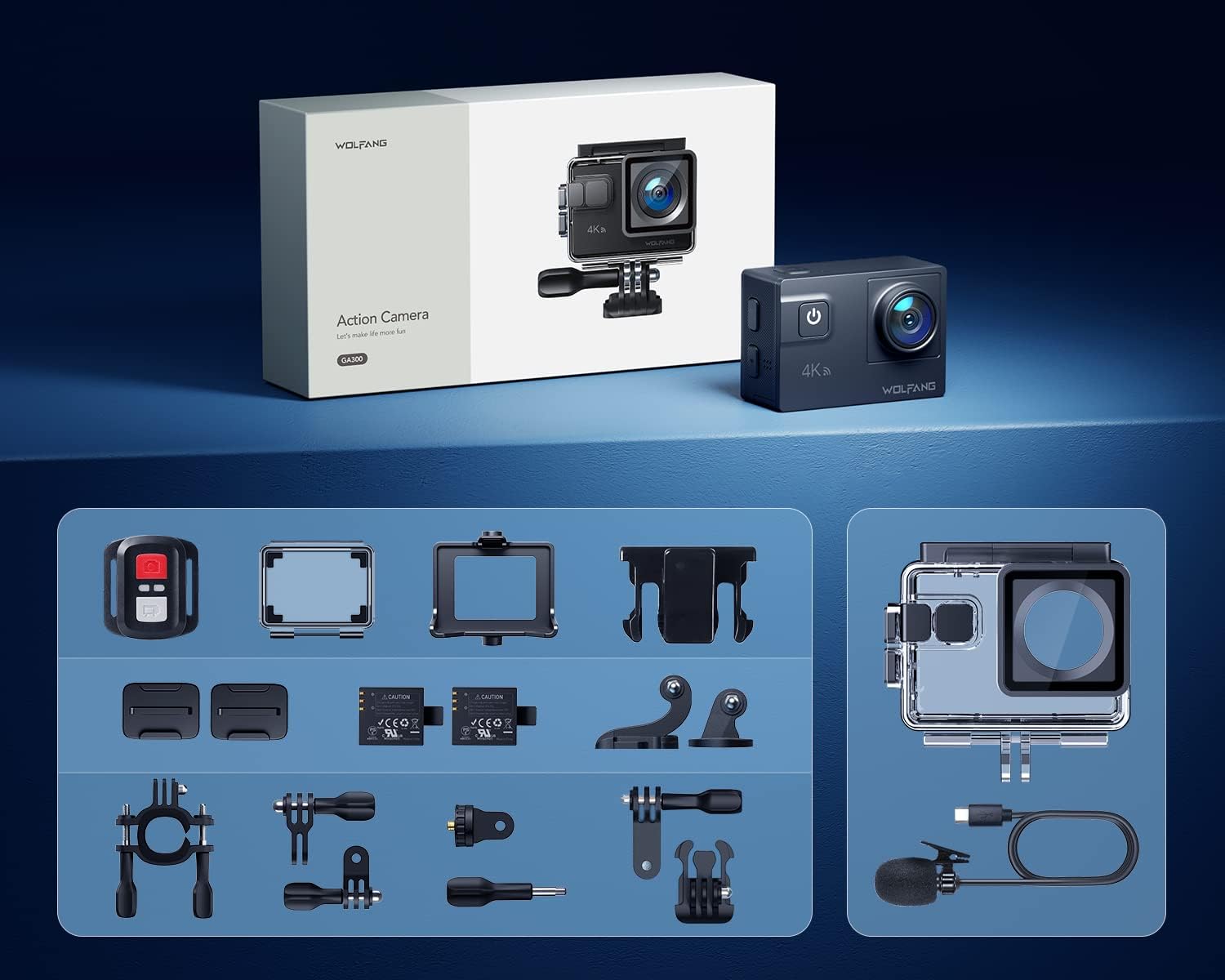
Image: All accessories included with the WOLFANG GA300 Action Camera, neatly arranged.
Aufstellen
Ersteinrichtung der Kamera
Before first use, ensure the included 1350mAh batteries are fully charged using the provided USB cable. Insert a compatible Micro SD card (not included) into the camera's slot. Power on the camera and follow the on-screen prompts to set the language, date, and time.

Image: Illustration of the pop-up battery cover for easy battery insertion.
Connecting to Mobile App (Wi-Fi)
To control your WOLFANG GA300 remotely and view footage, download the iSmartDV2 app on your smartphone. Activate Wi-Fi on your camera and connect your phone to the camera's Wi-Fi network. The network name (SSID) and password will be displayed on the camera screen.
Video: Demonstrates how to connect the WOLFANG GA300 to a smartphone via Wi-Fi using the iSmartDV2 app for remote control and viewing.
Bedienungsanleitung
Grundlegende Bedienung
The WOLFANG GA300 features a sensitive touchscreen for easy navigation. Use the power/mode button to switch between video and photo modes. The up/down buttons on the side allow for menu navigation and digital zoom adjustments. Ensure the protective film is removed from the lens and screen for optimal clarity.

Image: The WOLFANG GA300 camera displayed next to a smartphone showing its connected app interface, highlighting remote control capabilities.
Videoaufzeichnung
Record stunning 4K video at 60 frames per second. The advanced 6-axis EIS stabilization ensures smooth footage even during strenuous activities. Utilize the 8x digital zoom to capture distant subjects. For underwater recording, use the included waterproof case and activate Dive Mode for color correction.
Video: Eine detaillierte Review of the WOLFANG GA300 Action Camera, showcasing its 4K 60FPS video capabilities and EIS stabilization in various scenarios.

Image: Icon representing the 6-axis Electronic Image Stabilization (EIS) feature of the WOLFANG GA300.

Image: Icon representing the 8x digital zoom capability of the WOLFANG GA300.
Audioaufnahme
The GA300 comes with an external noise-canceling microphone for clearer sound capture in noisy environments. This is particularly useful for vlogging or recording in windy conditions.
Video: An audio test of the Wolfang GA300, demonstrating the sound quality with and without the external microphone.

Image: Icon representing the external microphone feature of the WOLFANG GA300.
Fotoaufnahme
Capture high-resolution 24MP photos. The camera supports various photo modes including time-lapse photography, slow-motion, and long exposure for creative shots.

Bild: Visuelles Beispielamples of Time Lapse, Slow Motion, and Long Exposure modes captured with the WOLFANG GA300.
Wartung
- Reinigung: Reinigen Sie Objektiv und Bildschirm der Kamera mit einem weichen, fusselfreien Tuch. Spülen Sie das wasserdichte Gehäuse nach Gebrauch im Salzwasser mit Süßwasser ab und lassen Sie es an der Luft trocknen.
- Batteriepflege: Bewahren Sie Batterien an einem kühlen, trockenen Ort auf. Vermeiden Sie es, Batterien über längere Zeit vollständig zu entladen.
- Lagerung: When not in use, store the camera in a dry, dust-free environment. Remove batteries if storing for a long duration.
Fehlerbehebung
- Kamera lässt sich nicht einschalten: Stellen Sie sicher, dass die Batterien vollständig geladen und korrekt eingesetzt sind.
-
Zugehörige Dokumente - GA300

Wolfgang GA100 Action-Kamera: Häufig gestellte Fragen
Antworten auf häufig gestellte Fragen zur Wolfgang GA100 Action-Kamera, einschließlich Speicherkartenerkennung, Verbindung mit Mobiltelefonen, Wasserdichtigkeit und Akkukaufasing, Verwendung der Fernbedienung und Umgang mit Verpackungsproblemen oder defektem Zubehör.
Benutzerhandbuch für die Action-Kamera - WOLFANG GA200
Ausführliches Benutzerhandbuch für die WOLFANG GA200 Action-Kamera mit detaillierten Informationen zu Funktionen, Einstellungen und Bedienung für 4K-Videoaufnahmen, Wasserdichtigkeit, EIS-Stabilisierung und Wi-Fi-Konnektivität.
Fragen und Antworten zur Wolfang GA200 Action-Kamera
Häufig gestellte Fragen und Antworten zur Wolfang GA200 Action-Kamera, einschließlich App-Verbindung, wasserdichter Verwendung, Fernbedienung, Speicherkartenformatierung, Videoqualität und Verpackungsproblemen.
WOLFANG GA300 Actionkamera Bedienungsanleitung
Umfassendes Benutzerhandbuch für die WOLFANG GA300-Actionkamera mit Informationen zu Installation, Aufladen, TF-Kartennutzung, Produktdiagrammen, Spezifikationen und Modusbetrieb.
Fragen und Antworten zur Wolfang GA200 Action-Kamera
Häufig gestellte Fragen und Antworten zur Wolfang GA200 Action-Kamera, zu den Themen App-Verbindung, Unterwassernutzung, Fernbedienung, Formatierung der Speicherkarte, Videoqualität und Packungsinhalt.
Wolfang GA420 Action-Kamera – Fragen und Antworten und Benutzerhandbuch
Häufig gestellte Fragen und Benutzerhandbuch zur Wolfang GA420-Actionkamera mit Informationen zur App-Verbindung, EIS-Funktion, Verwendung der Fernbedienung und Formatierung der Speicherkarte.