1. Einleitung
The FOREVER Smartwatch Kids Call Me 2 KW-60 is designed to provide safety and communication for children. This manual will guide you through the setup, operation, and maintenance of your new smartwatch, ensuring a safe and enjoyable experience for your child.

Image: The FOREVER Smartwatch Kids Call Me 2 KW-60 in blue, shown from an angled perspective, highlighting its screen and side buttons.
2. Packungsinhalt
Bitte prüfen Sie das Paket auf folgende Artikel:
- FOREVER Smartwatch Kids Call Me 2 KW-60
- USB-Ladekabel
- Benutzerhandbuch (dieses Dokument)

Image: The FOREVER Smartwatch KW-60 displayed next to its green retail packaging, illustrating the product as it appears in its box.
3. Installationsanleitung
3.1 Erstaufladung
Before first use, fully charge the smartwatch. Connect the USB charging cable to the watch's charging port and plug the other end into a USB power adapter (not included) or a computer's USB port. The charging indicator will show the progress.
3.2 Installation der SIM-Karte
The KW-60 requires a 2G Micro SIM card for call and data functions. Ensure the SIM card is active and has sufficient credit/data. Turn off the watch before inserting the SIM card.
- Locate the SIM card slot on the side or back of the watch.
- Öffnen Sie vorsichtig die Abdeckung des SIM-Kartenfachs.
- Insert the Micro SIM card with the gold contacts facing up and the notched corner aligned correctly.
- Close the SIM card tray cover securely.
3.3 App-Installation und -Kopplung
To manage the smartwatch and access all its features, download the Forever KidsCare application on your smartphone. The app is compatible with Android 5.0 or later and iOS 10.0 or later.
- Scan the QR code provided in the watch's packaging or search for "Forever KidsCare" in your smartphone's app store.
- Installieren und öffnen Sie die Anwendung.
- Registrieren Sie ein neues Konto oder melden Sie sich an, falls Sie bereits eines besitzen.
- In the app, select "Add Device" and scan the QR code displayed on the smartwatch screen (or enter the device ID manually).
- Befolgen Sie die Anweisungen auf dem Bildschirm, um den Kopplungsvorgang abzuschließen.
4. Bedienungsanleitung
4.1 Grundlegende Navigation
The KW-60 features a touch screen for easy navigation. Swipe left/right or up/down to browse through menus and tap to select options.
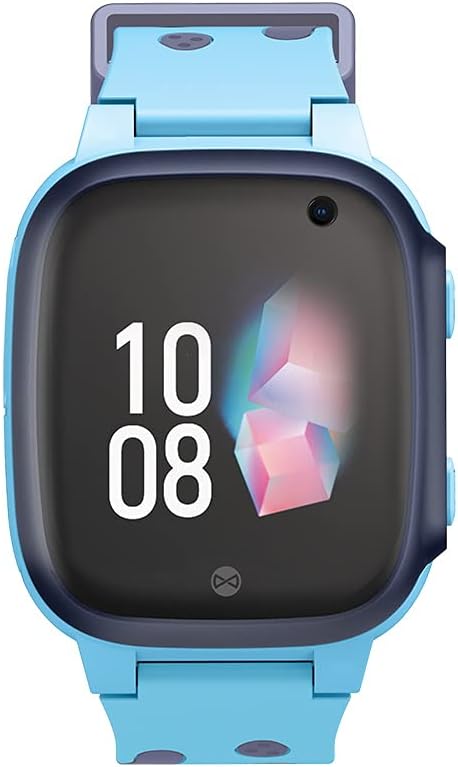
Bild: Eine direkte Front view of the FOREVER Smartwatch KW-60, showing its display with time and date, and the integrated camera lens.
4.2 Anrufe tätigen und entgegennehmen
The watch allows calls to and from up to 10 registered numbers. These numbers must be set up by the parent/guardian through the Forever KidsCare app.
- Einen Anruf tätigen: From the watch's phonebook, select a contact and tap to dial.
- Empfangen eines Anrufs: When a call comes in, tap the green answer icon on the screen.
4.3 SOS-Funktion
In case of emergency, the child can press and hold the SOS button on the side of the watch. This will automatically dial pre-set emergency contacts until one answers, and send a location alert to the parent's app.
4.4 Location Tracking (GPS/LBS)
The smartwatch uses GPS and LBS (Location Based Service) to track the child's location, which can be viewed in real-time on the Forever KidsCare app. You can also define safe zones on the map; an alert will be sent to your phone if the child enters or leaves these zones.

Image: The FOREVER Smartwatch KW-60 positioned over a stylized map with various colored location pins, illustrating its tracking capabilities.
4.5 Camera and Photo Sharing
The watch is equipped with a camera. Children can take photos directly from the watch. Parents can also remotely activate the camera via the app to check the child's surroundings.

Image: A hand interacting with the FOREVER Smartwatch KW-60, with chat bubbles displaying "Hi!", "OK", and "Yes!", indicating communication features.
4.6 Messaging (SMS)
The watch supports text messaging. Children can send and receive messages from approved contacts.
4.7 Alarm Clock, Flashlight, and Games
- Wecker: Set alarms via the app for reminders like wake-up times or study breaks.
- Taschenlampe: A built-in flashlight can be activated from the watch's menu.
- Spiele: The watch includes pre-installed games for entertainment.
5. Wartung
5.1 Reinigung
Reinigen Sie die Uhr regelmäßig mit einem weichen, trockenen Tuch. Bei hartnäckigem Schmutz leicht wischen.ampBefeuchten Sie das Tuch mit Wasser. Verwenden Sie keine scharfen Chemikalien oder Scheuermittel.
5.2 Batteriepflege
- Vermeiden Sie extreme Temperaturen, da diese die Batterielebensdauer beeinträchtigen können.
- Laden Sie die Uhr regelmäßig auf, vermeiden Sie es jedoch, sie über längere Zeiträume vollständig entladen zu lassen.
- Verwenden Sie ausschließlich das mitgelieferte Ladekabel.
5.3 Speicherung
When not in use for a long time, store the watch in a cool, dry place, away from direct sunlight. Ensure it has some charge to prevent deep discharge.
6. Fehlerbehebung
| Problem | Mögliche Ursache | Lösung |
|---|---|---|
| Uhr lässt sich nicht einschalten | Low battery; Power button not pressed long enough; System crash. | Charge the watch; Press and hold the power button for 5-10 seconds; Perform a soft reset (if applicable, check device specific instructions). |
| Kein Netzsignal / Anrufe können nicht getätigt werden | SIM card not inserted correctly; SIM card inactive/no credit; Poor network coverage. | Reinsert SIM card; Check SIM card status with provider; Move to an area with better signal. |
| GPS-Position ungenau | Weak GPS signal (indoors/dense areas); LBS used instead of GPS. | Move to an open outdoor area; Ensure watch has clear sky view. |
| Kopplung mit der App nicht möglich | Incorrect device ID/QR code; Watch not powered on; App issues. | Verify ID/QR code; Ensure watch is on; Restart app and watch; Check app permissions. |
| Der Akku entlädt sich schnell | Frequent GPS updates; High screen brightness; Excessive usage. | Adjust GPS update frequency in app; Lower screen brightness; Reduce continuous usage. |
7. Spezifikationen
- Marke: FÜR IMMER
- Modellname: KW-60
- Betriebssystem: Android Wear 2.6
- Bildschirmgröße: 3.66 Zentimeter
- Konnektivität: Bluetooth
- Besondere Merkmale: Camera, GPS, Alarm Clock
- Kompatible Geräte: Smartphone
- Batteriezusammensetzung: Lithium-Ionen
- Wiederaufladbarer Akku: Ja
- ASIN: B09HHNTT8B
- Verfügbarkeitsdatum: 5. Juni 2022
8. Garantie und Support
For detailed warranty information and technical support, please refer to the warranty card included with your product or visit the official FOREVER webBewahren Sie Ihren Kaufbeleg als Kaufnachweis für Garantieansprüche auf.
For further assistance, you may contact FOREVER customer service through their official channels.


