1. Einleitung
Thank you for choosing BLX Earbuds. These True Wireless Stereo (TWS) earbuds are designed to provide a seamless and high-quality audio experience with the convenience of Bluetooth 5.1 technology. This manual will guide you through the setup, operation, and maintenance of your new earbuds to ensure optimal performance and longevity.
2. Lieferumfang
Bitte überprüfen Sie den Packungsinhalt, um sicherzustellen, dass alle Artikel vorhanden sind:
- BLX Wireless Earbuds (Left and Right)
- Kabelloses Ladecase
- Micro-USB-Ladekabel
- Silikon-Ohrstöpsel (Klein, Mittel, Groß)
- Bedienungsanleitung
3. Produktüberschreitungview
The BLX Earbuds offer a compact and ergonomic design for comfortable, all-day wear. The included charging case provides extended battery life and convenient storage.
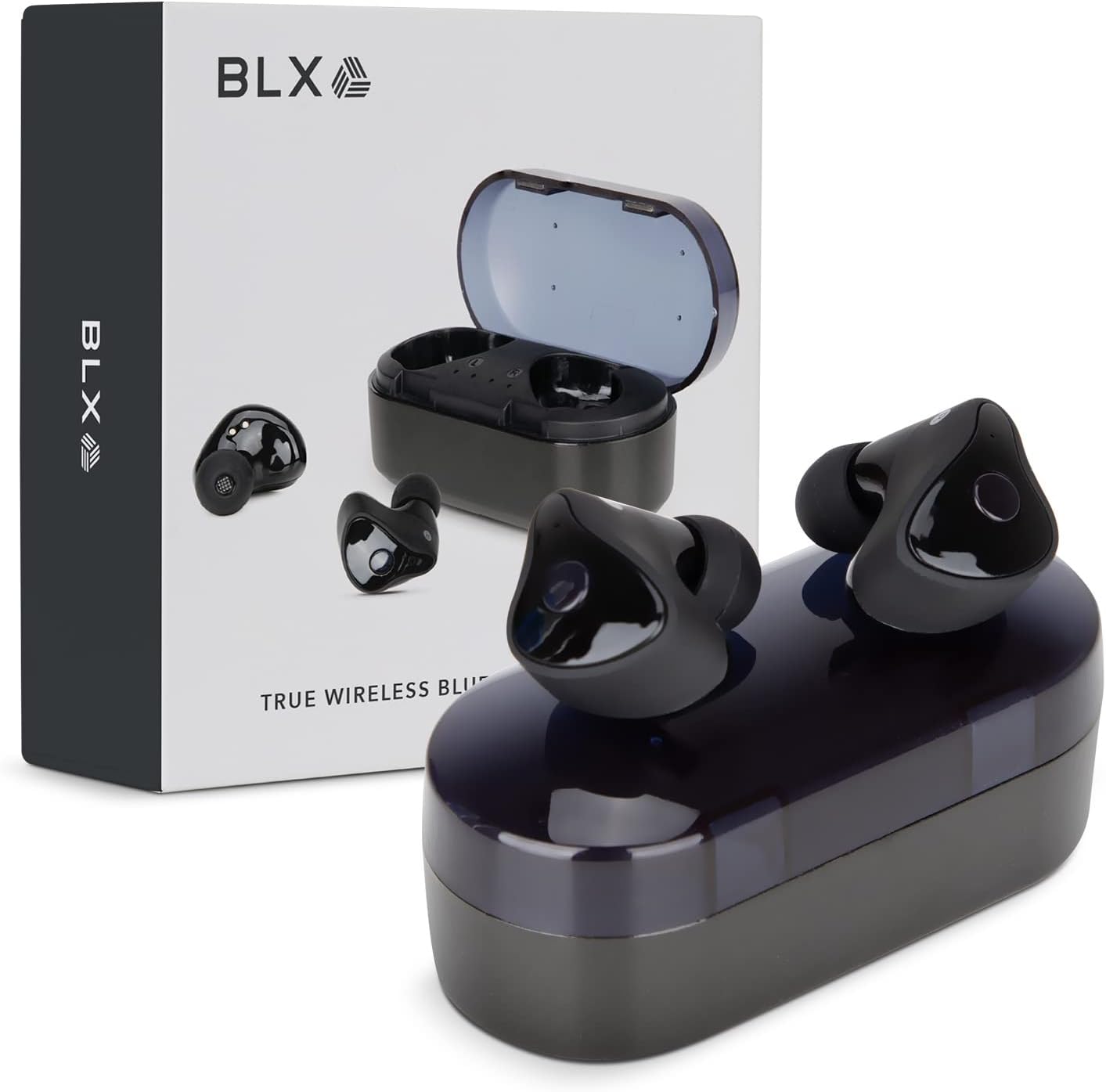
Image: BLX Earbuds, charging case, and product packaging.
3.1 Hauptmerkmale
- Echtes drahtloses Stereo (TWS): Enjoy a completely wireless audio experience with independent earbuds.
- Bluetooth 5.1-Technologie: Provides a stable and efficient wireless connection with a range of up to 10 meters.
- Schnelles Pairing: Earbuds automatically connect to your device once removed from the charging case.
- Intuitive Touch-Steuerung: Manage music playback, calls, and voice assistants with simple taps.
- IPX4 Wasserbeständigkeit: Designed to withstand sweat and splashes, making them suitable for workouts and outdoor activities.
- Eingebautes Mikrofon: Ermöglicht freihändiges Telefonieren und die Interaktion mit Sprachassistenten.

Image: BLX Earbuds demonstrating true wireless freedom with Bluetooth 5.1, fast pairing, and a 10-meter range.

Bild: Detailliert view of a BLX Earbud highlighting its smart touch control capabilities for various functions.

Image: A person running while wearing BLX Earbuds, emphasizing their IPX4 water resistance for sweat and splashes, and the portability of the compact charging case.

Image: A woman wearing a BLX Earbud, with an illustration of the three included silicone ear tip sizes (11mm, 12mm, 13mm) to help users find their perfect fit.

Image: A woman enjoying music with BLX Earbuds, illustrating the battery performance: 4.5 hours of listening time, up to 18 hours with the charging case, and a 1-hour full charge time for the case.

Image: A close-up of a BLX Earbud, emphasizing its clear immersive audio quality with a frequency response range of 20Hz to 20KHz.

Image: BLX Earbuds depicted with icons for Google Assistant and Siri, along with a built-in microphone icon, indicating hands-free voice assistant capabilities.
4. Einrichtung
4.1 Aufladen der Ohrhörer und des Ladecase
Before first use, fully charge the BLX Earbuds and their charging case.
- Legen Sie die Ohrhörer in das Ladecase. Achten Sie darauf, dass sie richtig in ihren jeweiligen Fächern sitzen (L für links, R für rechts).
- Verbinden Sie das Micro-USB-Ladekabel mit dem Ladeanschluss am Gehäuse und das andere Ende mit einer USB-Stromquelle (z. B. Computer, Netzteil).
- The indicator lights on the charging case will illuminate to show charging status. A full charge for the case takes approximately 1 hour.
- Once fully charged, disconnect the charging cable. The earbuds will charge automatically when placed in the powered case.
4.2 Koppeln mit Ihrem Gerät
BLX Earbuds feature auto-pairing technology for quick and easy connection.
- Stellen Sie sicher, dass das Ladecase geladen ist und Bluetooth auf Ihrem Gerät aktiviert ist.
- Öffnen Sie das Ladecase. Die Ohrhörer schalten sich automatisch ein und wechseln in den Kopplungsmodus.
- On your device (smartphone, tablet, laptop), go to the Bluetooth settings and search for available devices.
- Select "BLX Earbuds" from the list of found devices.
- Once connected, your device will confirm the pairing, and the earbuds will be ready for use.
- Bei der nächsten Verwendung verbinden sich die Ohrhörer beim Herausnehmen aus dem Ladecase automatisch mit dem zuletzt gekoppelten Gerät.
4.3 Finding the Perfect Fit
A proper fit is crucial for sound quality and comfort. Experiment with the included silicone ear tips (Small, Medium, Large) to find the size that best seals your ear canal.
- Führen Sie den Ohrhörer vorsichtig in Ihren Gehörgang ein.
- Twist slightly to secure it in place. The earbud should feel snug and comfortable without causing pressure.
- Wenn die Klangqualität schlecht ist oder die Ohrhörer locker sitzen, versuchen Sie es mit einer anderen Ohrstöpselgröße.
5. Operating Your BLX Earbuds
The BLX Earbuds utilize touch controls for easy management of audio and calls.
5.1 Ein-/Ausschalten
- Einschalten: Öffnen Sie das Ladeetui und die Ohrhörer schalten sich automatisch ein.
- Ausschalten: Legen Sie die Ohrhörer zurück in das Ladecase und schließen Sie den Deckel. Sie schalten sich automatisch aus und beginnen mit dem Ladevorgang.
5.2 Musikwiedergabe
| Aktion | Kontrolle |
|---|---|
| Abspielen/Pause | Tippen Sie einmal auf einen der Ohrhörer |
| Nächster Titel | Doppeltippen Sie auf den rechten Ohrhörer |
| Vorheriger Titel | Doppeltippen Sie auf den linken Ohrhörer |
5.3 Anrufmanagement
| Aktion | Kontrolle |
|---|---|
| Anruf annehmen/beenden | Tippen Sie einmal auf einen der Ohrhörer |
| Anruf ablehnen | Halten Sie einen der Ohrhörer 2 Sekunden lang gedrückt |
5.4 Sprachassistent
| Aktion | Kontrolle |
|---|---|
| Sprachassistent aktivieren (Siri, Google Assistant usw.) | Dreimaliges Tippen auf einen der Ohrhörer |
5.5 Lautstärkeregelung
Volume control is managed directly through your connected device (phone, tablet, laptop).
6. Wartung
Proper care and maintenance will extend the life of your BLX Earbuds.
6.1 Reinigung
- Verwenden Sie ein weiches, trockenes, fusselfreies Tuch, um die Ohrhörer und das Ladecase zu reinigen.
- Bei Ohrstöpseln diese von den Ohrhörern abnehmen und gegebenenfalls mit einer milden Seifenlösung reinigen, anschließend gründlich abspülen und vollständig trocknen lassen, bevor sie wieder angebracht werden.
- Verwenden Sie keine Scheuermittel, Alkohol oder chemische Lösungsmittel.
- Stellen Sie sicher, dass die Ladekontakte an beiden Ohrhörern und am Ladecase sauber und frei von Verunreinigungen sind.
6.2 Speicherung
Bewahren Sie die Ohrhörer bei Nichtgebrauch stets im Ladecase auf, um sie vor Staub und Beschädigungen zu schützen und sie geladen zu halten.
6.3 Wasserdichtigkeit (IPX4)
Your BLX Earbuds are rated IPX4, meaning they are resistant to splashing water from any direction. This makes them suitable for:
- Sweaty workouts
- Light rain or splashes
Wichtiger Hinweis:
- IPX4 rating does NOT mean the earbuds are waterproof. Do not submerge them in water.
- Do not wear them while swimming, showering, or in heavy rain.
- If the earbuds get wet, wipe them dry immediately before placing them back in the charging case.
7. Fehlerbehebung
If you encounter issues with your BLX Earbuds, try the following solutions:
7.1 Ohrhörer lassen sich nicht koppeln oder verbinden
- Stellen Sie sicher, dass beide Ohrhörer aufgeladen sind.
- Stellen Sie sicher, dass Bluetooth auf Ihrem Gerät aktiviert ist.
- Legen Sie die Ohrhörer zurück in das Ladecase, schließen Sie den Deckel, warten Sie einige Sekunden und öffnen Sie dann den Deckel erneut, um den Kopplungsmodus wieder zu aktivieren.
- Forget/delete "BLX Earbuds" from your device's Bluetooth list and try pairing again.
- Bringen Sie die Ohrhörer näher an Ihr Gerät heran (innerhalb von 10 Metern).
7.2 Kein Ton oder geringe Lautstärke
- Überprüfen Sie die Lautstärke auf Ihrem angeschlossenen Gerät.
- Stellen Sie sicher, dass die Ohrhörer ordnungsgemäß mit Ihrem Gerät verbunden sind.
- Entfernen Sie jeglichen Schmutz vom Lautsprechergitter des Ohrhörers.
- Versuchen Sie, die Audiowiedergabe über eine andere Anwendung oder Quelle zu starten.
7.3 Ein Ohrhörer funktioniert nicht
- Legen Sie beide Ohrhörer zurück in das Ladecase, schließen Sie den Deckel und öffnen Sie ihn dann wieder.
- Stellen Sie sicher, dass beide Ohrhörer aufgeladen sind.
- Versuchen Sie, die Ohrhörer zurückzusetzen (siehe Herstellerangaben). website or support for specific reset instructions if needed).
7.4 Ladecase lädt nicht
- Stellen Sie sicher, dass das Ladekabel sowohl mit dem Gehäuse als auch mit der Stromquelle fest verbunden ist.
- Versuchen Sie es mit einem anderen USB-Anschluss oder Netzteil.
- Stellen Sie sicher, dass das Ladekabel nicht beschädigt ist.
8. Spezifikationen
| Besonderheit | Detail |
|---|---|
| Modellname | 30888 |
| Konnektivitätstechnologie | Kabellos (Bluetooth 5.1) |
| Drahtlose Reichweite | Bis zu 10 Meter |
| Frequenzgang | 20 Hz – 20,000 Hz |
| Akkulaufzeit (Ohrhörer) | Approx. 4.5 Hours (listening time) |
| Akkulaufzeit (mit Ladecase) | Approx. 18 Hours total |
| Ladezeit (Case) | Ca. 1 Stunde |
| Wasserbeständigkeit | IPX4 (wasserbeständig) |
| Mikrofon | Eingebaut, bidirektional |
| Steuerungstyp | Touch-Steuerung |
| Kompatible Geräte | Cellphones, Tablets, Laptops (iOS, Android, PC) |
| Material | Plastik |
| Artikelgewicht | 44 Gramm |
| Technische Daten | 9.9 x 9.9 x 3.8 cm |
9. Garantie und Support
BLAUX products are manufactured to high standards and undergo rigorous testing. For information regarding warranty coverage, technical support, or service inquiries, please visit the official BLAUX webWebsite oder wenden Sie sich direkt an den Kundendienst.
Weitere Informationen und Unterstützung finden Sie unter BLAUX Store on Amazon.