1. Einleitung
Thank you for choosing the TechniSat DIGITRADIO CD 2GO BT. This portable device combines a CD player with DAB+ and FM radio reception, along with Bluetooth connectivity, offering versatile audio entertainment. This manual provides essential information for the safe and efficient use of your device, including setup, operation, and maintenance.
Bitte lesen Sie diese Bedienungsanleitung vor der Benutzung des Geräts sorgfältig durch und bewahren Sie sie zum späteren Nachschlagen auf.
2. Sicherheitshinweise
Beachten Sie die folgenden Sicherheitsvorkehrungen, um Schäden am Gerät oder Verletzungen zu vermeiden:
- Setzen Sie das Gerät weder Regen, Feuchtigkeit noch extremen Temperaturen aus.
- Vermeiden Sie, das Gerät in der Nähe von Wärmequellen oder in direktem Sonnenlicht aufzustellen.
- Öffnen Sie das Gerät nicht.asing. Alle Wartungsarbeiten sind qualifiziertem Personal zu überlassen.
- Verwenden Sie ausschließlich das angegebene Netzteil und die angegebenen Batterien.
- Sorgen Sie während des Betriebs für ausreichende Belüftung rund um das Gerät.
- Um Gehörschäden vorzubeugen, vermeiden Sie es, über längere Zeiträume bei übermäßig hoher Lautstärke zu hören.
3. Packungsinhalt
Bitte überprüfen Sie, ob alle Artikel im Paket vorhanden sind:
- TechniSat DIGITRADIO CD 2GO BT unit
- Kopfhörer
- 2 x BL5C rechargeable batteries
- External power cable (AC adapter)
- Benutzerhandbuch (dieses Dokument)
4. Produktüberschreitungview
Familiarize yourself with the main components and controls of your DIGITRADIO CD 2GO BT.

Abbildung 4.1: Front view of the TechniSat DIGITRADIO CD 2GO BT, showing the display, navigation buttons (ON/OFF OK, SKIP UP, SKIP DOWN), playback controls (PLAY/PAUSE, STOP/SEARCH), and function buttons (MENU, EQ/BT, MODE).
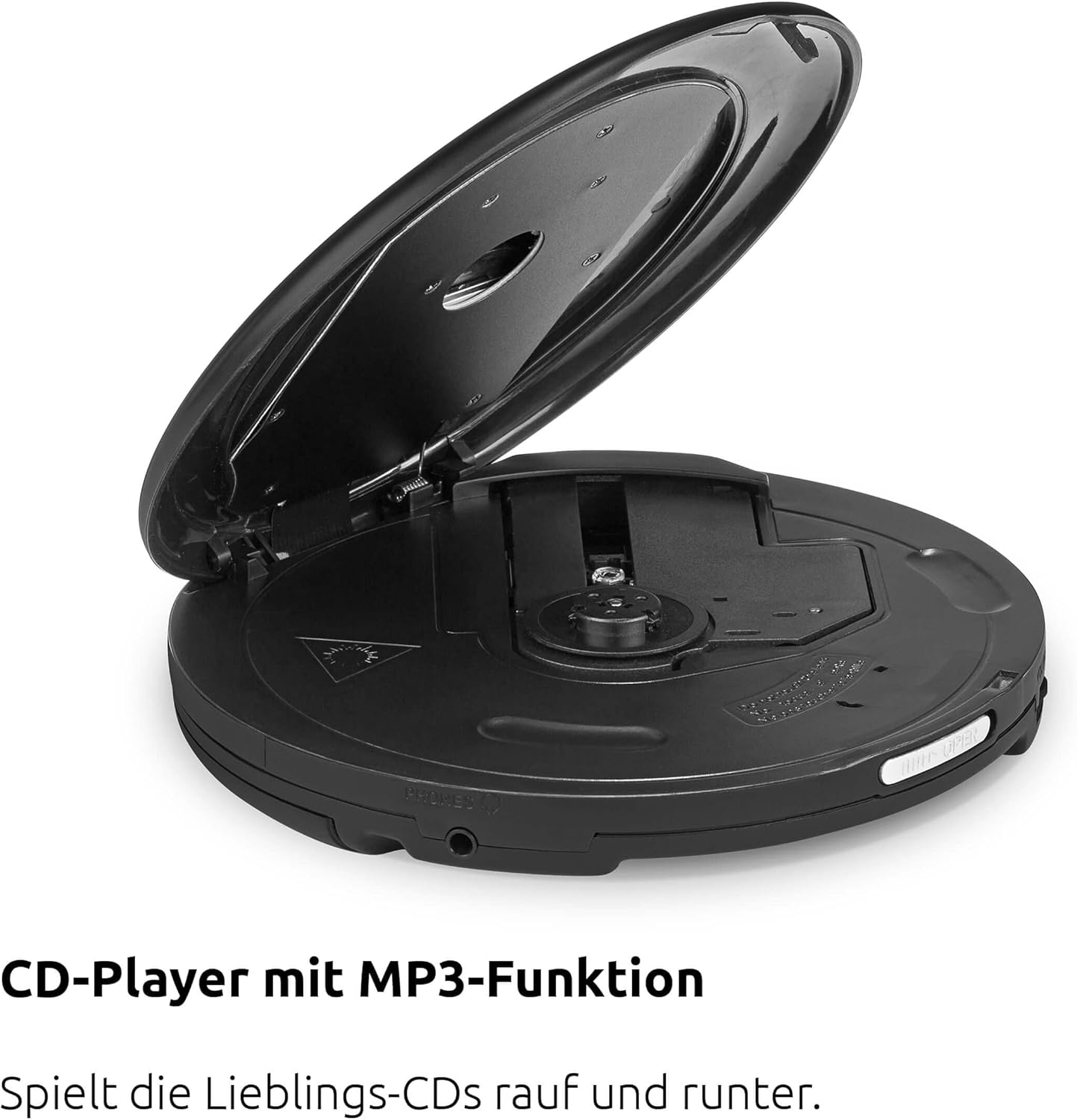
Abbildung 4.2: Spitze view of the device with the CD compartment open, revealing the CD spindle and loading area. This is where audio CDs, MP3 CDs, CD-R, and CD-RW discs are inserted.

Abbildung 4.3: Seite view illustrating the 3.5mm headphone jack, which also serves as the antenna for FM and DAB+ radio reception when headphones are connected.
Steuerung:
- ON/OFF OK: Ein-/Ausschalten, Auswahl bestätigen.
- WIEDERGABE/PAUSE: Starten oder pausieren Sie die Wiedergabe.
- STOP/SEARCH: Stop playback, initiate station search in radio mode.
- SKIP UP / SKIP DOWN: Skip tracks on CD, navigate menus, tune radio stations.
- SPEISEKARTE: Greifen Sie auf Menüoptionen zu.
- EQ/BT: Access equalizer settings, activate Bluetooth pairing.
- MODUS: Switch between CD, DAB+, FM, and Bluetooth modes.
5. Einrichtung
5.1. Einlegen der Batterie
The DIGITRADIO CD 2GO BT operates on two BL5C rechargeable batteries. To install:
- Suchen Sie das Batteriefach auf der Unterseite des Geräts.
- Öffnen Sie die Abdeckung des Batteriefachs.
- Insert the two BL5C batteries, ensuring correct polarity (+/-).
- Schließen Sie den Batteriefachdeckel fest.
5.2. Gerät einschalten
You can power the device using the included AC adapter or the installed rechargeable batteries.
- Wechselstromversorgung: Connect the external power cable to the DC IN port on the device and plug the adapter into a wall outlet.
- Batterieleistung: Ensure the batteries are charged. The device will automatically switch to battery power when disconnected from AC.
5.3. Erstes Einschalten
Halten Sie die ON/OFF OK button to power on the device. The display will illuminate. If this is the first time powering on, the device may prompt you for initial setup options such as language or perform an automatic DAB+ station scan.
6. Bedienungsanleitung
6.1. CD-Wiedergabe
The DIGITRADIO CD 2GO BT supports audio CDs, MP3 CDs, CD-R, and CD-RW formats.

Abbildung 6.1: The portable design of the DIGITRADIO CD 2GO BT makes it suitable for on-the-go use.
- Öffnen Sie die Abdeckung des CD-Fachs.
- Legen Sie eine CD mit der beschrifteten Seite nach oben auf die Spindel.
- Schließen Sie den Deckel des CD-Fachs fest, bis er einrastet.
- Drücken Sie die MODUS Drücken Sie die Taste, bis der Modus „CD“ ausgewählt ist.
- Drücken Sie die WIEDERGABE/PAUSE Taste, um die Wiedergabe zu starten.
- Verwenden ÜBERSPRINGEN Und NACH UNTEN ÜBERSPRINGEN um zwischen den Gleisen zu navigieren.
- Drücken WIEDERGABE/PAUSE anhalten und STOP/SEARCH , um die Wiedergabe zu stoppen.
Funktion „Lebenslauf“: The player will automatically resume playback from the last listened position after being turned off and on again, ideal for audiobooks.
Anti-Schock-Schutz (ASP): This feature helps prevent playback interruptions during movement, ensuring a smooth listening experience.

Abbildung 6.2: The Anti-Shock Protection (ASP) feature ensures uninterrupted audio playback even during activities like cycling or walking.
6.2. DAB+ Radio
DAB+ (Digital Audio Broadcasting Plus) offers high-quality digital radio reception.

Abbildung 6.3: Enjoy a wide variety of digital radio programs with DAB+ reception.
- Connect the included headphones to the 3.5mm jack; they act as the antenna.
- Drücken Sie die MODUS button until "DAB+" mode is selected.
- If this is the first time in DAB+ mode, the device will perform an automatic scan for available stations.
- Verwenden ÜBERSPRINGEN Und NACH UNTEN ÜBERSPRINGEN to browse through available DAB+ stations.
- To save a favorite station, press and hold the SPEISEKARTE button, navigate to "Preset Store", select a preset number (1-10), and press ON/OFF OK zur Bestätigung.
- To recall a favorite station, press the SPEISEKARTE button, navigate to "Preset Recall", select the desired preset, and press ON/OFF OK.
6.3. UKW-Radio
For traditional analog radio reception.
- Connect the included headphones to the 3.5mm jack; they act as the antenna.
- Drücken Sie die MODUS Drücken Sie die Taste, bis der Modus "FM" ausgewählt ist.
- Drücken STOP/SEARCH to automatically scan for the next available FM station.
- Alternativ verwenden Sie ÜBERSPRINGEN Und NACH UNTEN ÜBERSPRINGEN für manuelle Abstimmung.
- To save a favorite station, press and hold the SPEISEKARTE button, navigate to "Preset Store", select a preset number (1-10), and press ON/OFF OK zur Bestätigung.
- To recall a favorite station, press the SPEISEKARTE button, navigate to "Preset Recall", select the desired preset, and press ON/OFF OK.
6.4. Bluetooth-Verbindung
Connect your DIGITRADIO CD 2GO BT to Bluetooth headphones or speakers.
- Drücken Sie die MODUS button until "Bluetooth" mode is selected. The device will enter pairing mode, indicated by a flashing Bluetooth icon on the display.
- Activate Bluetooth on your external audio device (e.g., headphones, speaker) and set it to pairing mode.
- On the DIGITRADIO CD 2GO BT, press and hold the EQ/BT button to initiate a search for nearby Bluetooth devices.
- Select your desired device from the list on the DIGITRADIO CD 2GO BT's display using NACH OBEN/NACH UNTEN SPRINGEN und bestätigen Sie mit ON/OFF OK.
- Once connected, the Bluetooth icon will become solid. Audio will now be streamed to the connected device.
6.5. Lautstärkeregelung
Adjust the volume using the dedicated volume buttons (often integrated with SKIP UP/DOWN or separate buttons, refer to your device's specific button layout if different from general description). Note that due to European standards, a default volume limitation is active. To deactivate this and increase the maximum volume, press and hold the SPEISEKARTE button for a few seconds. Navigate through the menu options to find the "Volume Limit" setting and adjust it as desired. Refer to page 17 of the original printed manual for precise instructions on this setting.
6.6. Equalizer-Einstellungen
Passen Sie Ihr Audioerlebnis mit dem integrierten Equalizer individuell an.
- Drücken Sie die EQ/BT button (short press) to cycle through preset equalizer modes (e.g., Pop, Rock, Jazz, Classic, Flat).
- Some models may offer a custom equalizer setting, allowing manual adjustment of bass and treble. Consult the device display for available options.
7. Wartung
7.1. Reinigung
Um das Aussehen und die Funktionalität Ihres Geräts zu erhalten:
- Wischen Sie die Außenseite mit einem weichen, trockenen Tuch ab.
- Bei hartnäckigen Flecken etwas d verwenden.amp Mit einem milden Reinigungsmittel befeuchten und anschließend trocken wischen.
- Verwenden Sie keine Scheuermittel, Lösungsmittel oder Alkohol, da diese die Oberfläche beschädigen können.
- Reinigen Sie die CD-Linse regelmäßig mit einer speziellen CD-Linsenreinigungsscheibe.
7.2. Batteriepflege
So verlängern Sie die Akkulaufzeit:
- Laden Sie die Batterien vor dem ersten Gebrauch vollständig auf.
- Wenn das Gerät längere Zeit nicht benutzt wird, sollten die Batterien entfernt werden, um ein Auslaufen zu verhindern.
- Entsorgen Sie gebrauchte Batterien gemäß den örtlichen Vorschriften.
8. Fehlerbehebung
If you encounter issues with your DIGITRADIO CD 2GO BT, refer to the following table:
| Problem | Mögliche Ursache | Lösung |
|---|---|---|
| Gerät lässt sich nicht einschalten. | Die Batterien sind leer oder falsch eingelegt. Das Netzteil ist nicht angeschlossen oder defekt. | Check battery charge and polarity. Ensure AC adapter is securely connected and functional. |
| Kein Ton aus den Kopfhörern. | Headphones not properly connected. Volume too low. Volume limit active. | Ensure headphones are fully plugged in. Increase volume. Deactivate volume limit (see Section 6.5). |
| Die CD springt oder spielt nicht ab. | CD is dirty, scratched, or inserted incorrectly. CD compartment not closed. | Clean the CD. Ensure it is inserted correctly. Close the CD compartment firmly. |
| Schlechter Radioempfang (DAB+/FM). | Headphones not connected or poorly positioned. Weak signal in current location. | Ensure headphones are connected and fully extended. Try repositioning the device or moving to a different location. |
| Die Bluetooth-Kopplung schlägt fehl. | Device not in pairing mode. External device too far or not in pairing mode. | Stellen Sie sicher, dass sich beide Geräte im Kopplungsmodus befinden und in Reichweite sind. Versuchen Sie, beide Geräte neu zu starten. |
9. Spezifikationen
| Besonderheit | Detail |
|---|---|
| Modellname | DIGITRADIO CD 2GO BT |
| Modellnummer | 0000/3970 |
| Marke | TechniSat |
| Konnektivitätstechnologie | Bluetooth |
| Besondere Merkmale | Replaceable Battery, Anti-Shock Function, Resume Function |
| Kompatible Geräte | Kopfhörer |
| Unterstützte Audioformate | MP3, WMA, AAC |
| Anzahl der Discs | 1 |
| Steckertyp | 3.5 mm Klinke |
| Stromquelle | 2 x Lithium-ion batteries (included), AC adapter |
| Akku wiederaufladbar | Ja |
| Verwendung | Innen und Außen |
| Abmessungen (B x H x T) | 14 x 2.50 x 14 cm (approximate, from feature bullets) |
10. Garantie und Support
For warranty information and customer support, please refer to the warranty card included with your product or visit the official TechniSat webBewahren Sie Ihren Kaufbeleg für eventuelle Garantieansprüche auf.
Please note that spare parts availability is currently listed as "unavailable" according to product specifications. Software updates are also listed as "information not available".


