Einführung
This manual provides comprehensive instructions for the VINABTY ERF2F60G Voice Remote Control. This remote is designed as a replacement for various Hisense Smart Android TV models, offering standard remote functions and integrated voice control capabilities. Please read this manual carefully to ensure proper setup and operation.
Aufstellen
1. Einlegen der Batterie
The VINABTY ERF2F60G remote control requires two AAA batteries for operation. Follow these steps to install them:
- Suchen Sie die Batteriefachabdeckung auf der Rückseite der Fernbedienung.
- Schieben Sie den Deckel nach unten oder drücken Sie den Riegel und heben Sie ihn an, um das Fach zu öffnen.
- Legen Sie zwei neue AAA-Batterien ein und achten Sie darauf, dass die positiven (+) und negativen (-) Pole mit den Markierungen im Batteriefach übereinstimmen.
- Setzen Sie die Abdeckung des Batteriefachs wieder ein, indem Sie sie so weit hineinschieben, bis sie sicher einrastet.

The back of the remote control is shown, highlighting the battery compartment cover. This is where two AAA batteries are inserted for operation.
2. Initial Pairing (for Voice Functionality)
For the voice control feature to work, the remote may need to be paired with your Hisense Smart Android TV. If the remote does not respond or voice commands are not recognized after battery installation, follow your TV's specific pairing instructions. Generally, this involves:
- Vergewissern Sie sich, dass Ihr Fernseher eingeschaltet ist.
- Navigate to the TV's settings menu (often under Fernbedienungen & Zubehör or Bluetooth-Einstellungen).
- Select the option to add a new device or pair a new remote.
- Halten Sie die OK und die Lautstärke verringern button simultaneously on the remote for a few seconds until a pairing indicator appears on the TV screen or the remote's LED flashes.
- Befolgen Sie die Anweisungen auf dem Bildschirm, um den Kopplungsvorgang abzuschließen.
Note: Specific pairing steps may vary slightly depending on your Hisense TV model and Android TV version. Refer to your TV's user manual for precise instructions.
Bedienungsanleitung
The VINABTY ERF2F60G remote control provides intuitive access to your Hisense Smart Android TV's features. Below are the primary functions:

This image displays the front of the VINABTY ERF2F60G remote control, showing all buttons including the power, number pad, navigation, volume, channel, and dedicated app buttons for Netflix, YouTube, and Google Play. The microphone button for voice control is also visible.
- Power-Taste (●): Schaltet den Fernseher ein oder aus.
- INPUT-Taste: Wählt die Eingangsquelle aus (HDMI, AV usw.).
- Nummernblock (0-9): Gibt die Kanalnummern direkt ein.
- GUIDE / Info Buttons: Accesses the TV program guide or displays information about the current content.
- Navigationsfeld (Hoch, Runter, Links, Rechts, OK): Navigiert durch Menüs und bestätigt Auswahlen.
- Zurück (↶) / Home (⌂) Tasten: Returns to the previous screen or goes to the TV's home screen.
- Subtitle Button: Schaltet Untertitel ein oder aus.
- Lautstärke erhöhen/verringern (VOL +/-): Regelt die Lautstärke des Fernsehers.
- Stummschalttaste (🔇): Schaltet den Ton des Fernsehers stumm oder hebt die Stummschaltung auf.
- Kanal hoch/runter (CH +/-): Wechselt den Fernsehkanal.
- Media Control Buttons (Play/Pause, Fast Forward, Rewind, Stop): Steuert die Medienwiedergabe.
- Dedicated App Buttons (Netflix, YouTube, Google Play)Bietet schnellen Zugriff auf diese Streaming-Anwendungen.
Sprachsteuerungsfunktion
The ERF2F60G remote features a voice control button for hands-free operation and search. To use this feature:
- Halten Sie die Mikrofontaste (🎙) located below the Home button.
- While holding the button, speak your command clearly into the remote. For example, you can say "Open Netflix," "Suchen nach Actionfilme“ oder „Wie ist das Wetter?“
- Release the button once you have finished speaking. The TV will process your command.

This image focuses on the microphone button located on the VINABTY ERF2F60G remote control, indicating its function for voice commands. A visual representation of the voice assistant's active state is also depicted.
Wartung
Batteriewechsel
Replace the AAA batteries when the remote's performance degrades or it stops responding. Always replace both batteries at the same time with new ones. Do not mix old and new batteries, or different types of batteries.
Reinigung
Reinigen Sie die Fernbedienung mit einem weichen, trockenen Tuch. Bei hartnäckigem Schmutz leicht andrücken.ampReinigen Sie das Tuch mit Wasser oder einem milden, nicht scheuernden Reinigungsmittel. Vermeiden Sie die Verwendung von scharfen Chemikalien oder Scheuermitteln, da diese die Oberfläche oder die internen Bauteile der Fernbedienung beschädigen können.
Fehlerbehebung
- Fernbedienung reagiert nicht:
- Prüfen Sie, ob die Batterien korrekt und mit der richtigen Polarität eingelegt sind.
- Ersetzen Sie die Batterien durch neue AAA-Batterien.
- Stellen Sie sicher, dass sich keine Hindernisse zwischen der Fernbedienung und dem Infrarotempfänger des Fernsehers befinden.
- If it's a paired remote, try re-pairing it with the TV (refer to the "Initial Pairing" section).
- Sprachsteuerung funktioniert nicht:
- Ensure the remote is properly paired with your TV for voice functionality.
- Speak clearly and hold the microphone button while speaking.
- Check your TV's internet connection, as voice commands often require online processing.
- Verify that the TV's voice assistant settings are enabled.
- Die Schaltflächen klemmen oder reagieren nicht:
- Reinigen Sie die Fernbedienung wie im Abschnitt Wartung beschrieben.
- Vermeiden Sie es, Flüssigkeiten auf die Fernbedienung zu verschütten.
Technische Daten
| Modellnummer | ERF2F60G |
| Marke | VINABTY |
| Technische Daten | 8 x 2 x 0.7 Zoll (20.32 x 5.08 x 1.78 cm) |
| Artikelgewicht | 2.9 Unzen (82.2 Gramm) |
| Batterien erforderlich | 2 x AAA (nicht enthalten) |
| Besonderheit | Sprachsuche |
| Farbe | Schwarz |
| Maximale Anzahl unterstützter Geräte | 1 |
| Kompatible Geräte | Fernsehen |
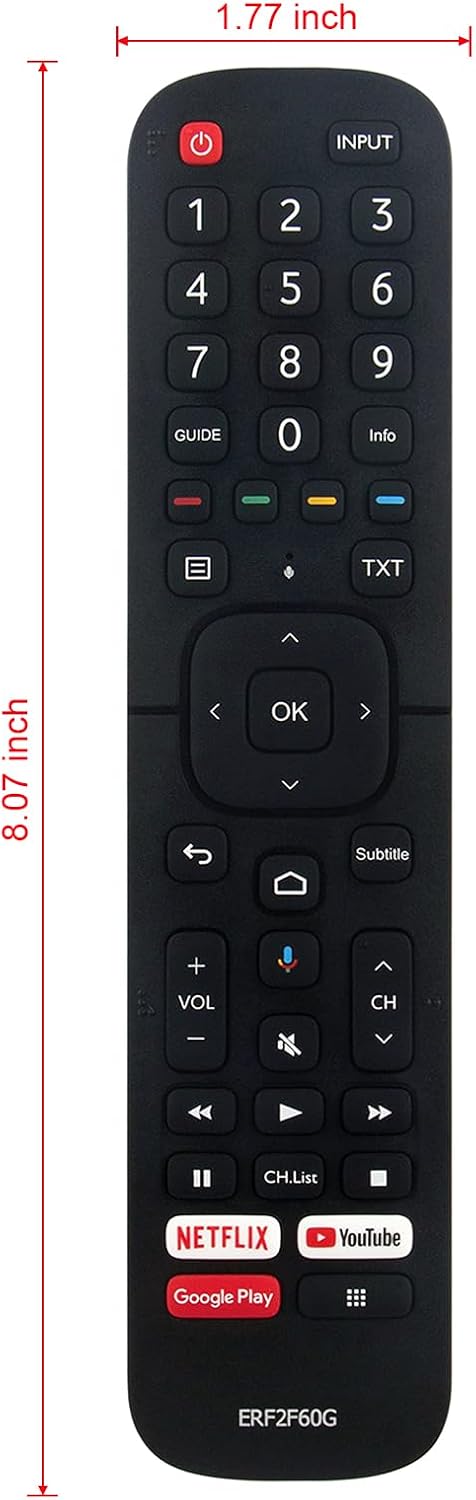
The remote control is displayed with its approximate dimensions: 8.07 inches in length and 1.77 inches in width, providing a clear understanding of its physical size.
Compatible Hisense Smart Android TV Models:
This remote control is compatible with a wide range of Hisense Smart Android TV models, including but not limited to:
- 32A56E, 40A56E, ERF2B60H
- 55Q7G, 65Q7G, 75Q7G, 50Q8G, 65Q8G, 75Q8G
- 50H8G, 55H8G, 75H8G, 55H9G, 65H9G
- 55Q9G, 65Q9G
- 32H5500F, 32H5520F, 32H5530F, 32H5540F
- 40H5609, 40H5500F, 40H5520F, 40H5530F, 40H5540F
- 32H5550F, 32H5560F, 32H5570F, 32H5580F, 32H5590F
- 40H5550F, 40H5560F, 40H5570F, 40H5580F, 40H5590F
- 32H56G, 40H56G, 50Q7G
- 65H9F, 55H9F, 55H8F, 65H8F, 50H8F
- 43H6570F, 50H6570F, 55H6570F, 65H6570
- 55H9020F, 55H9030F, 55H9040F, 55H9050F, 55H9070F
- 55H9F1, 65H9F1
- 65H9020F, 65H9030F, 65H9040F, 65H9050F, 65H9070F
- 65H8030F, 65H8050F, 65H8090F
- 55H8030F, 55H8050F, 55H8090F
- 55Q9809, 55H9809, 65Q9809, 65H9809
- 55H8809, 65H8809, H6590, 43H6590F
- 50H8G, 55H8G, 65H8G, 65H6570F
- 55Q8G, 55Q8G, 65Q8G, 75Q8G
- 50H6510G, 55H6510G, 65H6510G, 75H6510G, 85H6510G
- 55A6501EU, 65A6501EU, 50A6501EU
- 55U6EU, 65U6EU, HU100L5, HU120L5
Garantie
This product is typically covered by a standard manufacturer's warranty against defects in materials and workmanship. Please refer to the retailer's return policy or contact the seller for specific warranty details and duration. Keep your purchase receipt as proof of purchase.
Unterstützung
For further assistance or technical support, please contact the retailer or the manufacturer directly. You may find contact information on the product packaging or the seller's website. When contacting support, please have your product model number (ERF2F60G) and purchase details ready.
