
Einführung
Welcome to the user manual for your FOREVER Fitband fitness tracker. This guide provides essential information on setting up, operating, maintaining, and troubleshooting your device to ensure optimal performance and a comprehensive understanding of its features. Please read this manual carefully before using your Fitband.
1. Einrichtung
1.1 Erstaufladung
Before first use, fully charge your Fitband. Connect the charging cable to the designated port on the device and to a standard USB power source. A full charge typically takes approximately 2 hours. The battery icon on the display will indicate charging status.

Image: The Fitband displaying its charging port and key specifications like battery capacity and standby time.
1.2 App-Installation
To unlock the full functionality of your Fitband, download the companion application on your smartphone. The app is compatible with both Android and iOS devices.
- For Android devices, search for the 'FOREVER Fitband' app on Google Play Store.
- For iOS devices, search for the 'FOREVER Fitband' app on the Apple App Store.

Image: The Fitband shown alongside a smartphone screen, illustrating the mobile application interface.
1.3 Gerätekopplung
- Ensure your Fitband is charged and your smartphone's Bluetooth is enabled.
- Open the installed 'FOREVER Fitband' application on your smartphone.
- Follow the on-screen instructions within the app to search for and connect to your Fitband. The device name will typically appear as 'Fitband' or similar.
- Confirm the pairing request on both your smartphone and the Fitband, if prompted.
2. Betrieb
2.1 Grundlegende Navigation
The Fitband features a touch-sensitive display. Tap or swipe on the screen to navigate through different functions and menus. Refer to the in-app guide for specific gesture controls.
2.2 Hauptmerkmale
Your FOREVER Fitband offers several features to monitor your daily activity and well-being:
- Herzfrequenzmesser: Erfasst Ihre Herzfrequenz den ganzen Tag über.
- Schrittzähler: Counts your steps taken.
- Kalorienzähler: Schätzt den Kalorienverbrauch anhand der Aktivität.
- Sportmodi: Dedicated modes for various activities such as walking, running, cycling, and hiking, providing specific metrics for each.
- Benachrichtigungen: Empfängt Benachrichtigungen für Anrufe, Nachrichten und App-Benachrichtigungen von Ihrem gekoppelten Smartphone.
- Schlafmonitor: Analyzes your sleep patterns and duration.
- Wetter: Displays current weather information when connected to your smartphone.

Image: The Fitband's screen displaying various health and activity tracking icons, including heart rate, calorie count, sleep, weather, pedometer, and notifications.

Image: The Fitband's screen illustrating the selection of different sports modes, such as walking, running, cycling, and hiking.
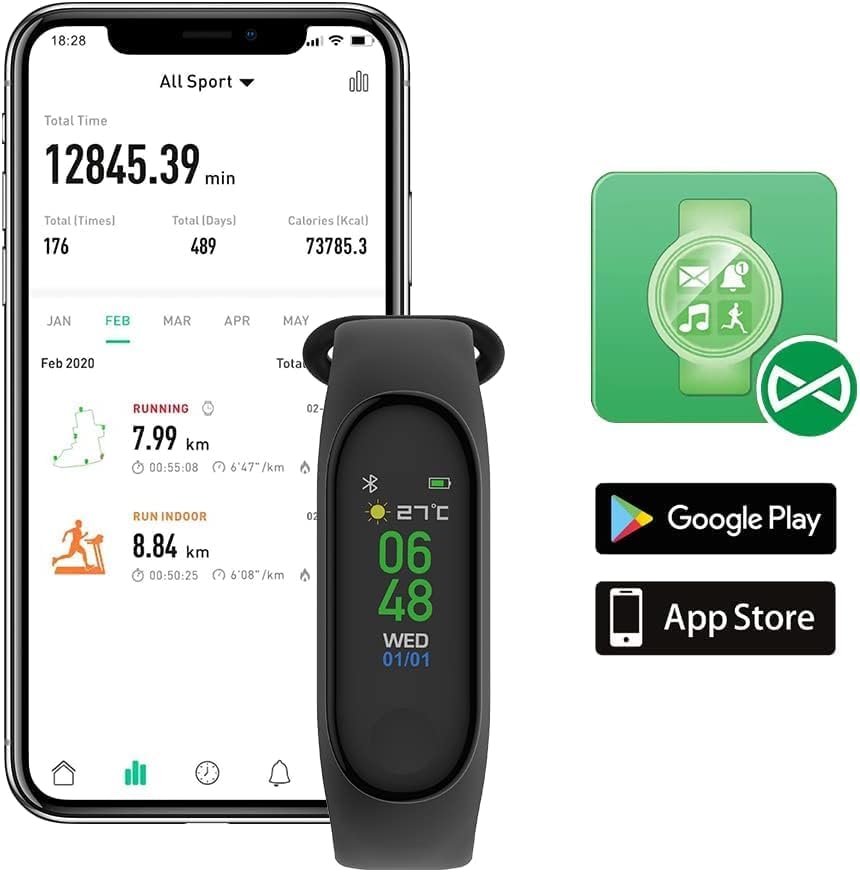
Image: A person sleeping while wearing the Fitband, demonstrating its sleep monitoring capability.
3. Wartung
3.1 Reinigung
To maintain your Fitband, regularly clean the device and strap with a soft, dry cloth. Avoid using harsh chemicals or abrasive materials, as these can damage the device. Ensure the charging contacts are clean and dry.
3.2 Wasserbeständigkeit
The Fitband has an IP65 water resistance rating. This means it is protected against dust ingress and low-pressure water jets from any direction. It is suitable for daily use, such as washing hands or light rain exposure. However, it is nicht recommended for swimming, showering, or prolonged submersion in water.
3.3 Batteriepflege
To prolong battery life, avoid fully discharging the device frequently. Charge the Fitband when the battery level is low. The device offers up to 10 days of standby time on a single charge.
4. Fehlerbehebung
If you encounter issues with your Fitband, please refer to the following common solutions:
- Gerät lässt sich nicht einschalten: Ensure the device is fully charged. Connect it to the charger and wait a few minutes before attempting to turn it on again.
- Not connecting to smartphone:
- Stellen Sie sicher, dass Bluetooth auf Ihrem Smartphone aktiviert ist.
- Ensure the Fitband is within Bluetooth range (typically 10 meters).
- Restart both your Fitband and smartphone.
- Versuchen Sie, das Gerät über die App-Einstellungen zu entkoppeln und anschließend erneut zu koppeln.
- Inaccurate activity tracking (steps, heart rate):
- Ensure the Fitband is worn snugly on your wrist, about one finger's width above your wrist bone.
- Calibrate the device through the companion app if a calibration option is available.
- Movement during activities like driving may sometimes be misinterpreted as steps.
- Kurze Akkulaufzeit:
- Reduce the frequency of heart rate monitoring or screen brightness if adjustable.
- Stellen Sie sicher, dass das Gerät nicht ständig nach einer Bluetooth-Verbindung sucht.
- Prüfen Sie, ob im Hintergrund Apps aktiv sind, die möglicherweise den Akku entladen.
If the issue persists after attempting these steps, please consult the support section of the companion app or contact FOREVER customer support.
5. Spezifikationen
| Besonderheit | Detail |
|---|---|
| Marke | FÜR IMMER |
| Modellnummer | Fitband |
| Farbe | Schwarz |
| Betriebssystem | AsteroidOS |
| Konnektivität | Bluetooth 5.0 |
| Besondere Merkmale | Notification, Activity Tracker, Heart Rate Tracker |
| Kompatible Geräte | Smartphone (Android, iOS) |
| Batteriezusammensetzung | Lithium-Ionen |
| Batteriekapazität | 90 mAh |
| Standby-Zeit | Bis zu 10 Tage |
| Sensortyp | Optisch |
| Wasserbeständigkeit | IP65 |
| Armbandlänge | 245 mm |
| Gewicht | 23 g |
6. Garantie und Support
For information regarding product warranty, please refer to the documentation provided with your purchase or visit the official FOREVER website. For technical support or further assistance, please contact FOREVER customer service through their official channels.


