1. Einleitung
The FOREVER SB-315 Fitband Smartwatch is a versatile activity tracker designed to help you monitor your fitness and stay connected. Featuring a heart rate sensor, step counter, distance tracker, and sleep monitor, it provides comprehensive insights into your daily activity. Its discreet and lightweight design, coupled with a long-lasting battery, ensures maximum comfort and convenience.
This manual provides detailed instructions on how to set up, operate, and maintain your SB-315 smartwatch to ensure optimal performance and longevity.

Abbildung 1.1: Vorderseite view of the FOREVER SB-315 Fitband Smartwatch.
2. Einrichtung
2.1 Auspacken und Erstaufladung
Carefully remove all components from the packaging. The box should contain the SB-315 smartwatch and its charging cable. Before first use, fully charge the device.
- Schließen Sie das Ladekabel an die Ladekontakte auf der Rückseite der Smartwatch an.
- Stecken Sie das USB-Ende des Kabels in ein Standard-USB-Netzteil (nicht im Lieferumfang enthalten) oder in einen USB-Anschluss Ihres Computers.
- Das Display der Uhr zeigt den Ladestatus an. Eine vollständige Aufladung dauert in der Regel 2–3 Stunden.
- The 155 mAh battery provides up to 10 days of standby time on a single charge.

Figure 2.1: The SB-315 Smartwatch and its retail packaging.
2.2 App-Installation und -Kopplung
To unlock the full potential of your SB-315 smartwatch, you need to install the companion application on your smartphone and pair the devices via Bluetooth.
- Laden Sie die App herunter: Suchen nach the "Forever Smart" or "Forever Fit" app (refer to the packaging or quick start guide for the exact app name) on the Apple App Store (for iOS 10.0 and above) or Google Play Store (for Android 5.0 and above).
- Bluetooth aktivieren: Stellen Sie sicher, dass Bluetooth auf Ihrem Smartphone aktiviert ist.
- Öffnen Sie die App: Starten Sie die installierte Anwendung auf Ihrem Smartphone.
- Koppeln Sie das Gerät: Follow the in-app instructions to add a new device. Select "SB-315" from the list of available devices. The app will guide you through the pairing process.
- Berechtigungen erteilen: Erteilen Sie die notwendigen Berechtigungen (z. B. Benachrichtigungen, Standort, Gesundheitsdaten), damit die App ordnungsgemäß funktioniert.
Once successfully paired, the watch will synchronize time and data with your smartphone.
3. Bedienung Ihrer Smartwatch
3.1 Grundlegende Navigation
The SB-315 features a bright 0.96-inch (or 1.3-inch, depending on specific model variant) display. Navigate through menus by swiping across the screen and tapping to select options.
- Nach oben/unten wischen: Scroll through different functions and menus.
- Nach links/rechts wischen: Access quick views like daily activity, heart rate, or notifications.
- Klopfen: Wählen Sie eine Option aus oder rufen Sie ein Untermenü auf.
- Press Side Button (if applicable): Zum Startbildschirm zurückkehren oder das Gerät ein-/ausschalten.
3.2 Kernfunktionen
The SB-315 is equipped with several features to help you monitor your health and fitness.
- Herzfrequenz-Überwachung: The integrated heart rate sensor continuously monitors your heart rate. View Echtzeitdaten auf der Uhr oder detaillierte Trendanalysen in der App.
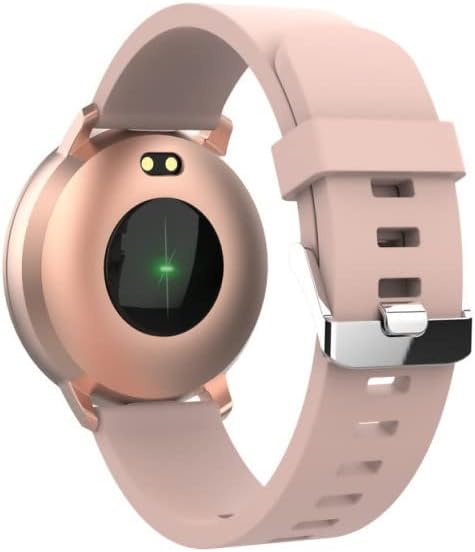
Abbildung 3.1: Rückseite view of the SB-315, highlighting the heart rate sensor.
- Aktivitätsverfolgung: Erfasst die zurückgelegten Schritte, die zurückgelegte Strecke und den Kalorienverbrauch im Laufe des Tages.
- Schlafüberwachung: Automatically monitors your sleep patterns, including deep sleep, light sleep, and awake times. Access detailed sleep analysis in the companion app.
- Sportmodi: Select from various sports modes such as running, cycling, climbing, and walking to track specific workout data.
- Erinnerung an die Flüssigkeitszufuhr: Set reminders to ensure you drink enough water throughout the day.
3.3 Intelligente Funktionen
- Benachrichtigungen: Receive instant notifications for incoming calls, SMS messages, and alerts from social media applications directly on your wrist.
- Fernsteuerung der Kamera: Nutzen Sie Ihre Smartwatch als Fernauslöser für die Kamera Ihres Smartphones.
- Musiksteuerung: Steuern Sie die Musikwiedergabe auf Ihrem Smartphone (Wiedergabe, Pause, Titel überspringen) direkt von der Uhr aus.
- Anpassung des Zifferblatts: Personalize your watch by choosing from various watch faces available through the companion app.
- Wecker: Set silent vibrating alarms to wake you up or remind you of important events.
4. Wartung
4.1 Reinigung und Pflege
To ensure the longevity and proper functioning of your SB-315 smartwatch, follow these cleaning and care guidelines:
- Reinigung: Reinigen Sie das Uhrendisplay und das Armband regelmäßig mit einem weichen, fusselfreien Tuch.amp, lint-free cloth. Avoid using harsh chemicals, abrasive cleaners, or solvents.
- Trocknen: Ensure the watch is completely dry before charging or wearing, especially after exposure to water.
- Riemenpflege: If the strap is removable, clean it separately. Allow it to air dry completely before reattaching.
4.2 Wasserdichtigkeit (IP67)
The SB-315 smartwatch is rated IP67, meaning it is protected from dust and can withstand immersion in water up to 1 meter for up to 30 minutes. While it is water-resistant, it is not waterproof for prolonged submersion or high-pressure water activities.
- Do not wear the watch while showering with hot water, in saunas, or steam rooms.
- Vermeiden Sie es, unter Wasser Knöpfe zu drücken.
- Falls die Uhr nass wird, wischen Sie sie vor dem Aufladen gründlich trocken.
4.3 Batteriepflege
Um die Akkulaufzeit und Leistung zu maximieren:
- Laden Sie die Uhr vor dem ersten Gebrauch vollständig auf.
- Vermeiden Sie es, den Akku häufig vollständig zu entladen.
- Bewahren Sie die Uhr an einem kühlen, trockenen Ort auf, wenn Sie sie längere Zeit nicht tragen.
- Verwenden Sie ausschließlich das mitgelieferte Ladekabel.
5. Fehlerbehebung
If you encounter issues with your SB-315 smartwatch, refer to the following common problems and solutions:
| Problem | Mögliche Ursache | Lösung |
|---|---|---|
| Die Uhr lässt sich nicht einschalten | Niedriger Akkustand; Gerät eingefroren | Charge the watch for at least 30 minutes. If still unresponsive, try a soft reset (refer to app or manufacturer's web(siehe Website für genaue Anweisungen). |
| Kopplung mit Smartphone nicht möglich | Bluetooth off; app not running; watch not discoverable; interference | Ensure Bluetooth is on for both devices. Restart both the watch and phone. Make sure the app is open and searching. Forget previous pairings on phone. |
| Nicht erhaltene Benachrichtigungen | App permissions not granted; notification settings off; app not running in background | Check app permissions in phone settings. Verify notification settings within the companion app. Ensure the app is running in the background. |
| Inaccurate heart rate/step count | Improper fit; sensor obstruction; software glitch | Ensure the watch is worn snugly on the wrist, about one finger's width above the wrist bone. Clean the sensor on the back of the watch. Restart the watch. |
| Kurze Akkulaufzeit | Frequent use of features; high brightness; constant notifications | Reduce screen brightness. Limit continuous heart rate monitoring. Turn off unnecessary notifications. Ensure background app refresh is optimized. |
If the problem persists, please contact FOREVER customer support for further assistance.
6. Spezifikationen
Key technical specifications for the FOREVER SB-315 Fitband Smartwatch:
| Besonderheit | Detail |
|---|---|
| Modellname | SB-315 |
| Marke | FÜR IMMER |
| Farbe | Rosa |
| Konnektivitätstechnologie | Bluetooth 5.0 |
| Anzeigegröße | 0.96" (or 1.3", depending on specific model variant) - 240 x 240 pixels |
| Batteriekapazität | 155 mAh Lithium-Polymer |
| Maximale Standby-Zeit | Bis zu 10 Tage |
| Wasserbeständigkeit | IP67 |
| Kompatible Geräte | Smartphones (iOS ≥ 10.0, Android ≥ 5.0) |
| Besondere Merkmale | Heart Rate Monitor, Sleep Monitor, Notification, Alarm Clock, Activity Tracker, Remote Camera/Music Control |
| Nettogewicht | 57g |
7. Garantie und Support
For warranty information, please refer to the warranty card included in your product packaging or contact your point of purchase. Warranty terms and conditions may vary by region and retailer.
For technical support, troubleshooting assistance beyond this manual, or inquiries about spare parts, please visit the official FOREVER webSie können sich auch an den Kundendienst wenden. Die Kontaktdaten finden Sie in der Regel auf der Website des Herstellers. webStandort oder Produktverpackung.
Manufacturer: TelForceOne


