Produkt überview
The RAINPOINT WiFi 2-Outlet Smart Automatic Irrigation Controller is designed to provide intelligent and efficient watering for your garden, greenhouse, or lawn. This device connects to your 2.4GHz WiFi network, allowing you to program and manage your watering schedules from anywhere using the RainPoint app. It features two independent outlets, offering flexible control over different irrigation zones.

Image: The RAINPOINT WiFi 2-Outlet Smart Automatic Irrigation Controller, its accompanying WiFi hub, and a smartphone displaying the intuitive RainPoint app interface. This setup allows for remote control and monitoring of your garden's watering system.
Hauptmerkmale
- Einfache App-Steuerung: Connect the 2-zone WiFi irrigation computer to your 2.4GHz WiFi and program your watering schedule anytime, anywhere with the RainPoint app. The intuitive app interface makes programming simple and straightforward. (Only compatible with 2.4GHz WiFi).
- Timed Automatic Watering: Features two watering modes: Irrigation Mode and Spray Mode. For each mode, you can individually set the start time, duration (1 minute to 11 hours and 59 minutes), and watering frequency (Monday to Sunday).
- Flexible Manual Watering: Manual watering time can be set from 1 to 59 minutes for each zone. You can activate manual watering for the left, right, or both zones via the app or the button on the timer, allowing you to water when and where you want without interrupting the programmed schedule.
- Kompatibilität mit Sprachsteuerung: Works with voice assistants like Alexa and Google Assistant for convenient hands-free operation.
- Intelligente Automatisierung: Create multi-custom plans based on various conditions such as time, weather, temperature, or soil moisture (with optional soil sensor).
- Echtzeitüberwachung: Monitor water flow and humidity in real-time, providing accurate data for efficient watering.
- Regenverzögerungsfunktion: Save water by delaying watering for 24, 48, or 72 hours based on weather conditions.
Installationshandbuch
1. Auspacken und Komponentencheck
Nehmen Sie alle Komponenten vorsichtig aus der Verpackung. Stellen Sie sicher, dass Sie Folgendes haben:
- RAINPOINT WiFi 2-Outlet Smart Automatic Irrigation Controller
- WiFi Hub (Smart Plug)
- Benutzerhandbuch (dieses Dokument)
- Required batteries (4 x AAA, not included)
2. Einlegen der Batterie
Locate the battery compartment on the irrigation controller. Insert 4 AAA batteries, ensuring correct polarity. Close the battery compartment securely.
3. Download und Installation der App
Download the "RainPoint" app from your smartphone's app store (available on Apple App Store and Google Play Store). Create an account or log in if you already have one.

Image: A smartphone screen showing the RainPoint app download page, with icons for the Apple App Store and Google Play, indicating where users can download the application.
4. WiFi Hub Setup
Plug the WiFi Hub into a power outlet within range of your home's 2.4GHz WiFi network. Open the RainPoint app and follow the on-screen instructions to add the WiFi Hub to your account. Ensure your smartphone is connected to the 2.4GHz WiFi network during this process.
5. Controller-Kopplung
Once the WiFi Hub is successfully connected, use the RainPoint app to add the irrigation controller. The app will guide you through the pairing process, which typically involves pressing a button on the controller to enter pairing mode. Ensure the controller is within range of the WiFi Hub.

Image: A visual representation of the quick connection process between the WiFi hub, the irrigation timer, and the smartphone app, highlighting the seamless integration for smart garden management.
6. Physische Installation
Attach the irrigation controller to your outdoor faucet. Ensure a secure and watertight connection. Connect your garden hoses to the two outlets (L and R) on the bottom of the controller.

Image: The RAINPOINT irrigation controller is shown installed on an outdoor faucet, with hoses connected to its two outlets. A smartphone displays the app, illustrating remote control capabilities for garden watering.
Bedienungsanleitung
1. Setting Up Automatic Watering Schedules
Open the RainPoint app and navigate to the specific irrigation controller. You can set up multiple watering plans (e.g., Plan A, Plan B, Plan C) with different start times, durations, and frequencies for each of the two zones.
- Select the desired zone (Zone 1 or Zone 2).
- Wählen Sie zwischen Bewässerungsmodus (for general watering) or Sprühmodus (for misting/spraying).
- Legen Sie die Startzeit zum Bewässern.
- Definieren Sie die Dauer (from 1 minute to 11 hours and 59 minutes).
- Wählen Sie die Frequenz by choosing specific days of the week (Monday to Sunday).
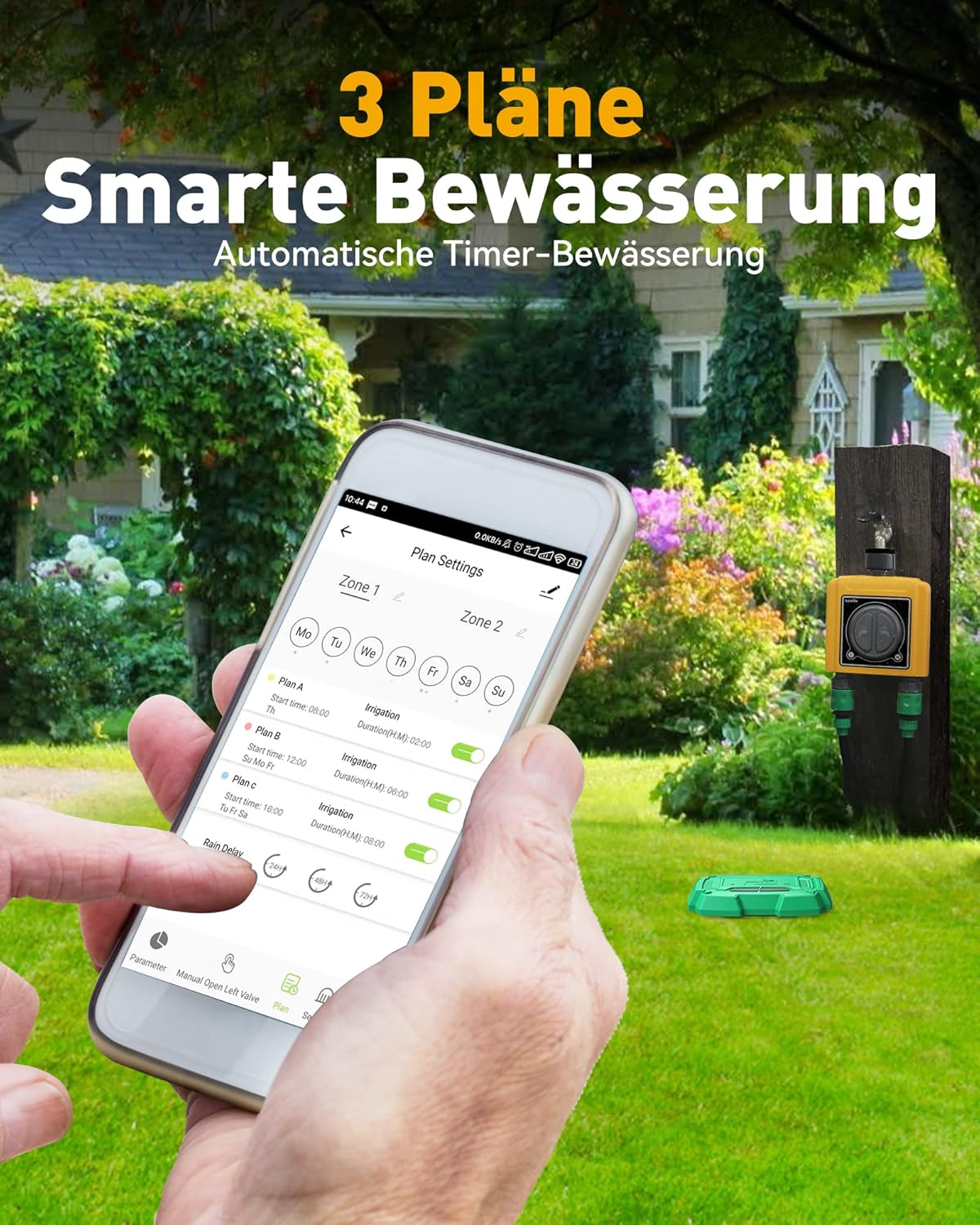
Image: A smartphone screen showing the "Plan Settings" interface within the RainPoint app, illustrating how users can configure multiple smart watering schedules for different zones and days of the week.

Image: The RAINPOINT controller is shown with two distinct watering modes: Zone 1 for general irrigation (sprinkler) and Zone 2 for misting (fine spray), demonstrating its versatility for different plant needs.
2. Manuelle Bewässerung
Sie können die manuelle Bewässerung jederzeit starten, ohne dass dies Ihre programmierten Bewässerungspläne beeinträchtigt.
- Per App: In the RainPoint app, select the manual watering option for Zone 1, Zone 2, or both. Set the desired duration (1-59 minutes) and start watering.
- Über die Gerätetaste: Press the corresponding button on the controller (L for left outlet, R for right outlet) to manually open or close the valve.
3. Sprachsteuerung
Integrate your RAINPOINT controller with Amazon Alexa or Google Assistant for voice commands.
- Enable the RainPoint skill/action in your Alexa or Google Home app.
- Entdecken Sie Geräte.
- Use commands such as: "Alexa, turn on the timer 1" or "Hey Google, open Zone 1."

Image: A man relaxing in his living room, using an Amazon Echo device to control the irrigation system via Alexa voice commands, demonstrating the convenience of smart home integration.
4. Intelligent Automation and Rain Delay
The app allows for advanced automation based on various conditions and offers a rain delay feature to conserve water.
- Intelligente Szenen: Create custom automation rules based on weather changes (e.g., if temperature is above X, start watering), time schedules, or even soil moisture levels (requires optional soil sensor).
- Regenverzögerung: If rain is expected or has occurred, you can activate the rain delay function for 24, 48, or 72 hours to prevent overwatering and save water.

Image: A smartphone screen displaying the "Create Smart" interface in the RainPoint app, showing options to set conditions for intelligent automation, such as time, weather, temperature, and soil moisture.

Image: A visual representation of the rain delay feature, showing options to pause watering for 24, 48, or 72 hours, which helps save water by preventing irrigation during or after rainfall.
Wartung
- Batteriewechsel: Replace AAA batteries when the low battery indicator appears in the app or on the device.
- Reinigung: Reinigen Sie die Außenseite des Controllers regelmäßig mit einem Reinigungstuch.amp Tuch. Keine Scheuermittel verwenden.
- Überwinterung: Before the first frost, disconnect the controller from the faucet and store it indoors in a dry, protected area to prevent damage from freezing temperatures.
- Dichtungsinspektion: Regularly check the rubber seals and gaskets for wear and tear. Replace if necessary to ensure a watertight connection.
Fehlerbehebung
- Controller not connecting to WiFi Hub:
- Ensure the WiFi Hub is plugged in and powered on.
- Verify your home WiFi is 2.4GHz. The device does not support 5GHz networks.
- Check the distance between the controller and the WiFi Hub. Move them closer if necessary.
- Reset both the controller and the WiFi Hub and attempt pairing again.
- Ensure your smartphone is connected to the 2.4GHz WiFi network during setup.
- Kein Wasserfluss:
- Prüfen Sie, ob der Wasserhahn vollständig geöffnet ist.
- Ensure batteries in the controller are not depleted.
- Verify that a watering schedule is active or initiate manual watering via the app or device button.
- Check for any blockages in the hoses or the controller's outlets.
- Wasserleck:
- Ensure all connections (faucet to controller, hoses to controller) are tight and secure.
- Check the rubber washers and seals for proper seating and damage. Replace if worn.
- Inaccurate water flow data:
- Ensure the water flow sensor is clean and free of debris.
- Verify the controller is installed correctly and water is flowing consistently.
Technische Daten
| Attribut | Wert |
|---|---|
| Marke | REGENPUNKT |
| Modell | B09MRN3P3H |
| Farbe | Wlan 2 Ausgänge (WiFi 2 Outlets) |
| Technische Daten | 15 x 12 x 5.2 cm |
| Artikelgewicht | 920 g |
| Material | Plastik |
| Anzahl der Einstellungen | 2 (Steckdosen) |
| Konnektivität | 2.4GHz WiFi |
Garantie und Support
RAINPOINT offers a 5 Jahr Garantie on this product, ensuring long-term reliability and customer satisfaction. For any technical assistance, troubleshooting, or warranty claims, please contact RAINPOINT customer support. Their support team is known for providing excellent and responsive service.
For the most up-to-date contact information, please refer to the RainPoint official website or the contact details provided within the RainPoint app.


