1. Einleitung
Thank you for choosing the Dalton 2000VA Uninterruptible Power Supply (UPS). This device is designed to provide reliable power backup and protection for your electronic equipment against power outages, surges, and fluctuations. Please read this manual thoroughly before installation and operation to ensure optimal performance and safety.
2. Wichtige Sicherheitshinweise
Beachten Sie stets diese grundlegenden Sicherheitsvorkehrungen, um das Risiko von Bränden, Stromschlägen und Verletzungen zu verringern:
- Öffnen Sie das UPS-Gehäuse nicht.asing. Im Inneren befinden sich keine vom Benutzer wartbaren Teile. Wartungsarbeiten dürfen nur von qualifiziertem Fachpersonal durchgeführt werden.
- Do not use the UPS in environments with excessive dust, humidity, or extreme temperatures.
- Stellen Sie sicher, dass die USV an eine geerdete Steckdose angeschlossen ist.
- Do not connect non-computer related items like medical equipment, life support equipment, or household appliances to the UPS.
- Position the UPS in a well-ventilated area, away from direct sunlight or heat sources.
- In case of emergency, press the power button to turn off the UPS and disconnect it from the AC power source.
3. Packungsinhalt
Überprüfen Sie, ob alle Artikel in Ihrem Paket vorhanden sind:
- Dalton 2000VA UPS Unit
- Netzkabel
- USB-Kommunikationskabel (falls zutreffend)
- Benutzerhandbuch (dieses Dokument)

Abbildung 3.1: Vorderseite view of the Dalton 2000VA UPS unit, showing the display screen and power button.
4. Einrichtung und Installation
Follow these steps to set up your UPS:
- Auspacken: Nehmen Sie das UPS-Gerät vorsichtig aus der Verpackung. Prüfen Sie es auf Transportschäden.
- Platzierung: Place the UPS on a flat, stable surface in a cool, dry, and well-ventilated area. Ensure there is adequate space around the unit for airflow.
- Grundgebühr: Before connecting any devices, plug the UPS power cord into a grounded wall outlet. Allow the unit to charge for at least 8 hours to ensure the battery is fully charged. The display will indicate charging status.
- Anschließen von Geräten:
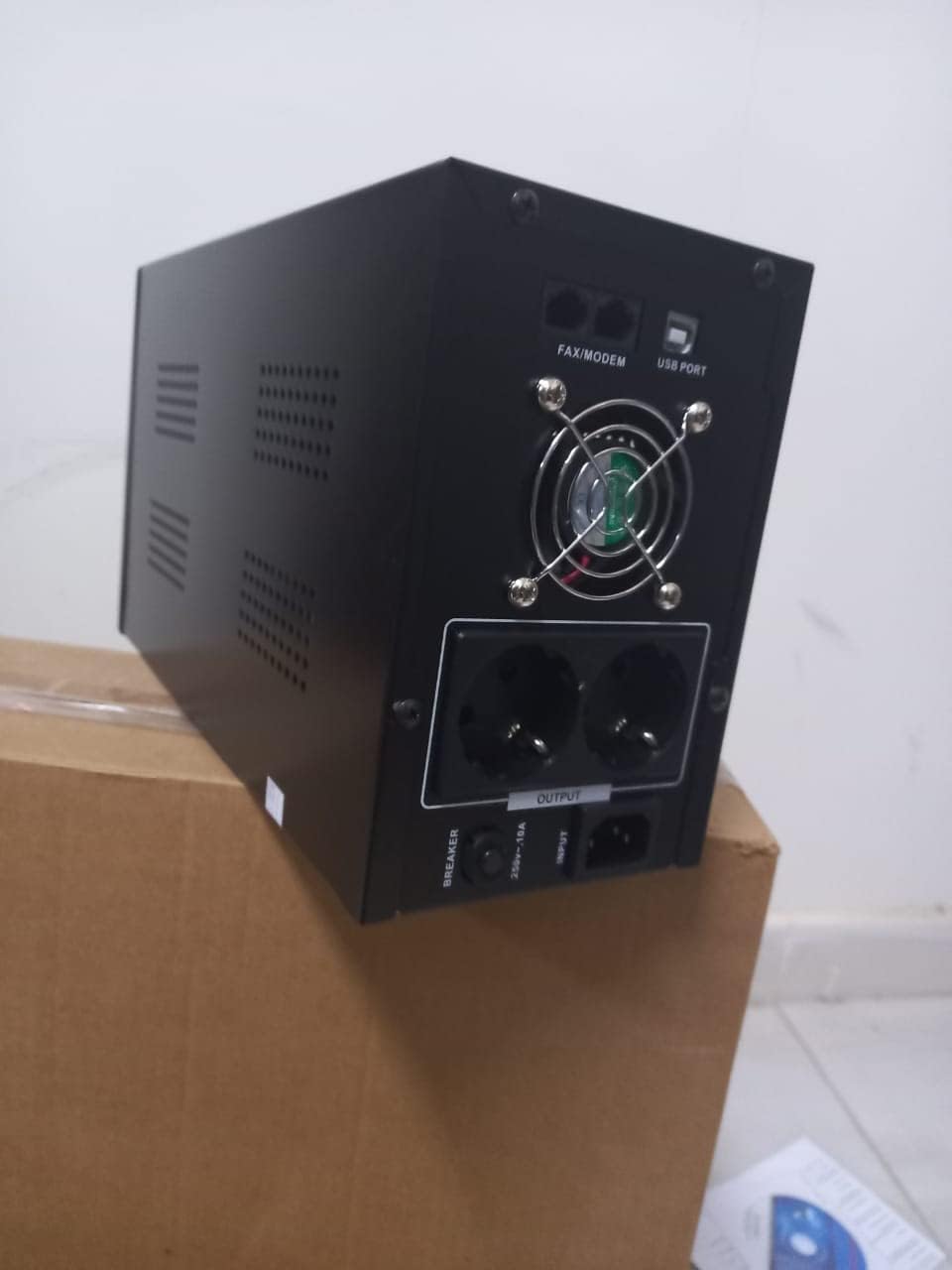
Abbildung 4.1: Rückseite view of the Dalton 2000VA UPS, highlighting the input power port, output sockets, and USB/Modem ports.
- Once the battery is charged, connect your computer, monitor, and other critical electronic devices to the UPS output sockets.
- Do not overload the UPS. Refer to the specifications section for maximum load capacity.
- If applicable, connect the USB communication cable from the UPS to your computer for monitoring software (software not included, check manufacturer's webSeite? ˅).
5. Betrieb der USV
5.1 Ein-/Ausschalten
- So schalten Sie das Gerät ein: After connecting to AC power and charging, press and hold the power button on the front panel for approximately 3 seconds until you hear a beep and the display illuminates.
- So schalten Sie das Gerät aus: Press and hold the power button for approximately 3 seconds until you hear a beep and the display turns off. If the UPS is running on battery, it will shut down immediately. If connected to AC, it will switch to bypass mode before shutting down.
5.2 Das Display verstehen
The front panel LCD display provides real-time status information:
- IN: Zeigt die Eingangslautstärke antage aus dem Stromnetz.
- AUS: Zeigt die Ausgabelautstärke antage provided by the UPS to connected devices.
- NORMAL: Zeigt an, dass die USV mit Netzstrom betrieben wird.
- Schläger: Zeigt den aktuellen Ladezustand des Akkus an.
- Laden: Gibt die Prozent antage der von den angeschlossenen Geräten genutzten Kapazität der USV.
- Battery Mode Icon: Appears when the UPS is running on battery power during an outage.

Abbildung 5.1: Seite view of the UPS, showing the illuminated display with power status indicators.
5.3 Batterie-Backup-Funktion
Im Falle eines Stromausfallstage, the UPS will automatically switch to battery power, providing continuous power to your connected devices. The duration of backup power depends on the load connected and the battery's charge level. The UPS will emit an audible alarm during battery operation.
When utility power returns, the UPS will automatically switch back to AC power and begin recharging its battery.
6. Wartung
- Batteriepflege: To maximize battery life, ensure the UPS is always connected to an AC outlet to keep the battery charged. If the UPS is stored for an extended period, recharge it every three months for at least 8 hours.
- Reinigung: Disconnect the UPS from all power sources before cleaning. Use a soft, dry cloth to wipe the exterior. Do not use liquid or aerosol cleaners.
- Belüftung: Regularly check that the ventilation openings are not blocked by dust or debris to prevent overheating.
7. Fehlerbehebung
In der folgenden Tabelle finden Sie häufig auftretende Probleme und deren Lösungen:
| Problem | Mögliche Ursache | Lösung |
|---|---|---|
| Die USV schaltet sich nicht ein. | Battery not charged or power cord disconnected. | Ensure power cord is securely plugged in and allow battery to charge for 8 hours. |
| Die USV piept im Normalmodus ununterbrochen. | Überlastungszustand. | Disconnect non-essential equipment until the alarm stops. Check total load. |
| Kurze Backup-Zeit. | Battery not fully charged or battery nearing end of life. | Allow UPS to charge for 8 hours. If issue persists, battery may need replacement (contact service center). |
| Die USV liefert während eines Stromausfalls keine Stromversorgung.tage. | Battery discharged or internal fault. | Ensure UPS was fully charged. If problem persists, contact authorized service center. |
8. Technische Daten
| Besonderheit | Detail |
|---|---|
| Technische Daten | 12.5 x 22.5 x 38 cm |
| Hersteller | Dalton |
| Markenname | Generisch |
| Farbe | Schwarz |
| Material | Metall |
| Aktuell | 5 Ampehe |
| Formfaktor | Gestell |
| Frequenzbereich | 50-60 Hz |
| Ausgangsvolumentage | 220 Volt |
| Steckertyp | AC |
9. Garantie und Support
Dalton provides an authorized maintenance center for all Uninterruptible Power Supply units. For warranty claims, technical support, or service inquiries, please contact your local Dalton authorized distributor or service center. Keep your purchase receipt as proof of purchase for warranty validation.
For further assistance, please visit the official Dalton webWebsite oder wenden Sie sich an den Kundendienst.


