1. Produktüberschreitungview
The LENRUE TouchGo F4 is a compact, portable Bluetooth speaker designed for clear audio and ease of use. It features touch controls, Bluetooth 5.0 connectivity, and supports TWS (True Wireless Stereo) pairing for an enhanced audio experience. The speaker comes with a hard EVA travel case for protection and portability.

Figure 1: LENRUE TouchGo F4 Bluetooth Speaker.
2. Packungsinhalt
Bitte prüfen Sie das Paket auf folgende Artikel:
- LENRUE TouchGo F4 Bluetooth Speaker
- Hard EVA Travel Case
- TYP-C-Ladekabel
- Bedienungsanleitung
3. Einrichtung
3.1 Erstaufladung
Before first use, fully charge the speaker. Connect the provided TYPE-C charging cable to the speaker's charging port and a compatible USB power adapter (not included). The charging indicator light will show the charging status. A full charge typically takes approximately 4 hours.
3.2 Ein-/Ausschalten
- So schalten Sie das Gerät ein: Press and hold the power button (usually the central play/pause button) for a few seconds until you hear an audible prompt and the indicator light illuminates.
- So schalten Sie das Gerät aus: Press and hold the power button again for a few seconds until you hear an audible prompt and the indicator light turns off.
3.3 Bluetooth-Kopplung
To connect the speaker to your device:
- Ensure the speaker is powered on and in pairing mode (the indicator light will typically flash blue).
- Aktivieren Sie auf Ihrem Gerät (Smartphone, Tablet usw.) Bluetooth und suchen Sie nach verfügbaren Geräten.
- Select "ToughGo" or "LENRUE TouchGo" from the list of devices.
- Once connected, you will hear a confirmation sound, and the indicator light will turn solid blue.
Der Lautsprecher verbindet sich beim Einschalten automatisch wieder mit dem zuletzt gekoppelten Gerät, sofern sich das Gerät in Reichweite befindet und Bluetooth aktiviert ist.

Figure 2: Speaker with touch controls for sensitive and elegant operation.
3.4 TWS Wireless Pairing (Connect Two Speakers)
To achieve dual-channel stereo sound, you can pair two TouchGo F4 speakers together:
- Power on both TouchGo F4 speakers.
- Stellen Sie sicher, dass beide Lautsprecher von allen anderen Bluetooth-Geräten getrennt sind.
- On eins of the speakers, press and hold the "+" button until you hear a prompt indicating TWS pairing mode.
- The two speakers will automatically pair with each other. You will hear a "beep" sound upon successful TWS pairing.
- Now, connect your device's Bluetooth to the device name "ToughGo". Both speakers will play audio in stereo.
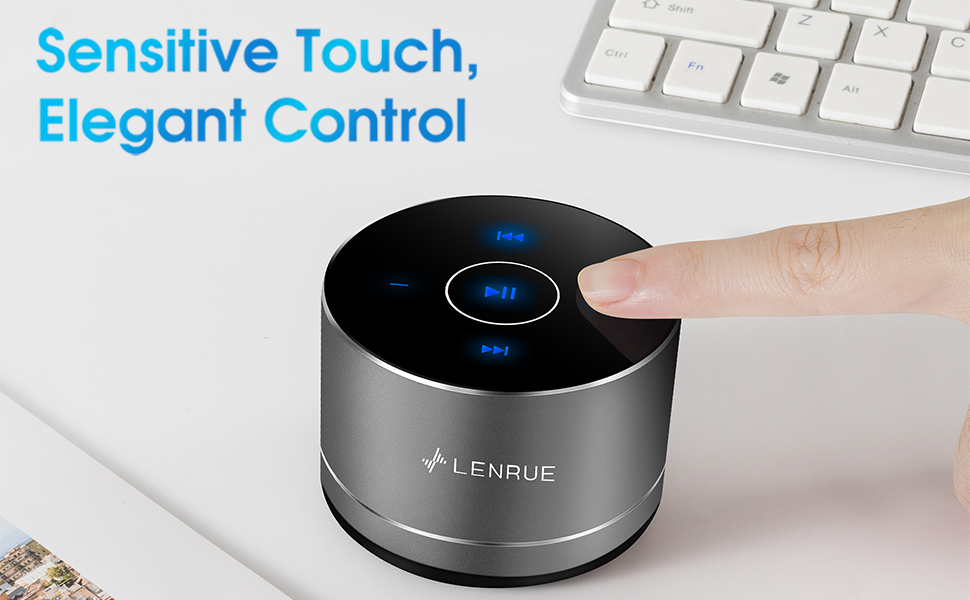
Figure 3: Two speakers connected for TWS wireless stereo pairing.
4. Bedienungsanleitung
4.1 Berührungssteuerung
The speaker features intuitive touch controls located on the top surface:
- Abspielen/Pause: Tap the central button once to play or pause music.
- Lautstärke erhöhen: Tap the "+" button to increase volume.
- Lautstärke runter: Tap the "-" button to decrease volume.
- Nächster Titel: Tap the ">>" button to skip to the next song.
- Vorheriges Lied: Tap the "<<" button to go to the previous song.
4.2 Freisprechfunktion
The speaker includes a built-in microphone for hands-free calls:
- Anruf annehmen: When a call comes in, tap the central button once to answer.
- Anruf beenden: During a call, tap the central button once to end the call.
- Anruf ablehnen: Press and hold the central button for approximately 2 seconds to reject an incoming call.
Figure 4: Speaker with hands-free calling capability.
4.3 Akkulaufzeit und Energiesparmodus
The speaker is equipped with a 1200mAh lithium-ion battery, providing 6-15 hours of music playback at 2/3 volume. To conserve power, the speaker will automatically shut down if Bluetooth is disconnected for 30 minutes.
5. Wartung
5.1 Reinigung
To clean the speaker, use a soft, dry cloth. Do not use abrasive cleaners, solvents, or immerse the speaker in water.
5.2 Speicherung
When not in use for extended periods, store the speaker in its hard EVA travel case in a cool, dry place. Avoid extreme temperatures and direct sunlight.
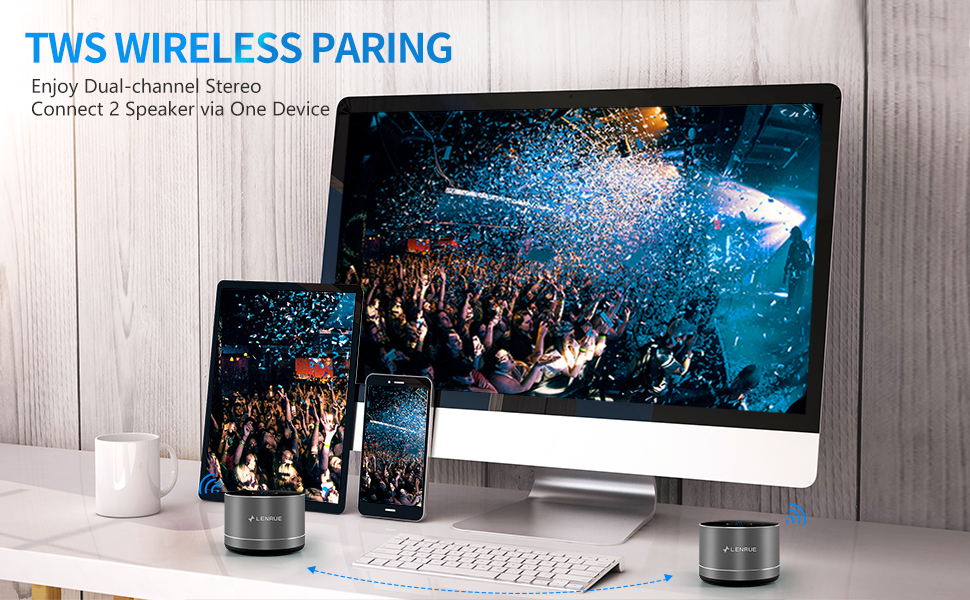
Figure 5: Speaker with its protective hard EVA travel case.
6. Fehlerbehebung
| Problem | Mögliche Ursache | Lösung |
|---|---|---|
| Der Lautsprecher lässt sich nicht einschalten. | Schwache Batterie; Einschalttaste nicht richtig gedrückt. | Laden Sie den Lautsprecher vollständig auf; Halten Sie den Ein-/Ausschalter einige Sekunden lang gedrückt. |
| Kopplung mit Bluetooth-Gerät nicht möglich. | Lautsprecher nicht im Kopplungsmodus; Bluetooth am Gerät deaktiviert; Lautsprecher bereits mit einem anderen Gerät verbunden. | Ensure speaker is in pairing mode (flashing blue light); Turn on Bluetooth on your device; Disconnect from other devices and try again. |
| Poor sound quality / Muffled sound. | Speaker placement; Obstructions; Low volume. | Ensure the speaker is placed on a flat, open surface, ideally not directly on its bottom where the speaker grille is located. Try placing it on its side for clearer sound. Remove any obstructions; Adjust volume on both speaker and device. |
| TWS-Kopplung fehlgeschlagen. | Speakers already paired to a device; Incorrect pairing procedure. | Ensure both speakers are disconnected from any Bluetooth devices before initiating TWS pairing. Follow the TWS pairing steps precisely. |
| Kein Ton. | Volume too low; Paused playback; Device not connected. | Increase volume on both speaker and device; Press play; Verify Bluetooth connection. |
7. Spezifikationen
| Besonderheit | Detail |
|---|---|
| Modellnummer | F4 |
| Konnektivitätstechnologie | Bluetooth 5.0 |
| Maximale Lautsprecherausgangsleistung | 5 Watt |
| Stromquelle | Batteriebetrieben (1 Lithium-Ionen-Akku im Lieferumfang enthalten) |
| Batteriekapazität | 1200 mAh |
| Spielzeit | 6-15 hours (at 2/3 volume) |
| Ladezeit | Ungefähr 4 Stunden |
| Kontrollmethode | Berühren |
| Technische Daten | 3.15 x 3.15 x 1.18 Zoll |
| Artikelgewicht | 9 Unzen |
| Besonderheit | Portable, Hands-Free Calling, TWS Pairing |
8. Garantie und Support
For warranty information and customer support, please refer to the documentation included with your purchase or contact LENRUE customer service directly. Contact details can typically be found on the official LENRUE webWebsite oder über Ihren Händler.


