Einführung
This manual provides comprehensive instructions for the Angrox XRT140 Universal Remote Control, designed as a replacement for various VIZIO Smart TV models. It covers setup, operation, and troubleshooting to ensure optimal performance and ease of use.
Produkt überview

Abbildung: Vorder- und Rückseite view of the Angrox XRT140 Universal Remote Control.
Hauptmerkmale
- Direktzugriff: Dedicated buttons for popular streaming services including Vudu, Netflix, Prime Video, Xumo, Hulu, and Redbox, plus a WatchFree button.
- Responsive Schaltflächen: Engineered for quick response times (less than 0.5 seconds) and durability (over 11,000 clicks).
- Erweiterte Reichweite: Offers a transmitting distance of over 42 feet for flexible use.
- Langlebige Konstruktion: Made from high-quality ABS material with a glossy finish for enhanced durability and soft, tactile buttons.
- Keine Programmierung erforderlich: Sofort nach dem Einlegen der Batterie einsatzbereit.
Kompatibilität
The Angrox XRT140 remote control is designed for broad compatibility with VIZIO Smart TV models and can replace several VIZIO remote models.
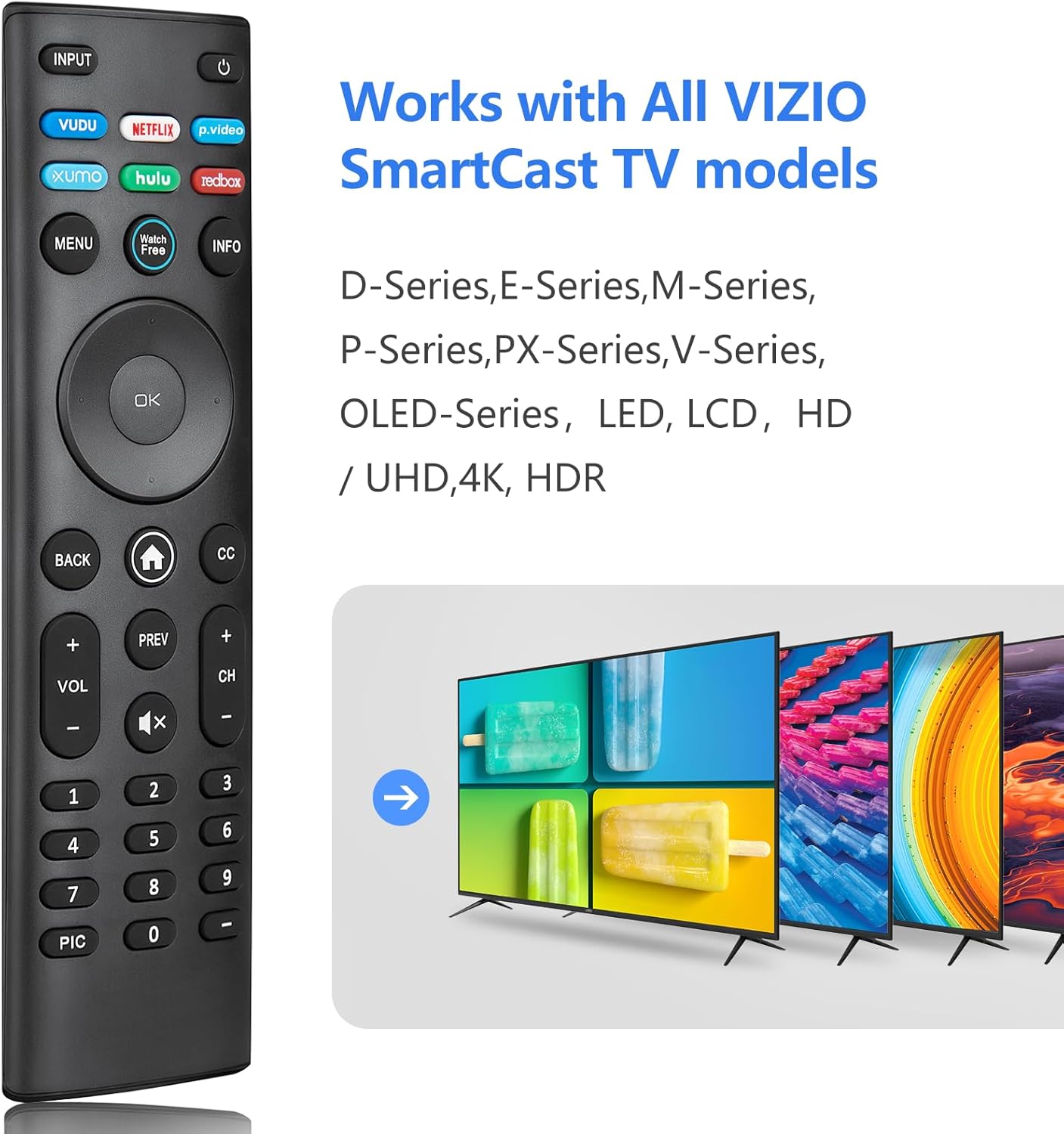
Image: The Angrox XRT140 remote control is compatible with various VIZIO SmartCast TV models, including D-Series, E-Series, M-Series, P-Series, PX-Series, V-Series, and OLED-Series.
- Compatible VIZIO TV Models: D-Series, E-Series, M-Series, P-Series, PX-Series, V-Series, OLED-Series, and other LED, LCD, HD, 4K UHD, HDR Smart TVs.
- Replaces VIZIO Remote Models: XRT136, XRT135, XRT510, XRT500, XRT100, XRT112, XRT122, XRT302, VR1, VR2, VR10, VR15.
Installationsanweisungen
Einlegen der Batterie
- Suchen Sie das Batteriefach auf der Rückseite der Fernbedienung.
- Schieben Sie die Batterieabdeckung nach unten, um sie zu öffnen.
- Insert two (2) 1.5V AAA batteries, ensuring the positive (+) and negative (-) terminals align correctly with the markings inside the compartment.
- Schieben Sie die Batterieabdeckung wieder an ihren Platz, bis sie sicher einrastet.
Notiz: Verwenden Sie stets neue Batterien und tauschen Sie beide Batterien gleichzeitig aus. Mischen Sie keine alten und neuen Batterien oder unterschiedliche Batterietypen.
Erste Verwendung
The Angrox XRT140 remote control requires no programming. Once batteries are installed, it is ready for immediate use with compatible VIZIO Smart TVs.
- Stellen Sie sicher, dass Ihr VIZIO Smart TV eingeschaltet ist.
- Point the remote control directly towards the TV's infrared (IR) sensor.
- Press any button (e.g., Power, Volume Up) to test functionality.
If the remote does not respond, verify battery installation and ensure there are no obstructions between the remote and the TV sensor.
Bedienungsanleitung
Tastenfunktionen
The following diagram and descriptions detail the functions of each button on the Angrox XRT140 remote control.

Image: Detailed diagram illustrating the function of each button on the Angrox XRT140 remote control.
| Taste | Funktion |
|---|---|
| EINGANG | Changes the currently displayed input source. |
| Leistung (⏻) | Turns the television ON or OFF. |
| VIDEOSPIELE | Accesses VUDU channels/application. |
| NETFLIX | Accesses NETFLIX channels/application. |
| p.video (Prime Video) | Accesses Prime Video channels/application. |
| XUMO | Accesses XUMO channels/application. |
| HULU | Accesses HULU channels/application. |
| REDBOX | Accesses REDBOX channels/application. |
| SPEISEKARTE | Displays the settings menu. |
| Kostenlos ansehen | Accesses WatchFree channels (availability may vary by region). |
| INFO | Displays the information window. |
| Navigationstasten (Hoch/Runter/Links/Rechts) | Navigates on-screen menus. |
| OK / Wiedergabe / Pause | Selects the highlighted menu option and plays or pauses content. |
| ZURÜCK | Goes to the previous on-screen menu. |
| Home-Taste (⌂) | Launches SmartCast Home or returns to the SmartCast Home Screen. |
| CC (Untertitel) | Enables or disables closed captions. Long press to open the Accessibility menu. |
| VOL +/- (Volume Up/Down) | Increases or decreases the loudness of the audio. |
| VORHERIGE | Returns to the channel last viewHrsg. |
| CH +/- (Channel Up/Down) | Ändert den Kanal. |
| Stumm (🔇) | Turns the audio ON or OFF. |
| Nummernblock (0-9) | Manually enters a channel number. |
| Bild | Cycles through different picture setting modes. Long press to enable/disable talk back feature. |
| Bindestrich (-) | Used with the number pad to manually enter a digital sub-channel (e.g., 18-4 or 18-5). |
Fehlerbehebung
If you encounter issues with your Angrox XRT140 remote control, please refer to the following common troubleshooting steps:
- Fernbedienung reagiert nicht:
- Ensure batteries are correctly installed with proper polarity (+/-).
- Replace old batteries with two new 1.5V AAA batteries.
- Confirm there are no obstructions between the remote's IR emitter and the TV's IR receiver.
- Richten Sie die Fernbedienung direkt auf den Infrarotsensor des Fernsehers.
- Begrenzte Reichweite:
- Ensure batteries are fresh. Low battery power can reduce signal strength.
- Remove any objects that might be blocking the signal path between the remote and the TV.
- The remote operates via infrared (IR) and requires a direct line of sight to the TV.

Image: The remote control offers an extended transmitting distance of over 42 feet, but requires a clear line of sight.
- Bestimmte Tasten funktionieren nicht:
- Clean the remote control buttons and surface with a soft, dry cloth to remove any dirt or residue that might be interfering with button presses.
- If only certain buttons are unresponsive, the remote may be damaged. Consider replacing the remote.
Technische Daten
| Besonderheit | Detail |
|---|---|
| Modellnummer | XRT140 |
| Marke | Angrox |
| Technische Daten | 6.3 x 1.57 x 0.39 Zoll (16.0 x 4.0 x 1.0 cm) |
| Artikelgewicht | 1.76 Unzen (50 Gramm) |
| Batterien erforderlich | 2 x AAA-Batterien (1.5 V) |
| Besondere Merkmale | Ergonomic design, No Programming Required, Universal compatibility with specified VIZIO TVs |
| Hersteller | ENJOYLink Direct |

Image: Physical dimensions of the Angrox XRT140 remote control.
Wartung
- Reinigung: Reinigen Sie die Fernbedienung mit einem weichen, trockenen Tuch. Verwenden Sie keine flüssigen Reinigungsmittel oder Scheuermittel.
- Batteriepflege: Remove batteries if the remote will not be used for an extended period to prevent leakage. Dispose of used batteries responsibly according to local regulations.
- Lagerung: Bewahren Sie die Fernbedienung an einem kühlen, trockenen Ort fern von direkter Sonneneinstrahlung und extremen Temperaturen auf.
Garantie und Support
Specific warranty details for the Angrox XRT140 remote control may vary. Please refer to the product packaging or contact the retailer where the product was purchased for detailed warranty information.
For technical support or further assistance, please contact Angrox customer service through their official channels or the retailer's support services.
