1. Einleitung
The Xetron STC-1000ProTH is a pre-wired digital temperature and humidity controller designed for precise environmental management. This device allows simultaneous or independent control of both temperature (heating or cooling) and humidity (humidification or dehumidification) within a specified range. It is suitable for various applications including seed fermentation, reptile habitats, incubators, greenhouses, and more.
This manual provides detailed instructions for the safe and effective use of your STC-1000ProTH controller. Please read it thoroughly before operation.
2. Sicherheitshinweise
- Stellen Sie sicher, dass die Stromversorgungslautstärketage matches the controller's specifications (110V 10A).
- Do not immerse the controller or sensor probe in water or expose to excessive moisture.
- Always unplug the controller from the power outlet before cleaning or performing any maintenance.
- Do not exceed the maximum load capacity of 10A for the outlets.
- Außerhalb der Reichweite von Kindern aufbewahren.
- The controller is made of anti-flame ABS material for enhanced safety.
3. Produktüberschreitungview und Funktionen
The Xetron STC-1000ProTH features a large LCD screen for clear display of current and set values, along with intuitive 3-button operation for easy programming.

Figure 3.1: Xetron STC-1000ProTH Controller, sensor, and power outlets.
Hauptmerkmale:
- Doppelte Kontrolle: Manages both temperature and humidity simultaneously or independently.
- Großer Aktionsradius und hohe Genauigkeit: Temperature control from 23℉ to 158℉ (-5℃ to 70℃) with ±1℉/±0.5℃ accuracy. Humidity control from 5%RH to 99%RH with ±5%RH accuracy.
- Vorverdrahtetes Design: Includes two pre-wired outlets (Work1 for temperature, Work2 for humidity) and a 2.5-inch LCD screen for plug-and-play operation.
- Anpassbare Parameter: Supports settings for ℃/℉, temperature & humidity calibration, high/low alarm values, start-up delay, and protection time.
- Doppeltes Alarmsystem: Visual (bell icon) and audible (buzzer) alerts activate if temperature or humidity exceeds set limits.
- Kompressorverzögerungsschutz: Extends the service life of connected equipment by preventing rapid cycling.
- Langlebige Konstruktion: Made from anti-flame ABS material, compliant with CE and FCC standards.

Figure 3.2: The controller supports both humidification/dehumidification and heating/cooling functions.

Figure 3.3: Visual and audible alerts, along with compressor delay protection.
4. Packungsinhalt
Überprüfen Sie, ob alle Artikel im Paket vorhanden sind:
- 1x Xetron STC-1000ProTH Temperature and Humidity Controller
- 1x Benutzerhandbuch (dieses Dokument)
- 1x Temperature and Humidity Sensor Probe
5. Installationsanleitung
5.1 Anschließen des Controllers
- Plug the main power cord of the Xetron STC-1000ProTH controller into a standard 110V AC power outlet.
- Connect the temperature and humidity sensor probe to the designated port on the controller. Ensure it is securely inserted.
- Identify the 'WORK1' outlet for temperature control and 'WORK2' for humidity control.
- Plug your heating or cooling device into the 'WORK1' outlet.
- Plug your humidifying or dehumidifying device into the 'WORK2' outlet.

Figure 5.1: Connection points for the sensor and controlled devices.

Figure 5.2: Features including the large LCD screen, 2m NTC sensor, pre-wired sockets, and safe plug.
6. Bedienungsanleitung
6.1 Das Display verstehen
The large LCD screen displays key information:
- TPV: Temperature Present Value (current temperature).
- HPV: Humidity Present Value (current humidity).
- TSV: Temperature Set Value (desired temperature).
- HSV: Humidity Set Value (desired humidity).
The display also shows icons for heating, cooling, humidifying, dehumidifying, and alarms.

Figure 6.1: Screen display with value definitions.
6.2 Grundlegende Parametereinstellungen
Um in den Einstellmodus zu gelangen, halten Sie die Taste gedrückt. SATZ button for 3 seconds until the display beeps or flashes. Use the UP Und RUNTER buttons to navigate through parameters. Press SATZ once to select a parameter, use UP/RUNTER to adjust the value, then press SATZ again to confirm. Hold SATZ Zum Verlassen des Einstellungsmodus 3 Sekunden lang warten.
Example: Setting Humidity Range (e.g., 55% to 65% RH)
- Drücken und halten SATZ 3 Sekunden lang gedrückt, um in den Einstellmodus zu wechseln.
- Verwenden UP/RUNTER to navigate to the 'HS' (Humidity Start) setting.
- Drücken SATZ once, then use UP/RUNTER to set the value to '60' (for 60% RH). Press SATZ zur Bestätigung.
- Navigate to the 'HD' (Humidity Differential) setting.
- Drücken SATZ once, then use UP/RUNTER to set the value to '5' (for 5% RH differential). Press SATZ to confirm. This means the humidity will turn on at 55% (60-5) and turn off at 60%.
- Halten SATZ Zum Verlassen des Einstellungsmodus 3 Sekunden lang warten.

Abbildung 6.2: Bspample of setting humidity parameters (HS and HD).
6.3 Alarmeinstellungen
The controller features dual alarms for both temperature and humidity. You can set high and low alarm limits. If the measured value goes outside these limits, the controller will sound a buzzer and display a bell icon.

Figure 6.3: Audible and visual alarm indicators.
6.4 Kompressorverzögerungsschutz
This feature prevents rapid cycling of connected compressors (e.g., in refrigerators or dehumidifiers), which can extend their lifespan. You can set a delay time in the parameter settings.

Figure 6.4: Compressor delay protection mechanism.
6.5 Screen Display Options
The controller allows you to set the screen display to always remain ON. Refer to the manual's parameter list for the specific setting (e.g., 'BL' to 'O').

Figure 6.5: Option to keep the screen display continuously ON.
7. Typische Anwendungen
The Xetron STC-1000ProTH controller is versatile and can be used in various environments requiring precise temperature and humidity control:
- Reptile Habitats: Maintain optimal temperature and humidity levels for the health and well-being of reptiles.
- Seed Germination/Cultivation: Create ideal conditions for plant growth and seed starting in greenhouses or grow tents.
- Fermentation: Control temperature for consistent results in home brewing, yogurt making, or other fermentation processes.
- Inkubatoren: Regulate temperature and humidity for successful egg incubation.
- Gefrierschränke/Kühlschränke: Convert a standard refrigerator into a freezer or maintain specific storage temperatures.
- Hausbrauen: Ensure precise temperature control for fermentation.
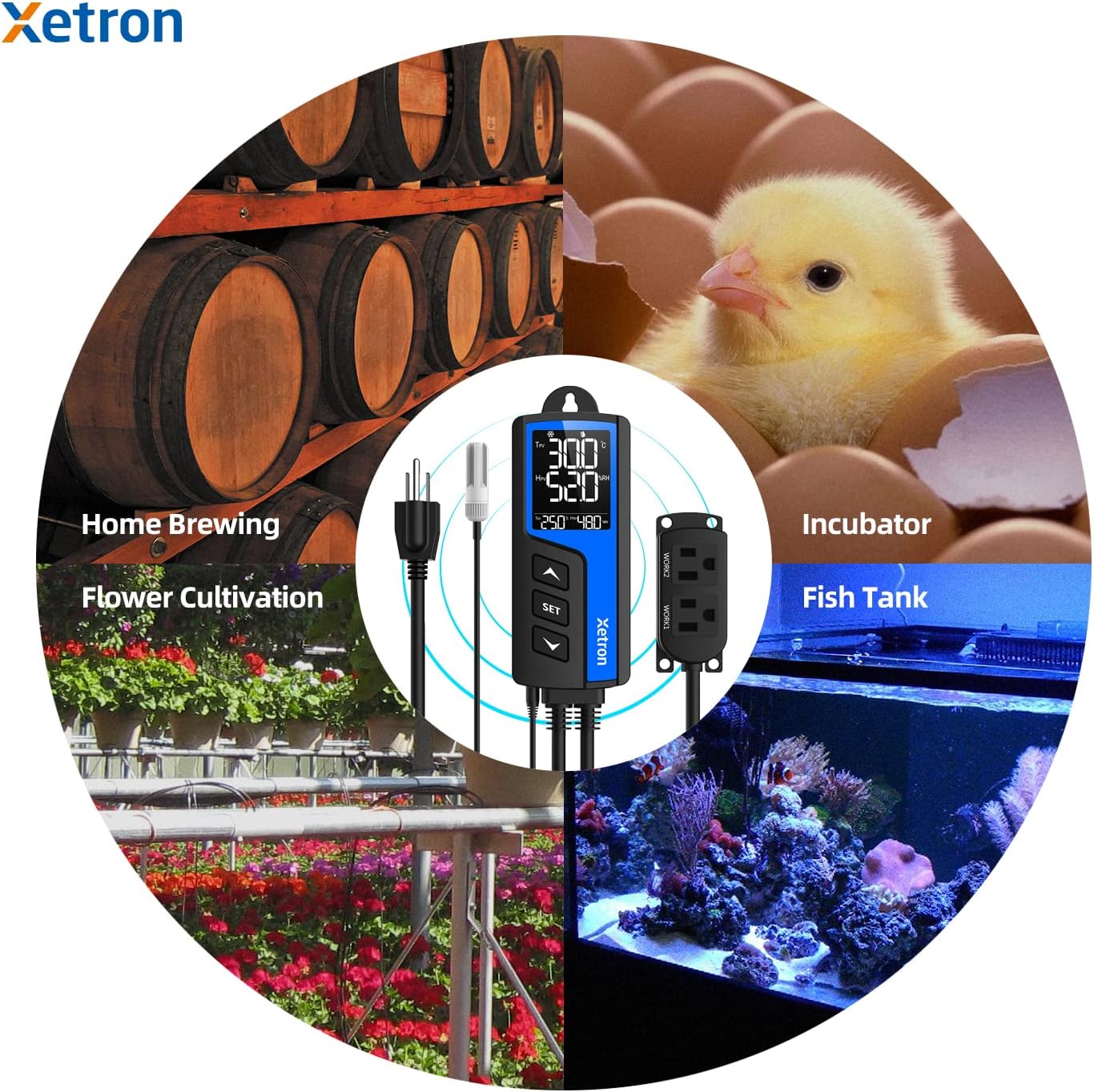
Figure 7.1: Diverse applications of the Xetron STC-1000ProTH controller.

Figure 7.2: Reptile temperature and humidity control.

Figure 7.3: Seedling temperature and humidity control.

Figure 7.4: Fermentation temperature control.

Figure 7.5: Freezer temperature control.
8. Wartung
- Reinigung: Wipe the controller and sensor probe with a soft, dry cloth. Do not use abrasive cleaners or immerse in liquids.
- Sensorpflege: Handle the sensor probe carefully. Avoid bending or damaging the cable. Ensure the sensor is free from dust or debris for accurate readings.
- Lagerung: When not in use, store the controller in a cool, dry place away from direct sunlight.
9. Fehlerbehebung
- Controller lässt sich nicht einschalten: Check if the main power plug is securely inserted into a live outlet.
- Connected Device Not Activating:
- Verify that the device is correctly plugged into the 'WORK1' (temperature) or 'WORK2' (humidity) outlet.
- Ensure the device itself is functional by plugging it directly into a wall outlet.
- Check your set parameters (TSV, HSV, differentials) to ensure the current conditions should trigger the device.
- Review alarm settings; if an alarm is active, it might prevent normal operation.
- Consider the compressor delay protection setting if applicable.
- Ungenaue Messwerte:
- Stellen Sie sicher, dass die Sensorsonde sauber und frei von Verstopfungen ist.
- Verify the sensor is properly connected to the controller.
- Perform a temperature and humidity calibration if you have a reference instrument.
- Alarm wird ständig ausgelöst: Adjust the high and low alarm limits to suit your desired operating range.
10. Technische Daten
| Spezifikation | Wert |
|---|---|
| Modellnummer | STC-1000ProTH |
| Eingangslautstärketage | 110 V Wechselstrom |
| Maximaler Laststrom | 10 A |
| Temperaturregelbereich | 23℉ ~ 158℉ (-5℃ ~ 70℃) |
| Temperaturgenauigkeit | ±1℉ / ±0.5℃ |
| Feuchtigkeitsregelbereich | 5% rF ~ 99% rF |
| Feuchtigkeitsgenauigkeit | ± 5% RH |
| Anzeigetyp | LCD |
| Material | Anti-flame ABS Plastic |
| Technische Daten | 7.87 x 5.91 x 2.36 inches (Controller: 2.36"L x 1.2"W x 5.5"H) |
| Artikelgewicht | 14.1 Unzen (0.4 Kilogramm) |
| Im Lieferumfang enthaltene Komponenten | Controller, User Manual, T&H Sensor Probe |
11. Garantie und Kundendienst
Xetron provides a one-year warranty for this product, covering manufacturing defects and ensuring continuous customer assistance. For technical support, troubleshooting, or warranty claims, please contact Xetron customer service through the retailer's platform or visit the official Xetron webWebsite für Kontaktinformationen.


