1. Einleitung
Vielen Dank für Ihren Einkauf.asing the Paladone Minecraft Glitter Flow Lamp. This product is designed to provide ambient mood lighting with a unique glitter flow effect, featuring iconic Minecraft characters. Please read this manual thoroughly before use to ensure proper operation and safety.
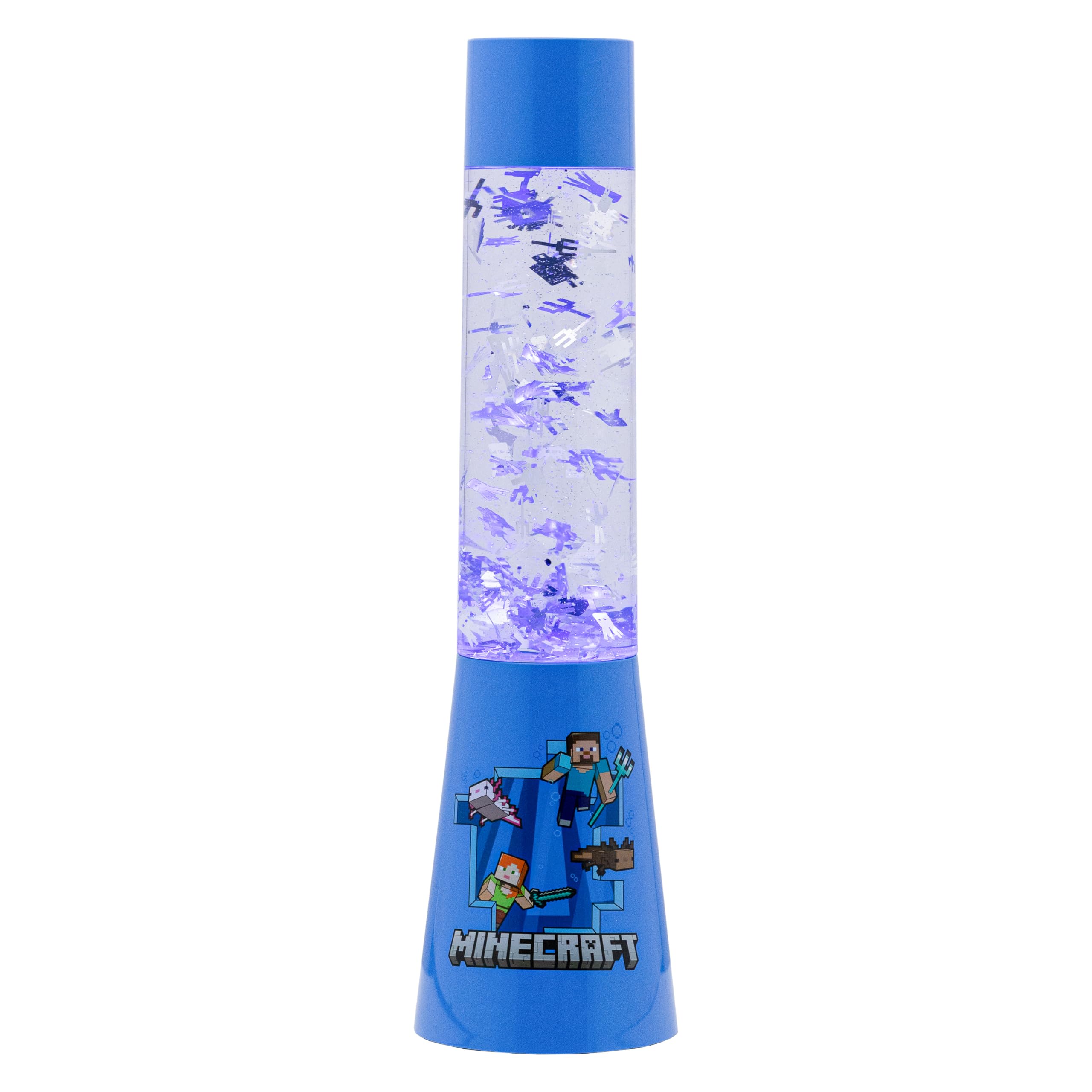
Image 1: The Paladone Minecraft Glitter Flow Lamp, featuring a green base with a Creeper face and a clear tube filled with glitter.
2. Sicherheitshinweise
- Keep this product out of reach of small children and pets.
- Öffnen Sie das l nichtamp unit or attempt to consume the liquid contents. In case of accidental ingestion or contact with skin/eyes, seek immediate medical attention.
- Use only 3 AAA batteries (not included) or a compatible USB power source (USB cable not included). Ensure correct battery polarity.
- Vermeiden Sie es, das l freizulegenamp extremen Temperaturen, direkter Sonneneinstrahlung oder hoher Luftfeuchtigkeit.
- Tauchen Sie das l nicht einamp in Wasser oder anderen Flüssigkeiten.
- Entsorgen Sie gebrauchte Batterien gemäß den örtlichen Vorschriften.
3. Packungsinhalt
Bitte kreuzen Sie das Kästchen für die folgenden Elemente an:
- 1 x Paladone Minecraft Glitter Flow Lamp Einheit
- 1 x Gebrauchsanweisung
Note: 3 AAA batteries and a USB power cable are NOT included and must be purchased separately.
4. Einrichtung
4.1 Stromversorgung des Lamp
The Minecraft Glitter Flow Lamp can be powered by either 3 AAA batteries or a USB cable.
Einlegen der Batterie:
- Locate the battery compartment on the bottom of the lamp.
- Öffnen Sie mit einem kleinen Schraubendreher die Abdeckung des Batteriefachs.
- Legen Sie 3 neue AAA-Batterien ein und achten Sie dabei auf die richtige Polarität (+/-), wie im Batteriefach angegeben.
- Bringen Sie die Batteriefachabdeckung wieder an und sichern Sie sie mit der Schraube.
USB Power Option:
- Connect a compatible USB cable (not included) to the USB port on the back of the lamp.
- Plug the other end of the USB cable into a suitable USB power source (e.g., computer, USB wall adapter).
4.2 Platzierung
Platzieren Sie das lamp on a stable, flat, and level surface to ensure proper glitter flow and prevent accidental tipping. Avoid placing it near edges where it could fall.
Image 2: The Minecraft Glitter Flow Lamp positioned on a bedside table, providing ambient blue lighting.
5. Bedienungsanleitung
5.1 Ein-/Ausschalten
Zum Einschalten desamp on, locate the power button on the back of the base and press it once. The lamp will illuminate and the glitter will begin to flow.
Zum Einschalten desamp auszuschalten, drücken Sie den Netzschalter erneut.
5.2 Timer-Funktion
Dieses lamp features a convenient 15-minute timer function.
- Mit dem lamp already on, press the power button a second time to activate the timer.
- Die lamp will remain lit for approximately 15 minutes and then automatically turn off.
- To manually turn off the lamp while the timer is active, press the power button a third time.
Image 3: The Minecraft Glitter Flow Lamp operating in a dimly lit room, showcasing the dynamic glitter movement and blue illumination.
Abbildung 4: Eine detaillierte view of the glitter particles suspended and flowing within the liquid of the lamp.
5.3 Offizielles Produktvideo
Video 1: An official product video demonstrating the glitter flow effect of the Minecraft Flow Lamp.
6. Wartung
6.1 Reinigung
Zum Reinigen des lamp, gently wipe the exterior with a soft, dry cloth. Do not use abrasive cleaners, solvents, or harsh chemicals, as these may damage the finish or the plastic components.
6.2 Batteriewechsel
When the light dims or the lamp stops functioning, it is time to replace the batteries. Follow the battery installation steps in Section 4.1, ensuring to replace all 3 AAA batteries simultaneously with new ones.
7. Fehlerbehebung
7.1 Literamp Lässt sich nicht einschalten
- Batterien prüfen: Ensure 3 fresh AAA batteries are correctly installed with the proper polarity.
- USB-Verbindung prüfen: If using USB power, verify that the USB cable is securely connected to both the lamp and a functional power source.
7.2 Glitter Not Flowing Properly
- Ebene Oberfläche: Stellen Sie sicher, dass die lamp is placed on a completely flat and level surface. Tilting can affect glitter movement.
- Temperatur: Erlaube dem lamp to reach room temperature. Extreme cold can temporarily affect the liquid's viscosity and glitter movement.
8. Spezifikationen
| Modellname: | Minecraft Glitter Flow Lamp, Night Light Mood Lighting |
| Teilenummer: | PP10069MCF |
| Abmessungen: | 4.06"T x 4.06"B x 13.9"H |
| Artikelgewicht: | 910 Gramm (2.01 Pfund) |
| Energiequelle: | Battery Powered (3 AAA, not included) or USB (cable not included) |
| Material: | Plastik |
| Lichtquellentyp: | Fluoreszierend |
| Helligkeit: | 50 Lumen |
| Kontrollmethode: | Berühren |
9. Garantie und Support
This product comes with a standard manufacturer's warranty. For detailed warranty information, please refer to the packaging or contact Paladone customer support.
If you experience any issues or have questions about your Paladone Minecraft Glitter Flow Lamp, please visit our official webWebsite oder wenden Sie sich für Hilfe an unser Kundensupportteam.


