1. Einleitung
The LG CineBeam HU715QW projector is designed to transform your living room into a home theater experience. It delivers 4K resolution with an ultra-short throw ratio, allowing for large screen sizes from a short distance. This manual provides essential information for setting up, operating, and maintaining your projector.

Abbildung 1: Vorderseite view of the LG CineBeam UHD 4K Projector HU715QW.
2. Lieferumfang
Stellen Sie sicher, dass beim Auspacken alle Artikel vorhanden sind:
- LG CineBeam UHD 4K Projector HU715QW
- Magische Fernbedienung
- Netzkabel
- Benutzerhandbuch (dieses Dokument)
3. Hauptmerkmale
- 4K UHD-Auflösung: Experience incredible detail with 3840 x 2160 resolution, 4x greater than Full HD.
- Ultra Short Throw (0.22 Throw Ratio): Project an 80-inch screen from less than five inches away from the wall, or up to 120 inches from 12.48 inches away.
- 2,500 ANSI Brightness: Produces brilliant color for vivid home theater experiences, even in well-lit rooms.
- Embedded 2.2-channel Quad Woofer Speakers: Delivers rich, deep bass sound with minimal screen vibrations.
- Bluetooth Surround Capabilities: Connect up to two wireless speakers for an immersive audio experience.
- WebOS 6.0.1 Smart Platform: Access built-in streaming apps like Netflix, YouTube, and Apple TV+.
- Apple AirPlay 2 & HomeKit Compatibility: Wirelessly control, cast, and mirror content from iOS or MacOS devices.
4. Einrichtung
4.1 Platzierung
Position the projector on a flat, stable surface directly in front of your projection screen or wall. Due to its ultra-short throw capability, the projector can be placed very close to the projection surface.
- For an 80-inch screen: Place approximately 4.65 inches (11.8 cm) from the wall.
- For a 100-inch screen: Place approximately 8.54 inches (21.7 cm) from the wall.
- For a 120-inch screen: Place approximately 12.48 inches (31.7 cm) from the wall.

Figure 2: Ultra Short Throw placement for an 80-inch screen.
4.2 Stromanschluss
Connect the supplied power cord to the projector's power input and then to a wall outlet.
4.3 Erstkonfiguration
Upon first power-on, the projector will guide you through initial setup steps:
- Remote-Kopplung: Press the OK (wheel) button on your Magic Remote to pair it with the projector.
- Sprache & Standort: Select your preferred language, region, and country.
- Netzwerkverbindung: Connect to your Wi-Fi network by selecting it and entering the password.
- Allgemeine Geschäftsbedingungen: Review und die Allgemeinen Geschäftsbedingungen akzeptieren.
- User Analysis: The projector will analyze the user environment.
- Adresseinrichtung: Enter your service area postcode for local content.
- LG-Konto: Sign in or skip to create an LG account later.
Video 1: Official LG CineBeam HU715QW Projector overview, showcasing features and setup process.
5. Betrieb
5.1 WebOS-Navigation
The projector runs on LG's WebOS 6.0.1 smart platform, providing an intuitive interface for accessing apps and settings. Use the Magic Remote to navigate the on-screen cursor or directional buttons.

Abbildung 3: Die WebOS 6.0.1 interface, showing various streaming apps and settings.
5.2 Eingangsauswahl
To switch between connected devices (e.g., gaming console, Blu-ray player), press the input button on your Magic Remote and select the desired HDMI input.
5.3-Fernbedienung
The included Magic Remote allows for easy navigation and control. It features a scroll wheel, directional buttons, and dedicated buttons for popular streaming services and settings. The remote is also backlit for use in dark environments.
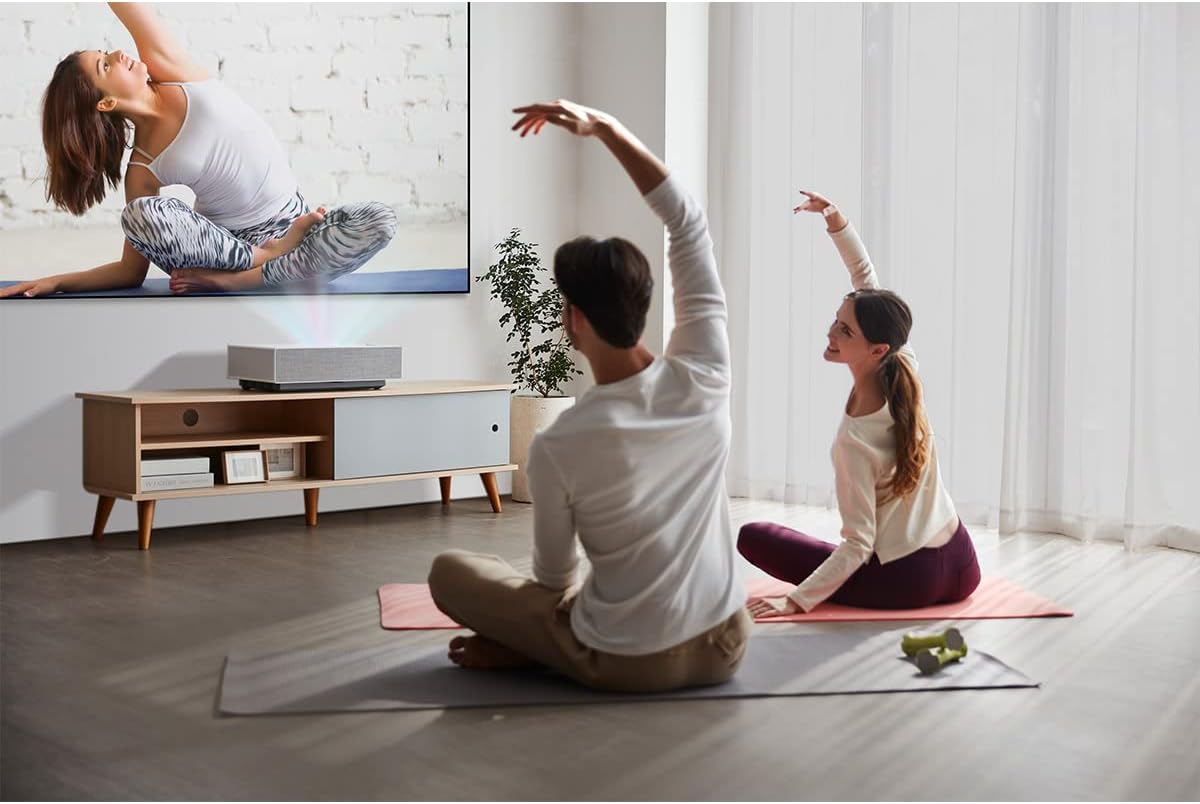
Figure 4: The LG Magic Remote Control, featuring a scroll wheel and backlit buttons.
6. Konnektivität
Der Projektor bietet eine Vielzahl von Anschlüssen zum Verbinden externer Geräte:
- HDMI-Anschlüsse: Three HDMI ports are available. One supports HDMI 2.1 (eARC/ARC) for enhanced audio return, and two are HDMI 2.0.
- USB-Anschlüsse: Two USB ports (USB 1, USB 2) for connecting USB storage devices.
- Optischer digitaler Audioausgang: Zum Anschluss an externe Audiosysteme.
- LAN-Anschluss: Für kabelgebundene Netzwerkverbindung.
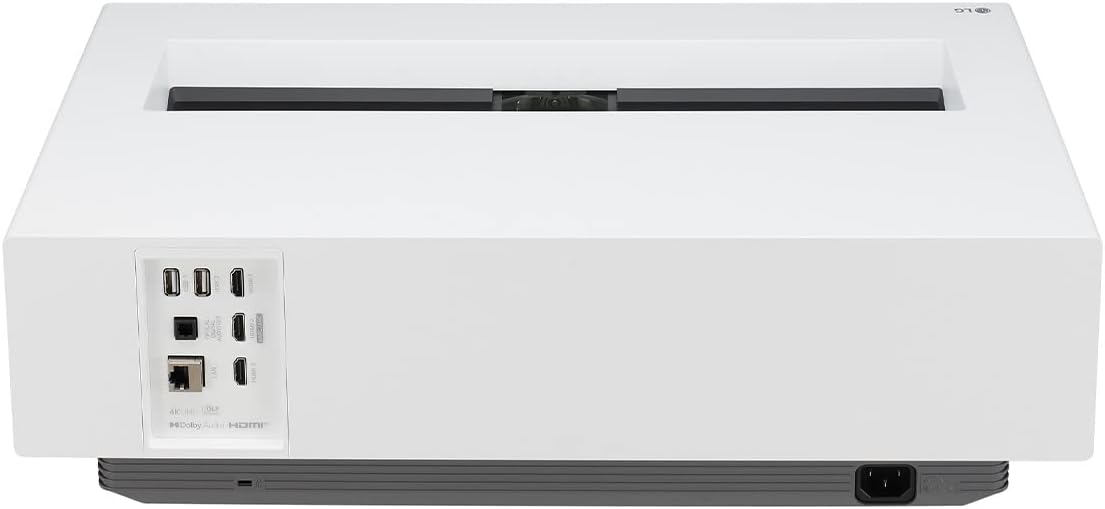
Abbildung 5: Rückseite view of the projector, highlighting the various input and output ports.
7. Bild- und Toneinstellungen
Access picture and sound settings via the WebOS menu to customize your viewErfahrung.
7.1 Bildmodi
Select from various preset picture modes:
- Lebendig: Enhances brightness and sharpness for a dynamic image.
- Standard: Ausgewogene Einstellungen für allgemeine viewing.
- Kino: Optimized for movie viewing with natural colors.
- Sport: Verbessert Bewegung und Farbe für Sportübertragungen.
- Game Optimiser: Reduziert die Eingabeverzögerung und optimiert die Einstellungen für Spiele.
- Filmemacher-Modus: Bewahrt die ursprüngliche Vision des Regisseurs für Filme.
- Brightest: Maximizes brightness for well-lit environments.
- Expert (Bright Space, Daytime): Calibrated settings for bright room conditions.
- Expert (Dark Space, Nighttime): Calibrated settings for dark room conditions.
7.2 HDR-Modi
The projector supports HDR10 and HLG standards, with HDR Pro Dynamic Tone Mapping for vivid HDR content.
7.3 Brightness Optimizer II - Auto Brightness & Adaptive Contrast
The built-in ambient sensor automatically adjusts screen brightness based on ambient light conditions. Adaptive Contrast enhances depth and vividness by adjusting laser output.

Figure 6: Brightness Optimizer II automatically adjusts brightness based on ambient light.
7.4 Edge Adjustment & Focus Adjustment
Use the Edge Adjustment feature (4, 9, or 15 points) to precisely fit the projected image to your screen. The electronic Focus Adjustment allows you to fine-tune image clarity.
8. Spielen
The LG CineBeam HU715QW offers features to enhance your gaming experience, though it is not optimized for competitive gaming requiring extremely low input lag or high refresh rates (e.g., 4K@120Hz).
- Game Optimiser: Provides game-related settings, including FPS (First Person Shooter), RPG (Role-playing Game), and RTS (Real-time Strategy) modes.
- Black Stabiliser & White Stabiliser: Adjust visibility in dark and bright game scenes.
- Auto-Low-Latency-Modus (ALLM): Schaltet automatisch in einen Modus mit niedriger Latenz, sobald ein Spiel erkannt wird.
9. Erweiterte Funktionen
9.1 Apple AirPlay 2 & HomeKit Support
Wirelessly stream content from your iPhone, iPad, or Mac directly to your projector. With HomeKit, you can control your CineBeam with Siri or the Home app on your Apple devices.

Figure 7: AirPlay 2 and HomeKit integration for seamless Apple device connectivity.
10. Spezifikationen
| Besonderheit | Detail |
|---|---|
| Modellnummer | HU715QW |
| Technische Daten | 21 x 12.4 x 6 Zoll |
| Artikelgewicht | 26.4 Pfund |
| Hersteller | LG |
| Datum der ersten Verfügbarkeit | 10. Februar 2022 |
11. Fehlerbehebung
- Kein Signal: Ensure all external devices are powered on and cables are securely connected to the correct HDMI input. Use the remote to cycle through inputs.
- Flackerndes Bild: If the image appears to flicker, this may be due to camera recording frequencies and is not typically visible to the naked eye. Check external device settings for refresh rate compatibility.
- Color Shift/Image Quality Issues: Adjust picture settings (e.g., Picture Mode, HDR settings, Brightness Optimizer II, Adaptive Contrast) to suit your viewing environment and content. Ensure optimal projector placement to avoid digital distortion.
- Unresponsive Optical Port: Verify cable connections and audio output settings on both the projector and the external audio device.
12. Wartung
- Reinigung der Linse: Verwenden Sie ein weiches, fusselfreies Tuch, das speziell für optische Linsen entwickelt wurde. Verwenden Sie keine scheuernden Reinigungs- oder Tücher.
- Reinigung des Projektorgehäuses: Wischen Sie die Außenseite mit einem weichen, trockenen Tuch ab. Vermeiden Sie die Verwendung aggressiver Chemikalien.
- Belüftung: Um eine Überhitzung zu vermeiden, stellen Sie sicher, dass die Lüftungsöffnungen des Projektors nicht blockiert sind.
- Lagerung: When not in use for extended periods, store the projector in a cool, dry place, ideally in its original packaging or a protective cover.
13. Garantie und Support
Your LG CineBeam projector is covered by a manufacturer's warranty. For detailed warranty information, product registration, or technical support, please visit the official LG webBesuchen Sie die Website oder kontaktieren Sie den LG-Kundendienst.
Bewahren Sie Ihren Kaufbeleg als Kaufnachweis für Garantieansprüche auf.