1. Einleitung
The FeiyuTech SCORP-C2 is a professional 3-axis handheld gimbal stabilizer designed for DSLR and mirrorless cameras. It provides smooth, stable footage, enhancing your videography experience. This manual provides essential information for setup, operation, maintenance, and troubleshooting.
2. Sicherheitshinweise
Please read all safety instructions carefully before use. Improper use may result in damage to the device or personal injury.
- Der Gimbal darf nicht mit Wasser oder anderen Flüssigkeiten in Berührung kommen.
- Vermeiden Sie es, den Gimbal fallen zu lassen oder starken Stößen auszusetzen.
- Keep the gimbal away from heat sources and direct sunlight.
- Verwenden Sie ausschließlich das angegebene Ladekabel und Netzteil.
- Ensure the camera is securely mounted and balanced before powering on the gimbal.
3. Produktüberschreitungview
The SCORP-C2 features an integrated underslung handle, quick buckle design for axis locks, an OLED screen, and smart status lights for real-time monitoring.

Figure 1: FeiyuTech SCORP-C2 Gimbal and included accessories.
3.1 Was ist in der Box?
- Feiyu Scorp-C 2 Gimbal x1
- Schieber x1
- Upper Quick Release Plate x1
- L-Bracket Base (Horizontal Mount Plate) x1
- Lens Support Screw x1
- Lens Support Bracket x1
- Camera Mounting Screw x1
- Inbusschlüssel x1
- Stativ x1
- USB-C to Type-C Camera Control Cable x1
- USB-C Gimbal Charging Cable x1
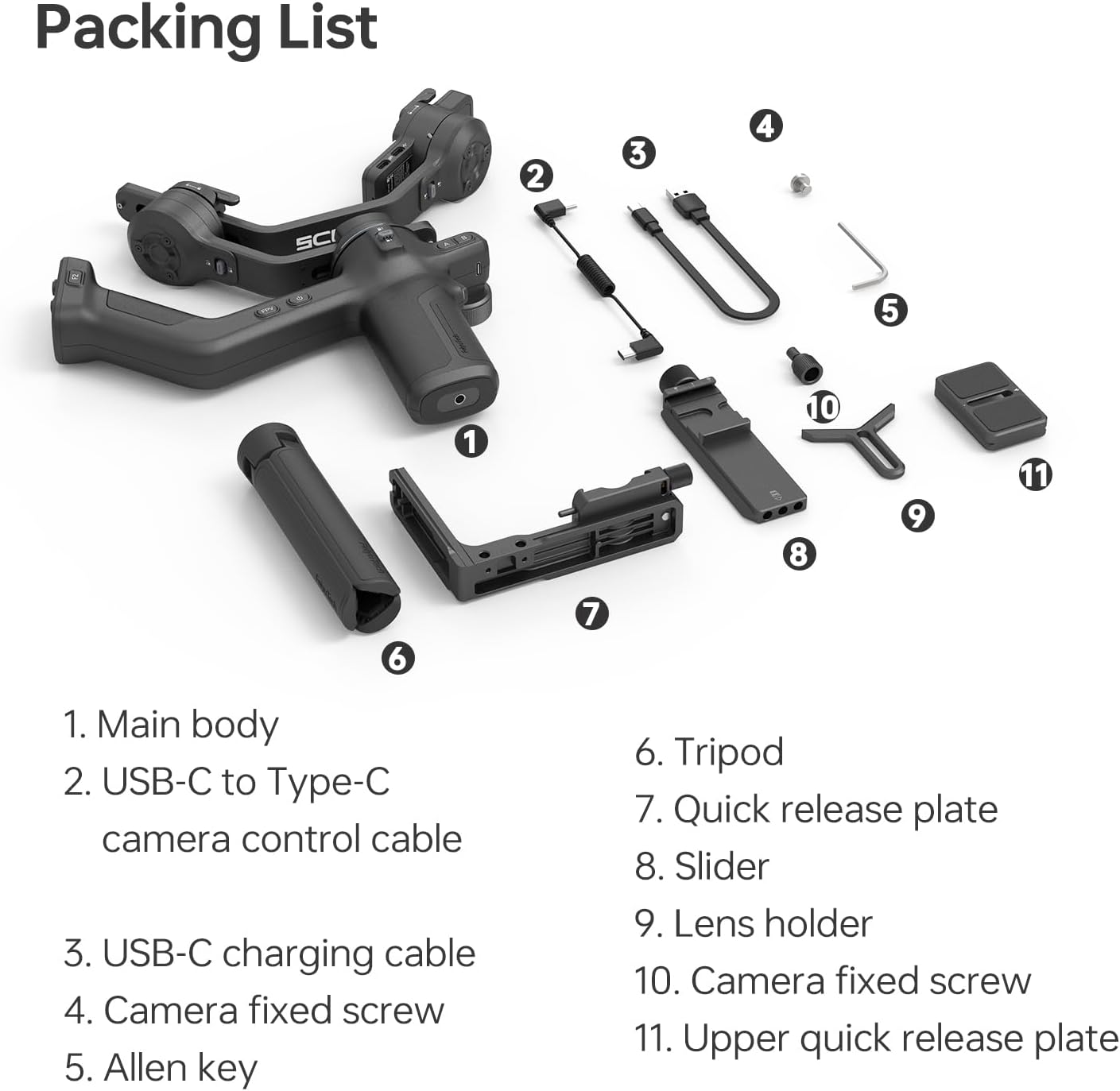
Abbildung 2: Ausführlich view of the FeiyuTech SCORP-C2 packing list.
3.2 Control Buttons and OLED Screen
The gimbal features an OLED status screen and various control buttons for intuitive operation.

Abbildung 3: Überview of the control buttons and OLED status screen.
4. Einrichtung
4.1 Attaching the Tripod/Handle
Attach the included tripod to the 1/4-inch screw hole at the bottom of the gimbal handle. This provides stability for balancing and can be used as an extended grip.
4.2 Kameramontage
Attach the quick release plate to the bottom of your camera using the camera mounting screw. Ensure it is securely tightened. If using a heavier lens, attach the lens support bracket for added stability.
4.3 Ausbalancieren des Gimbals
Proper balancing is crucial for optimal performance and to prevent motor strain. Unlock all three axes before balancing.
- Neigungsachsenbalance: Adjust the camera's position on the quick release plate until it remains level when tilted.
- Rollachsenbalance: Adjust the roll arm until the camera remains level when rotated.
- Schwenkachsenbalance: Adjust the pan arm until the gimbal remains stable when panned.
After balancing, lock all axes using the quick buckle design. The gimbal should remain stable in any position without motor assistance.
Video 1: FeiyuTech SCORP C2 - Horizontal Camera Mounting Guide
Video 2: FeiyuTech SCORP C2 - Horizontal Balancing Guide
Video 3: FeiyuTech SCORP C2 - Vertical Camera Mounting Guide
5. Betriebsarten
The SCORP-C2 offers various operating modes to suit different shooting scenarios. Use the mode button (M) and joystick for control.
- Pan Follow (PF): The camera pans left/right following the handle's movement, while tilt and roll axes are locked.
- Pan & Tilt Follow (PTF): The camera pans and tilts following the handle's movement, while the roll axis is locked.
- FPV (First Person View): Alle drei Achsen folgen der Bewegung des Griffs und bieten so eine Ich-Perspektive.
- Sperrmodus: Alle drei Achsen sind gesperrt, sodass die Kamera in eine feste Richtung zeigt.
- Sportmodus: Increases motor response speed for fast-moving shots.
Video 4: FeiyuTech SCORP-C 2 - Basic Button Functions
6. Erweiterte Funktionen
6.1 Built-in AI Tracking Module
The SCORP-C2 features an advanced AI 4.0 tracking module, eliminating the need for external accessories. It supports gesture recognition and face tracking from up to 59ft away, ideal for solo shooting.

Figure 4: AI Tracking 4.0 capabilities with gesture control and face tracking.
6.2 Native Vertical Shooting
The modular design allows the camera mounting slider to be rotated 90 degrees and secured into the vertical arm, enabling native vertical shooting without additional accessories. This is perfect for social media content creation.
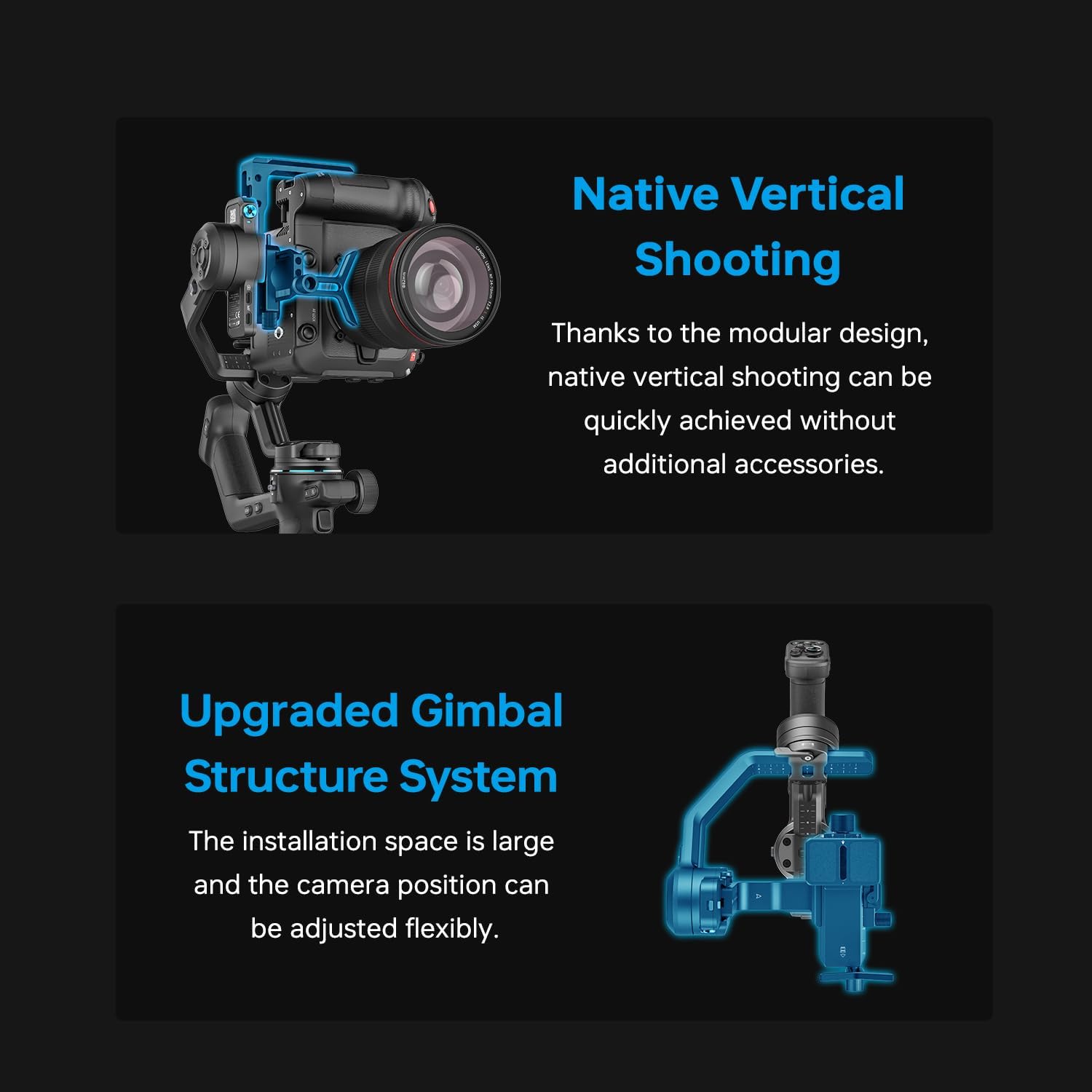
Figure 5: Native vertical shooting setup on the SCORP-C2 gimbal.
6.3 Fast Bluetooth Control
Pair your DSLR or mirrorless camera via Bluetooth to wirelessly start/stop recording or trigger focus instantly with a single press of the shutter button on the gimbal.
6.4 A-B Point Trajectory Memory
Preset two points (A and B) for camera movement paths with customizable speed, angle, and dwell time, enabling precise, repeatable shots.
6.5 Auto Rotation
The gimbal is capable of automatic, smooth rotation, perfect for creative shots like 'Inception' mode.
7. Wartung
- Reinigung: Use a soft, dry cloth to clean the gimbal. Avoid harsh chemicals.
- Lagerung: Store the gimbal in its protective case in a cool, dry place when not in use. Ensure all axes are locked for compact storage.
- Batteriepflege: Laden Sie den Akku regelmäßig auf, auch wenn er nicht benutzt wird, um seine Lebensdauer zu erhalten. Vermeiden Sie es, den Akku über längere Zeiträume vollständig zu entladen.
8. Fehlerbehebung
- Gimbal nicht im Gleichgewicht: Ensure all axes are unlocked during balancing. Recheck camera position and weight distribution.
- Motors vibrating/overheating: This often indicates improper balancing. Rebalance the gimbal carefully.
- Probleme mit der Bluetooth-Verbindung: Ensure the camera's Bluetooth is enabled and the gimbal is in pairing mode. Refer to your camera's manual for specific Bluetooth instructions.
- Unexpected movements: Check for any obstructions or loose connections. Ensure the gimbal firmware is up to date.
9. Spezifikationen
| Besonderheit | Detail |
|---|---|
| Modellnummer | SCORP-C2 |
| Tragfähigkeit | Bis zu 7.71 kg (3.5 Pfund) |
| Artikelgewicht | 2.91 Pfund |
| Technische Daten | 6.91 x 9.8 x 13.56 Zoll |
| Gefaltete Größe | 11.77 x 2.59 x 9.95 Zoll (verstaut und verriegelt) |
| Batterie | 1 Lithium-Ionen-Akku erforderlich |
| Akkulaufzeit | Bis zu 14 Stunden |
| AI-Tracking | Built-in AI 4.0 tracking module (gesture & face tracking up to 59ft) |
| Vertikales Schießen | Native vertical shooting via modular design |
| Konnektivität | Bluetooth camera control |
10. Garantie und Support
For detailed warranty information, firmware updates, and additional support resources, please visit the official FeiyuTech website. You can also find comprehensive video tutorials and FAQs there.
Offizieller FeiyuTech-Bericht WebWebsite: Besuchen Sie den FeiyuTech Store


