1. Einleitung
This manual provides detailed instructions for the LFF DAB Plus Digital FM Radio. It covers setup, operation, maintenance, and troubleshooting to ensure optimal performance and user experience. Please read this manual thoroughly before using the device.

Front view of the LFF DAB Plus Digital FM Radio, showing the speaker grille, color display, and extended antenna.
2. Packungsinhalt
Bitte prüfen Sie das Paket auf folgende Artikel:
- 1 x LFF DAB Plus Digital FM Radio
- 1 x Netzteil
- 1 x Kurzanleitung
3. Produktüberschreitungview
Machen Sie sich mit den Komponenten und Bedienelementen des Radios vertraut.
3.1 Hauptmerkmale

This diagram illustrates the radio's key functions: DAB+ radio, 60 station presets, FM radio, sleep timer, headphone jack, Bluetooth connectivity, full-color screen, and dual alarm capability.
3.2 Bedienelemente und Anschlüsse

Oben und seitlich view of the radio, showing control buttons and knobs on the top panel, and the 3.5mm headphone jack located on the side.
Refer to the diagram above for the location of the following:
- Netzschalter: Schaltet das Radio ein/aus.
- Modus-Taste: Schaltet zwischen DAB+, FM und Bluetooth-Modus um.
- Tune-/Select-Knopf: Rotates to tune stations or navigate menus, press to select.
- Lautstärkeregler: Regelt die Lautstärke.
- Preset-Tasten: For saving and recalling favorite stations.
- Alarm/Sleep Timer Button: Greift auf die Einstellungen für Wecker und Schlaftimer zu.
- Farbanzeige: Zeigt Senderinformationen, Uhrzeit und Menüoptionen an.
- Kopfhöreranschluss (3.5 mm): Zum privaten Hören.
- DC-Eingangsanschluss: Zum Anschließen des Netzteils.
- Teleskopantenne: Für einen besseren Radioempfang.
4. Einrichtung
4.1 Einschalten
The radio can be powered by the included AC adapter or by batteries.
- Wechselstromversorgung: Connect the AC power adapter to the DC IN port on the back of the radio and plug it into a wall outlet.
- Batterieleistung: Open the battery compartment on the back of the radio and insert 4 x 1.5V AA (LR6) batteries, ensuring correct polarity.
Zurück view of the radio, detailing the battery compartment for 4x AA batteries, the AC adapter input (5V/1000mA), and the 360° rotatable antenna. Product dimensions are also indicated.
4.2 Antenneneinstellung
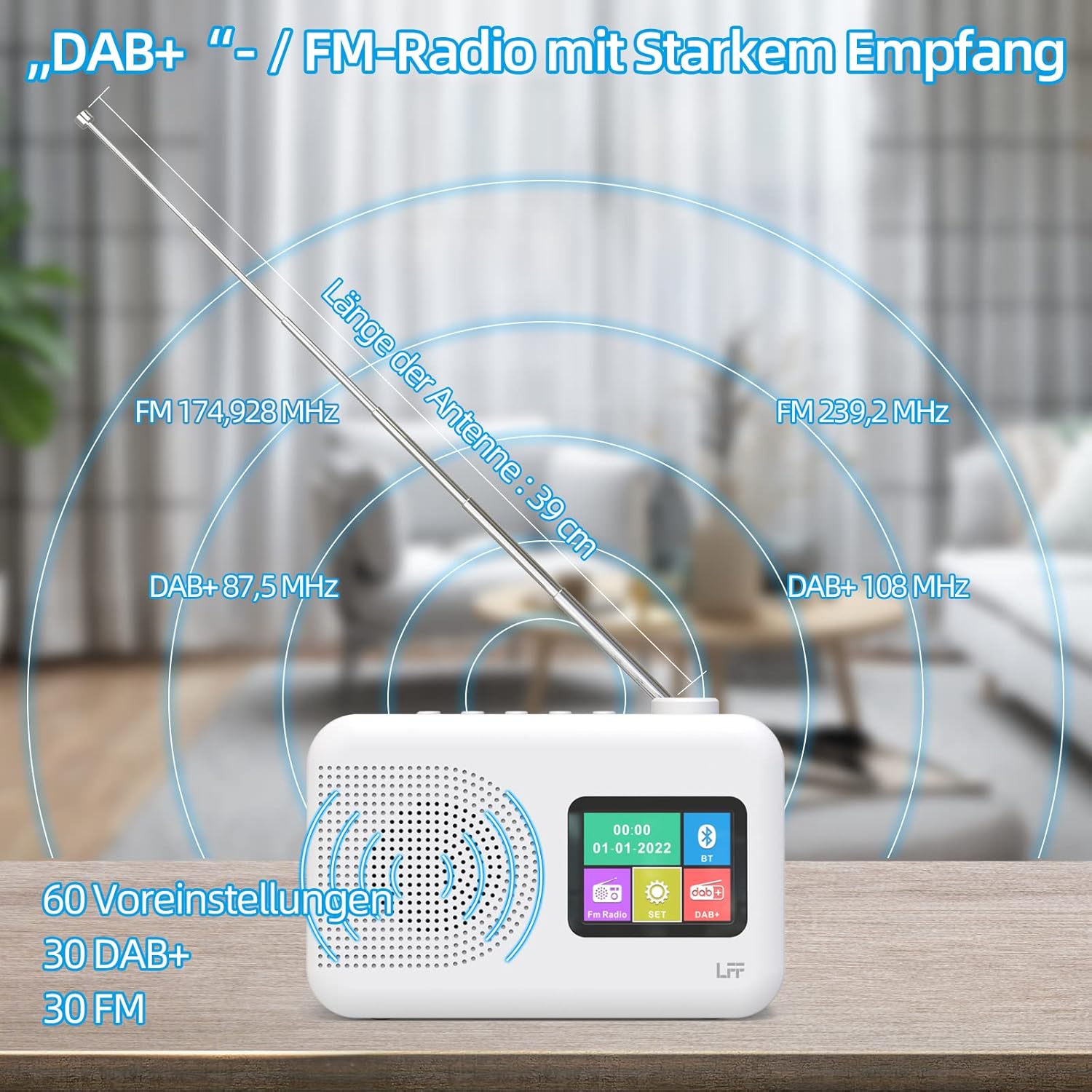
Extend the telescopic antenna fully (approximately 39 cm) and adjust its angle for optimal reception, especially for DAB+ and FM stations.

This diagram illustrates the radio's strong DAB+ and FM reception capabilities with the fully extended 39cm antenna, showing frequency ranges and the capacity for 60 total presets (30 DAB+, 30 FM).
4.3 Erster Scan (DAB+)
- Schalten Sie das Radio ein.
- Ensure the mode is set to DAB+. If not, press the Modus Taste zum Wechseln.
- The radio will automatically perform a full scan for available DAB+ stations. This may take a few minutes.
- Sobald der Scan abgeschlossen ist, zeigt das Radio eine Liste der gefundenen Sender an.
5. Bedienungsanleitung
5.1 DAB+ Radiomodus
- Drücken Sie die Modus Taste zur Auswahl des DAB+-Modus.
- Drehen Sie den Einstellen/Auswählen knob to browse through the available stations.
- Drücken Sie die Einstellen/Auswählen Drehknopf zur Senderauswahl.
- Voreinstellungen speichern: To save a station, press and hold a Vorgabe button until the display confirms. To recall, briefly press the corresponding Vorgabe button. Up to 30 DAB+ stations can be saved.
5.2 FM-Radio-Modus
- Drücken Sie die Modus Taste, um den FM-Modus auszuwählen.
- Drehen Sie den Einstellen/Auswählen Drehknopf zur manuellen Frequenzeinstellung.
- Halten Sie die Einstellen/Auswählen knob for a few seconds to auto-scan for the next available station.
- Voreinstellungen speichern: Similar to DAB+ mode, press and hold a Vorgabe button to save, and briefly press to recall. Up to 30 FM stations can be saved.
5.3 Bluetooth-Modus

This diagram illustrates the three primary playback options for the radio: through its internal speaker, via Bluetooth connection to an external device, or using headphones connected to the headphone jack.
- Drücken Sie die Modus button to select Bluetooth mode. The display will show "Bluetooth Pairing" or similar.
- Aktivieren Sie auf Ihrem externen Gerät (z. B. Smartphone) Bluetooth und suchen Sie nach verfügbaren Geräten.
- Select "LFF Radio" (or similar name) from the list to pair.
- Sobald die Geräte gekoppelt sind, können Sie Audio von Ihrem Gerät über den Lautsprecher des Radios abspielen.
- Notiz: This radio acts as a Bluetooth receiver. It does not support connecting to Bluetooth headphones or other Bluetooth speakers.
5.4 Sleeptimer
Der Sleep-Timer sorgt dafür, dass sich das Radio nach einer festgelegten Zeit automatisch ausschaltet.

This image depicts the sleep timer function, offering selectable durations of 15, 30, 45, 60, 90, and 120 minutes before the radio automatically powers off.
- Drücken Sie die Alarm/Sleep Timer button repeatedly to cycle through sleep timer options (15 min, 30 min, 45 min, 60 min, 90 min, 120 min, OFF).
- Select your desired duration. The radio will turn off automatically after this time.
5.5 Wecker
The radio features a dual alarm function.
- Halten Sie die Alarm/Sleep Timer Taste zum Aufrufen der Alarmeinstellungen.
- Verwenden Sie die Einstellen/Auswählen knob to set the alarm time, alarm source (DAB+, FM, or buzzer), and volume.
- Drücken Sie die Einstellen/Auswählen Drehknopf zum Bestätigen der einzelnen Einstellungen.
- Repeat the process for the second alarm if needed.
5.6 Kopfhörernutzung
Plug 3.5mm headphones into the headphone jack on the side of the radio for private listening. The internal speaker will automatically mute.
6. Wartung
6.1 Reinigung
- Wipe the radio's surface with a soft, dry cloth.
- Verwenden Sie keine Scheuermittel, Wachse oder Lösungsmittel, da diese die Oberfläche beschädigen können.
6.2 Batteriewechsel
When using battery power, replace all four AA batteries when the low battery indicator appears on the display or when performance degrades.
- Ensure the radio is turned off and disconnected from AC power.
- Öffnen Sie den Batteriefachdeckel auf der Rückseite.
- Entfernen Sie alte Batterien und entsorgen Sie diese ordnungsgemäß.
- Insert new 4 x 1.5V AA (LR6) batteries, observing correct polarity (+/-).
- Schließen Sie den Batteriefachdeckel fest.
6.3 Displayschutzfolie
The radio's display comes with a transparent protective film. For optimal clarity, gently peel off this film before first use.
7. Fehlerbehebung
Sollten Sie auf Probleme stoßen, konsultieren Sie bitte die folgenden häufigen Probleme und Lösungen:
| Problem | Mögliche Ursache | Lösung |
|---|---|---|
| Kein Strom | AC adapter not connected, batteries depleted or incorrectly inserted. | Überprüfen Sie den Anschluss des Netzteils. Tauschen Sie die Batterien aus oder stellen Sie die richtige Polarität sicher. |
| Schlechter Radioempfang | Antenna not extended, weak signal area, interference. | Fully extend and adjust the telescopic antenna. Move the radio to a different location. Avoid sources of interference. |
| Bluetooth stellt keine Verbindung her | Radio not in Bluetooth mode, device too far, already paired with another device. | Ensure radio is in Bluetooth mode. Keep devices within range. Disconnect from other devices. |
| Kein Ton | Volume too low, headphones connected, mute activated. | Lautstärke erhöhen. Kopfhörer abziehen. Prüfen, ob die Stummschaltung aktiviert ist. |
8. Spezifikationen
- Marke: LFF-Erweiterung
- Modell: DAB Plus Digital FM Radio
- Farbe: Weiß
- Konnektivitätstechnologie: Bluetooth
- Abmessungen (L x B x H): 16.1 cm x 5.9 cm x 10.9 cm
- Tuning-Technologie: TUPFEN
- Energiequelle: AC Adapter (5V/1000mA) or 4 x 1.5V AA (LR6) Batteries
- Unterstützte Radiobänder: DAB+, UKW
- DAB+ Frequenzbereich: 174.928 - 239.2 MHz
- FM-Frequenzbereich: 87.5 - 108 MHz
- Voreinstellungen: 30 DAB+, 30 UKW
- Antennenlänge: 39 cm (extendable)
- Besondere Merkmale: DAB Plus Radio, Sleep Timer, Dual Alarm, Headphone Jack, Color Display
- Enthaltene Komponenten: DAB Digital Radio, AC Power Adapter, Quick Start Guide
9. Garantie und Support
For any quality-related issues or technical support, please contact the seller directly. We are committed to resolving any problems you may encounter with your LFF DAB Plus Digital FM Radio.


