Einführung
The Arcade1Up Super PAC-MAN Partycade is a portable and versatile arcade machine designed for easy setup and enjoyment in various environments. It comes fully assembled and offers multiple display options, including tabletop, door hanging, and wall mounting. This Partycade features a 17-inch color LCD display and authentic controls, providing a classic arcade experience. It includes 10 iconic games: PAC-MAN, PAC-LAND, PAC-MANIA, DIG DUG, DIG DUG II, MAPPY, ROMPERS, ROLLING THUNDER, and NEW RALLY-X.

Abbildung 1: Vorderseite view of the Arcade1Up Super PAC-MAN Partycade.
Hauptmerkmale
- 10 Klassische Spiele: Enjoy a collection of 10 pre-installed arcade games, including Super PAC-MAN, PAC-MAN, PAC-LAND, MAPPY, DIG DUG, DIG DUG II, ROMPERS, ROLLING THUNDER, and NEW RALLY-X.
- Beleuchtetes Leuchtschild: Features an illuminated marquee displaying the "Super PAC-MAN" logo, enhancing the authentic arcade aesthetic.
- Vielseitige Montagemöglichkeiten: Includes hardware for door hanging, wall mounting, and detachable legs for tabletop play, offering flexible placement.
- Clear Deck Protector: A durable clear protector covers the control panel, safeguarding the joystick and buttons from wear.
- Kompaktes Design: With dimensions of 19.45” D x 14.49” W x 28.74” H, the Partycade is designed to fit easily in various spaces.

Abbildung 2: Nahaufnahme view of the control panel and light-up marquee.
Aufstellen
Montageoptionen
The Arcade1Up Partycade offers three primary setup configurations:
- Brettspiel: Attach the included detachable legs to the base of the unit for stable placement on any flat surface, such as a table or counter.
- Türbehang: Utilize the provided door hanging hardware to suspend the Partycade securely over a standard door. Ensure the door frame is sturdy enough to support the unit's weight (approximately 32.4 pounds).
- Wandmontage: For a more permanent installation, use the wall mounting hardware to affix the Partycade directly to a wall. It is crucial to mount the unit into wall studs for maximum stability and safety. Consult a professional if unsure about wall mounting procedures.

Figure 3: The Partycade unit displayed in a wall-mounted configuration.
Erstes Einschalten
Once the unit is securely placed or mounted, connect the power adapter to the designated port on the back of the Partycade and plug it into a standard electrical outlet. Locate the ON/OFF switch on the control panel and toggle it to the 'ON' position. The screen will illuminate, and the Arcade1Up logo will appear, indicating the unit is powering on.
Bedienungsanleitung
Spielauswahl
Upon powering on, the main game selection menu will be displayed. Use the joystick to navigate through the list of 10 available games. Press the 'A' button (typically the primary action button) to select your desired game. To return to the main menu from a game, hold the 'A' button for 5 seconds.
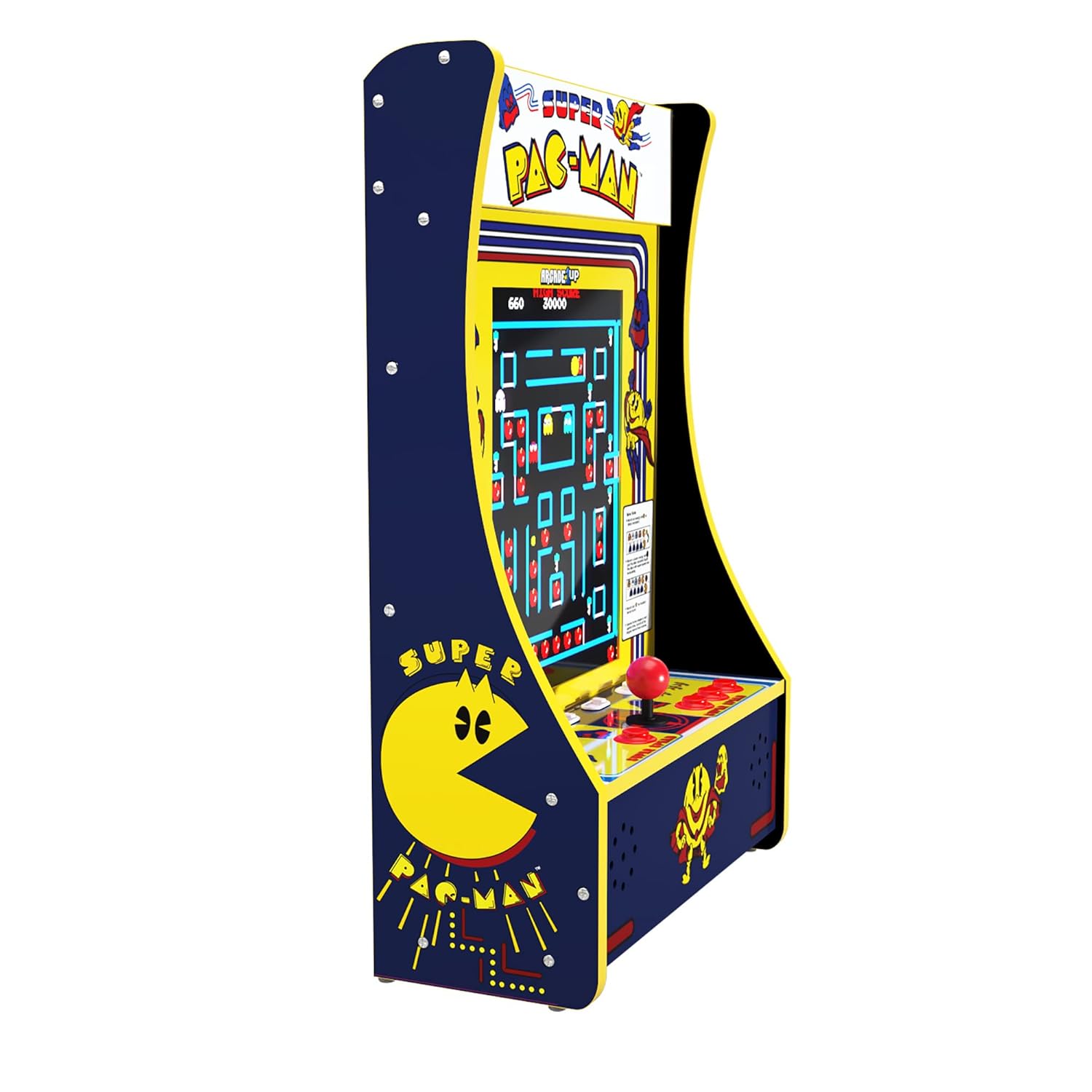
Figure 4: The game selection screen showing the 10 available titles.
Spielablauf
Each game utilizes the joystick for directional input and the various buttons for actions such as firing, jumping, or special abilities. Refer to the on-screen instructions or in-game tutorials for specific controls for each title. The unit supports both single-player and two-player modes, depending on the selected game. Press the 'Player 1' or 'Player 2' buttons to initiate a game.
Bedienelemente
The control panel features a classic arcade joystick for directional input and multiple action buttons. The layout is designed to replicate the feel of original arcade machines. A clear deck protector is installed over the control panel to ensure longevity and protect the components during intense gameplay.

Abbildung 5: Ausführlich view of the joystick and action buttons on the control panel.
Lautstärkeregelung
The volume can be adjusted using the dedicated volume buttons located on the control panel, typically labeled 'VOL+' and 'VOL-'. Adjust the volume to a comfortable level for your playing environment.
Wartung
To ensure the longevity and optimal performance of your Arcade1Up Partycade, follow these simple maintenance guidelines:
- Reinigung: Use a soft, dry cloth to wipe down the exterior surfaces, including the screen and control panel. For stubborn smudges, a slightly damp cloth with mild, non-abrasive cleaner can be used, ensuring no liquid seeps into the unit.
- Staubschutz: Keep the unit in a clean, dust-free environment. Regularly dust the vents and openings to prevent accumulation that could affect performance.
- Lagerung: Wenn Sie das Gerät über einen längeren Zeitraum lagern, trennen Sie es vom Stromnetz und lagern Sie es an einem kühlen, trockenen Ort, geschützt vor direkter Sonneneinstrahlung und extremen Temperaturen.
Fehlerbehebung
No Power / Screen Blank
If the unit does not power on or the screen remains blank after turning it on:
- Stellen Sie sicher, dass der Netzadapter sowohl an das Gerät als auch an eine funktionierende Steckdose fest angeschlossen ist.
- Prüfen Sie, ob die Steckdose funktioniert, indem Sie sie mit einem anderen Gerät testen.
- Check the ON/OFF switch on the control panel to ensure it is fully engaged.
Joystick or Button Unresponsive
If the joystick or buttons are not responding correctly during gameplay:
- Restart the unit by turning it off and then on again.
- Ensure the control panel is clean and free of debris that might obstruct button movement.
- While rare, if a joystick feels loose, it may require tightening. This typically involves removing the clear deck protector and gently tightening the base of the joystick. If uncomfortable performing this, contact customer support.
Spiel friert ein oder stürzt ab
If a game freezes or the unit becomes unresponsive:
- Hold the 'Player 1' button for 5 seconds to reset the current game.
- If the issue persists, power cycle the unit by turning it off, waiting 10 seconds, and then turning it back on.
Technische Daten
| Besonderheit | Detail |
|---|---|
| Marke | ARCADE1UP |
| Modellnummer | PAC-D-10182 |
| Plattform | Nicht maschinenspezifisch |
| Controllertyp | Joystick, Tastensteuerung |
| Bildschirmgröße | 17 Zoll |
| Hardware-Schnittstelle | Blitz |
| Produktabmessungen (L x B x H) | 19.45 x 14.49 x 28.74 Zoll |
| Artikelgewicht | 32.4 Pfund |
| Material | Plastik |
| Anzeigetyp | LCD |
Garantie und Support
For detailed warranty information, product registration, or technical support, please refer to the official Arcade1Up webBesuchen Sie die Website oder kontaktieren Sie den Kundendienst. Bewahren Sie Ihren Kaufbeleg für eventuelle Garantieansprüche auf.
Weitere Informationen und häufig gestellte Fragen finden Sie unter ARCADE1UP Store auf Amazon.


