1. Einleitung
Thank you for choosing the Marantz Model 40n Integrated Stereo Amplifier. Dies amplifier is designed to deliver exceptional audio performance with modern connectivity options, including HEOS Built-in for seamless music streaming. This manual provides essential information for setting up, operating, and maintaining your Model 40n to ensure optimal performance and longevity.
2. Wichtige Sicherheitshinweise
Please read these safety instructions carefully before using your Marantz Model 40n. Keep this manual for future reference.
- Energiequelle: Schließen Sie das Gerät nur an eine Wechselstromsteckdose der Spannung an.tage auf der Rückseite angegeben.
- Belüftung: Ensure adequate ventilation. Do not block ventilation openings. Maintain a minimum distance of 10 cm (4 inches) from other objects.
- Wasser und Feuchtigkeit: Setzen Sie das Gerät weder Regen noch Feuchtigkeit oder übermäßiger Luftfeuchtigkeit aus. Stellen Sie keine mit Flüssigkeiten gefüllten Gegenstände, wie z. B. Vasen, auf das Gerät.
- Hitze: Vermeiden Sie es, das Gerät in der Nähe von Wärmequellen wie Heizkörpern, Heizlüftern, Öfen oder anderen Geräten aufzustellen, die Wärme erzeugen.
- Reinigung: Ziehen Sie vor der Reinigung den Netzstecker. Verwenden Sie ausschließlich ein trockenes Tuch.
- Wartung: Versuchen Sie nicht, dieses Produkt selbst zu warten. Überlassen Sie alle Wartungsarbeiten qualifiziertem Servicepersonal.
- Kabel: Achten Sie darauf, dass die Stromkabel nicht betreten oder eingeklemmt werden, insbesondere an Steckern, Steckdosen und an der Stelle, an der sie aus dem Gerät austreten.
3. Packungsinhalt
Überprüfen Sie, ob alle Artikel im Paket vorhanden sind:
- Marantz Modell 40n Integrierte Stereoanlage Ampschwerer
- Fernbedienung
- Netzkabel
- FM/AM Antennas (if applicable to region)
- Kurzanleitung
- Sicherheitshinweise
4. Produktüberschreitungview
4.1 Frontplatte

Die Frontplatte bietet Zugang zu wichtigen Bedienelementen und Anzeigen:
- Ein-/Ausschalter (⑂): Schaltet das Gerät ein oder aus.
- Eingangsauswahl: Rotates to choose the desired audio input source.
- Direkte Quelle: Bypasses tone controls for the purest audio signal.
- Bass/Treble/Balance Controls: Adjusts audio characteristics.
- Lautstärkeregler: Steuert die Gesamtausgangslautstärke.
- Anzeige: Zeigt den aktuellen Eingangspegel, die Lautstärke und weitere Statusinformationen an.
- Kopfhöreranschluss: Zum privaten Musikhören mit Kopfhörern.
4.2 Rückseite
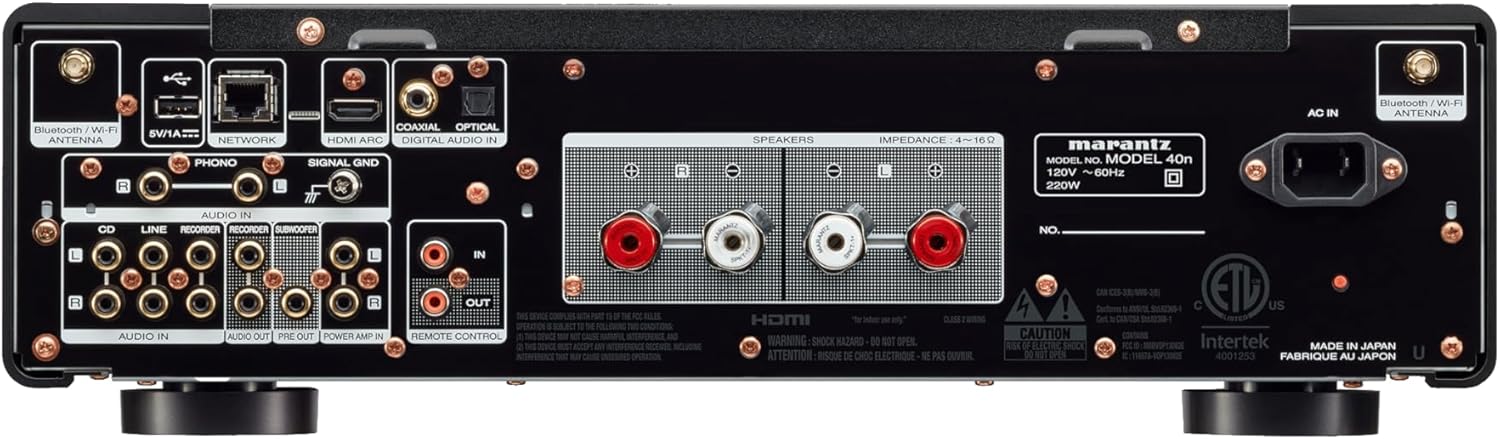
The rear panel houses all connectivity options:
- Lautsprecheranschlüsse: Connect your passive loudspeakers.
- Analog Audio Inputs (CD, LINE, RECORDER IN): For connecting external analog audio sources.
- PHONO-Eingang (MM): For connecting a turntable with a moving magnet cartridge. Includes a ground terminal.
- Digital Audio Inputs (COAXIAL, OPTICAL): For connecting digital audio sources like CD players or TVs.
- HDMI ARC-Eingang: For connecting to a TV to receive audio.
- Netzwerkanschluss (Ethernet): Für kabelgebundene Netzwerkverbindung.
- USB-A-Anschluss: Zum Anschließen von USB-Speichergeräten.
- Bluetooth/Wi-Fi Antenna Terminals: Für drahtlose Verbindungen.
- PRE-OUT: Zum Anschluss an eine externe Stromversorgung ampschwerer.
- LEISTUNG AMP IN: Allows the Model 40n to function as a power ampschwerer.
- SUBWOOFER-AUSGANG: Zum Anschluss eines aktiven Subwoofers.
- REMOTE CONTROL IN/OUT: For integration into a custom control system.
- AC-EINGANG: Netzkabelanschluss.
5. Einrichtung
5.1 Platzierung
Place the Model 40n on a stable, level surface with adequate ventilation. Avoid direct sunlight, heat sources, and areas with high humidity or dust. Ensure there is sufficient space around the unit for proper airflow.
5.2 Anschließen von Lautsprechern
The Model 40n supports a speaker impedance range of 4-16 ohms. Use high-quality speaker cables for optimal sound.
- Turn off the Model 40n and unplug the power cord.
- Connect the positive (+) terminal (red) of the left speaker to the L+ terminal on the ampschwerer.
- Connect the negative (-) terminal (black) of the left speaker to the L- terminal on the ampschwerer.
- Repeat for the right speaker, connecting to the R+ and R- terminals.
- Ensure all connections are secure and there are no stray wire strands touching other terminals.

5.3 Anschließen von Audioquellen
Connect your audio components to the appropriate input terminals on the rear panel.
- CD-Spieler: Use RCA cables to connect the CD player's analog output to the CD Eingangsklemmen.
- Other Analog Sources (e.g., Tuner, Cassette Deck): Verwenden Sie RCA-Kabel, um die Verbindung herzustellen. LINIE or RECORDER IN Klemmen.
- Drehscheibe: Connect your turntable's RCA outputs to the TELEFON input terminals. If your turntable has a ground wire, connect it to the SIGNAL-ERDE terminal. Ensure your turntable has a Moving Magnet (MM) cartridge, as the Model 40n's phono input is designed for MM.
- Digital Sources (e.g., TV, Blu-ray Player): Use an optical or coaxial digital cable to connect to the OPTIK or COAXIAL DIGITAL IN Klemmen.
- TV (HDMI ARC): Verbinden Sie ein HDMI-Kabel vom HDMI-ARC-Anschluss Ihres Fernsehers mit dem HDMI ARC input on the Model 40n. This allows your TV to send audio to the ampschwerer.
- USB Speicher: Stecken Sie einen USB-Stick in den USB-A port for playing audio files.
5.4 Netzwerkverbindung
The Model 40n supports both wired and wireless network connections for streaming services and firmware updates.
- Kabelverbindung: Verbinden Sie Ihren Router mit einem Ethernet-Kabel mit dem NETZWERK Hafen.
- Drahtlose Verbindung (Wi-Fi): Screw the supplied Wi-Fi/Bluetooth antennas onto the corresponding terminals. Follow the on-screen instructions or use the HEOS app for initial Wi-Fi setup.
5.5 Stromanschluss
Once all audio and network connections are made, connect the supplied power cord to the AC-EINGANG terminal on the rear panel and then to a wall outlet.
6. Bedienungsanleitung
6.1 Grundlegende Bedienung
- Einschalten: Drücken Sie den Netzschalter an der Vorderseite oder auf der Fernbedienung.
- Eingabe auswählen: Rotate the Input Selector knob or use the remote control to choose your desired audio source (e.g., CD, PHONO, HDMI ARC, HEOS).
- Lautstärke anpassen: Rotate the Volume knob or use the Volume +/- buttons on the remote control to set the listening level.
6.2 Tone Controls and Source Direct
- Bass/Höhen/Balance: Use the corresponding knobs on the front panel to fine-tune the audio output to your preference.
- Direkte Quelle: Engage the Source Direct switch to bypass the bass, treble, and balance circuits. This provides a purer, uncolored audio signal, ideal for audiophile listening.
6.3 Music Streaming with HEOS Built-in
The Model 40n features HEOS Built-in, allowing access to a wide range of streaming services and multi-room audio capabilities.


- Download HEOS App: Download the free HEOS app to your smartphone or tablet from the App Store or Google Play.
- Setup HEOS: Follow the in-app instructions to connect your Model 40n to your home network and set up your streaming accounts (e.g., Spotify, Apple Music, Tidal).
- Stream Music: Use the HEOS app to browse and play music from various online services, your local music library, or other HEOS-enabled devices.
6.4 AirPlay 2 and Bluetooth
- Luftspiel 2: From an Apple device, select the Model 40n as an AirPlay speaker to stream audio.
- Bluetooth: Enable Bluetooth on your mobile device, search for 'Marantz Model 40n', and pair.
6.5 Sprachsteuerung
The Model 40n supports voice control via Amazon Alexa, Google Assistant, and Apple Siri when integrated with compatible devices.

- Fähigkeit/Aktion aktivieren: Enable the Marantz HEOS skill/action in your Amazon Alexa or Google Home app.
- Konto verknüpfen: Link your HEOS account within the respective voice assistant app.
- Befehle verwenden: You can now use voice commands to control playback, volume, and input selection. For Siri, use AirPlay 2 from your Apple device.
7. Wartung
To ensure the longevity and optimal performance of your Model 40n, follow these maintenance guidelines:
- Reinigung: Disconnect the power cord before cleaning. Use a soft, dry cloth to wipe the exterior surfaces. Do not use abrasive cleaners, solvents, or chemical sprays, as they may damage the finish.
- Belüftung: Regularly check that the ventilation openings are not blocked by dust or debris. Use a soft brush or vacuum cleaner with a brush attachment to gently clear any obstructions.
- Verbindungen: Periodically check all cable connections to ensure they are secure. Loose connections can lead to signal degradation or intermittent issues.
- Lagerung: Wenn Sie das Gerät über einen längeren Zeitraum lagern, ziehen Sie den Netzstecker und decken Sie es ab, um es vor Staub zu schützen.
8. Fehlerbehebung
If you encounter issues with your Model 40n, refer to the following common problems and solutions:
| Problem | Mögliche Ursache | Lösung |
|---|---|---|
| Kein Strom | Netzkabel nicht angeschlossen; Steckdose defekt | Vergewissern Sie sich, dass das Netzkabel fest angeschlossen ist; versuchen Sie es mit einer anderen Steckdose. |
| Kein Ton | Falscher Eingang ausgewählt; Lautsprecherkabel lose; Lautstärke zu niedrig; Stummschaltung aktiviert | Wählen Sie den richtigen Eingang; Überprüfen Sie die Lautsprecheranschlüsse; Erhöhen Sie die Lautstärke; Deaktivieren Sie die Stummschaltung. |
| Schlechte Tonqualität | Poor cable connections; Source Direct enabled; Speaker phase incorrect | Check all audio cable connections; Disable Source Direct to use tone controls; Verify speaker polarity (+ to + and - to -). |
| Cannot connect to network/HEOS | Wi-Fi antennas not connected; Incorrect Wi-Fi password; Router issue | Ensure antennas are attached; Re-enter Wi-Fi password in HEOS app; Restart your router and the Model 40n. |
| Fernbedienung funktioniert nicht | Batterien leer; Blockade zwischen Fernbedienung und Gerät | Replace batteries; Remove any obstructions; Ensure remote is pointed at the unit's IR sensor. |
Sollte das Problem nach Anwendung dieser Lösungsansätze weiterhin bestehen, wenden Sie sich bitte an den Marantz-Kundendienst.
9. Spezifikationen
Key technical specifications for the Marantz Model 40n Integrated Stereo AmpReiniger:
- Marke: Marantz
- Modellnummer: MODEL40N
- Anzahl der Kanäle: 2
- Ausgangsleistung: 70 watts per channel (8 ohms, 20 Hz - 20 kHz, 0.07% THD)
- Schnittstellentyp: USB
- Material: SECC, Aluminum
- Produktabmessungen: 17 x 17.4 x 5.1 Zoll (43.18 x 44.2 x 12.95 cm)
- Artikelgewicht: 36.8 Pfund (16.7 kg)
- UPC: 747192135959
- Konnektivität: HDMI ARC, Phono (MM), Analog RCA, Optical, Coaxial, USB-A, Ethernet, Wi-Fi, Bluetooth, HEOS Built-in
- Sprachsteuerung: Works with Amazon Alexa, Google Assistant, Apple Siri
- Datum der Erstveröffentlichung: 24. Februar 2022
10. Garantie und Support
Marantz products are designed for reliability and performance. For warranty information, please refer to the warranty card included with your product or visit the official Marantz webWebsite.
For technical support, product registration, or service inquiries, please visit the Marantz support page:
You can also find frequently asked questions and additional resources on their webWebsite.


