DAREU EK807G

DAREU EK807G Wireless TKL Mechanical Keyboard User Manual

Model: EK807G | Brand: DAREU

1. Einleitung

This manual provides comprehensive instructions for the DAREU EK807G Wireless TKL Mechanical Keyboard. Designed for office use, this keyboard features an aluminum alloy panel, function keys, and stable 2.4G wireless connectivity, compatible with PC, Mac, and Windows systems. Please read this manual thoroughly to ensure proper use and longevity of your device.

Lieferumfang

  • DAREU EK807G Wireless TKL Mechanical Keyboard
  • USB-Empfänger (2.4 G)
  • Tastenkappenabzieher
  • Bedienungsanleitung
DAREU EK807G Wireless TKL Mechanical Keyboard on a desk setup

Image 1.1: The DAREU EK807G Wireless TKL Mechanical Keyboard in a typical office setup.

2. Einrichtung

2.1 Inserting Batteries and USB Receiver

The DAREU EK807G keyboard requires two AAA batteries (not included) for operation. The 2.4G USB receiver is conveniently stored within the keyboard's battery compartment.

  1. Suchen Sie die Abdeckung des Batteriefachs an der Unterseite der Tastatur.
  2. Remove the cover to access the battery slots and the stored USB receiver.
  3. Carefully remove the 2.4G USB receiver from its storage slot.
  4. Legen Sie zwei AAA-Batterien in das Batteriefach ein und achten Sie dabei auf die richtige Polarität (+/-).
  5. Bringen Sie die Abdeckung des Batteriefachs wieder an.
Underside of DAREU EK807G keyboard showing battery compartment and USB receiver

Image 2.1: The battery compartment and USB receiver storage on the keyboard's underside.

2.2 Verbindung zu Ihrem Gerät herstellen

The keyboard uses a 2.4G wireless connection for stable and reliable performance.

  1. Stecken Sie den 2.4-GHz-USB-Empfänger in einen freien USB-Anschluss Ihres Computers, Laptops oder Tablets.
  2. Locate the ON/OFF switch on the upper side of the keyboard.
  3. Schieben Sie den Schalter in die Position „EIN“.
  4. Your device should automatically detect and connect to the keyboard. No additional drivers are typically required.
DAREU EK807G keyboard overview with 2.4G wireless icon

Image 2.2: The keyboard features 2.4G wireless connectivity.

3. Bedienungsanleitung

3.1 Grundlagen des Tippens und Ergonomie

The DAREU EK807G features a classic TKL (Tenkeyless) 87-key layout, providing a comfortable typing experience. The keyboard is designed with an ergonomic 5° optimum slope when the folding holder is used, preventing wrist strain during long typing sessions. Anti-slide pads ensure stability.

This model is equipped with DAREU Red Switches, known for their linear and quiet operation, making them suitable for office and study environments where minimal noise is preferred.
Close-up of DAREU Red Switches on the keyboard

Image 3.1: The DAREU EK807G features quiet Red Switches for comfortable typing.

3.2 Function (Fn) Key Shortcuts

The keyboard includes 12 hotkeys accessible via the Fn key, allowing for quick access to various functions.

  • Fn+F1: Mein Computer
  • Fn+F2: Homepage
  • Fn+F3: E-Mail
  • Fn+F4: Kalkulator
  • Fn+F5: Stopp (Medien)
  • Fn+F6: Last Song (Media)
  • Fn+F7: Wiedergabe/Pause (Medien)
  • Fn+F8: Next Song (Media)
  • Fn+F9: Lautstärke verringern
  • Fn+F10: Lautstärke erhöhen
  • Fn+F11: Stumm
  • Fn+F12: Switch Left Win & Left Alt keys
Diagram showing Fn key combinations for shortcuts

Image 3.2: Shortcut keys activated by pressing the Fn key in combination with F1-F12.

3.3 Anti-Ghosting Technology

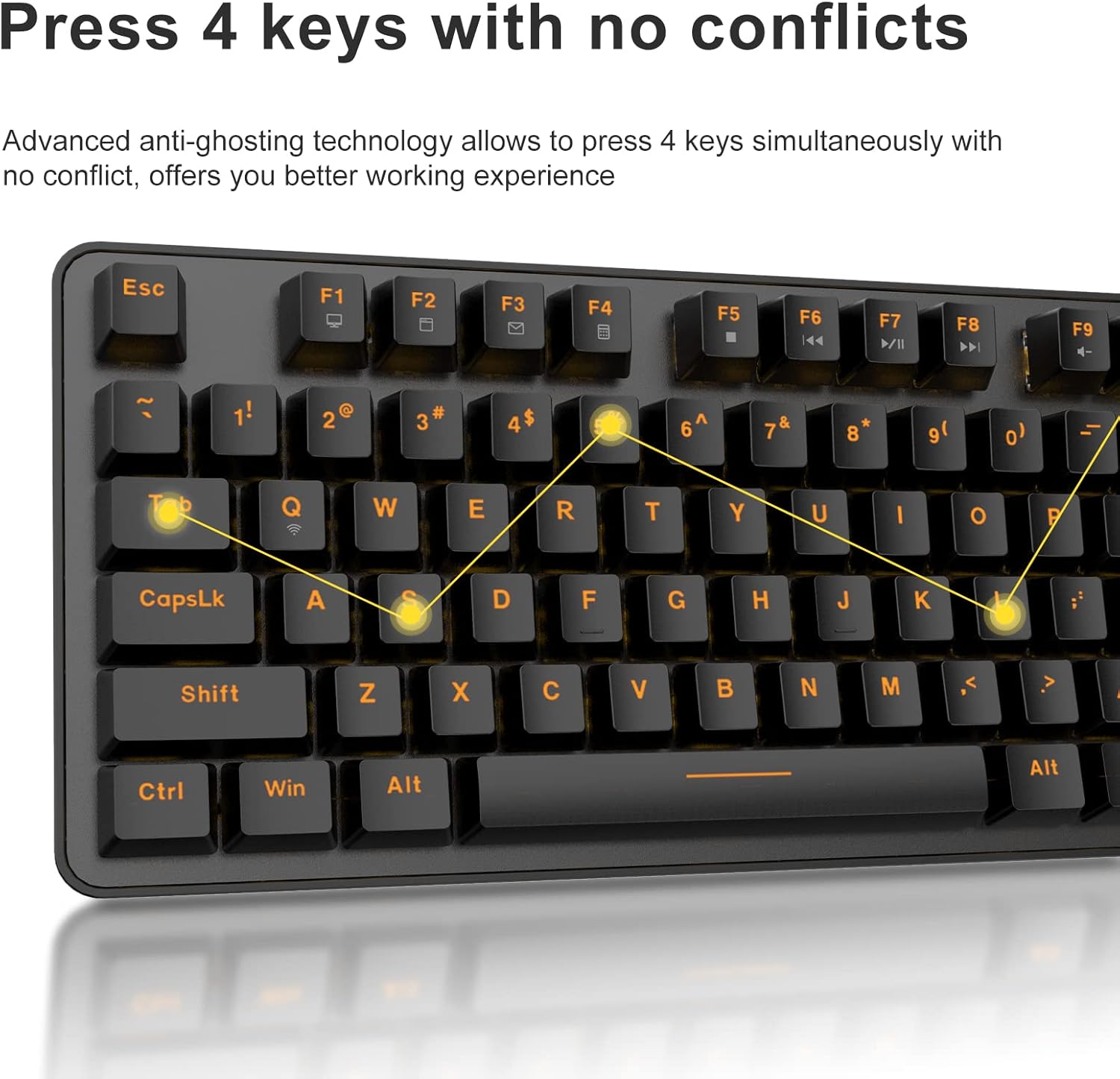
The DAREU EK807G features advanced anti-ghosting technology, allowing up to 6 keys to be pressed simultaneously without conflict. This ensures all your commands are registered accurately, improving efficiency.

Diagram illustrating anti-ghosting technology on the keyboard

Image 3.3: Anti-ghosting technology ensures multiple key presses are registered accurately.

3.4 Automatic Power Saving

To conserve battery life, the keyboard enters an automatic sleeping mode after 6 seconds of inactivity. To wake the keyboard, simply press any key. With this feature, the keyboard can last approximately 90 days of continuous use, and up to half a year between battery changes.

Image depicting long battery life and automatic sleep mode

Image 3.4: The keyboard features automatic power saving for extended battery life.

4. Wartung

4.1 Reinigung der Tastatur

Regelmäßige Reinigung trägt dazu bei, die Leistungsfähigkeit und das Aussehen der Tastatur zu erhalten.

  • Allgemeine Reinigung: Verwenden Sie ein weiches, trockenes Tuch, um die Oberfläche der Tastatur abzuwischen. Bei hartnäckigem Schmutz kann ein leicht dämpfendes Tuch hilfreich sein.amp Man kann ein Tuch mit milder Seife verwenden, wobei darauf zu achten ist, dass keine Flüssigkeit auf die Tastatur gelangt.
  • Tastenkappenreinigung: The DAREU EK807G features removable double-shot keycaps, which are resistant to fading and easy to clean. Use the included keycap puller to carefully remove keycaps. Clean them with a soft brush or a damp Reinigen Sie die Tastenkappen. Stellen Sie sicher, dass sie vollständig trocken sind, bevor Sie sie wieder anbringen.
  • Aluminum Alloy Panel: The aluminum alloy panel is designed to be sweat-resistant and anti-rust. Wipe it with a soft cloth to keep it clean.

5. Fehlerbehebung

5.1 Verbindungsprobleme

  • Tastatur reagiert nicht:
    • Ensure the keyboard's ON/OFF switch is in the "ON" position.
    • Check if the AAA batteries are correctly inserted and have sufficient charge. Replace if necessary.
    • Verify that the 2.4G USB receiver is securely plugged into a working USB port on your device. Try a different USB port.
    • Starten Sie Ihren Computer oder Ihr Gerät neu.
  • Unterbrechungsverbindung:
    • Ensure the keyboard is within the operating distance of 33 feet (10m) from the USB receiver.
    • Avoid placing the keyboard near strong electromagnetic interference sources (e.g., Wi-Fi routers, other wireless devices).

5.2 Wichtige Funktionsprobleme

  • Tasten werden nicht erkannt oder bleiben unerkannt:
    • While the keyboard has anti-ghosting for up to 6 keys, excessive simultaneous presses beyond this limit may not register.
    • Ensure keycaps are properly seated. If a key feels stuck, gently remove the keycap with the puller and reattach it.
    • Clean any debris under the keycaps (refer to Maintenance section).
  • Fn key shortcuts not working:
    • Ensure you are pressing the Fn key simultaneously with the desired F-key.
    • If Fn + F12 (Switch L-Win & L-Alt) was accidentally activated, press it again to revert the key functions.

6. Spezifikationen

MarkeDAREU
ModellnummerEK807G
TastaturbeschreibungMechanical (Red Switch)
Konnektivitätstechnologie2.4G Kabellos
ReichweiteBis zu 33 Fuß (10 m)
Kompatible GeräteLaptop, PC, Tablet (Mac, Windows, Chromebook)
Stromquelle2 x AAA-Batterien (nicht im Lieferumfang enthalten)
MaterialAluminum Alloy Panel
Technische Daten14.17"L x 5.31"B x 1.57"H (36.0 x 13.5 ​​x 4.0 cm)
Artikelgewicht1.65 Pfund (0.75 kg)
Besondere MerkmaleErgonomic design, Hotkeys, Multimedia Keys, Anti-ghosting, Removable Double-shot Keycaps

7. Garantie und Support

7.1 Garantieleistung

DAREU provides a 180-day warranty service for the EK807G Wireless TKL Mechanical Keyboard from the date of purchase. This warranty covers manufacturing defects and issues arising from normal use.

7.2 Kundendienst

If you encounter any problems during the use of your DAREU keyboard, please contact DAREU customer support. Our team is available to assist you with troubleshooting, product inquiries, and warranty claims.

Please refer to the contact information provided on the product packaging or the official DAREU webWebsite für die aktuellsten Supportkanäle.

Zugehörige Dokumente - EK807G

Vorview Dareu EK807G Tastatur Benutzerhandbuch
Benutzerhandbuch für die Dareu EK807G-Tastatur mit detaillierten Produktinformationen views, Einrichtungsanweisungen, Tastenkombinationen, Spezifikationen und Informationen zur FCC-Konformität.
Vorview Dareu Z82 Mechanische Tastatur – Benutzerhandbuch und Anleitung
Ausführliches Benutzerhandbuch für die mechanische Tastatur Dareu Z82 mit detaillierten Informationen zu Einrichtung, Anschlussmöglichkeiten (2.4 GHz, Bluetooth, kabelgebunden), Treiberinstallation und wichtigsten Funktionen für optimale Leistung.
Vorview DAREU EK75 Tastatur – Benutzerhandbuch – Funktionen und Spezifikationen
Benutzerhandbuch für das DAREU EK75 Keyboard, einschließlich Lieferumfang, physikalischer und elektrischer Spezifikationen sowie Produktbeschreibung. views und eine detaillierte Erklärung der Kombinationsfunktionstasten und der benutzerdefinierten Hintergrundbeleuchtungseinstellungen.
Vorview DAREU A87 Serie Mechanische Tastatur Benutzerhandbuch
Benutzerhandbuch für die mechanische Tastatur der DAREU A87-Serie, mit grundlegenden Informationen, Produktbeschreibung usw.viewBeleuchtungsmodi, Einrichtung, Installation und Treiberverwendung.
Vorview DAREU A87 Mechanische Tastatur mit drei Modi – Benutzerhandbuch
Ausführlicher Leitfaden für die mechanische Tastatur DAREU A87 Triple Mode, inklusive Einrichtung, Anschlussmöglichkeiten, Funktionen und Schalteraustausch. Enthält Garantieinformationen.
Vorview Dareu H101X Bluetooth Wireless Gamepad Benutzerhandbuch
Entdecken Sie das Benutzerhandbuch des Dareu H101X Bluetooth-Gamepads mit umfassenden Anweisungen zu Verbindung, Funktionen und Einrichtung auf PC, Switch, iOS, Mac und Android-Geräten. Erfahren Sie mehr über das 6-Achsen-Gyroskop, die Turbo-Funktion und die Xinput/Dinput-Modi für ein optimiertes Spielerlebnis.