1. Einleitung
This manual provides comprehensive instructions for the setup, operation, and maintenance of your Cherry MW 9100 Wireless Rechargeable Mouse. The MW 9100 is a compact, versatile mouse offering dual connectivity options (Bluetooth or 2.4 GHz USB receiver) and a convenient rechargeable battery.
Zu den Hauptmerkmalen gehören:
- Compact design with charging functionality.
- Flexible operation: use while charging via USB-C cable.
- Dual connectivity: Bluetooth or 2.4 GHz USB receiver.
- Magnetic storage for the USB receiver, ideal for travel.
- Adjustable DPI settings for varied usage.
2. Packungsinhalt
Überprüfen Sie, ob alle Artikel im Paket vorhanden sind:
- Cherry MW 9100 Wireless Rechargeable Mouse
- USB-C-Ladekabel
- 2.4 GHz USB-Empfänger
- Schutzhülle
- Bedienungsanleitung (dieses Dokument)
3. Einrichtung
3.1 Aufladen der Maus
The Cherry MW 9100 mouse features a built-in rechargeable battery. Before initial use, or when the battery is low, connect the included USB-C cable to the mouse and to a USB power source (e.g., computer USB port, USB wall adapter). The mouse can be used normally while charging.

Bild 3.1: Spitze view of the Cherry MW 9100 mouse, showing the charging indicator light.
3.2 Anschließen der Maus
The MW 9100 offers two connection methods: 2.4 GHz wireless via USB receiver or Bluetooth.
3.2.1 2.4-GHz-Funkverbindung
- Locate the USB receiver. It is magnetically stored in a compartment on the underside of the mouse.
- Stecken Sie den USB-Empfänger in einen freien USB-Port Ihres Computers.
- On the underside of the mouse, slide the switch to the "RF" position.
- Die Maus sollte sich automatisch mit Ihrem Computer verbinden.
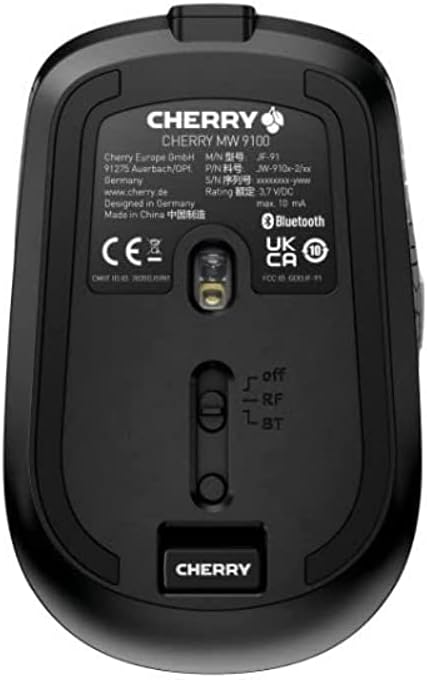
Bild 3.2: Underside of the Cherry MW 9100 mouse, highlighting the USB receiver storage and the connection mode switch.
3.2.2 Bluetooth-Verbindung
- On the underside of the mouse, slide the switch to the "BT" (Bluetooth) position.
- Press and hold the small pairing button located near the connection switch on the underside of the mouse until the LED indicator on the mouse starts blinking, indicating pairing mode.
- Öffnen Sie auf Ihrem Computer oder Gerät die Bluetooth-Einstellungen und suchen Sie nach neuen Geräten.
- Select "Cherry MW 9100" from the list of available devices to complete the pairing process.
4. Bedienungsanleitung
4.1 Grundfunktionen
The Cherry MW 9100 mouse features standard left and right click buttons, a scroll wheel (which also functions as a middle click button), and two side buttons for navigation (typically forward/back).
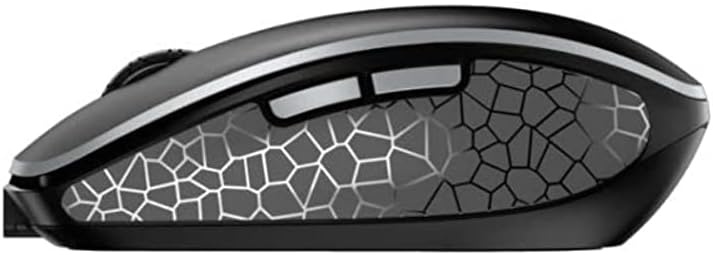
Bild 4.1: Seite view of the Cherry MW 9100 mouse, illustrating the ergonomic design and side buttons.
4.2 DPI-Anpassung
The mouse includes a DPI (Dots Per Inch) button, usually located near the scroll wheel, allowing you to adjust the cursor sensitivity. Press this button to cycle through different DPI settings to match your preference or task requirements.

Bild 4.2: A hand demonstrating the comfortable grip on the Cherry MW 9100 mouse during use.
5. Wartung
To ensure optimal performance and longevity of your Cherry MW 9100 mouse:
- Reinigung: Reinigen Sie die Mausoberfläche mit einem weichen, trockenen Tuch. Bei hartnäckigem Schmutz kann ein leicht trocknendes Tuch hilfreich sein.amp Ein Tuch kann verwendet werden, achten Sie jedoch darauf, dass keine Feuchtigkeit in das Gerät eindringt. Vermeiden Sie aggressive Chemikalien oder scheuernde Materialien.
- Lagerung: When not in use, especially during travel, store the mouse in the provided protective pouch to prevent scratches and damage.
- Batteriepflege: Vermeiden Sie häufiges vollständiges Entladen des Akkus. Laden Sie die Maus auf, sobald die Anzeige für niedrigen Akkustand erscheint.
6. Fehlerbehebung
| Problem | Mögliche Ursache | Lösung |
|---|---|---|
| Maus reagiert nicht | Low battery, incorrect connection mode, USB receiver not connected, Bluetooth not paired. |
|
| Intermittent connection (Bluetooth) | Interference, device driver issues, distance from device. |
|
| Die Cursorbewegung ist unregelmäßig oder langsam. | Dirty optical sensor, low battery, incorrect DPI setting. |
|
7. Spezifikationen
| Besonderheit | Detail |
|---|---|
| Marke | Kirsche |
| Modellnummer | JW-9100US-2 |
| Konnektivitätstechnologie | Bluetooth, 2.4 GHz USB Wireless |
| Bewegungserkennung | Optisch |
| Besondere Merkmale | Leicht, tragbar, wiederaufladbar |
| Technische Daten | 4 x 3 x 2 Zoll |
| Artikelgewicht | 6.4 Unzen |
| Farbe | Schwarz |
8. Garantie und Support
Informationen zur Garantie und zum technischen Support finden Sie auf der offiziellen Cherry-Website. webBesuchen Sie die Website oder kontaktieren Sie direkt den Cherry-Kundendienst. Bewahren Sie Ihren Kaufbeleg für Garantieansprüche auf.
Hersteller: KIRSCHE
WebWebsite: www.kirsche.de


