Einführung
This manual provides detailed instructions for the assembly, operation, and maintenance of your Transformers Studio Series 92 Deluxe Class Crosshairs Action Figure. This figure is inspired by the iconic movie scenes from the Transformers movie universe, specifically from Transformers: The Last Knight. The figure converts from robot mode to a licensed Corvette Stingray mode in 26 steps, offering an engaging experience for collectors and enthusiasts aged 8 and up.
Sicherheitshinweise
WARNUNG: Small parts may be generated. Not for children under 3 years. Please ensure all small accessories are kept out of reach of young children to prevent choking hazards.
Lieferumfang
- Crosshairs Action Figure
- 2 Blaster Accessories
- Removable Backdrop (Bowling Alley Quest scene)
- Bedienungsanleitung
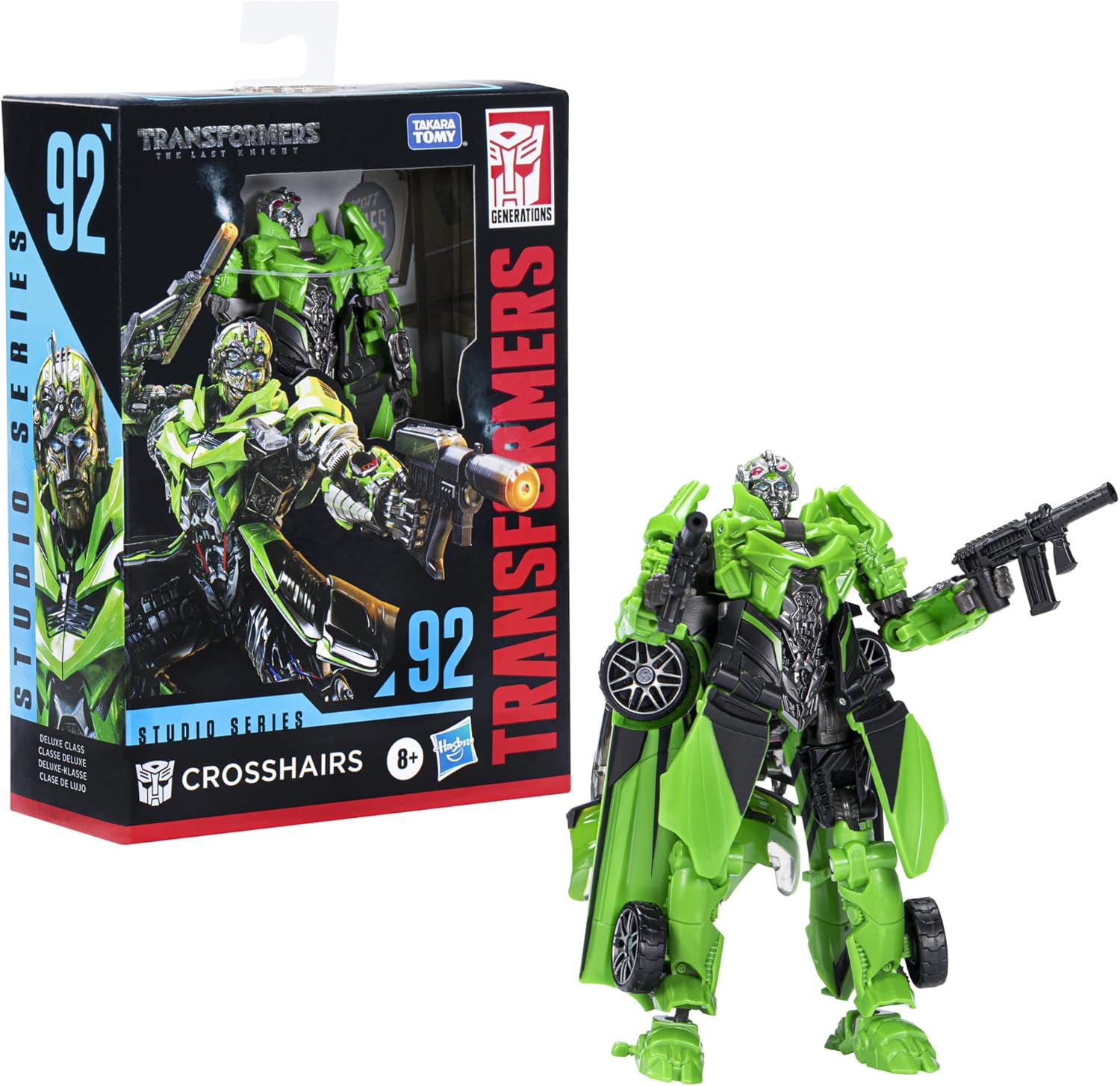
Image: Crosshairs figure and accessories as packaged.
Aufstellen
To begin, carefully remove the figure and all accessories from the packaging. The figure is secured with plastic ties that may require small cutters to remove. Ensure all components listed in the "What's in the Box" section are present.

Image: Close-up of the figure within its packaging, showing how it is secured.
The removable backdrop can be detached from the packaging and used to display your figure in the Bowling Alley Quest scene, as depicted on the packaging.

Bild: Rückseite view of the packaging, illustrating the backdrop and transformation steps.
Bedienungsanleitung: Transformation
The Crosshairs figure converts between robot mode and licensed Corvette Stingray mode in 26 steps. Refer to the detailed visual instructions provided on the packaging and the included instruction sheet for precise guidance. Below are the general steps:
- Robot Mode to Vehicle Mode: Carefully articulate the figure's limbs and body panels according to the numbered steps. Ensure all tabs and slots align correctly for a secure vehicle form.
- Vehicle Mode to Robot Mode: Reverse the transformation steps, carefully unfolding and re-positioning the panels and limbs to achieve the robot form.
Notiz: Some joints may be stiff initially. Apply gentle, consistent pressure during transformation. Avoid excessive force to prevent damage.

Image: Crosshairs figure in its robot mode, ready for action.

Image: Crosshairs figure fully transformed into its licensed Corvette Stingray vehicle mode.
Wartung
- Reinigung: Use a soft, dry cloth to gently wipe the figure. Avoid abrasive cleaners or solvents, as they may damage the paint or plastic.
- Lagerung: Um eine Materialbeeinträchtigung zu vermeiden, bewahren Sie die Figur an einem kühlen, trockenen Ort fern von direkter Sonneneinstrahlung und extremen Temperaturen auf.
- Gelenkpflege: If joints become loose over time, a small amount of clear nail polish or a specialized joint tightener can be applied to the peg and allowed to dry before reassembly.
Fehlerbehebung
| Ausgabe | Lösung |
|---|---|
| Figure does not transform correctly. | Ensure all steps in the instruction manual are followed precisely. Check for any misaligned panels or tabs that may be obstructing the transformation. Refer to the visual guide on the packaging. |
| Parts feel too stiff or too loose. | Stiff joints may loosen with repeated, gentle transformations. For loose joints, refer to the "Joint Care" section under Maintenance. |
| Accessories do not fit securely. | Ensure accessories are oriented correctly and inserted into the designated ports. Some ports may require a firm but gentle push. |
Technische Daten
- Produktabmessungen: 2.5 x 5.5 x 8.63 Zoll
- Artikelgewicht: 2.71 Unzen
- ASIN: B09WWK6CM5
- Artikelmodellnummer: F3165
- Vom Hersteller empfohlenes Alter: Ab 8 Jahren
- Batterien: Unknown batteries required (Note: This figure does not require batteries for operation)
- Veröffentlichungsdatum: 8. November 2022
- Hersteller: Hasbro
For more product details, you can visit the UPC Item Database using the UPC: 0195166181677.
Garantie und Support
For information regarding product warranty, returns, or additional support, please contact Hasbro customer service or visit the official Transformers brand store. The manufacturer is committed to providing quality products and assistance.
Besuchen Sie die offizielle Transformers Store Für weitere Produkte und Informationen.


