Einführung
Thank you for choosing the iJoy Ultra Wireless Over-Ear Bluetooth Headphones. These headphones are designed to provide a versatile audio experience with multiple connectivity options and comfortable wear. This manual will guide you through the features, setup, and operation of your new headphones.

Image: iJoy Ultra Wireless Over-Ear Bluetooth Headphones, showcasing the sleek design and over-ear cushions.
Lieferumfang
Bitte vergewissern Sie sich, dass alle Artikel in Ihrem Paket vorhanden sind:
- iJoy Ultra Wireless Over-Ear Bluetooth Headphones
- USB Typ C Ladekabel
- AUX-Kabel (3.5 mm)
Produkt überview
Machen Sie sich mit den Bedienelementen und Anschlüssen des Kopfhörers vertraut:

Abbildung: Seite view of the headphone ear cup, highlighting the control buttons for volume, track skipping, and power/play/pause/call management.
- Volume + / Skip Song: Hold for Volume Up, Press for Next Song.
- Power / Play / Pause / Answer/Reject Calls: Press to Play/Pause or Answer/Reject Calls. Hold to Power On/Off.
- Lautstärke - / Vorheriges Lied: Hold for Volume Down, Press for Previous Song.
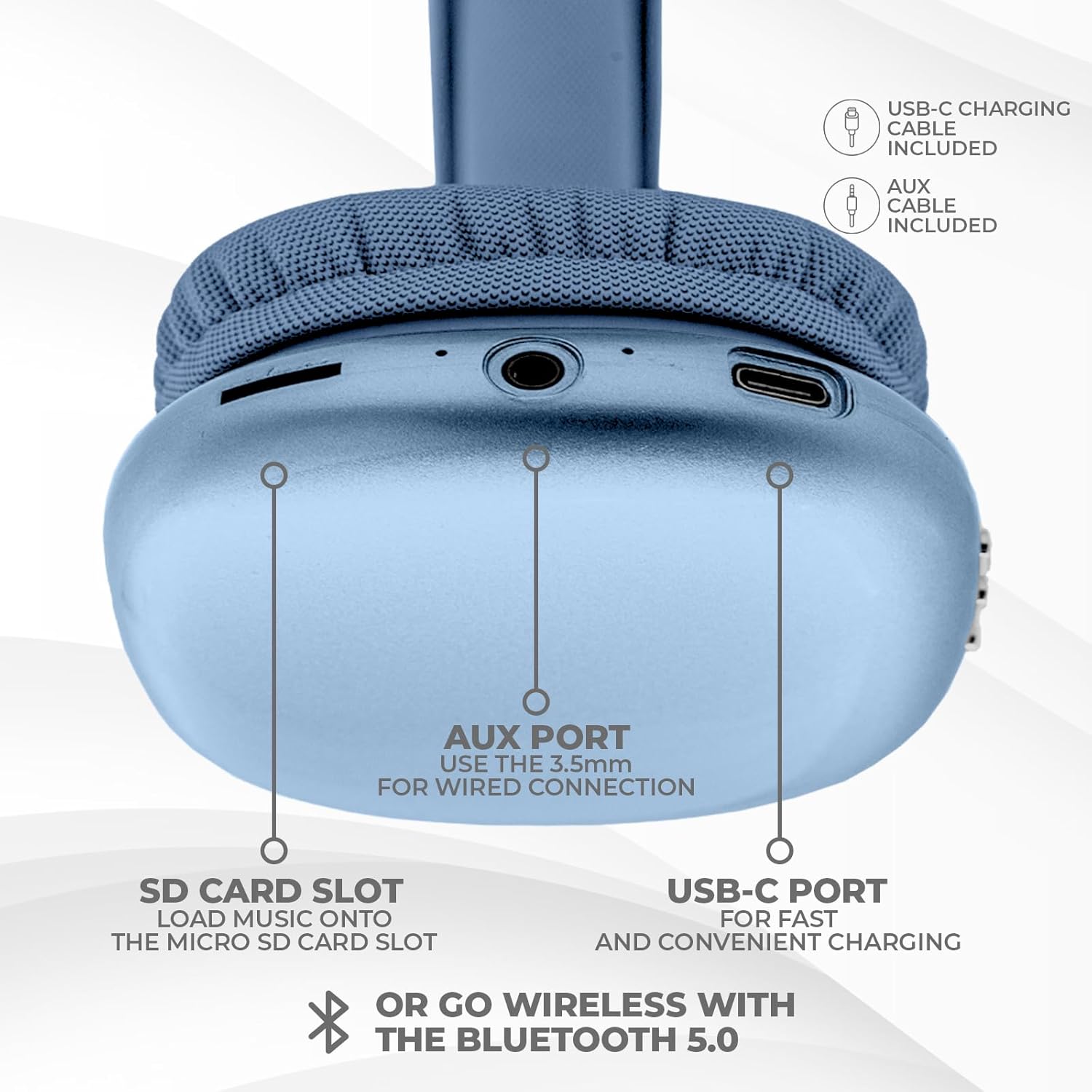
Abbildung: Unten view of the headphone ear cup, showing the USB-C charging port, AUX port, and SD card slot.
- USB-C-Anschluss: Zum Aufladen der Kopfhörer.
- AUX-Anschluss (3.5 mm): Für kabelgebundene Audioverbindungen.
- SD-Kartensteckplatz: For direct audio playback from a Micro SD card.
Aufstellen
1. Aufladen der Kopfhörer
Laden Sie Ihre Kopfhörer vor dem ersten Gebrauch vollständig auf. Eine vollständige Aufladung dauert etwa 2 Stunden.
- Connect the provided USB Type C charging cable to the USB-C port on the headphone.
- Verbinden Sie das andere Ende des USB-Kabels mit einer kompatiblen USB-Stromquelle (z. B. Netzteil, USB-Anschluss am Computer).
- Die LED-Anzeige zeigt den Ladestatus an und schaltet sich aus oder ändert die Farbe, wenn der Akku vollständig geladen ist.
2. Bluetooth-Kopplung
So verbinden Sie Ihre Kopfhörer kabellos:
- Stellen Sie sicher, dass die Kopfhörer geladen und ausgeschaltet sind.
- Halten Sie die Ein-/Aus-Taste gedrückt, bis die LED-Anzeige blinkt. Dies signalisiert den Kopplungsmodus.
- Aktivieren Sie auf Ihrem Gerät (Smartphone, Tablet, Laptop) Bluetooth und suchen Sie nach verfügbaren Geräten.
- Select "iJoy Ultra" from the list of devices.
- Once connected, the LED indicator will typically show a solid light or slow flash.
Note: The Bluetooth range is approximately 10 meters (33 feet).
3. Kabelverbindung (AUX)
For a non-wireless connection or when the battery is low:
- Connect one end of the provided 3.5mm AUX cable to the AUX port on the headphone.
- Connect the other end of the AUX cable to the 3.5mm audio jack on your device.
- Die Kopfhörer schalten automatisch in den kabelgebundenen Modus.
4. Wiedergabe von der SD-Karte
So spielen Sie Musik direkt von einer Micro-SD-Karte ab:
- Legen Sie eine Micro-SD-Karte ein (mit Musik) files) into the SD card slot on the headphone.
- Die Kopfhörer erkennen die Karte automatisch und beginnen mit der Musikwiedergabe.
- Use the track control buttons to navigate your music.
Bedienungsanleitung
Ein-/Ausschalten
- Einschalten: Den Ein-/Ausschalter etwa 3 Sekunden lang gedrückt halten.
- Ausschalten: Den Ein-/Ausschalter etwa 3 Sekunden lang gedrückt halten.
Musikwiedergabe
- Abspielen/Pause: Drücken Sie einmal die Power-Taste.
- Nächster Titel: Press the Volume + button once.
- Vorheriges Lied: Press the Volume - button once.
- Lautstärke erhöhen: Hold the Volume + button.
- Lautstärke runter: Hold the Volume - button.
Anruf-Management
When connected via Bluetooth:
- Anruf annehmen: Drücken Sie einmal die Power-Taste.
- Anruf beenden: Drücken Sie während eines Anrufs einmal den Ein-/Ausschalter.
- Anruf ablehnen: Den Ein-/Ausschalter etwa 2 Sekunden lang gedrückt halten.
Akkulaufzeit
The headphones offer up to 10 hours of wireless playtime on a single charge.

Image: Visual representation of the headphones' battery life, indicating up to 10 hours of wireless playtime.
Wartung
To ensure the longevity and optimal performance of your iJoy Ultra headphones:
- Reinigen Sie die Kopfhörer regelmäßig mit einem weichen, trockenen Tuch.
- Vermeiden Sie es, die Kopfhörer extremen Temperaturen, hoher Luftfeuchtigkeit oder direkter Sonneneinstrahlung auszusetzen.
- Keine Scheuer- oder Lösungsmittel verwenden.
- Bewahren Sie die Kopfhörer an einem kühlen, trockenen Ort auf, wenn Sie sie nicht verwenden.
- Vermeiden Sie es, die Kopfhörer fallen zu lassen oder starken Stößen auszusetzen.
Fehlerbehebung
Sollten Sie Probleme mit Ihren Kopfhörern haben, beachten Sie bitte die folgenden gängigen Lösungsansätze:
| Problem | Lösung |
|---|---|
| Die Kopfhörer lassen sich nicht einschalten. | Stellen Sie sicher, dass die Kopfhörer vollständig aufgeladen sind. Verbinden Sie sie mit einer Stromquelle über das USB-C-Kabel. |
| Kopplung via Bluetooth nicht möglich. | Make sure the headphones are in pairing mode (flashing LED). Turn off and on Bluetooth on your device. Ensure no other devices are currently connected to the headphones. Try 'forgetting' the device on your phone and re-pairing. |
| No sound or choppy audio. | Check volume levels on both headphones and your device. Ensure Bluetooth connection is stable or try a wired AUX connection. If using an SD card, ensure it is properly inserted and the files sind kompatibel. |
| Headphones are uncomfortable or too tight. | Adjust the headband for a better fit. The over-ear cushions are designed for comfort, but individual fit may vary. |
| Cannot connect to multiple devices simultaneously. | These headphones typically support connection to one device at a time. Disconnect from the current device before attempting to connect to another. |
Technische Daten
| Besonderheit | Detail |
|---|---|
| Modellname | Ultra |
| Artikelmodellnummer | IJHP21 |
| Konnektivitätstechnologie | Kabellos (Bluetooth), Kabelgebunden (3.5-mm-AUX-Anschluss) |
| Drahtlose Kommunikationstechnologie | Bluetooth |
| Bluetooth-Reichweite | 10-Meter (33-Füße) |
| Kopfhöreranschluss | 3.5 mm Klinke |
| Besondere Merkmale | SD Card Slot, Soft Cushion Padding, USB Type C |
| Akkulaufzeit | Bis zu 10 Stunden |
| Ladezeit | 2 Stunden |
| Steuerungstyp | Volume Control, Track Management, Call Management |
| Platzierung des Ohrs | Über dem Ohr |
| Material | Plastik |
| Artikelgewicht | 8 Unzen |
| Technische Daten | 7 x 3 x 8 Zoll |
| UPC | 842700193053 |
Offizielles Produktvideo
Video: Ein offizielles Produktvideo von iJoy Electronics zeigtasing the features and design of the iJoy Ultra Bluetooth Over-Ear Headphones.
Garantie und Support
For warranty information or technical support, please refer to the documentation included with your product or contact iJoy customer service directly. Keep your proof of purchase for any warranty claims.


