1. Einleitung
Thank you for choosing the Beelink MINI S12 N95 Mini PC. This compact and efficient desktop computer is designed for various tasks, from home entertainment and web browsing to office work. This manual provides essential information for setting up, operating, maintaining, and troubleshooting your device to ensure optimal performance.

Image: The Beelink MINI S12 Mini PC, highlighting its compact size and key specifications including the Intel Alder Lake-N N95 Processor, 4 cores, 4 threads, 3.4GHz Max Turbo Frequency, 16EUs Intel UHD Graphics, WiFi 5 (802.11ac), Bluetooth 4.2, LAN (1000M), DDR4 3200MHz single channel 8/16GB, dual SSD card slots (optional 256/500GB), and a cooling system with silent fan, heat pipe/heat sink, and SSD cooling.
2. Produktüberschreitungview
The Beelink MINI S12 N95 Mini PC features a robust Intel N95 processor, 8GB DDR4 RAM, and a 256GB M.2 SATA3 SSD, providing reliable performance for daily computing needs. Its compact design and versatile connectivity options make it suitable for various environments.
2.1. Ports und Schnittstellen

Abbildung: Vorder- und Rückseite views of the Beelink MINI S12 Mini PC. The front panel includes an RTC Key (CLR CMOS), two USB 3.2 Gen2 (10Gbps) ports, an earphone jack, and a power button. The rear panel features a locking slot, two USB 3.2 Gen2 (10Gbps) ports, a 2.5G LAN port, two 4K 60Hz HDMI ports, and a DC power adapter input.
The device offers a rich interface design for comprehensive connectivity:
- Vorderseite: RTC Key (CLR CMOS), 2x USB 3.2 Gen2 (10Gbps) ports, 3.5mm Earphone Jack, Power Button.
- Rückwand: Locking Slot, 2x USB 3.2 Gen2 (10Gbps) ports, 1x 2.5G LAN port, 2x 4K 60Hz HDMI ports, DC Power Adapter Input.
3. Einrichtungsanweisungen
- An die Stromversorgung anschließen: Plug the DC power adapter into the Mini PC's DC input port and then into a power outlet.
- Anschluss an das Display: Use an HDMI cable to connect the Mini PC to your monitor or TV. The device supports dual 4K displays.
- Peripheriegeräte anschließen: Schließen Sie Ihre Tastatur, Maus und andere USB-Geräte an die verfügbaren USB-Anschlüsse an.
- Netzwerkverbindung: For wired internet, connect an Ethernet cable to the 2.5G LAN port. For wireless internet, the device supports WiFi 5 (802.11ac).
- Einschalten: Press the power button on the front panel to start the Mini PC.

Image: The Beelink MINI S12 Mini PC positioned on a desk, connected to two external monitors via HDMI cables, showcasing its capability to support dual 4K displays for enhanced productivity.
4. Bedienungsanleitung
The Beelink MINI S12 N95 Mini PC comes pre-installed with Windows 11 Home. Upon first boot, follow the on-screen instructions to complete the initial Windows setup, including language, region, network, and user account creation.
4.1. Unterstützung für zwei Bildschirme
The Mini PC supports dual 4K display output via its two HDMI ports. This allows for an extended desktop experience, increasing work efficiency or enhancing multimedia viewing. Simply connect two monitors using HDMI cables, and Windows will automatically detect and configure them. You can adjust display settings (resolution, orientation, primary display) through the Windows Display Settings.
4.2. Drahtlose Konnektivität
The device features WiFi 5 (802.11ac) for high-speed wireless internet access and Bluetooth 4.2 for connecting wireless peripherals such as keyboards, mice, and headphones.
4.3. Wake On LAN / Auto Power On
The Mini PC supports Wake On LAN (WOL) and Auto Power On features. These can be configured in the BIOS settings to allow the device to be powered on remotely or automatically at a scheduled time. For detailed instructions on configuring these features, refer to the Beelink official support webWebsite oder wenden Sie sich an den technischen Support.
5. Speicher- und Speichererweiterung
The Beelink MINI S12 N95 Mini PC is equipped with 8GB DDR4 RAM and a 256GB M.2 SATA3 SSD. It offers options for storage and memory expansion to meet evolving needs.
5.1. SSD-Erweiterung

Abbildung: Ein interner view of the Beelink MINI S12 Mini PC, highlighting two M.2 2280 SSD slots. One slot is labeled PCIe3.0 x1 (not compatible with SATA3 SSDs), and the other is PCIe3.0 x4 (compatible with SATA3 SSDs). This illustrates the dual high-speed storage expansion capability.
The Mini PC supports M.2 2280 NVMe/SATA3 SSDs and is configurable up to 4TB storage. The Mini S12 ships with a SATA3 SSD. There are two M.2 SSD slots:
- PCIe3.0 x1 Slot: Not compatible with SATA3 SSDs.
- PCIe3.0 x4 Slot: Compatible with SATA3 SSDs.
When upgrading or adding an SSD, ensure compatibility with the specific slot type.
5.2. Speichererweiterung

Bild: Eine Nahaufnahme view of a SO-DIMM DDR4 3200MHz memory module, emphasizing its high quality and stable operation. The text indicates single-channel support up to 16GB, with optional single-channel 8GB or 16GB memory configurations.
The device supports single-channel SO-DIMM DDR4 memory up to 16GB. The standard configuration includes 8GB DDR4 RAM. If you wish to upgrade the memory, ensure you use compatible SO-DIMM DDR4 modules.
6. Wartung
Durch sachgemäße Wartung wird die Langlebigkeit und optimale Leistung Ihres Mini-PCs sichergestellt.
6.1. Kühlsystem
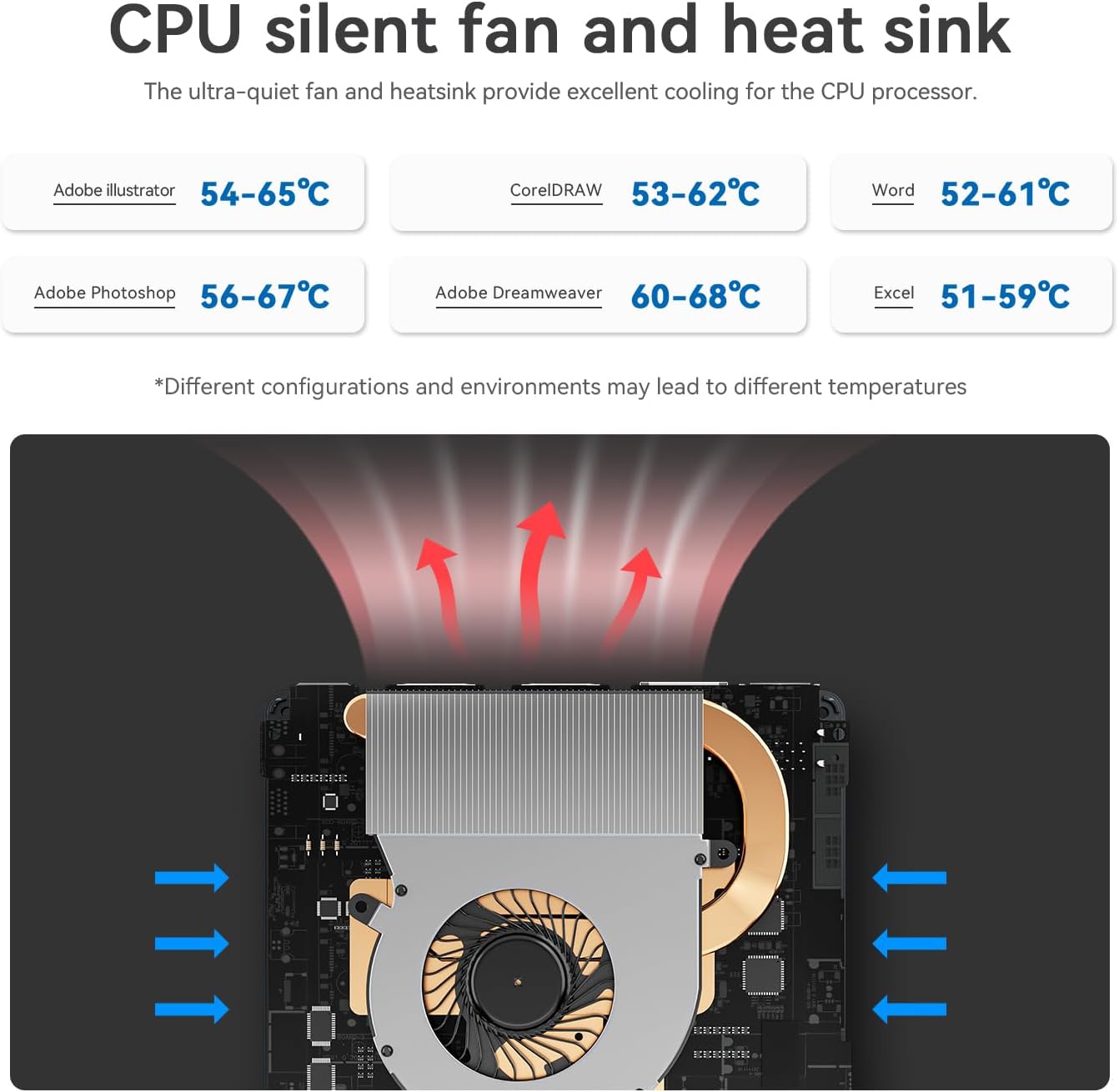
Image: An internal diagram illustrating the CPU silent fan and heat sink cooling system within the Mini PC. Arrows indicate airflow, demonstrating how the ultra-quiet fan and heatsink provide efficient cooling for the CPU processor. Typical operating temperatures for various applications are also shown.
The Mini PC features an ultra-quiet fan and heatsink for efficient CPU cooling. To maintain optimal cooling:
- Ensure proper ventilation around the device. Avoid blocking the air vents.
- Reinigen Sie die Lüftungsschlitze regelmäßig mit Druckluft von Staub.
- Avoid operating the Mini PC in excessively hot or dusty environments.
6.2. Software-Updates
Keep your operating system and drivers updated to ensure security and performance. Windows Update will handle most system updates automatically.
7. Fehlerbehebung
If you encounter issues with your Beelink MINI S12 N95 Mini PC, refer to the following common troubleshooting steps:
- Kein Strom: Stellen Sie sicher, dass das Netzteil fest mit dem Mini-PC und einer funktionierenden Steckdose verbunden ist. Versuchen Sie gegebenenfalls eine andere Steckdose.
- Kein Bildschirm: Verify that the HDMI cable is correctly connected to both the Mini PC and the monitor. Ensure the monitor is set to the correct input source. Try a different HDMI cable or monitor.
- Keine Internetverbindung: For wired connections, check the Ethernet cable and router. For Wi-Fi, ensure the Wi-Fi adapter is enabled and you are connected to the correct network with the correct password.
- Langsame Leistung: Close unnecessary applications. Check for background processes consuming high resources. Ensure sufficient free storage space. Consider upgrading RAM or SSD if performance issues persist.
- Überhitzung: Ensure the Mini PC has adequate ventilation. Clean any dust from the vents. Avoid placing the device in direct sunlight or confined spaces.
- BIOS-Zugriff: To enter the BIOS settings, press the DEL key repeatedly during startup. To access boot options, press F7.
If problems persist, please contact Beelink technical support.
8. Spezifikationen
| Besonderheit | Spezifikation |
|---|---|
| Prozessor | Intel N95 (bis zu 3.4 GHz, 4 Kerne/4 Threads, 4 MB Cache) |
| RAM | 8 GB DDR4 (Single-channel, 3200MHz) |
| Lagerung | 256 GB M.2 SATA3 SSD (Expandable up to 4TB) |
| Grafik | Intel UHD Graphics (Supports 4K FPS video playback) |
| Betriebssystem | Windows 11 Home |
| Kabellose Konnektivität | WiFi 5 (802.11ac), Bluetooth 4.2 |
| LAN | 2.5G Ethernet |
| Videoausgang | 2x HDMI (Supports Dual 4K 60Hz Display) |
| USB-Anschlüsse | 4x USB 3.2 Gen2 (10 Gbit/s) |
| Audio | 3.5mm Kopfhörerbuchse |
| Maße | 4.52 x 4.01 x 1.54 Zoll (ca.) |
| Gewicht | 1.57 Pfund (ca.) |
| Farbe | Schwarz |
9. Packungsinhalt
The following items are included with your Beelink MINI S12 N95 Mini PC:

Image: A visual representation of the accessories included with the Beelink MINI S12 Mini PC. These include a user manual, a wall-mounted bracket with dimensions (74.25mm x 99.61mm), HDMI cables, and a power adapter with optional plugs for US, EU, UK, JP, and AU regions.
- Beelink MINI S12 N95 Mini PC
- Bedienungsanleitung
- Wandhalterung
- HDMI-Kabel
- Power Adapter (with optional regional plugs)
10. Offizielles Produktvideo
Video: Ein offizielles Produktvideo präsentiertasing the Beelink MINI S12 N95 Mini PC, its compact size, various ports, internal components like SSD and RAM, cooling system, and dual 4K display capabilities. The video highlights its suitability for office, home video, and general computing needs.
11. Garantie und Support
Beelink offers a 3 Jahr kostenlose Garantie for the MINI S12 N95 Mini PC. We also provide 7 days/24 hours customer service. For technical assistance, warranty claims, or any other inquiries, please contact Beelink customer support through the official webWebsite oder Ihre Einkaufsplattform.


