Einführung
Thank you for choosing the DELTACO GAMING DC440L Gaming Chair. This manual provides detailed instructions for assembly, operation, maintenance, and troubleshooting to ensure you get the most out of your new gaming chair. Designed for comfort and durability, the DC440L features a soft Alcantara-like fabric, ergonomic design, and multiple adjustment options to support long gaming sessions or work hours.

Abbildung 1: Vorderseite view of the DELTACO GAMING DC440L Gaming Chair.
Sicherheitshinweise
- Vor der Montage sicherstellen, dass alle Komponenten vorhanden und unbeschädigt sind. Nicht verwenden, wenn Teile fehlen oder beschädigt sind.
- Follow all assembly steps carefully. Incorrect assembly can lead to instability and injury.
- Stellen Sie sich nicht auf den Stuhl.
- Do not use the chair for purposes other than its intended use (sitting).
- Halten Sie Kinder und Haustiere während der Montage vom Stuhl fern. Kleinteile können verschluckt werden und eine Erstickungsgefahr darstellen.
- Do not exceed the recommended maximum weight capacity of 90 kg (198 lbs).
- Um eine Materialbeeinträchtigung zu vermeiden, sollte der Stuhl weder direkter Sonneneinstrahlung noch extremen Temperaturen ausgesetzt werden.
Packungsinhalt
Bitte überprüfen Sie, ob alle folgenden Komponenten in Ihrem Paket enthalten sind:
- Rückenlehne
- Sitzfläche
- Armlehnen (2x)
- Star Base (5-point aluminum)
- Rollen (5x)
- Gas Lift (Class 3, 100mm)
- Gasheber-Abdeckung
- Mechanismusplatte
- Kopfkissen
- Lendenkissen
- Montagezubehör (Schrauben, Unterlegscheiben, Inbusschlüssel)
Note: The arm pads and cushions are explicitly mentioned in the "whats_in_the_box" section of the product data.
Einrichtung und Montage
Follow these steps to assemble your DELTACO GAMING DC440L Gaming Chair. It is recommended to have a second person assist with some steps.
- Befestigen Sie die Rollen an der Sternbasis: Setzen Sie die fünf Rollen jeweils in die Löcher an den Enden der Beine des Sternfußes ein. Drücken Sie fest, bis sie einrasten.
- Gaslift einbauen: Place the gas lift cylinder into the center hole of the assembled star base. Cover the gas lift with the telescopic plastic cover.
- Mechanismusplatte an der Sitzbasis befestigen: Align the mechanism plate with the pre-drilled holes on the underside of the seat base. Ensure the front of the mechanism plate faces the front of the seat. Secure with the provided screws and tighten with the Allen key.
- Connect Seat Base to Gas Lift: Carefully place the assembled seat base onto the gas lift cylinder, ensuring the tapered end of the gas lift fits securely into the mechanism plate.
- Rückenlehne an der Sitzfläche befestigen: Align the backrest's mounting brackets with the corresponding holes on the sides of the seat base. Secure with the provided screws. Do not fully tighten until both sides are loosely attached.

Figure 2: Illustration of the chair's main components during assembly.
- Armlehnen montieren: Attach the armrests to the sides of the seat base using the designated screws. Ensure they are oriented correctly (left and right).

Figure 3: Detail of the armrest attachment point.
- Kissen anbringen: The head cushion and lumbar cushion can be attached using their integrated straps. Adjust their positions for optimal comfort.
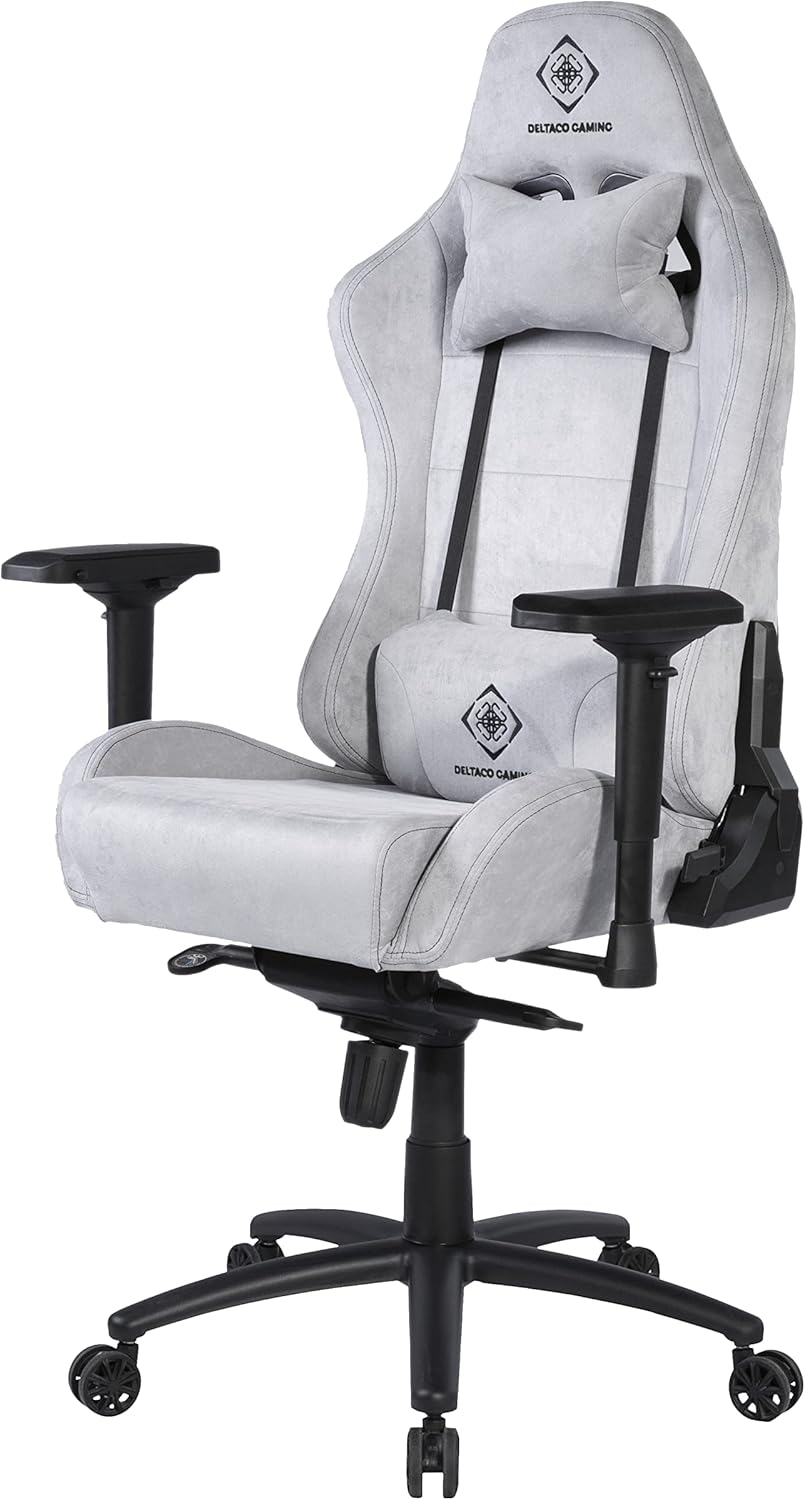
Figure 4: Chair with head and lumbar cushions in place.
- Abschließendes Anziehen: Once all components are in place, go back and securely tighten all screws. Do not overtighten.
Bedienungsanleitung
The DELTACO GAMING DC440L Gaming Chair offers several adjustment features to customize your seating experience:
- Höhenverstellung: Locate the lever on the right side, under the seat. Pull the lever up to raise the chair (when no weight is applied) or lower it (when seated). Release the lever at your desired height.
- Rückenlehnenneigung: Use the lever on the right side of the chair, near the seat base, to adjust the backrest angle. Pull the lever up to unlock, recline to your desired position, and release the lever to lock.
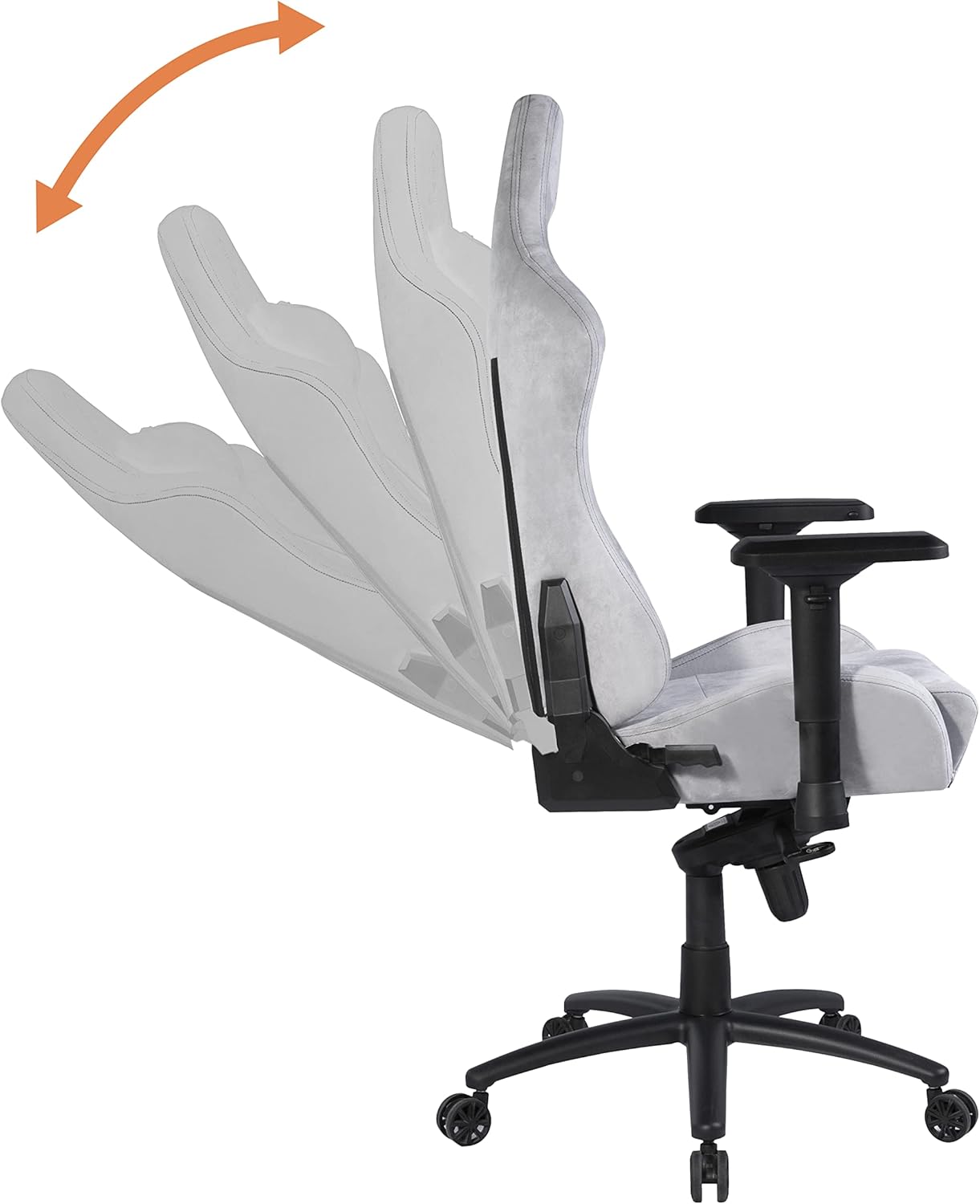
Figure 5: Demonstrates the recline function of the backrest.
- Armlehnenverstellung: The armrests are height-adjustable. Locate the button or lever on the side of each armrest support. Press or lift it to unlock, move the armrest up or down, and release to lock at the desired height.

Figure 6: Illustrates the multi-directional adjustment capabilities of the armrests.
- Tilt Lock/Tension: The chair features a tilt mechanism. A knob under the seat (usually at the front) controls the tilt tension, allowing you to adjust the resistance when rocking. A lever (often combined with the height adjustment lever) can lock the chair in an upright position or allow it to tilt freely.
Wartung
Die richtige Pflege verlängert die Lebensdauer Ihres Gaming-Stuhls:
- Reinigung: Zur allgemeinen Reinigung wischen Sie den Stuhl mit einem weichen, feuchten Tuch ab.amp cloth. For stubborn stains on the Alcantara-like fabric, use a mild fabric cleaner and test on an inconspicuous area first. Do not use abrasive cleaners or solvents.
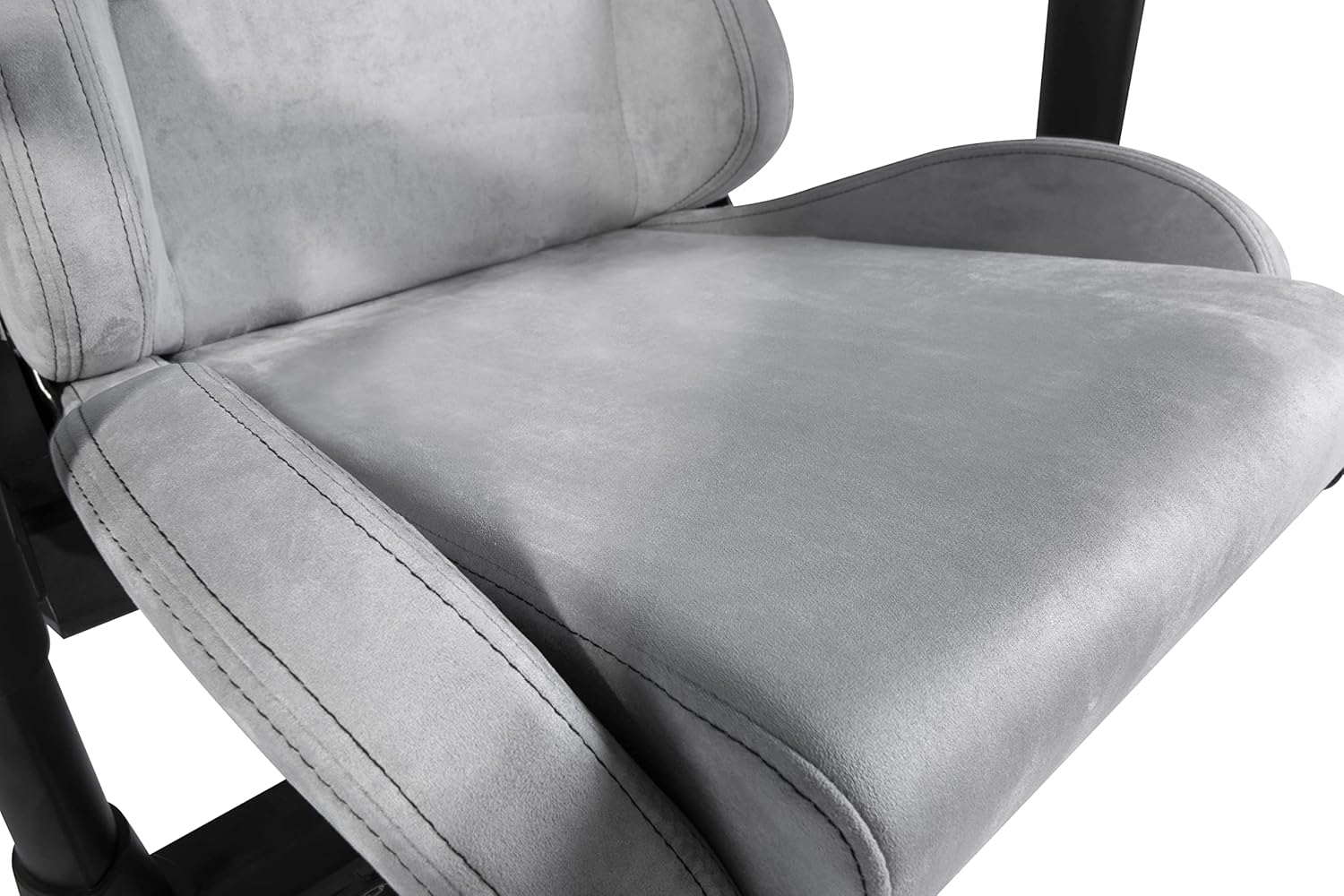
Figure 7: Detail of the soft Alcantara-like fabric on the seat.
- Hardwareprüfung: Überprüfen Sie regelmäßig alle Schrauben und Bolzen auf festen Sitz. Ziehen Sie sie gegebenenfalls nach, um die Stabilität zu gewährleisten.
- Pflege des Casters: Clean casters regularly to remove dust, hair, and debris that can impede smooth rolling.
- Überladung vermeiden: Do not place excessive weight on the chair or its components.
Fehlerbehebung
| Problem | Mögliche Ursache | Lösung |
|---|---|---|
| Der Stuhl wackelt oder ist instabil. | Loose screws; uneven floor; damaged base. | Check and tighten all assembly screws. Ensure the chair is on a flat surface. Inspect the base for damage. |
| Der Stuhl ist nicht höhenverstellbar. | Gas lift malfunction; lever mechanism stuck. | Stellen Sie sicher, dass der Höhenverstellhebel vollständig eingerastet ist. Sollte das Problem weiterhin bestehen, muss die Gasdruckfeder möglicherweise ausgetauscht werden. Wenden Sie sich an den Kundendienst. |
| Die Rollen rollen nicht reibungslos. | Fremdkörper in den Rollen; beschädigte Rollen. | Remove any hair or debris from the caster wheels. If damaged, casters can be replaced. |
| Die Rückenlehne lässt sich weder verstellen noch arretieren. | Recline mechanism stuck or damaged. | Ensure the recline lever is fully engaged. Check for obstructions. If damaged, contact support. |
Technische Daten
- Modell: DC440L
- Material: Soft Alcantara-like fabric
- Farbe: Hellgrau
- Gaslift: Klasse 3, 100 mm
- Base: 5-point aluminum wheel base
- Abmessungen des Sitzkissens: 55 cm x 50 cm (ca. 21.7 Zoll x 19.7 Zoll)
- Maße der Rückenlehne: 58 cm x 80 cm (ca. 22.8 Zoll x 31.5 Zoll)
- Max Seat Height: 53 cm (ca. 20.9 Zoll)
- Min Seat Height: 45 cm (ca. 17.7 Zoll)
- Max Armrest Height: 37.5 cm (ca. 14.8 Zoll)
- Min Armrest Height: 30.5 cm (ca. 12.0 Zoll)
- Empfohlenes Maximalgewicht: 90 kg (ca. 198 Pfund)
- Recommended Max Height: 175 cm (approx. 5 ft 9 in)
- Stuhlgewicht: Approx. 20 kg (approx. 44 lbs)
- Produktabmessungen: 50 x 50 x 28 cm (Verpackungs-/Versandmaße)
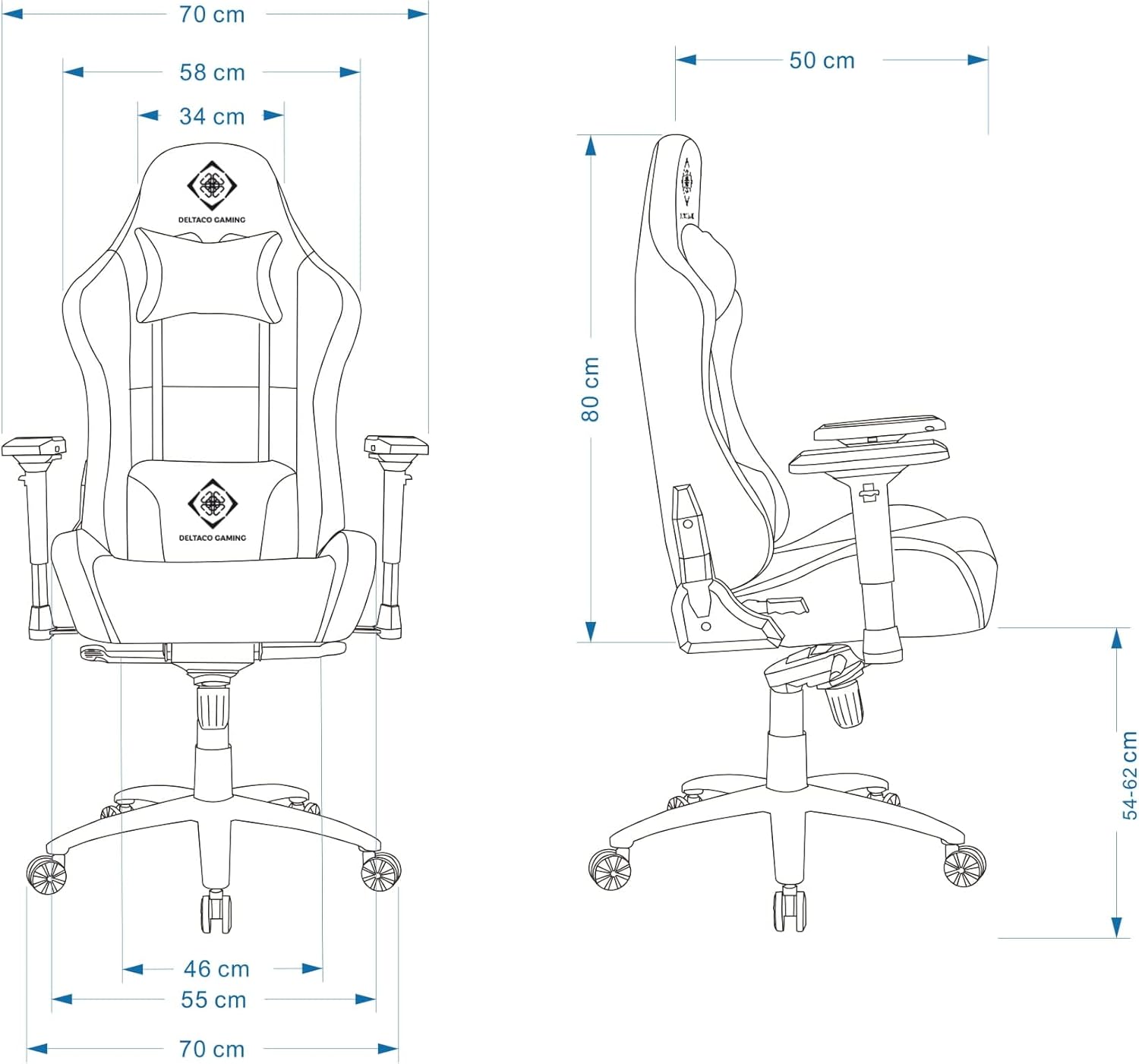
Figure 8: Detailed dimensions of the DELTACO GAMING DC440L Gaming Chair.
Garantie und Support
For warranty information and technical support, please refer to the official DELTACO GAMING webBesuchen Sie unsere Website oder wenden Sie sich an Ihren Händler vor Ort. Bewahren Sie Ihren Kaufbeleg für eventuelle Garantieansprüche auf.
Online-Ressourcen:


