1. Einleitung
Thank you for choosing the COMAOGO T002-W Mini Projector. This manual provides essential information for setting up, operating, and maintaining your projector to ensure optimal performance and longevity. The T002-W is a versatile projector featuring 9500 Lumens brightness, 1080P support, 5G WiFi, and Bluetooth 5.1 connectivity, designed for an immersive viewErfahrung bis zu 220 Zoll.
2. Packungsinhalt
Bitte prüfen Sie das Paket auf folgende Artikel:
- 1 x COMAOGO T002-W Mini Projector
- 1 x Fernbedienung
- 1 x Stromkabel
- 1 x HDMI-Kabel
- 1 x AV-Kabel
- 1 x Benutzerhandbuch
3. Produktüberschreitungview
Machen Sie sich mit den Komponenten und Schnittstellen des Projektors vertraut.

Image: COMAOGO T002-W Projector with 5G and 2.4G WiFi capabilities, showing wireless screen synchronization with a tablet and smartphone.
The projector features various ports for connectivity, including HDMI, USB, VGA, AV, and a TF card slot, along with a 3.5mm audio output. It also supports dual-band 5G and 2.4G WiFi for stable wireless connections and Bluetooth 5.1 for audio devices.

Image: COMAOGO T002-W Projector connected to various devices including a laptop, game console, and streaming stick, highlighting its multiple input ports (AV, HDMI, USB, TF, VGA).
4. Einrichtung
4.1 Platzierung
Position the projector on a stable, flat surface or mount it on a tripod. Ensure there are no obstructions to the ventilation vents. For optimal viewing, the projection distance should be between 1.5 meters and 5.5 meters, yielding a screen size from 45 inches to 220 inches.
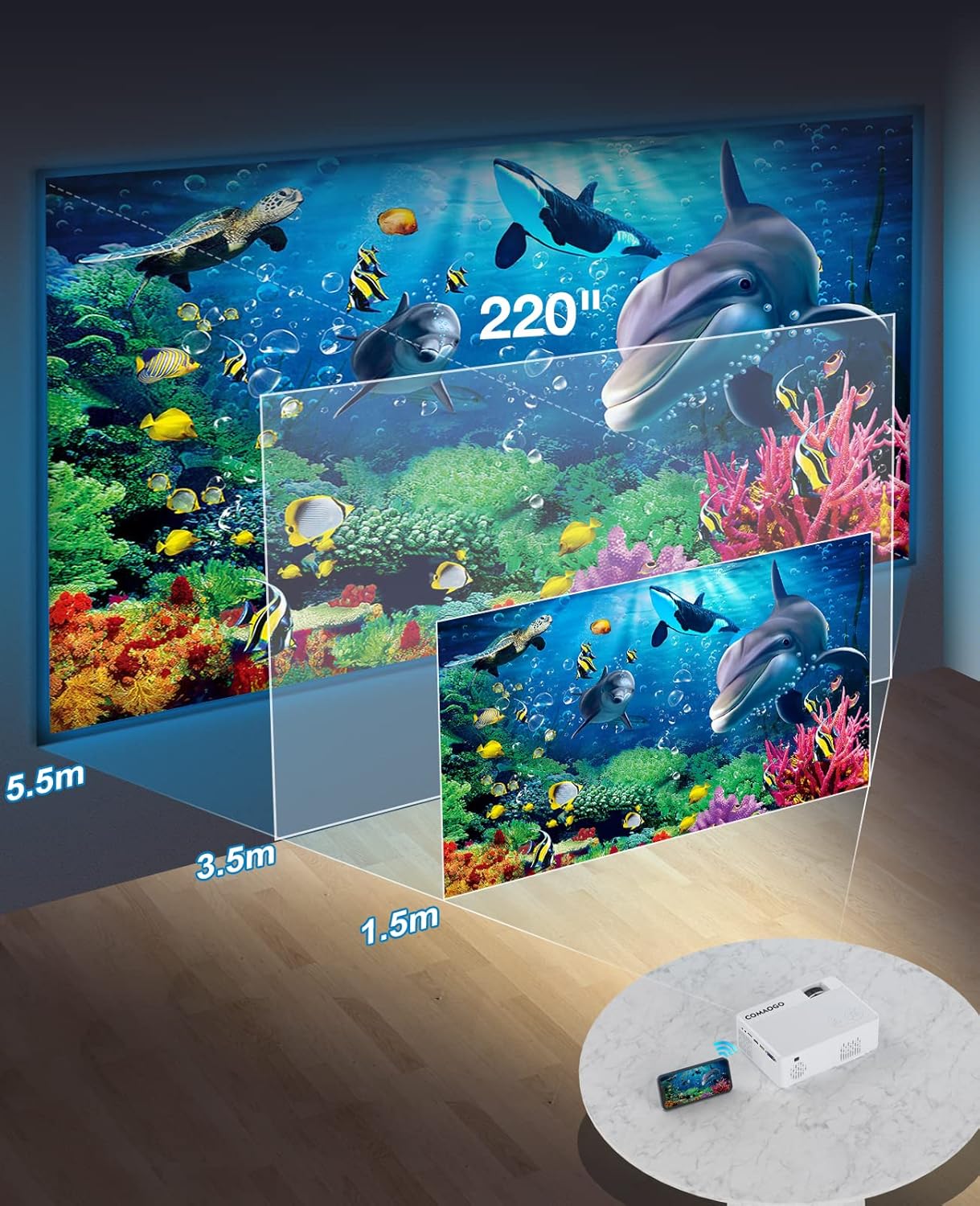
Image: Diagram illustrating the projection distances (1.5m to 5.5m) and corresponding screen sizes (45 to 220 inches) for the COMAOGO T002-W Projector.
4.2 Stromanschluss
Connect the power cable to the projector's power input and then plug it into a power outlet (AC 220V).
4.3 Fokus- und Trapezkorrektur
Um ein klares und rechteckiges Bild zu erhalten:
- Fokuseinstellung: Drehen Sie den Fokusring am Projektorobjektiv, bis das Bild scharf erscheint.
- Trapezkorrektur: Adjust the keystone correction dial (if available, or via menu settings) to correct trapezoidal distortion, ensuring the image is rectangular. The projector supports ±15° keystone correction.

Image: Illustration of keystone correction and focus adjustment for the COMAOGO T002-W Projector, showing how to achieve a clear, rectangular image.
5. Bedienungsanleitung
5.1 Ein-/Ausschalten
- Einschalten: Drücken Sie die Ein/Aus-Taste am Projektor oder auf der Fernbedienung.
- Ausschalten: Drücken Sie den Netzschalter erneut, um den Projektor auszuschalten.
5.2 Auswahl der Eingangsquelle
Use the "Source" button on the remote control or the projector's control panel to select the desired input source (e.g., HDMI, USB, VGA, AV).
5.3 Drahtlose Konnektivität (WiFi)
The projector supports dual-band 5G and 2.4G WiFi for stable screen mirroring.
- Navigieren Sie im Menü des Projektors zu den WLAN-Einstellungen.
- Select your desired WiFi network (5G for faster, more stable connection; 2.4G for longer range and better penetration).
- Geben Sie das Passwort ein, um sich zu verbinden.
- For screen mirroring, select the appropriate option (e.g., "iOS Cast" or "Android Cast") on the projector and follow the on-screen instructions to connect your smartphone or tablet.
5.4 Bluetooth-Konnektivität
Connect external Bluetooth audio devices like speakers or headphones.

Image: COMAOGO T002-W Projector demonstrating Bluetooth 5.1 connection with a speaker and headphones.
- Gehen Sie in das Menü des Projektors zu den Bluetooth-Einstellungen.
- Stellen Sie sicher, dass sich Ihr Bluetooth-Gerät im Kopplungsmodus befindet.
- Wählen Sie Ihr Gerät aus der Liste aus, um es zu koppeln.
- Note: The projector's Bluetooth function is for connecting output devices (speakers, headphones) only.
5.5 Kabelverbindungen
Verbinden Sie verschiedene Geräte über die verfügbaren Anschlüsse:
- HDMI: Connect laptops, PCs, game consoles (Xbox), TV sticks (Roku, Chromecast), DVD players.
- USB: Medien abspielen files direkt von USB-Laufwerken.
- VGA: Schließen Sie ältere Computer oder Laptops an.
- EIN V: Ältere Videogeräte anschließen.
- TF-Karte: Insert a TF card to play media files.
- Important: Copyright-protected content from services like Netflix or Disney+ is not directly supported via screen mirroring. For these services, use an HDMI connection with a compatible adapter (e.g., Lightning Digital AV Adapter for iOS devices) or a streaming stick.
6. Wartung
6.1 Reinigung der Linse
Use a soft, lint-free cloth or lens cleaning paper to gently wipe the projector lens. Avoid using abrasive materials or harsh chemicals that could damage the lens coating.
6.2-Kühlsystem
The projector features an updated cooling system designed to reduce noise and maintain optimal operating temperature. Ensure the ventilation vents are clear of dust and obstructions to prevent overheating. Regular cleaning of the vents with a soft brush or compressed air is recommended.
7. Fehlerbehebung
Sollten Sie Probleme mit Ihrem Projektor haben, beachten Sie bitte die folgenden gängigen Lösungsansätze:
- Kein Bild:
- Prüfen Sie den Stromanschluss und stellen Sie sicher, dass der Projektor eingeschaltet ist.
- Verify the input source selection matches your connected device.
- Ensure all cables (HDMI, VGA, etc.) are securely connected.
- Fokus und Trapezkorrektur einstellen.
- Kein Ton:
- Stellen Sie die Lautstärke des Projektors ein.
- Wenn Sie externe Lautsprecher verwenden, vergewissern Sie sich, dass diese ordnungsgemäß angeschlossen und eingeschaltet sind.
- Check Bluetooth connection for external audio devices.
- Ensure the audio output from your source device is enabled.
- WiFi/Screen Mirroring Issues:
- Ensure both the projector and your device are connected to the same WiFi network.
- Check for strong WiFi signal.
- Restart both the projector and your source device.
- For Android devices, ensure "Wireless Projection" or "Screen Mirroring" is enabled. For iOS, use "Screen Mirroring" from Control Center.
- Das Bild ist unscharf:
- Stellen Sie den Fokusring am Objektiv ein.
- Stellen Sie sicher, dass der Projektionsabstand im empfohlenen Bereich liegt.
- Das Bild ist trapezförmig:
- Adjust the keystone correction dial or setting.
For further assistance or software updates, please contact COMAOGO customer support.
8. Spezifikationen
| Besonderheit | Spezifikation |
|---|---|
| Marke | COMAOGO |
| Modell | T002-W |
| Helligkeit | 9500 Lumen (220 ANSI) |
| Kontrastverhältnis | 6000:1 |
| Native Auflösung | 1280 x 720 |
| Unterstützte Auflösung | 1080P |
| Projektionsgröße | 45" - 220" |
| Projektionsabstand | 1.5 m - 5.5 m |
| Keystone-Korrektur | ±15° |
| WiFi-Konnektivität | Dual-band (5G + 2.4G) |
| Bluetooth | Bluetooth 5.1 |
| Hardware-Schnittstelle | 3.5mm Audio, TF Card, USB 2.0, VGA, HDMI |
| Eingebauter Lautsprecher | Ja |
| Geräuschpegel | 45 Dezibel |
| Energieaufnahme | 48 Watt |
| Maße | 20.32 x 15.24 x 7.62 cm |
| Gewicht | 1 Kilogramm |
9. Offizielles Produktvideo
Watch this video for a visual guide on the COMAOGO T002-W Mini Projector's features and operation.
Video: An official product video demonstrating the features and usage of the COMAOGO T002-W Mini Projector, including connectivity and display capabilities.
10. Garantie und Support
The COMAOGO T002-W Mini Projector comes with a standard manufacturer's warranty. For warranty claims, technical support, or inquiries regarding software updates, please contact COMAOGO customer service through the retailer where you purchased the product or visit the official COMAOGO webWebsite.
SOFTWARE UPDATES can be provided; please contact us if needed.


