Einführung
This manual provides essential information for the safe and efficient use of your SHARP 24EA4E 24-inch HD-Ready LED TV. Please read these instructions thoroughly before operating the television and retain them for future reference. This television is designed for use in living rooms, bedrooms, or guest rooms, offering an elegant design and intuitive operation.
Packungsinhalt
Before beginning installation, ensure all items listed below are present in your package:
- SHARP 24EA4E LED TV Unit
- Fernbedienung
- 2 x AAA-Batterien (für die Fernbedienung)
- TV Stand Installation Kit
- Kurzanleitung

Image: SHARP 24EA4E LED TV with its included stand.
Aufstellen
1. Physische Installation
Your television can be placed on a flat surface using the included stand or mounted on a wall using a VESA-compatible bracket (not included). The VESA standard for this model is 100 x 100 mm.
- Standmontage: Carefully attach the TV stand to the bottom of the television using the screws provided in the installation kit. Ensure the stand is securely fastened before placing the TV on a stable surface.
- Wandmontage: If wall mounting, refer to the instructions provided with your VESA 100 x 100 mm wall mount bracket. Ensure proper ventilation around the TV.

Abbildung: Seite view of the SHARP 24EA4E LED TV, illustrating the stand attachment.
2. Anschließen externer Geräte
The SHARP 24EA4E offers various connection options for your external devices:
- HDMI-Anschlüsse (x2): Connect Blu-Ray players, game consoles, satellite boxes, or other HDMI-enabled devices.
- USB-Anschluss (x1): For playing media (music, movies, photos) from USB storage devices.
- SCART Input: Zum Anschluss älterer Geräte.
- Satellite Input (DVB-S/S2): Connect your satellite dish.
- RF Input (DVB-T/T2/C): Connect your terrestrial antenna or cable TV.
- Headphone Jack (3.5mm Audio): Zum privaten Hören.
- CI-Port: Für Conditional Access Modules (CAM) zum Entschlüsseln verschlüsselter Kanäle.
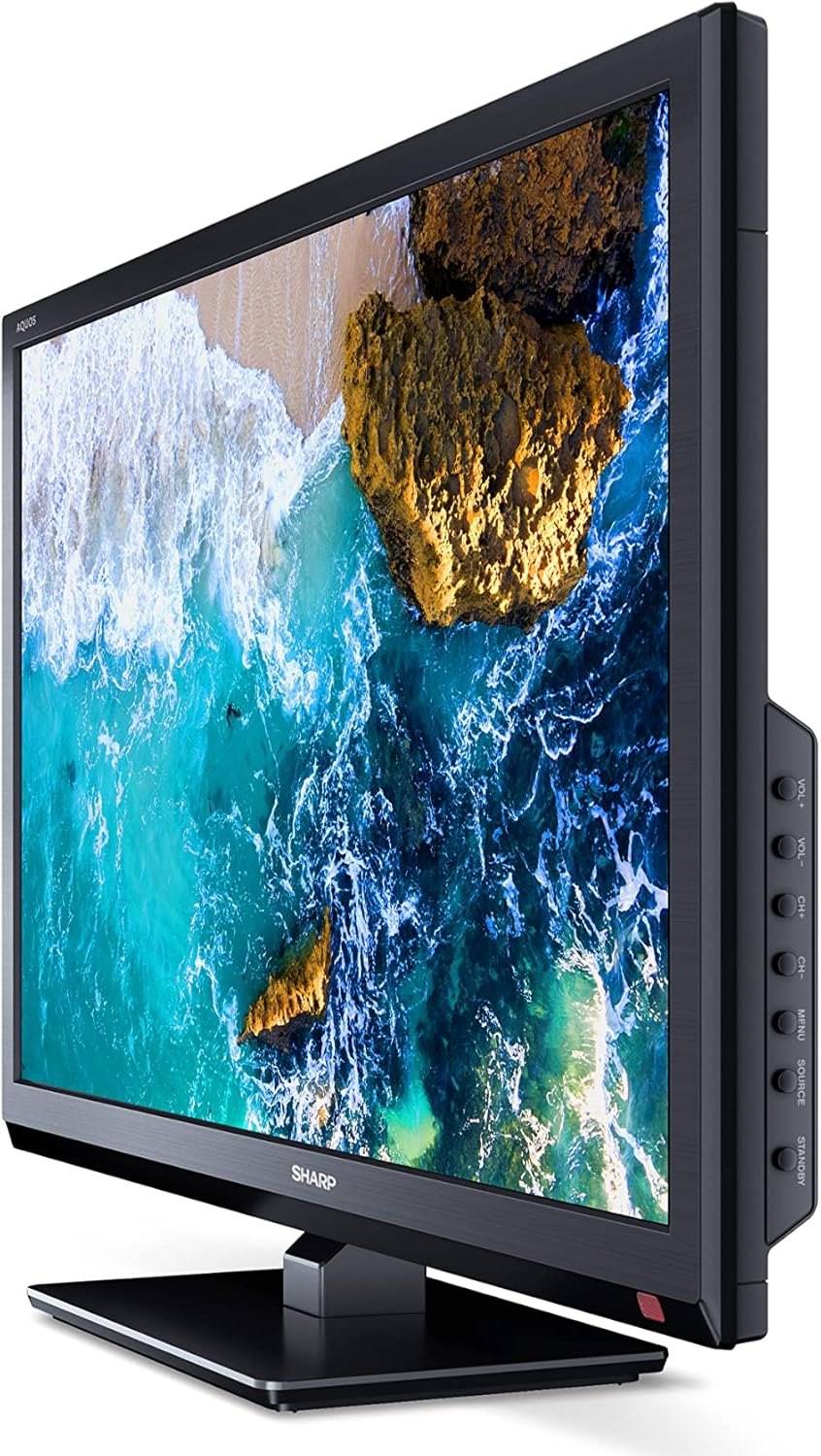
Abbildung: Seite view of the SHARP 24EA4E LED TV, highlighting the various input ports.
After connecting all desired devices, plug the TV's power cord into a suitable electrical outlet (220V).
Bedienungsanleitung
1. Ersteinrichtung und Kanalsuche
Upon first power-on, the TV will guide you through an initial setup process. Follow the on-screen prompts to select your language, country, and perform a channel scan for DVB-T/T2 (terrestrial), DVB-C (cable), or DVB-S/S2 (satellite) signals.
2. Fernbedienungsfunktionen
The included infrared remote control allows full operation of your TV. Insert the 2 AAA batteries into the remote control, ensuring correct polarity.
- Netzschalter: Schaltet den Fernseher ein oder aus.
- Kanaltasten (CH+/-): Wechselt die Kanäle.
- Lautstärketasten (VOL+/-): Regelt die Lautstärke.
- Quellentaste: Wählt die Eingangsquellen aus (HDMI, AV, USB, TV).
- Menü-Schaltfläche: Accesses the TV's main menu for settings adjustments.
- Navigationstasten: Dient zur Navigation in Menüs und zur Auswahl von Optionen.
- OK-Taste: Bestätigt die Auswahl.
- Exit-Taste: Exits menus.
- Zifferntasten (0-9): Direkte Kanalauswahl.

Abbildung: Seite view of the SHARP 24EA4E LED TV, showing the physical control buttons on the side panel.
3. Medienwiedergabe über USB
Sie können verschiedene Medien abspielen. files directly from a USB storage device:
- Insert your USB drive into the USB port on the TV.
- Select the USB input source using the remote control's Source button.
- Navigieren Sie durch die files and folders using the remote control and select the desired media (music, video, or photo) to play.
Wartung
To ensure the longevity and optimal performance of your SHARP 24EA4E TV, follow these maintenance guidelines:
- Reinigen des Bildschirms: Wischen Sie den Bildschirm vorsichtig mit einem weichen, fusselfreien Tuch ab. Bei hartnäckigen Flecken leicht andrücken.ampBefeuchten Sie das Tuch mit Wasser oder einem speziellen Bildschirmreiniger. Sprühen Sie niemals Flüssigkeit direkt auf den Bildschirm.
- Reinigung des Schranks: Verwenden Sie ein weiches, trockenes Tuch, um den Fernsehschrank abzuwischen. Vermeiden Sie die Verwendung von Scheuermitteln oder Lösungsmitteln.
- Belüftung: Um eine Überhitzung zu vermeiden, stellen Sie sicher, dass die Lüftungsöffnungen auf der Rückseite des Fernsehers nicht blockiert sind.
- Netzkabel: Überprüfen Sie das Netzkabel regelmäßig auf Beschädigungen. Wenden Sie sich im Schadensfall an einen qualifizierten Kundendienst, um es austauschen zu lassen.
Fehlerbehebung
Sollten Sie Probleme mit Ihrem Fernseher haben, beachten Sie bitte die folgenden gängigen Schritte zur Fehlerbehebung:
| Problem | Mögliche Lösung |
|---|---|
| Kein Strom | Check if the power cord is securely plugged into both the TV and the wall outlet. Ensure the wall outlet is functional. |
| Kein Bild, aber Ton ist vorhanden | Überprüfen Sie die Eingangsquellenauswahl. Stellen Sie sicher, dass externe Geräte eingeschaltet und korrekt angeschlossen sind. |
| Kein Ton, aber ein Bild ist vorhanden. | Check the volume level and mute status. Ensure audio cables are connected correctly for external devices. |
| Schlechte Bildqualität | Check antenna/cable connections. Adjust picture settings in the TV menu. For external devices, check their output resolution. |
| Fernbedienung funktioniert nicht | Tauschen Sie die AAA-Batterien aus. Stellen Sie sicher, dass sich keine Hindernisse zwischen der Fernbedienung und dem Infrarotsensor des Fernsehers befinden. |
Sollte das Problem nach Anwendung dieser Lösungsansätze weiterhin bestehen, wenden Sie sich bitte an den SHARP-Kundendienst.
Technische Daten
Key technical specifications for the SHARP 24EA4E LED TV:
- Modell: 24EA4E
- Anzeigetechnologie: LED
- Bildschirmgröße: 24 Zoll (60 cm Diagonale)
- Auflösung: 1366 x 768 Pixel (HD Ready)
- Seitenverhältnis: 16:9
- Aktualisierungsrate: 60 Hz (Active Motion 100)
- Kontrastverhältnis: 100000:1
- Ansprechzeit: 8 Millisekunden
- Viewing-Winkel: 178 Grad
- Audioausgang: 2 x 5W speakers, Dolby Digital, Dolby Digital Plus, Surround Sound
- Tuner-Technologie: DVB-T/T2 (Terrestrial), DVB-C (Cable), DVB-S/S2 (Satellite) - MPEG4 + HEVC/H.265 (10-bit)
- Konnektivität: 2 x HDMI, 1 x USB, 1 x SCART, RF Input, Satellite Input, 3.5mm Audio (Headphone Jack), CI Port
- Betriebssystem: Linux
- Energieverbrauch: 17 Watts (in SDR mode)
- Bandtage: 220 V
- Abmessungen (mit Ständer): 56 cm (B) x 38.5 cm (H) x 14 cm (T)
- Gewicht: 3.8 kg
- VESA-Standard: 100 x 100 mm

Image: Diagram showing the dimensions of the SHARP 24EA4E LED TV.
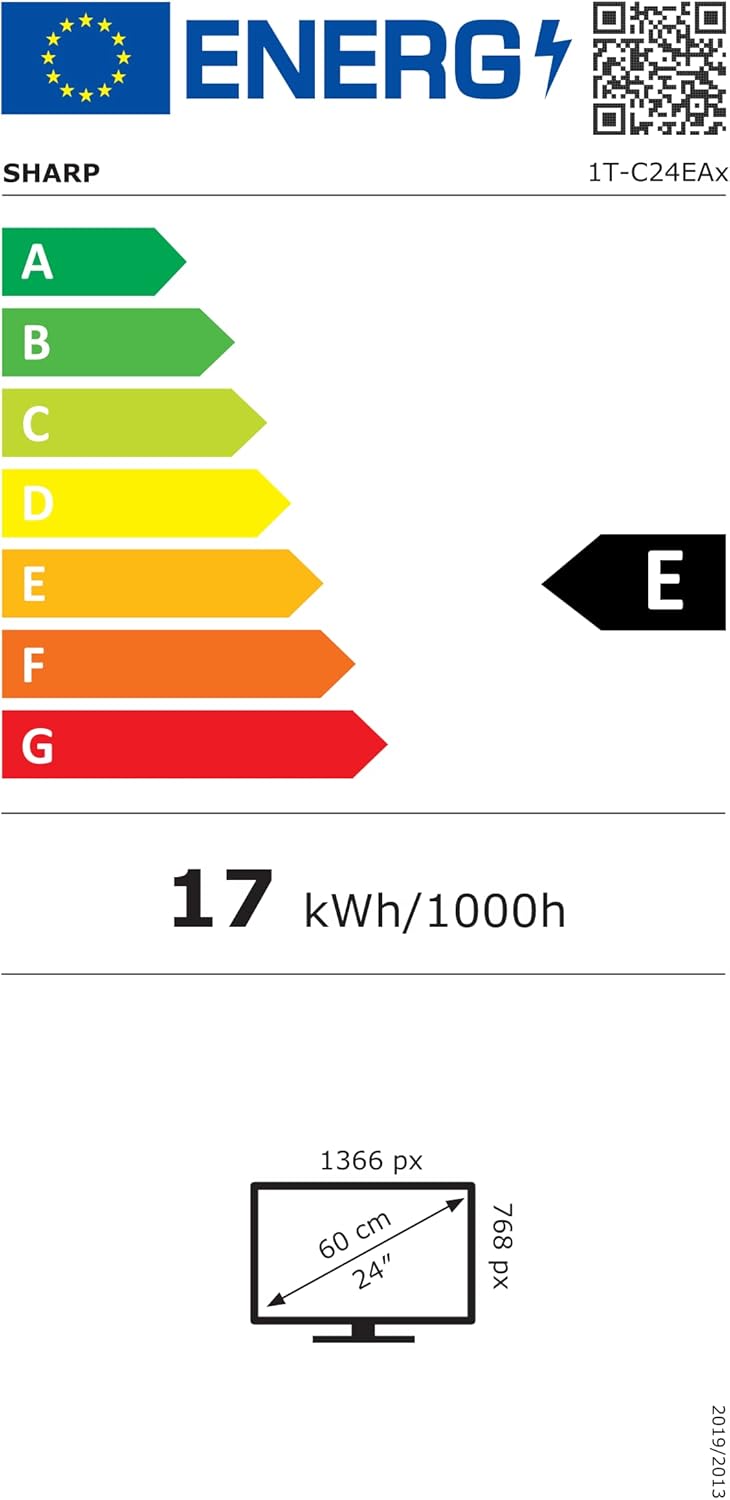
Image: EU Energy Label for the SHARP 24EA4E LED TV, indicating Energy Class E and 17 kWh/1000h consumption.
Für detailliertere Produktinformationen verweisen wir auf die offizielle EU-EPREL-Datenbank: https://eprel.ec.europa.eu/qr/1242293
Garantie und Support
Your SHARP 24EA4E LED TV comes with a manufacturer's warranty. The minimum guaranteed product support is 2 years, and the minimum guaranteed availability of spare parts is 8 years from the date of market introduction.
For warranty claims, technical assistance, or further support, please contact your retailer or visit the official SHARP support webBewahren Sie Ihren Kaufbeleg zur Überprüfung der Garantie auf.


