1. Produktüberschreitungview
The ezcap234 TapeDigi 1 is a multi-functional device designed to bring your analog audio into the digital age. It combines a cassette player, AM/FM radio, and a digital audio recorder/converter into one portable unit. You can enjoy your old cassette tapes, tune into your favorite radio stations, and even record audio directly to a Micro SD card.
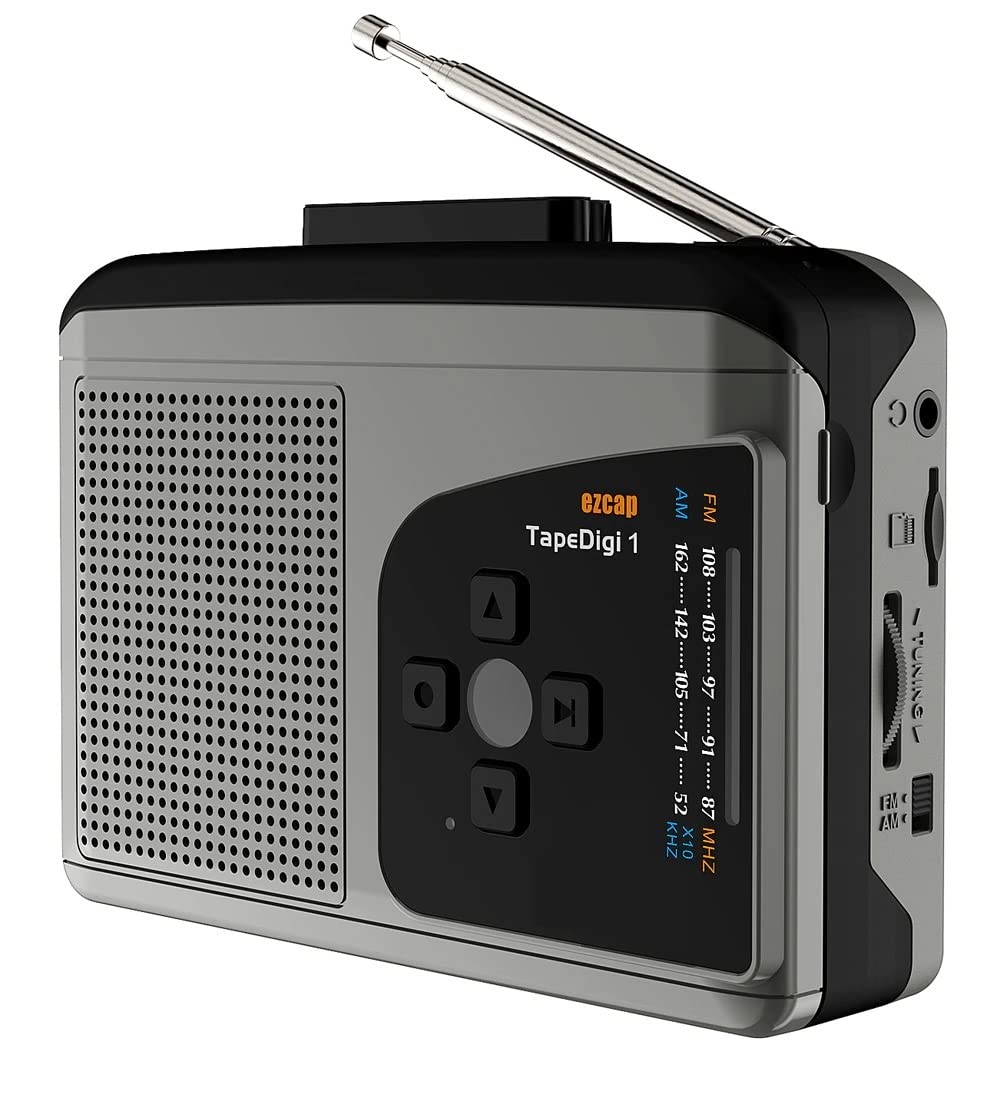
Bild: Vorderseite view of the ezcap234 TapeDigi 1, showcasing its speaker grille, control buttons, and extended antenna.
2. Hauptmerkmale
- Kassettenspieler: Playback your classic cassette tape collection.
- AM/FM-Radio: Tune into local radio stations with clear reception.
- MP3 Conversion: Convert cassette tapes and radio broadcasts directly to MP3 files on a Micro SD card (up to 32GB).
- Sprachrekorder: Built-in microphone allows for direct voice recording to Micro SD card.
- Integrierter Lautsprecher: Enjoy audio playback directly from the device.
- Kopfhörerbuchse: Zum privaten Hören.
- Dual-Power-Optionen: Operates via USB power or 2x AA batteries (not included).

Image: Visual representation of the device's core functionalities, including tape playback, radio, recording, and audio output options.
3. Komponentenidentifikation
Familiarize yourself with the various parts of your ezcap234 TapeDigi 1:

Image: Detailed diagram labeling the antenna, volume adjustment, earphone jack, Micro SD card slot, radio tuning knob, FM/AM switch, Tape/Radio switch, Record/Stop recording button, Indicator LED, UP/DOWN/Play/Stop playing buttons, Speaker, Tape fast forward/rewind, Stop playing tape, Play tape, Microphone inside, and 5V DC jack.
- Antenne: Extendable for FM/AM radio reception.
- Lautstärkeregelung: Rotary knob to control audio output level.
- Kopfhörerbuchse: 3.5mm port for connecting headphones.
- Micro-SD-Kartensteckplatz: Insert Micro SD card for recording and playback.
- Radio-Tuning-Knopf: Passt die Funkfrequenz an.
- FM/AM Switch: Wählt zwischen FM- und AM-Radiofrequenzbändern.
- Tape/Radio Switch: Toggles between cassette player and radio modes.
- Record/Stop Recording Button: Initiates and ends audio recording.
- Anzeige-LED: Shows device status (e.g., recording, power).
- Control Buttons (UP/DOWN/Play/Stop): For navigation and playback control.
- Lautsprecher: Eingebauter Lautsprecher für die Audioausgabe.
- Tape Controls (Fast Forward/Rewind/Stop/Play): Standard cassette player controls.
- Mikrofon: Internal microphone for voice recording.
- 5-V-DC-Buchse: Stromeingangsanschluss.
4. Gerät einschalten
The ezcap234 TapeDigi 1 can be powered in two ways:
- USB-Stromversorgung: Connect a 5V DC power adapter (not included) to the 5V DC jack using a USB cable.
- AA-Batterien: Insert 2x AA batteries (not included) into the battery compartment located on the back of the device. Ensure correct polarity.

Image: The device demonstrating its power options, showing both USB cable connection and the open battery compartment for AA batteries.
5. Kassettenwiedergabe
So spielen Sie eine Kassette ab:
- Öffnen Sie das Kassettenfach.
- Insert a cassette tape, ensuring it is properly seated.
- Schließen Sie das Kassettenfach.
- Schieben Sie den Tape/Radio Switch to the 'Tape' position.
- Drücken Sie die Spielen Taste an den Kassettenreglern.
- Passen Sie die Lautstärkeregelung Stellen Sie mit dem Drehknopf die gewünschte Lautstärke ein.
- Verwenden Sie die Schneller Vorlauf Und Zurückspulen Tasten zur Navigation durch das Band.
- Drücken Sie die Stoppen Taste, um die Wiedergabe zu stoppen.

Image: The ezcap234 TapeDigi 1 positioned on a wooden surface, surrounded by various cassette tapes, illustrating its primary function as a cassette player.
6. AM/FM-Radiobetrieb
Radio hören:
- Schieben Sie den Tape/Radio Switch to the 'Radio' position.
- Erweitern Sie die Antenne für optimalen Empfang.
- Schieben Sie den FM/AM Switch to select your desired band (FM: 87-108MHz, AM: 520-1610 KHz).
- Drehen Sie den Radio-Tuning-Knopf to find a station.
- Passen Sie die Lautstärkeregelung Stellen Sie mit dem Drehknopf Ihre bevorzugte Lautstärke ein.

Image: The device with its telescopic antenna fully extended, highlighting its capability as a portable FM/AM radio receiver.

Image: A conceptual image showing the device broadcasting radio waves, with text bubbles indicating various types of content such as music, news, and talk shows, emphasizing its AM/FM radio function.
7. Audio aufnehmen
The device supports recording from cassette tapes, AM/FM radio, and the built-in microphone directly to a Micro SD card.
7.1. Preparing for Recording
- Ensure a Micro SD card (up to 32GB, formatted to FAT32) is inserted into the Micro SD-Kartensteckplatz.
- Select the desired audio source (Tape or Radio) using the Tape/Radio Switch, or prepare to use the built-in microphone.

Bild: Eine Nahaufnahme view of the side of the device, clearly showing the Micro SD card slot, indicating where to insert the storage for recordings.
7.2. Recording from Tape or Radio
- Start playback of the cassette tape or tune to the desired radio station.
- Drücken Sie die Record/Stop Recording Button. The Indicator LED will illuminate, indicating recording is in progress.
- Drücken Sie die Record/Stop Recording Button again to stop recording. The LED will turn off.
7.3. Recording Voice (Built-in Microphone)
- Ensure the device is in 'Radio' mode (even if not listening to radio) or 'Tape' mode without a tape playing.
- Drücken Sie die Record/Stop Recording Button. The Indicator LED will illuminate.
- Speak clearly towards the built-in Mikrofon.
- Drücken Sie die Record/Stop Recording Button erneut, um die Aufnahme zu stoppen.

Image: The device next to a microphone icon and text, illustrating its capability to record voice using its built-in microphone and save to a Micro SD card.

Image: A person speaking near the device, with visual cues of sound waves, demonstrating the microphone recording function to a TF card.
7.4. Recording Modes (Auto/Manual)
The device supports both automatic and manual recording modes. In auto mode, the device can detect pauses in audio and automatically partition recordings into separate MP3 files, which is useful for digitizing albums or long broadcasts.

Image: A graphic illustrating audio waveforms, explaining the Auto or Manual Recording Mode feature, where auto mode can partition songs into separate MP3 files.
8. Converting Tapes to MP3
The ezcap234 TapeDigi 1 simplifies the process of converting your analog cassette tapes into digital MP3 files, saving them directly to a Micro SD card.
- Insert your Micro SD card into the slot.
- Legen Sie die Musikkassette ein, die Sie konvertieren möchten.
- Stellen Sie sicher, dass Tape/Radio Switch is in the 'Tape' position.
- Drücken Sie die Spielen Taste an den Kassettenreglern.
- Drücken Sie sofort die Record/Stop Recording Button to begin conversion. The audio from the tape will be recorded as an MP3 file auf die Micro-SD-Karte.
- Drücken Sie die Record/Stop Recording Button again to stop the conversion.
Die konvertierte MP3-Datei files can then be transferred to a computer or other devices for playback.

Image: A visual representation of the conversion process, showing a cassette tape transforming into MP3 format and being stored on a 32GB Micro SD card.

Image: An overhead shot of a workspace featuring the ezcap234 TapeDigi 1 alongside a laptop and other audio gear, demonstrating its role in converting old cassettes to MP3s for digital use.
9. Wiedergabe von aufgezeichneten Files
To listen to MP3 files stored on the Micro SD card:
- Ensure a Micro SD card with MP3 files wird eingefügt.
- Schieben Sie den Tape/Radio Switch to the 'Radio' position.
- Drücken Sie die Play/Stop playing button (often the center button in the control cluster).
- Verwenden Sie die AUF/AB buttons to navigate between recorded tracks.
- Passen Sie die Lautstärkeregelung knob as needed.

Image: The device surrounded by icons for music, news, and talk shows, illustrating its dual function of playing FM/AM radio and recording that content to MP3 format.
10. Fehlerbehebung
| Problem | Mögliche Ursache | Lösung |
|---|---|---|
| Kein Strom / Gerät schaltet sich nicht ein | Batteries are dead or incorrectly inserted; USB cable not connected properly or power source is faulty. | Replace batteries, ensuring correct polarity. Check USB cable connection and try a different power source. |
| No sound from speaker/earphones | Volume is too low; Earphones not fully plugged in; Device in wrong mode. | Increase volume. Ensure earphones are fully inserted. Check Tape/Radio switch position. |
| Schlechter Radioempfang | Antenne nicht ausgefahren; Schwaches Signal; Störungen. | Fully extend the antenna. Try repositioning the device. Avoid areas with strong electromagnetic interference. |
| Cannot record to Micro SD card | Micro SD card is full, corrupted, or not formatted correctly (FAT32); Card not inserted properly. | Check Micro SD card capacity. Reformat the card to FAT32 on a computer. Reinsert the card firmly. Try a different Micro SD card. |
| Cassette tape not playing correctly | Tape is tangled or damaged; Tape compartment not closed properly. | Inspect the tape for damage. Ensure the tape compartment is securely closed. |
11. Spezifikationen
| Besonderheit | Detail |
|---|---|
| Marke | MIKROWARE |
| Modell | EZCAP-234-TapeDigi1 |
| Technische Daten | 10 x 3 x 8 cm |
| Artikelgewicht | 290 g |
| Stromversorgung | 5V DC (USB) or 2x AA Batteries |
| Radiofrequenz | FM: 87-108MHz, AM: 520-1610 KHz |
| Aufnahmeformat | MP3 |
| Speichermedium | Micro SD Card (up to 32GB, FAT32 format) |
| Audioausgang | Eingebauter Lautsprecher, 3.5-mm-Kopfhöreranschluss |
| Eingang | Cassette Tape, AM/FM Radio, Built-in Microphone |
12. Pflege und Wartung
- Halten Sie das Gerät trocken. Setzen Sie es weder Feuchtigkeit noch extremen Temperaturen aus.
- Reinigen Sie die Außenseite mit einem weichen, trockenen Tuch. Verwenden Sie keine Scheuermittel oder Lösungsmittel.
- For cassette playback, periodically clean the tape head and pinch roller with a cotton swab lightly dampwurde mit Isopropylalkohol behandelt, um eine optimale Klangqualität zu gewährleisten und Beschädigungen des Bandes zu vermeiden.
- Bei längerer Nichtbenutzung sollten die Batterien entfernt werden, um ein Auslaufen zu verhindern.
- Lassen Sie das Gerät nicht fallen und setzen Sie es keinen starken Stößen aus.
13. Garantie und Support
For warranty information and customer support, please refer to the documentation included with your purchase or visit the official MICROWARE webBewahren Sie Ihren Kaufbeleg als Kaufnachweis für Garantieansprüche auf.
Hersteller: Microware Multimedia Private Limited
Ursprungsland: China


