1. Einleitung
The MOOER F4 Wireless Footswitch Controller is designed to provide seamless, hands-free control over your MOOER Prime P1, looper, and drum machine functions. This compact and versatile device enhances your performance and practice sessions by allowing quick preset switching, looper management, and drum pattern control. Optimized for clarity and ease of use, the F4 integrates effortlessly into your setup, offering robust wireless connectivity and extensive customization options via its dedicated mobile application.
2. Lieferumfang
- MOOER F4 Wireless Footswitch Controller
- USB-C-Ladekabel
- Benutzerhandbuch (dieses Dokument)
3. Produktüberschreitungview
Familiarize yourself with the physical components and controls of your MOOER F4 Wireless Footswitch Controller.

Bild 3.1: Spitze view of the MOOER F4 Wireless Footswitch Controller, showing the four footswitches (A, B, C, D) and the central display screen.
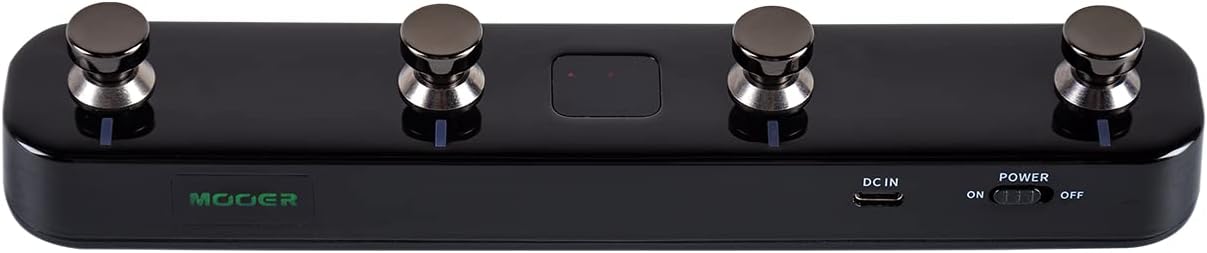
Bild 3.2: Unten view of the MOOER F4 Wireless Footswitch Controller, highlighting the power switch, DC IN port, and USB port.
3.1 Bedienelemente und Anzeigen
- Fußschalter (A, B, C, D): Used for preset switching, looper control, drum machine functions, and custom MIDI commands.
- Bildschirm: Shows current bank/preset number, mode, and other relevant information.
- Stromschalter: Schaltet das Gerät ein/aus.
- DC-Eingangsanschluss: For external power supply (5V 1A adapter).
- USB-Anschluss: For charging the internal battery and connecting to a computer for firmware updates or MIDI over USB.
- LED-Anzeigen: Provide visual feedback on battery status, Bluetooth connection, and footswitch activity.
4. Einrichtung
4.1 Ein-/Ausschalten und Laden
- So schalten Sie das Gerät ein: Slide the POWER switch to the 'ON' position.
- So schalten Sie das Gerät aus: Slide the POWER switch to the 'OFF' position.
- Laden: Connect the F4 to a 5V 1A USB power adapter using the provided USB-C cable. The battery indicator LED will show charging status. A full charge typically provides several hours of operation.
4.2 Bluetooth-Kopplung und -Verbindung
The F4 connects wirelessly via Bluetooth to compatible MOOER devices and mobile applications.
- Ensure the F4 is powered on and within range of your MOOER device (e.g., Prime P1/P2) or mobile device.
- On your MOOER device or mobile app, initiate the Bluetooth pairing process.
- On the F4, press and hold footswitches A Und C simultaneously for a few seconds to enter pairing mode. The Bluetooth indicator LED will flash.
- Wählen
Zugehörige Dokumente - F4

MOOER Hornet 05i Intelligent Amp Bedienungsanleitung
Ausführliches Benutzerhandbuch für das MOOER Hornet 05i Intelligent Amp, mit Informationen zu Sicherheitsvorkehrungen, Funktionen, Anschlüssen, Kurzanleitung, App-Integration, Fußschaltersteuerung, Effektliste und technischen Daten.
Mooer Prime N1 Intelligent Pedal Owner's Manual
Owner's manual for the Mooer Prime N1 Intelligent Pedal, covering precautions, features, layout, instructions, effect list, and specifications. Learn how to connect, operate, and troubleshoot your device.
MOOER PRIME M2 Intelligentes Pedal – Kurzanleitung
Ein kompakter Leitfaden zum MOOER PRIME M2 Intelligent Pedal mit detaillierten Informationen zu Touchscreen-Funktionen, Hardware-Features und Betriebsmodi wie Looper, Drumcomputer und Stimmgerät. Inklusive App-Integration und Informationen zur FCC-Konformität.
MOOER STUDIO GE300 Software-Benutzerhandbuch | Amp Modellierung und Effektsteuerung
Umfassendes Benutzerhandbuch für die MOOER STUDIO-Software, mit dem Benutzer Voreinstellungen bearbeiten, verwalten files und Firmware-Update für das MOOER GE300 amp Modellierer und Multieffektprozessor.
MOOER PRIME STOMP S1 Intelligentes Pedal: Benutzerhandbuch
Ausführliches Benutzerhandbuch für das MOOER PRIME STOMP S1 Intelligent Pedal mit detaillierten Informationen zu Funktionen, Layout, Bedienung und technischen Spezifikationen für Gitarristen.
Mooer SD50A Akustik Amplifier-Benutzerhandbuch
Dieses Handbuch enthält detaillierte Anweisungen für das Mooer SD50A Akustikgerät. AmpDieser Verstärker wird vorgestellt und seine Funktionen, Bedienung, Einrichtung und Spezifikationen werden erläutert. Erfahren Sie mehr über seine Zweikanal-Vorstufe.amp, integrierte Effekte, Looper, Drumcomputer und Anschlussmöglichkeiten.