1. Einleitung
Thank you for choosing the WORKPRO Pink Cordless Drill Driver Set. This 12V electric power drill is designed for household tasks, offering versatility and ease of use for various DIY projects. Its lightweight design and adjustable settings make it suitable for tasks such as hanging pictures, assembling furniture, and tightening screws.

Image: The WORKPRO Pink Cordless Drill Driver Set, showcasing the drill, various drill bits, and the Type-C charging cable.
2. Sicherheitshinweise
Beachten Sie beim Umgang mit Elektrowerkzeugen stets grundlegende Sicherheitsvorkehrungen, um das Risiko von Bränden, Stromschlägen und Verletzungen zu verringern.
- Tragen Sie geeignete persönliche Schutzausrüstung, einschließlich Augenschutz (Schutzbrille oder Schutzbrille) und Gehörschutz.
- Halten Sie Ihren Arbeitsbereich sauber und gut beleuchtet. Überladene oder dunkle Bereiche laden zu Unfällen ein.
- Betreiben Sie Elektrowerkzeuge nicht in explosionsgefährdeten Bereichen, in denen sich beispielsweise brennbare Flüssigkeiten, Gase oder Staub befinden.
- Halten Sie Kinder und andere Personen während der Benutzung des Elektrowerkzeugs fern. Durch Ablenkung können Sie die Kontrolle verlieren.
- Vermeiden Sie versehentliches Einschalten. Stellen Sie sicher, dass sich der Schalter in der Aus-Position befindet, bevor Sie das Gerät an den Akku anschließen, es anheben oder tragen.
- Verwenden Sie das richtige Werkzeug für Ihre Anwendung. Erzwingen Sie kein bestimmtes Werkzeug.
- Pflegen Sie die Werkzeuge sorgfältig. Halten Sie Schneidwerkzeuge scharf und sauber.
- Trennen Sie den Akku vom Elektrowerkzeug, bevor Sie Einstellungen vornehmen, Zubehörteile wechseln oder Elektrowerkzeuge lagern.
- Bewahren Sie unbenutzte Elektrowerkzeuge außerhalb der Reichweite von Kindern auf. Lassen Sie das Elektrowerkzeug nicht von Personen benutzen, die mit diesem nicht vertraut sind oder diese Anweisungen nicht gelesen haben.
3. Komponenten und Packungsinhalt
Your WORKPRO Pink Cordless Drill Driver Set includes the following items:
- 1 x WORKPRO 12V Cordless Drill Driver
- 6 x Drill Bits (various sizes)
- 1 x Typ-C-Ladekabel

Image: A detailed diagram of the WORKPRO Pink Cordless Drill, highlighting its key components such as the keyless chuck, torque adjustment collar, variable speed switch, LED light, and Type-C charging port. The included drill bits and screwdriver bits are also shown.
4. Einrichtung
4.1 Attaching Drill Bits / Screwdriver Bits
The drill features a 3/8-inch keyless chuck for quick and easy bit changes. To attach a bit:
- Ensure the drill is off and the forward/reverse switch is in the neutral (locked) position.
- Durch Drehen des Spannfutters gegen den Uhrzeigersinn werden die Backen geöffnet.
- Insert the desired drill bit or screwdriver bit into the chuck, ensuring it is seated firmly.
- Twist the chuck clockwise to tighten the jaws securely around the bit. The automatic spindle lock assists in one-handed tightening.
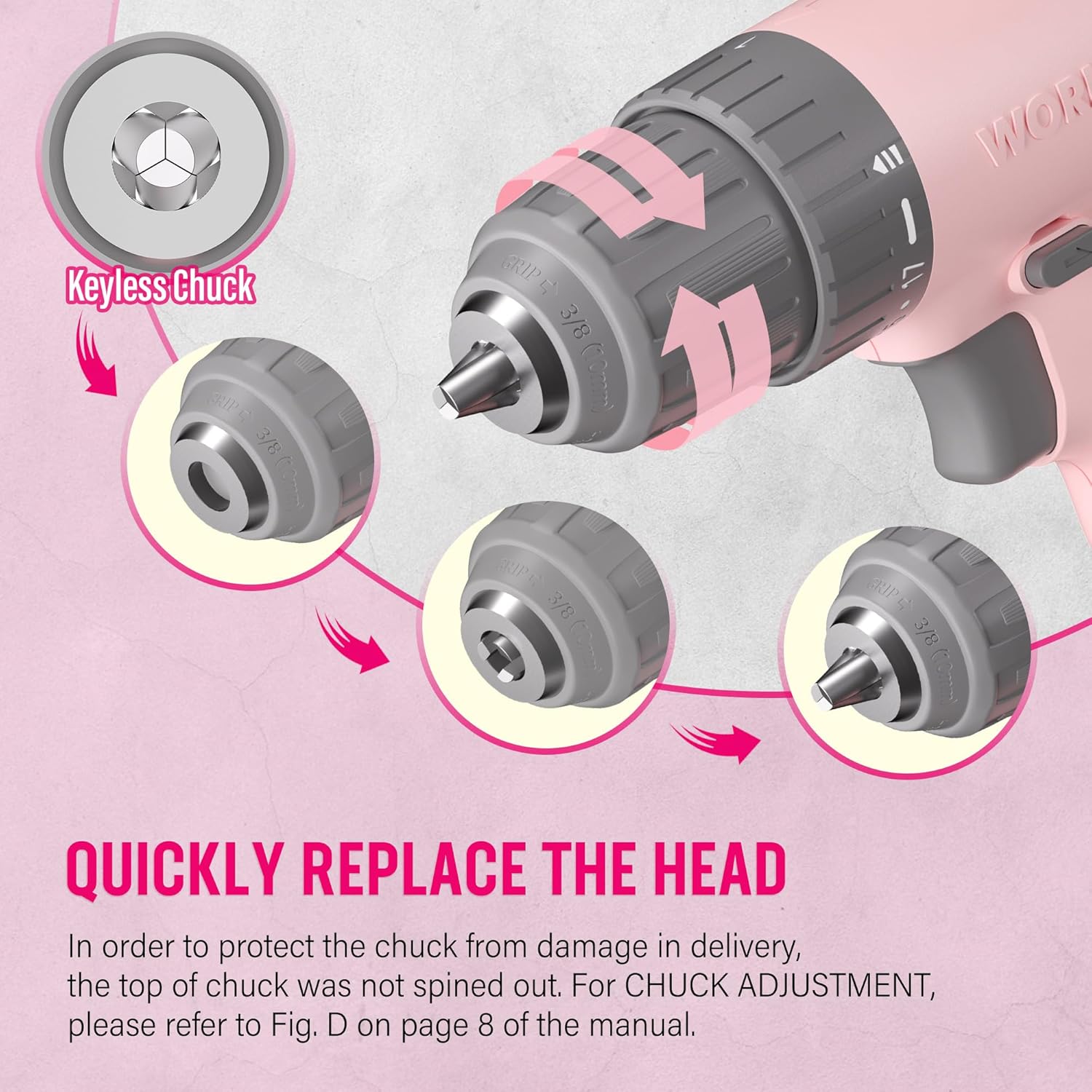
Image: A close-up illustration demonstrating the operation of the keyless chuck, showing how to open and close it to quickly replace drill or screwdriver bits.
4.2 Laden des Akkus
The drill is equipped with an integrated 12V Lithium-Ion battery and charges via a Type-C USB cable. Use a 5V/1A charger for optimal charging.
- Connect the Type-C end of the charging cable to the drill's charging port.
- Connect the USB-A end of the cable to any compatible USB power source (e.g., computer, power bank, USB wall adapter, car charger).
- Monitor the battery capacity indicator lights on the drill to check the charging status.
- A blinking light indicates the battery needs recharging. Multiple solid lights indicate charge level.

Image: The WORKPRO Pink Cordless Drill connected to a laptop via its Type-C charging cable, illustrating its USB rechargeable feature.
5. Bedienungsanleitung
5.1 Drehzahlregelung
The drill features a variable speed trigger, allowing you to control the rotational speed from 0 to 750 RPM based on the pressure applied.
- Leichter Druck: For slower speeds, ideal for starting holes or driving screws precisely.
- Heavy Pressure: For faster speeds, suitable for drilling into materials.
- Releasing the trigger will automatically stop the drill.

Image: A hand holding the WORKPRO Pink Cordless Drill, illustrating how the variable speed switch operates based on trigger pressure (0-750 RPM).
5.2 Drehmomenteinstellungen (17+1)
The 17+1 torque adjustable design allows you to select the appropriate torque for different tasks and materials, preventing over-driving screws or damaging surfaces. The maximum torque can reach 19 Newton Meters (168 IN-LBS).
- Rotate the torque adjustment collar located behind the chuck to select the desired setting.
- Niedrigere Einstellungen eignen sich zum Eindrehen kleiner Schrauben oder zum Bearbeiten weicher Materialien.
- Higher settings are for driving larger screws or drilling into harder materials like wood, PVC, or metal.
- The "+1" setting is for drill mode, providing maximum torque for drilling applications.
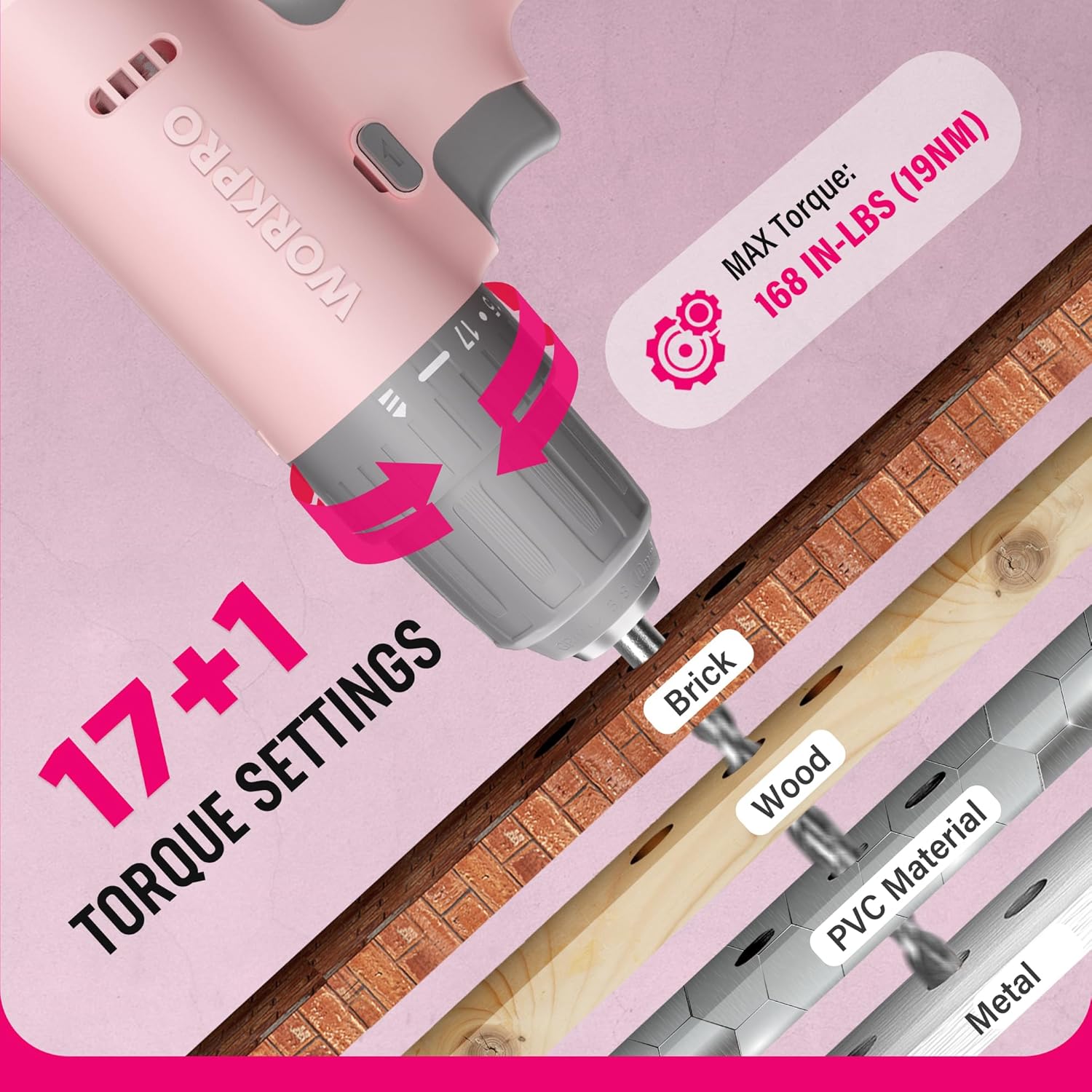
Bild: Eine Nahaufnahme view of the WORKPRO Pink Cordless Drill's 17+1 torque settings, indicating suitable materials like brick, wood, PVC, and metal for different torque levels.
5.3 Vorwärts-/Rückwärtsschalter
The forward/reverse switch allows you to change the direction of rotation for driving or removing screws and bits.
- Push the switch to the left for forward rotation (driving screws/drilling).
- Push the switch to the right for reverse rotation (removing screws/bits).
- Center the switch to lock the trigger and prevent accidental operation.
5.4 LED-Arbeitsleuchte
The integrated LED light activates when the trigger is pressed, illuminating the work area for improved visibility in dark or confined spaces.

Image: The WORKPRO Pink Cordless Drill in use, with its LED work light brightly illuminating the area, making it easier to work in dark environments.
6. Wartung
Proper maintenance ensures the longevity and optimal performance of your drill.
- Reinigung: Regularly wipe down the drill with a soft, damp Mit einem Tuch abwischen. Keine scharfen Chemikalien oder Scheuermittel verwenden. Lüftungsöffnungen frei von Staub und Schmutz halten.
- Lagerung: Store the drill in a dry place, away from direct sunlight and extreme temperatures. Ensure the battery is partially charged before long-term storage.
- Batteriepflege: Avoid fully discharging the battery frequently. Recharge the battery before it is completely depleted to prolong its lifespan.
- Wartung des Spannfutters: Reinigen Sie die Spannbacken regelmäßig, um einen sicheren Halt der Bohrer zu gewährleisten.
7. Fehlerbehebung
| Problem | Mögliche Ursache | Lösung |
|---|---|---|
| Die Bohrmaschine lässt sich nicht einschalten. | Batterie ist leer. Forward/reverse switch is in the locked (center) position. | Charge the battery using the provided Type-C cable. Move the forward/reverse switch to the forward or reverse position. |
| Reduzierte Leistung oder Geschwindigkeit. | Niedrige Batterieladung. Incorrect torque setting for the task. | Laden Sie den Akku auf. Adjust the torque collar to a higher setting or switch to drill mode. |
| Der Bohrer rutscht im Bohrfutter ab. | Das Spannfutter war nicht ausreichend festgezogen. Der Gebissschaft ist verschmutzt oder beschädigt. | Retighten the chuck firmly. Reinigen oder ersetzen Sie das Bohrteil. |
8. Spezifikationen
| Besonderheit | Detail |
|---|---|
| Marke | ARBEITSPRO |
| Modellnummer | W122061 |
| Stromquelle | Batteriebetrieben |
| Bandtage | 12 Volt |
| Maximale Drehzahl | 750 U/min |
| Maximales Drehmoment | 19 Newton Meters (168 IN-LBS) |
| Drehmomenteinstellungen | 17 + 1 (Bohrmodus) |
| Chuck Größe | 3/8 Inches (Keyless) |
| Akku-Typ | Lithium-Ionen-Akku (enthalten) |
| Ladeanschluss | Type-C USB (5V-9V input) |
| Besondere Merkmale | Variable Speed, LED Work Light |
| Material | ABS Plastic + TPE |
| Artikelgewicht | 1.37 Kilogramm (ca. 3.01 Pfund) |
| Technische Daten | 9.37 x 2.87 x 9.92 Zoll |
9. Garantie und Support
For warranty information or technical support, please refer to the contact details provided with your product packaging or visit the official WORKPRO webBewahren Sie Ihren Kaufbeleg als Kaufnachweis auf.
WORKPRO Tools is committed to quality and customer satisfaction. Additionally, a portion of this product's purchase supports the NATIONAL BREAST CANCER FOUNDATION, INC., aiding in early detection, education, and support services.


