1. Einrichtung
Follow these steps to install and connect your Linkind ST19 Smart Edison Bulbs.
1.1 Physische Installation
Ensure the power is off before installation. Screw the E26 base bulb into a standard E26 light socket. These bulbs are designed for indoor use and are not compatible with dimmer switches, which may cause flickering.

Image: Easy installation into a standard E26 bulb base. Confirm bulb dimensions (2.28in x 5.04in) for proper fit before purchase.
1.2 App Connection (AiDot APP)
The Linkind Smart Edison Bulbs require the AiDot APP for smart features. Download the AiDot APP from your device's app store. Ensure your Wi-Fi network is 2.4GHz, as 5GHz networks are not supported for initial setup.
- Download the AiDot APP from the App Store or Google Play.
- Erstellen Sie ein Konto und melden Sie sich an.
- Tippen Sie auf das Symbol "+" oder auf "Gerät hinzufügen", um den Kopplungsvorgang zu starten.
- Follow the in-app instructions to connect your bulbs to your 2.4GHz Wi-Fi network.
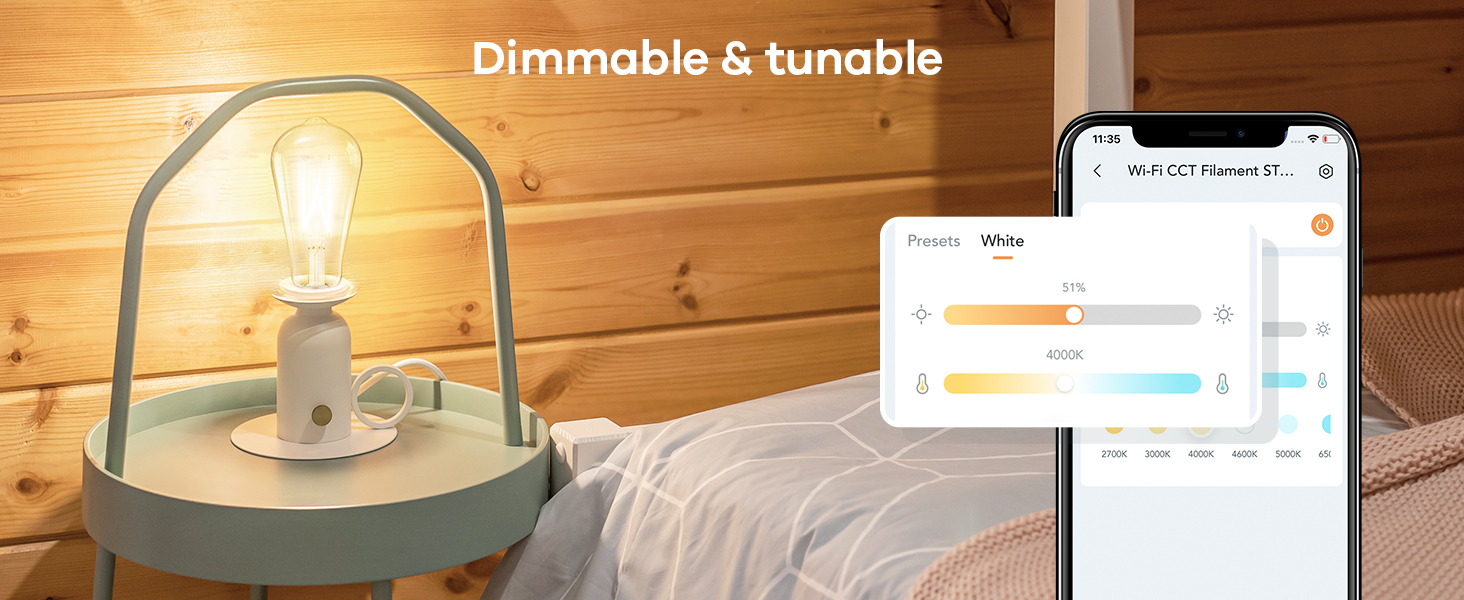
Image: Visual guide for connecting the smart bulbs using the AiDot APP, showing the device addition process and Wi-Fi setup.
1.3 Fernbedienungskopplung
The included remote control is pre-paired with the bulbs for immediate use. If re-pairing is needed, ensure the bulb is powered on, then press the remote's pairing button as instructed in the remote's user guide. The remote features a magnetic piece for convenient storage, such as on a refrigerator.
Video: Instructions on how to pair Linkind Smart Bulbs with the remote control. This video demonstrates the steps to establish a connection between the bulb and the remote for direct control.
2. Bedienungsanleitung
Control your Linkind Smart Edison Bulbs using the AiDot APP, voice commands, or the included remote control.
2.1 AiDot APP Control
The AiDot APP provides full control over your bulbs:
- Abstimmbares weißes Licht: Adjust color temperature from 2700K (warm white) to 6500K (cool white).
- Dimmbar: Passen Sie die Helligkeit von 1 % bis 100 % an.
- Time Schedule Function: Legen Sie Zeitpläne für automatische Ein-/Ausschaltzeiten fest.
- Gruppensteuerung: Control multiple bulbs simultaneously.
- Voreinstellungen: Utilize pre-set lighting scenes.

Image: Demonstrates both app control for dimming and color temperature, and remote control functions for turning on/off, adjusting temperature, and brightness.
Video: A step-by-step guide on how to set timers and schedules for your Linkind smart bulbs using the AiDot APP, allowing for automated lighting control.
2.2 Sprachsteuerung (Alexa & Google Home)
The bulbs are compatible with Amazon Alexa and Google Home for convenient voice control. Link your AiDot account to your Alexa or Google Home app to enable voice commands.
- Example-Befehle:
- "Alexa, schalte das Licht im Wohnzimmer ein."
- "Hey Google, set the bedroom light to warm white."
- "Alexa, dimme das Küchenlicht auf 50 %."
Video: Demonstrates the integration of Linkind smart bulbs with Alexa and Google Home, showing how to control lighting using voice commands for on/off, dimming, and color temperature adjustments.
2.3 Fernbedienungsbetrieb
The remote control offers quick access to basic functions:
- 1x kurz drücken: An / Ausschalten.
- 2x kurz drücken: Change color temperature.
- Langes Drücken: Helligkeit anpassen.
3. Wartung
To ensure optimal performance and longevity of your Linkind Smart Edison Bulbs, follow these simple maintenance guidelines:
- Reinigung: Ensure the bulb is off and cool before cleaning. Use a soft, dry cloth to wipe the bulb. Avoid using liquid cleaners or abrasive materials.
- Lagerung: If storing the bulbs for an extended period, keep them in their original packaging in a cool, dry place.
- Ersatz: With an average life of 25,000 hours, these LED bulbs are designed for long-term use. Replacement is typically not required for many years under normal usage.
4. Fehlerbehebung
If you encounter issues with your Linkind Smart Edison Bulbs, refer to the following common solutions:
4.1 Verbindungsprobleme
- Glühbirne verbindet sich nicht mit dem WLAN: Ensure your Wi-Fi network is 2.4GHz. Move the bulb closer to your router during setup. Restart your router and try connecting again.
- Fernbedienung reagiert nicht: Check if the remote's battery is properly inserted or needs replacement. If the remote is not paired, follow the pairing instructions in Section 1.3.
- Sprachsteuerung funktioniert nicht: Verify that your AiDot account is correctly linked to your Alexa or Google Home app. Ensure your voice assistant device is online and within range.
4.2 Leistungsprobleme
- Bulb flickering: These bulbs are not compatible with traditional dimmer switches. Ensure they are installed in a non-dimmable fixture or that any existing dimmer switch is set to full power (100%) or bypassed.
- Incorrect brightness or color temperature: Use the AiDot APP or remote control to adjust settings. If using voice control, specify the desired brightness percentage or color temperature (e.g., "warm white").

Image: Illustrates the ST19 (ST58) bulb shape and explicitly states incompatibility with dimmer switches to prevent flickering.
5. Spezifikationen
| Besonderheit | Detail |
|---|---|
| Marke | Linkind |
| Modellnummer | Edison (ST19/ST58) |
| Lichtart | LED |
| Wastage | 8 Watt |
| Glühlampenäquivalent | 60 Watt |
| Helligkeit | 800 Lumen |
| Farbtemperatur | 2700K-6500K (einstellbares Weiß) |
| Dimmbar | Yes (via App/Voice/Remote, NOT external dimmer switches) |
| Lampensockel | E26 |
| Größe der Glühbirnenform | ST19 (ST58) |
| Kontrollmethode | App, Fernbedienung, Sprachsteuerung (Alexa, Google Home) |
| Konnektivität | 2.4 GHz WLAN |
| Verwendung im Innen- und Außenbereich | Innenbereich |
| Durchschnittliches Leben | 25,000 Stunden |
| Material | Glas |

Bild: Detailliert view of the Linkind ST19 Smart Edison Bulb, showing its physical dimensions and highlighting key features and limitations.
6. Garantie und Support
Linkind is committed to providing quality products and customer satisfaction.
- Garantie: This product comes with a 1-year coverage from the date of purchase.
- Kundendienst: For any questions, technical assistance, or warranty claims, please contact Linkind customer service. Live customer service is available Monday-Friday, 9 AM - 5 PM PST.
- Online-Ressourcen: Besuchen Sie die offizielle Linkind Store für zusätzliche Produktinformationen und Support.