Einführung
The Orbit B-hyve Smart Hose Faucet Timer with Wi-Fi Hub provides advanced control over your outdoor watering. This system allows you to manage your hose faucet watering from anywhere using your smart device, ensuring your plants receive optimal hydration while conserving water. The included Wi-Fi hub connects your timers to the internet, enabling remote programming, weather-based adjustments, and real-time monitoring.
Packungsinhalt
- 2 x B-hyve Smart Hose Faucet Timers
- 1 x B-hyve Wi-Fi Hub
- Benutzerhandbuch (dieses Dokument)
Setup und Installation
1. Wi-Fi Hub Setup
Plug the B-hyve Wi-Fi Hub into an indoor electrical outlet within range of your home's Wi-Fi router. Ensure it is placed in a central location to maximize signal strength to your hose faucet timers.
2. Zeitschaltuhr-Installation
Thread the B-hyve Smart Hose Faucet Timer onto any standard outdoor hose faucet. Hand-tighten until snug. Do not overtighten. Ensure the timer is oriented vertically for optimal performance.

Image: Proper installation of the B-hyve timer on a hose faucet.
3. App-Download und Kopplung
Download the free B-hyve app from the Apple App Store (iOS) or Google Play Store (Android). Create an account and follow the in-app instructions to add your Wi-Fi Hub and then your Smart Hose Faucet Timers. The app will guide you through the pairing process.
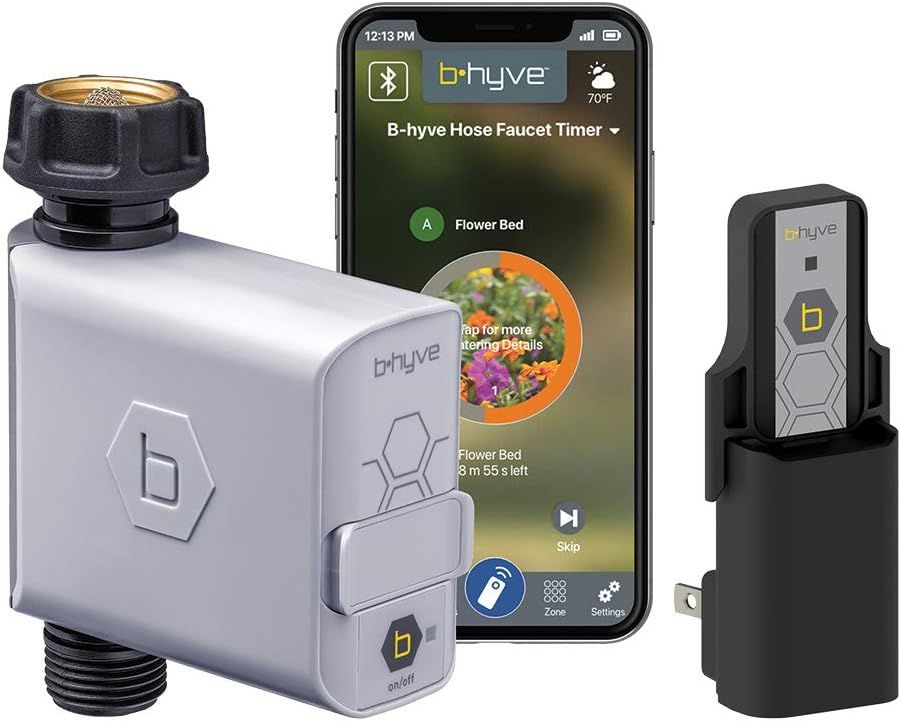
Image: The B-hyve timer, Wi-Fi hub, and the B-hyve mobile application.
Betrieb
Manuelle Bewässerung
To manually water without using the app, press the 'on/off' button on the front of the timer. Press once to turn on, and press again to turn off. The timer will run for a default duration, which can be adjusted in the app.
App-Steuerung und Zeitplanung
The B-hyve app provides complete control over your watering schedule. You can set custom watering programs, including start times, durations, and days of the week. The app allows you to make changes from anywhere with an internet connection.

Image: The B-hyve system offers comprehensive control via the app.
Smart Watering with Weather Sense
Utilize the Weather Sense technology for optimized watering. Based on local weather feeds, soil type, slope, and sun exposure, the timer automatically adjusts watering schedules to deliver the precise amount of water needed, preventing overwatering and conserving resources.

Image: The B-hyve system's smart watering capabilities.
Water Usage Tracking (Know the Flow)
The built-in flow meter allows you to monitor and track water usage directly within the B-hyve app. This feature helps you understand your water consumption and identify potential leaks or inefficiencies.
Erweiterte Funktionen
Erweiterbares System
The B-hyve system is designed to be expandable. You can add additional B-hyve Smart Hose Faucet Timers (sold separately) to create multiple watering zones in your yard, all managed from the same B-hyve app and Wi-Fi Hub. These timers network together to boost signal strength.

Image: The B-hyve system supports multiple timers for expanded coverage.
For Use In North America Only
Please note that the software and updates for this model are specifically approved for use in North America. International versions of Orbit B-hyve products are available for other regions.

Image: This B-hyve model is intended for use in North America.
Wartung
- Reinigung: Periodically wipe down the exterior of the timer and hub with a damp cloth. Do not submerge the timer or hub in water.
- Batteriewechsel: The hose faucet timer uses standard batteries (type not specified in provided data, typically AA or AAA). Replace batteries when the low battery indicator appears in the app or on the device.
- Überwinterung: Before the first frost, disconnect the timer from the faucet and store it indoors in a dry, protected area to prevent freezing damage.
Fehlerbehebung
| Problem | Mögliche Ursache | Lösung |
|---|---|---|
| Zeitschaltuhr bewässert nicht | Low batteries, no schedule set, manual override, water supply off. | Check/replace batteries. Verify schedule in app. Ensure manual watering is off. Check faucet. |
| App not connecting to timer/hub | Hub unplugged, out of Wi-Fi range, timer out of hub range, internet issue. | Ensure hub is plugged in and has power. Move hub closer to router. Move timer closer to hub. Check home internet connection. |
| Inaccurate watering duration | Incorrect settings in app, Weather Sense adjustments. | Review program settings in the B-hyve app. Understand that Weather Sense may adjust durations based on conditions. |
Produktspezifikationen
| Besonderheit | Detail |
|---|---|
| Marke | Orbit |
| Modellname | B-hyve Smart Hose Faucet Timer |
| Material | Plastic (2 Pack configuration) |
| Anzahl der Einstellungen | 3 (likely referring to programming modes) |
| UPC | 840041554687 |
| Hersteller | ORBIT IRRIGATION |
| Erstes verfügbares Datum | 9. August 2022 |
Garantie und Support
Orbit products are designed for durability and performance. For specific warranty information regarding your B-hyve Smart Hose Faucet Timer and Wi-Fi Hub, please refer to the warranty card included with your product or visit the official Orbit website. For technical support, troubleshooting assistance, or to purchase additional accessories, please visit the Orbit Store auf Amazon or the Orbit customer support portal.
Always ensure you are using the latest version of the B-hyve app for optimal performance and access to the newest features and bug fixes.


