Einführung
The IMICE T97 RGB Honeycomb Gaming Mouse is designed to provide a precise and comfortable experience for gaming and general computer use. It features a high-precision 4800 DPI sensor, a durable and ergonomic design, and is compatible with various operating systems. This manual will guide you through the setup, operation, and maintenance of your new gaming mouse.
- Marke: IMICE
- Typ: Maus
- Kompatibilität: Computer und Laptops
- Hauptmerkmale: High precision 4800 DPI, comfortable and durable design, anti-sweat design, precise positioning.
- Farbe: Schwarz
Installationsanweisungen
1. Anschließen der Maus
The IMICE T97 mouse uses a standard USB connection for plug-and-play functionality. No additional drivers are typically required for basic operation on supported operating systems.
- Suchen Sie einen freien USB-Anschluss an Ihrem Computer oder Laptop.
- Insert the USB connector of the IMICE T97 mouse firmly into the USB port.
- Ihr Betriebssystem sollte die benötigten Treiber automatisch erkennen und installieren. Dieser Vorgang kann einige Augenblicke dauern.
- Nach der Installation ist die Maus sofort einsatzbereit.
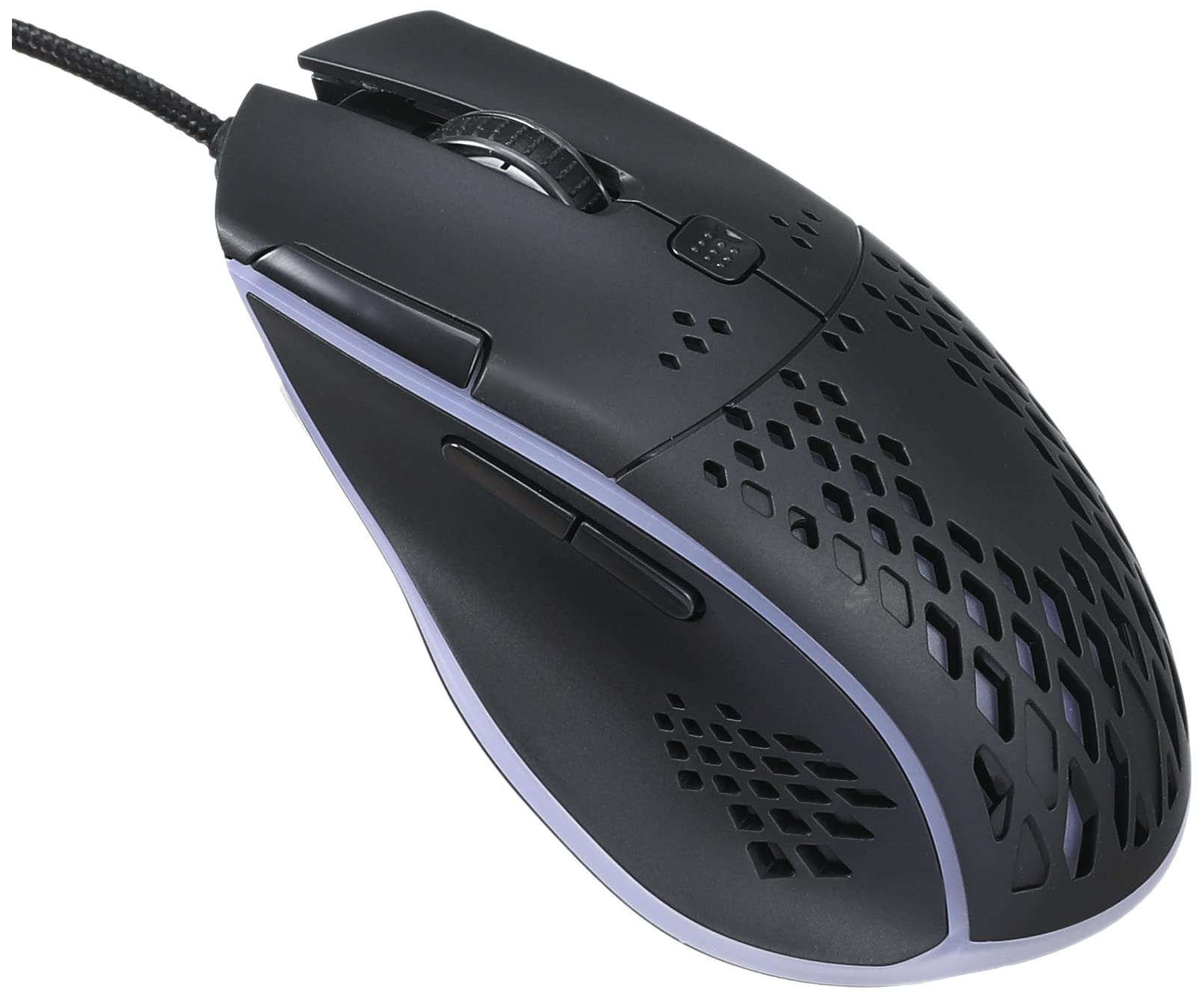
Bild: Draufsicht view of the IMICE T97 RGB Honeycomb Gaming Mouse, showing its ergonomic shape and honeycomb shell design.
Bedienung der Maus
Grundfunktionen
- Links Klick: Primary action, selection, activation.
- Rechtsklick: Kontextmenü, sekundäre Aktionen.
- Scrollrad: Dokumente nach oben/unten scrollen und web Seiten. Kann auch per Mittelklick bedient werden.
- Seitentasten: (If present, typically for forward/back navigation in browsers or custom functions in games). The T97 model typically includes two side buttons.
DPI-Anpassung
The IMICE T97 mouse features adjustable DPI (Dots Per Inch) settings, allowing you to change the cursor sensitivity. This mouse supports up to 4800 DPI. There is usually a dedicated button, often located behind the scroll wheel, to cycle through different DPI levels. Press this button to switch between sensitivity settings to find your preferred speed.
RGB-Beleuchtung
The mouse features RGB lighting, which typically cycles through various colors automatically. There may not be user-configurable software for lighting control, and it operates as a default aesthetic feature.

Abbildung: Unterseite view of the IMICE T97 RGB Honeycomb Gaming Mouse, showing the optical sensor, product label with model T97, and regulatory marks.
Wartung
Reinigung
- Trennen Sie die Maus vor der Reinigung von Ihrem Computer.
- Verwenden Sie ein weiches, trockenes, fusselfreies Tuch, um die Oberfläche der Maus abzuwischen.
- Bei hartnäckigen Verschmutzungen leicht dampDas Tuch mit Wasser oder einer milden Reinigungslösung befeuchten (scharfe Chemikalien vermeiden).
- Verwenden Sie ein Wattestäbchen oder Druckluft, um die Bereiche um die Tasten und das Scrollrad zu reinigen.
- Stellen Sie sicher, dass keine Flüssigkeit in die internen Komponenten der Maus eindringt.
Lagerung
Bewahren Sie die Maus bei längerem Nichtgebrauch an einem kühlen, trockenen Ort fern von direkter Sonneneinstrahlung und extremen Temperaturen auf.
Fehlerbehebung
| Problem | Lösung |
|---|---|
| Die Maus reagiert nicht. |
|
| Die Cursorbewegung ist unregelmäßig oder sprunghaft. |
|
| Buttons or scroll wheel are not working. |
|
| Cannot find software for customization. | The IMICE T97 mouse is primarily designed for plug-and-play operation. Dedicated software for advanced customization (like button remapping or detailed RGB control) may not be available or easily accessible for this model. Most functions are hardware-controlled. |
Technische Daten
| Marke | IMICE |
| Modell | T97 |
| Farbe | Schwarz |
| Konnektivitätstechnologie | USB |
| DPI (Max.) | 4800 DPI |
| Besondere Merkmale | Comfortable design, RGB lighting, honeycomb shell |
| Handausrichtung | Beidhändig |
| Empfohlene Verwendung | Spiele |
| Kompatible Geräte | Personalcomputer, Laptop |
| Betriebssystemkompatibilität | Linux, Windows XP (and newer versions) |
| Artikelgewicht | 120 Gramm |
| Versandabmessungen | 15 x 11 x 5 cm |
| Batterien im Lieferumfang enthalten | No (Wired USB mouse) |
| ASIN | B0BD2DDWNQ |
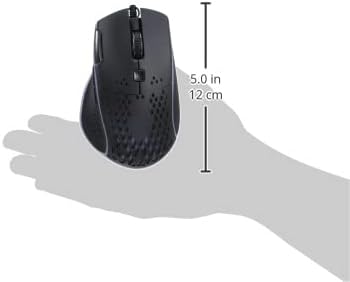
Abbildung: Seite view of the IMICE T97 RGB Honeycomb Gaming Mouse held in a hand, illustrating its compact size (approximately 5.0 inches or 12 cm in length).
Garantieinformationen
Please refer to the retailer or your purchase documentation for specific warranty terms and conditions. IMICE products typically come with a limited warranty against manufacturing defects. Keep your proof of purchase for warranty claims.
Kundenservice
For technical assistance or further inquiries, please contact your retailer or visit the official IMICE website for support resources. Ensure you have your product model (T97) and purchase details ready when contacting support.