1. Einleitung
This manual provides detailed instructions for the operation and maintenance of your LFF DAB+/FM Digital Radio, Model YT81107. Please read this manual thoroughly before using the device to ensure proper function and to maximize your listening experience.

Bild 1: Vorderseite view of the LFF DAB+/FM Digital Radio, Model YT81107, featuring its speaker grille, color LCD display, and telescopic antenna.
2. Packungsinhalt
Bitte prüfen Sie das Paket auf folgende Artikel:
- 1 x LFF DAB Digital Radio (Model YT81107)
- 1 x Netzteil
- 1 x Schnellstartanleitung (dieses Handbuch)
Sollten Artikel fehlen oder beschädigt sein, wenden Sie sich bitte umgehend an den Kundendienst.
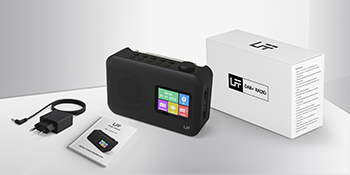
Image 2: The LFF DAB+/FM Digital Radio, AC power adapter, and quick start guide as included in the package.
3. Produktmerkmale
The LFF DAB+/FM Digital Radio YT81107 offers a range of features designed for versatile listening:
- DAB+ and FM Digital Radio: Supports ultra-wide signals in DAB+ (174.928 - 239.2 MHz) and FM (87.5 - 108 MHz) bands.
- Sendervoreinstellungen: Store up to 30 FM and 30 DAB+ stations for quick access.
- Klares LCD-Display: Large color LCD screen displays station information and time.
- Flexible Energieoptionen: Operates with the included AC adapter or 4 x 1.5V (LR6, AA) batteries (not included).
- Verbesserter Empfang: Features a 39 cm extendable antenna for improved signal strength.
- Schlaf-Timer: Programmable sleep timer (15/30/45/60/90/120 minutes).
- Dualer Wecker: Stellen Sie zwei unabhängige Alarme ein.
- Bluetooth-Konnektivität: Functions as a Bluetooth speaker for streaming audio from compatible devices.
- Kopfhöreranschluss: 3.5-mm-Klinkenanschluss für ungestörtes Hören.

Bild 3: Überview of the radio's functions, including DAB+ radio, 60 presets, FM radio, sleep timer, headphone jack, Bluetooth, full-color screen, and dual alarm.

Image 4: Close-up of the radio's full-color LCD display, showing time and date.
4. Einrichtung
4.1 Einschalten des Geräts
Your radio can be powered by either the AC adapter or batteries.
- Wechselstromversorgung: Connect the included AC adapter to the DC 5V input port on the radio and plug the other end into a standard wall outlet.
- Batterieleistung: Open the battery compartment on the back of the radio. Insert 4 x 1.5V AA (LR6) batteries, ensuring correct polarity. Close the compartment securely. (Batteries are not included.)
4.2 Antenneneinstellung
Extend the telescopic antenna fully and adjust its angle for optimal reception. For DAB+ and FM radio, a fully extended antenna generally provides the best signal.

Image 5: Illustration of the radio's dimensions (16.1 x 10.9 x 5.6 cm), battery requirements (4 x 1.5V AA), AC adapter (5V/1000mA), and the 360° adjustable antenna.
4.3 Initial Scan for Stations
Upon first power-on, the radio will typically perform an automatic scan for available DAB+ and FM stations. This process may take a few minutes. Once complete, the radio will store the found stations.
5. Bedienungsanleitung
5.1 Ein-/Ausschalten
Drücken Sie die Leistung button (usually located on the top or front panel) to turn the radio on or off.
5.2 Modusauswahl
Drücken Sie die Modus button to cycle through available modes: DAB+ Radio, FM Radio, and Bluetooth.
5.3 Tuning Radio Stations (DAB+/FM)
There are three primary ways to find and select radio stations:
- Automatischer Scan: In DAB+ or FM mode, initiate an auto-scan. The radio will search for and list all available stations.
- Manuelle Suche: Use the tuning knob or navigation buttons to manually adjust the frequency.
- Voreinstellungen: Store your favorite stations to preset numbers (1-30 for FM, 1-30 for DAB+). To save a station, tune to it, then press and hold a preset number button until the display confirms storage. To recall a station, simply press the corresponding preset number button.

Image 6: Visual representation of the three methods for selecting radio stations: Automatic Scan, Manual Search, and using Presets.
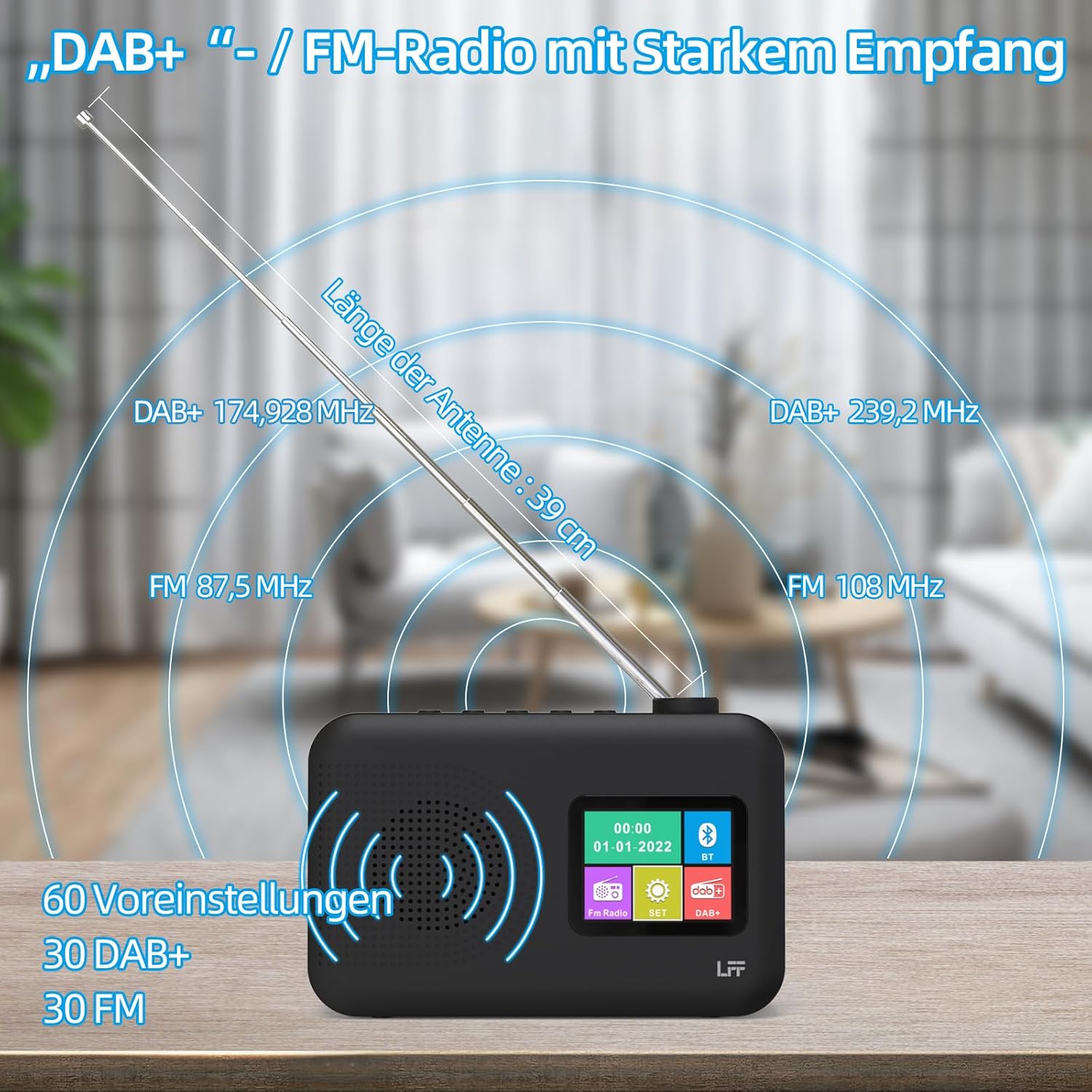
Image 7: Diagram showing the radio's reception capabilities for DAB+ (174.928 - 239.2 MHz) and FM (87.5 - 108 MHz) bands, highlighting the 39 cm antenna and 60 total presets.
5.4 Lautstärkeregelung
Adjust the volume using the dedicated volume knob or buttons, typically located on the top or side of the radio. The radio features 16 adjustable volume levels.
5.5 Sleeptimer
To activate the sleep timer:
- Drücken Sie die Einschlaftimer Taste.
- Cycle through the available durations: 15, 30, 45, 60, 90, or 120 minutes.
- Das Radio schaltet sich nach der gewählten Zeit automatisch aus.

Image 8: Visual guide to setting the sleep timer, showing options for 15, 30, 45, 60, 90, and 120 minutes.
5.6 Doppelwecker
So stellen Sie die Alarme ein:
- Drücken Sie die Alarm Taste zum Aufrufen der Alarmeinstellungen.
- Wählen Sie Alarm 1 oder Alarm 2.
- Set the desired alarm time, alarm source (e.g., buzzer, DAB+, FM), and volume.
- Bestätigen Sie Ihre Einstellungen.

Image 9: Depiction of the dual alarm clock feature, allowing for two separate alarm settings (Alarm 1 and Alarm 2).
5.7 Bluetooth-Konnektivität
So koppeln Sie Ihr Gerät über Bluetooth:
- Switch the radio to Bluetooth mode. The display will indicate it is searching for devices.
- Suchen Sie auf Ihrem Smartphone oder einem anderen Bluetooth-fähigen Gerät nach verfügbaren Bluetooth-Geräten.
- Select "LFF YT81107" (or similar name) from the list to pair.
- Sobald die Verbindung hergestellt ist, können Sie Audio von Ihrem Gerät an das Radio streamen.
Note: This radio acts as a Bluetooth receiver. It cannot connect to Bluetooth headphones.

Image 10: The radio's display showing a successful Bluetooth connection, indicating the paired device name.
5.8 Kopfhörernutzung
Plug standard 3.5mm wired headphones into the headphone jack on the side of the radio for private listening. The internal speaker will automatically mute when headphones are connected.

Image 11: Close-up of the 3.5mm headphone jack located on the side of the radio.
6. Wartung
Um die Langlebigkeit und optimale Leistung Ihres Funkgeräts zu gewährleisten, befolgen Sie bitte diese Wartungsrichtlinien:
- Reinigung: Reinigen Sie die Außenseite des Radios mit einem weichen, trockenen Tuch. Verwenden Sie keine Scheuermittel, Wachse oder Lösungsmittel.
- Lagerung: Bei längerer Nichtbenutzung die Batterien entfernen und das Radio an einem kühlen, trockenen Ort aufbewahren.
- Umfeld: Vermeiden Sie es, das Radio extremen Temperaturen, direkter Sonneneinstrahlung, hoher Luftfeuchtigkeit oder staubigen Umgebungen auszusetzen.
- Wassereinwirkung: This radio is not waterproof. Keep it away from water and liquids.
7. Fehlerbehebung
Sollten Sie Probleme mit Ihrem Funkgerät haben, beachten Sie bitte die folgenden häufig auftretenden Probleme und Lösungen:
| Problem | Mögliche Ursache | Lösung |
|---|---|---|
| Kein Strom | AC adapter not connected, batteries depleted or incorrectly inserted. | Ensure AC adapter is securely plugged in. Replace batteries or check polarity. |
| Schlechter Radioempfang | Antenna not extended, weak signal area, interference. | Fully extend and adjust the antenna. Move the radio to a different location. Avoid placing near other electronic devices. |
| Bluetooth stellt keine Verbindung her | Radio not in Bluetooth mode, device not discoverable, already paired with another device. | Ensure radio is in Bluetooth mode. Make sure your device's Bluetooth is on and discoverable. Disconnect from other Bluetooth devices. |
| Der Alarm ertönt nicht | Alarm not activated, volume too low, incorrect time setting. | Verify alarm is set and enabled. Increase alarm volume. Check alarm time. |
| Kein Ton vom Lautsprecher | Lautstärke zu niedrig, Kopfhörer angeschlossen. | Increase volume. Disconnect headphones. |
If the problem persists after trying these solutions, please contact LFF customer support.
8. Spezifikationen
| Besonderheit | Detail |
|---|---|
| Marke | LFF-Erweiterung |
| Modellnummer | YT81107 |
| Farbe | Schwarz |
| Abmessungen (L x B x H) | 16.1 x 5.9 x 10.9 cm |
| Tuning-Technologie | DAB+ |
| Unterstützte Funkbänder | DAB+ (174.928 - 239.2 MHz), FM (87.5 - 108 MHz) |
| Konnektivität | Bluetooth, 3.5mm Headphone Jack |
| Stromquelle | AC Adapter (5V/1000mA), 4 x 1.5V AA (LR6) Batteries |
| Besondere Merkmale | Color LCD Display, Sleep Timer, Dual Alarm Clock, 60 Presets (30 DAB+, 30 FM) |
| Kompatible Geräte | Smartphones (for Bluetooth audio), Wired Headphones |
9. Garantie und Support
LFF is committed to providing quality products. If you experience any quality issues or require assistance with your LFF DAB+/FM Digital Radio, please contact our customer support directly. Refer to the contact information provided in your purchase documentation or on the official LFF webWebsite.


