1. Einleitung
The NVAHVA A68 Translation Earbuds are designed to provide a seamless audio experience with advanced real-time translation capabilities. These earbuds feature an invisible, lightweight design for comfort, especially for side sleepers, and support various translation modes, meeting recording, and call translation. This manual will guide you through the setup, operation, and maintenance of your device.
2. Packungsinhalt
Bitte überprüfen Sie, ob alle unten aufgeführten Artikel in Ihrem Paket enthalten sind:
- 2 x Ohrhörer
- 1 x Ladekoffer
- 1 x Typ-C Ladekabel
- 3 Paar Ohrstöpsel (S/M/L)
- 1 x Benutzerhandbuch
- 1 x App Code Card
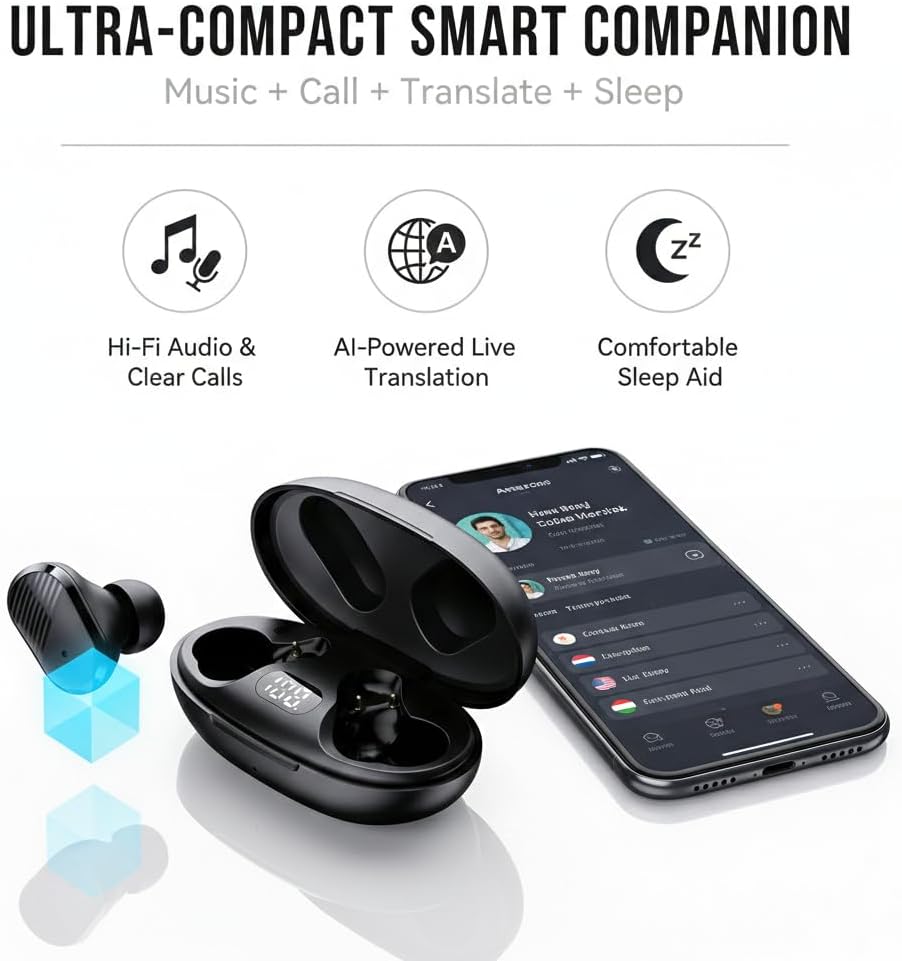
Image: NVAHVA A68 Earbuds, charging case, and accessories.
3. Produktüberschreitungview
The NVAHVA A68 earbuds are designed for versatility, offering high-fidelity audio, AI-powered translation, and a comfortable fit for extended wear, including during sleep.

Bild: Überview of the NVAHVA A68 as an ultra-compact smart companion.
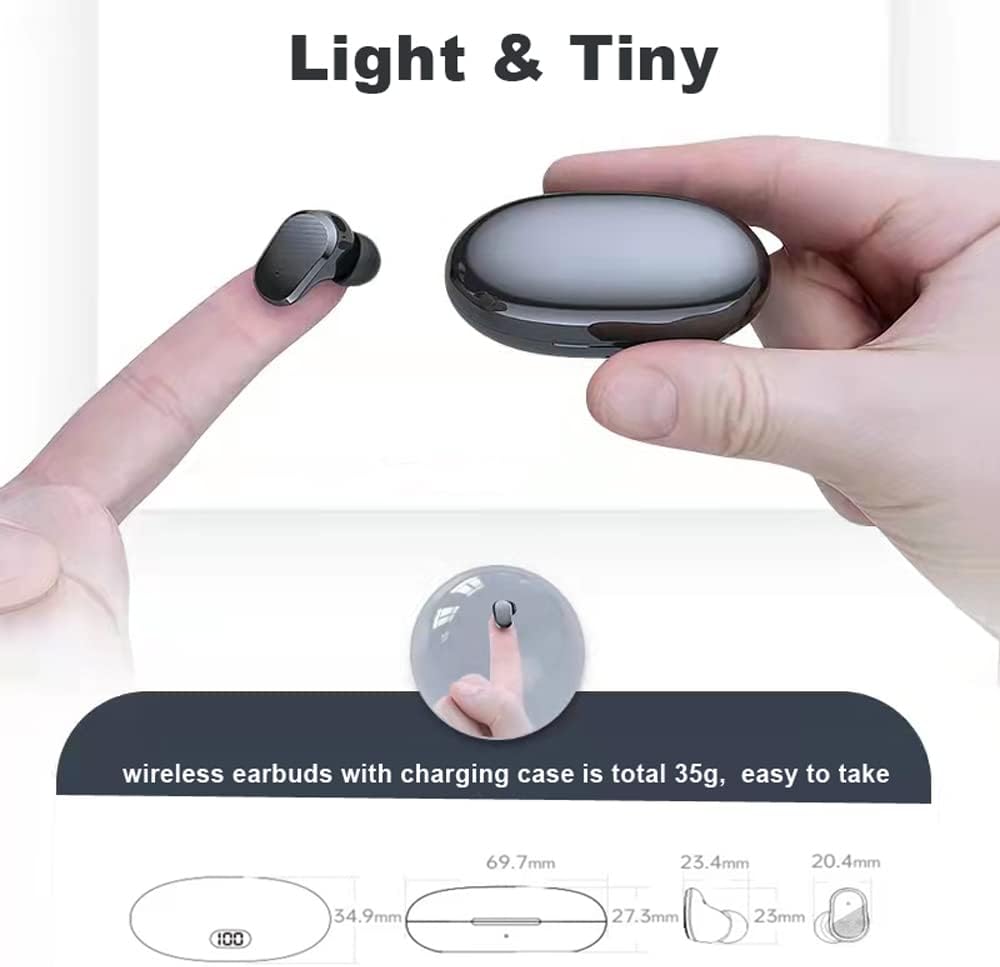
Image: The lightweight and compact design of the earbuds and charging case.
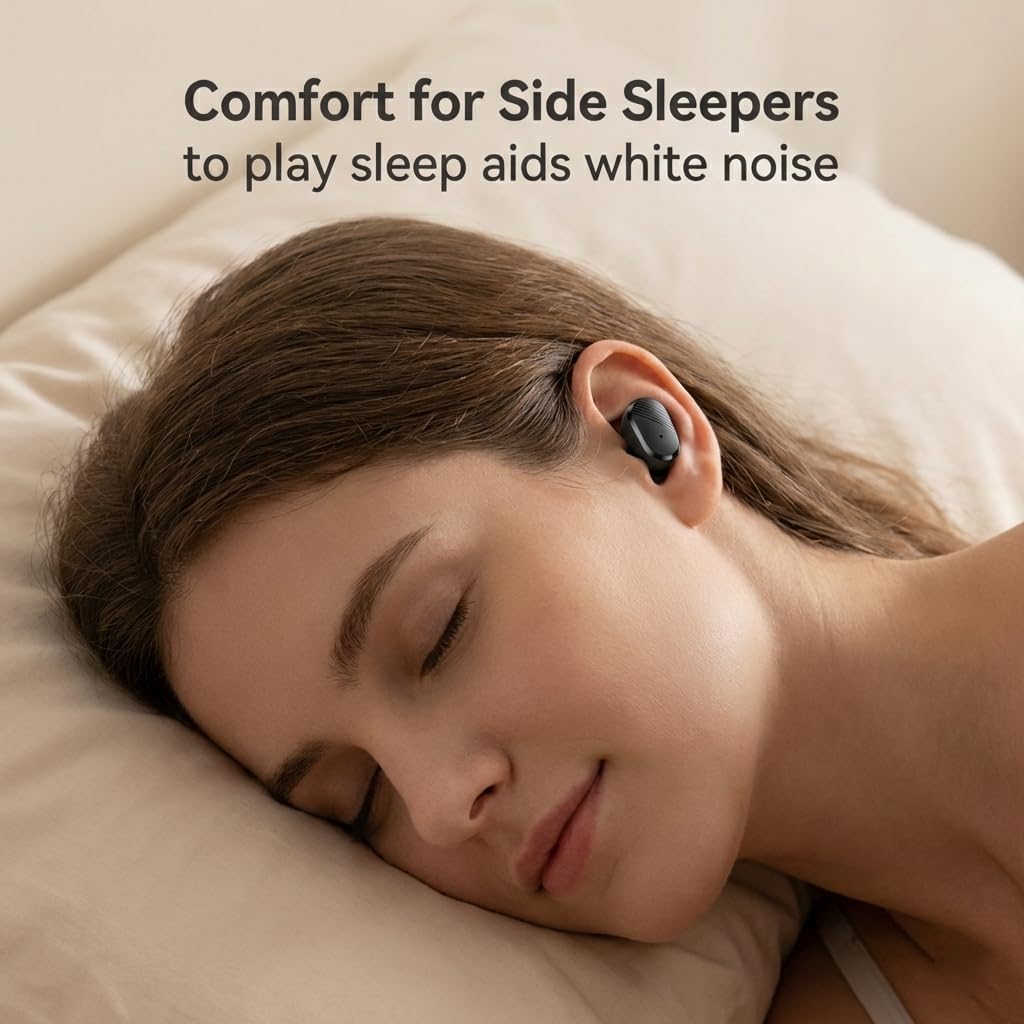
Image: Earbuds designed for comfort, even for side sleepers.
Video: Ein überview of the NVAHVA A68 Invisible Wireless Earbuds, showcasing their small size and features.
4. Installationsanleitung
4.1 Aufladen der Ohrhörer und des Ladecase
Before first use, fully charge the earbuds and charging case. Connect the provided Type-C charging cable to the charging case and a USB power source. The digital display on the case will indicate the charging status. A full charge takes approximately 2 hours. The earbuds provide 4-6 hours of continuous use, with the charging case extending total usage to 20-24 hours.
4.2 Download und Installation der App
To utilize the full translation features, download the companion application:
- Open a QR code scanning function on your smartphone (e.g., your phone's browser or a dedicated QR scanner app).
- Scan the QR code found on the included App Code Card or in the physical user manual. This will direct you to the app download page.
- Select the appropriate download link for your mobile phone system (Android or Apple).
- Follow the on-screen prompts to download and install the application. You may need to grant permission for installation from external sources.
- Once installed, open the 'AI Cool' app.
Video: Step-by-step guide on downloading and installing the NVAHVA AI Translation Earbuds application.
4.3 Bluetooth-Verbindung
So verbinden Sie Ihre Ohrhörer mit Ihrem Smartphone:
- Ensure the earbuds are charged and removed from the charging case to enter pairing mode.
- On your smartphone, go to 'Settings' and enable 'Bluetooth'.
- In the Bluetooth device list, select the NVAHVA A68 (or similar name like 'AIWA' or 'TWS') to pair.
- Open the 'AI Cool' app. On the home screen, click 'Add Device'.
- You may be prompted to enter a binding code. This code is typically found on the cover of the AI Cool user guide. If not available, contact customer support. For built-in devices, a binding code may not be required.
- Once connected, you can begin using the app's features.
5. Bedienungsanleitung
5.1 Grundlegende Touch-Bedienelemente
Die Ohrhörer verfügen über berührungsempfindliche Bedienelemente für verschiedene Funktionen:
- Abspielen/Pause: Einmal berühren
- Anruf annehmen/auflegen: Einmal berühren
- Sprachassistenten aktivieren: Hold button for approximately 2 seconds
- Anruf ablehnen: Hold button for approximately 2 seconds
- Nächster / Vorheriger Track: Knock L/R earbud 3 times
- Lautstärke erhöhen/verringern: Knock L/R earbud twice

Image: NVAHVA A68 Earbuds touch control functions.
5.2 Übersetzungsmodi
The AI Cool app offers several translation modes:
- Simul Mode (Face-to-Face): For natural conversations where both parties wear an earbud and speak simultaneously. The earbuds provide real-time interpretation.
- Speaker Mode (Earbud + Mobile): One person wears an earbud, and the other speaks into the smartphone. The app translates and plays the audio through the earbud, facilitating quick interactions.
- Listen Mode (Two Earphone Mode): Both individuals wear earbuds, and the device recognizes and translates short sentences, enabling smooth and natural conversations.

Image: Face-to-face simultaneous translation mode.

Image: Earbud + Mobile mode for two-way conversation.

Image: Two Earphone Mode for free talk translation.
5.3 AI Meeting Assistant
The built-in Meeting Recorder feature provides real-time transcription and AI summarizing, ideal for international conferences and academic settings.

Image: Meeting Recorder function for transcription and summarizing.
5.4 Call Translation
The earbuds support audio and video call translation on third-party applications like WhatsApp and Zoom, facilitating communication for remote teams and international connections. Note that this feature may require additional charges.

Image: Audio and video call translation in action.
5.5 Offline-Übersetzung
For situations without internet access, Offline Translation packs are available for a one-time purchase ($9.99 lifetime buyout). These packs ensure translation functionality in remote areas or during travel. Supported languages include Chinese, English, German, Japanese, Korean, Hindi, Thai, Spanish, French, and Russian.

Image: Using offline translation during air travel.
6. Wartung
To ensure the longevity and optimal performance of your NVAHVA A68 earbuds:
- Reinigung: Reinigen Sie die Ohrhörer und das Ladecase regelmäßig mit einem weichen, trockenen Tuch. Vermeiden Sie die Verwendung von scharfen Chemikalien oder scheuernden Materialien.
- Ohrstöpsel: Clean the eartips with a damp Bei Bedarf mit einem Tuch und milder Seife behandeln. Sicherstellen, dass sie vor dem Wiederanbringen vollständig trocken sind.
- Lagerung: Bewahren Sie die Ohrhörer bei Nichtgebrauch im Ladecase auf, um sie vor Staub und Beschädigungen zu schützen. Lagern Sie sie an einem kühlen, trockenen Ort, geschützt vor direkter Sonneneinstrahlung und extremen Temperaturen.
- Wasserbeständigkeit: The earbuds are water-resistant. However, they are not waterproof. Avoid submerging them in water or exposing them to heavy rain. Dry them thoroughly if they get wet.
7. Fehlerbehebung
If you encounter issues with your NVAHVA A68 earbuds, refer to the following common solutions:
| Ausgabe | Mögliche Lösung |
|---|---|
| Earbuds not pairing/connecting to phone |
|
| Kein Ton oder geringe Lautstärke |
|
| Translation not working or incorrect |
|
| App voice prompts are in a foreign language |
|
| Earbuds falling out or uncomfortable |
|
8. Spezifikationen
| Besonderheit | Detail |
|---|---|
| Modellname | A68 |
| Marke | NVAHVA |
| Konnektivitätstechnologie | Kabellos (Bluetooth 5.3) |
| Bluetooth-Reichweite | 10 Meter |
| Lärmschutz | Schallisolierung |
| Kopfhöreranschluss | USB-C (für Ladecase) |
| Akkulaufzeit (Ohrhörer) | 5 Hours (continuous AI translation/music) |
| Gesamte Akkulaufzeit (mit Hülle) | 20-24 Stunden |
| Ladezeit | 2 Stunden |
| Kontrollmethode | Berührung, Stimme |
| Material | Acrylnitril-Butadien-Styrol (ABS) |
| Artikelgewicht (Ohrhörer) | 34 Grams (total for both earbuds and case) |
| Wasserbeständigkeit | Wasserfest |
| Audiotreibertyp | Dynamischer Treiber |
| Größe des Audiotreibers | 10 Millimeter |
| Impedanz | 32 Ohm |
| Form der Hörmuschel | Knospe |
| Besondere Merkmale | Lightweight, Noise Isolation, Surround Sound, Sweatproof, Real-time Translation |
9. Sicherheitshinweise
Bitte lesen und befolgen Sie diese Sicherheitsrichtlinien, um Verletzungen oder Schäden an Ihrem Gerät zu vermeiden:
- Die Ohrhörer und das Ladecase dürfen keinen extremen Temperaturen, direkter Sonneneinstrahlung oder hoher Luftfeuchtigkeit ausgesetzt werden.
- Vermeiden Sie es, das Gerät fallen zu lassen, anzustoßen oder auseinanderzunehmen.
- Außerhalb der Reichweite von Kindern und Haustieren aufbewahren.
- Do not use the device while driving or in situations where you need to be aware of your surroundings.
- Längere Einwirkung lauter Geräusche kann zu Gehörschäden führen. Stellen Sie die Lautstärke auf ein moderates Niveau ein.
- Verwenden Sie ausschließlich das mitgelieferte Ladekabel und ein zertifiziertes Netzteil.
10. Garantie und Support
For warranty information, please refer to the documentation provided at the time of purchase or contact your retailer. If you require technical assistance or have questions not covered in this manual, please contact the seller or manufacturer directly for support.


