1. Einleitung
Thank you for choosing coioc Bluetooth Sport Headphones, Model U89. These headphones are designed to provide a high-quality audio experience with advanced features such as Bluetooth 5.3 connectivity, HiFi stereo sound, long battery life, and IPX7 waterproofing, making them ideal for sports and active lifestyles. This manual will guide you through the setup, operation, and maintenance of your new headphones.
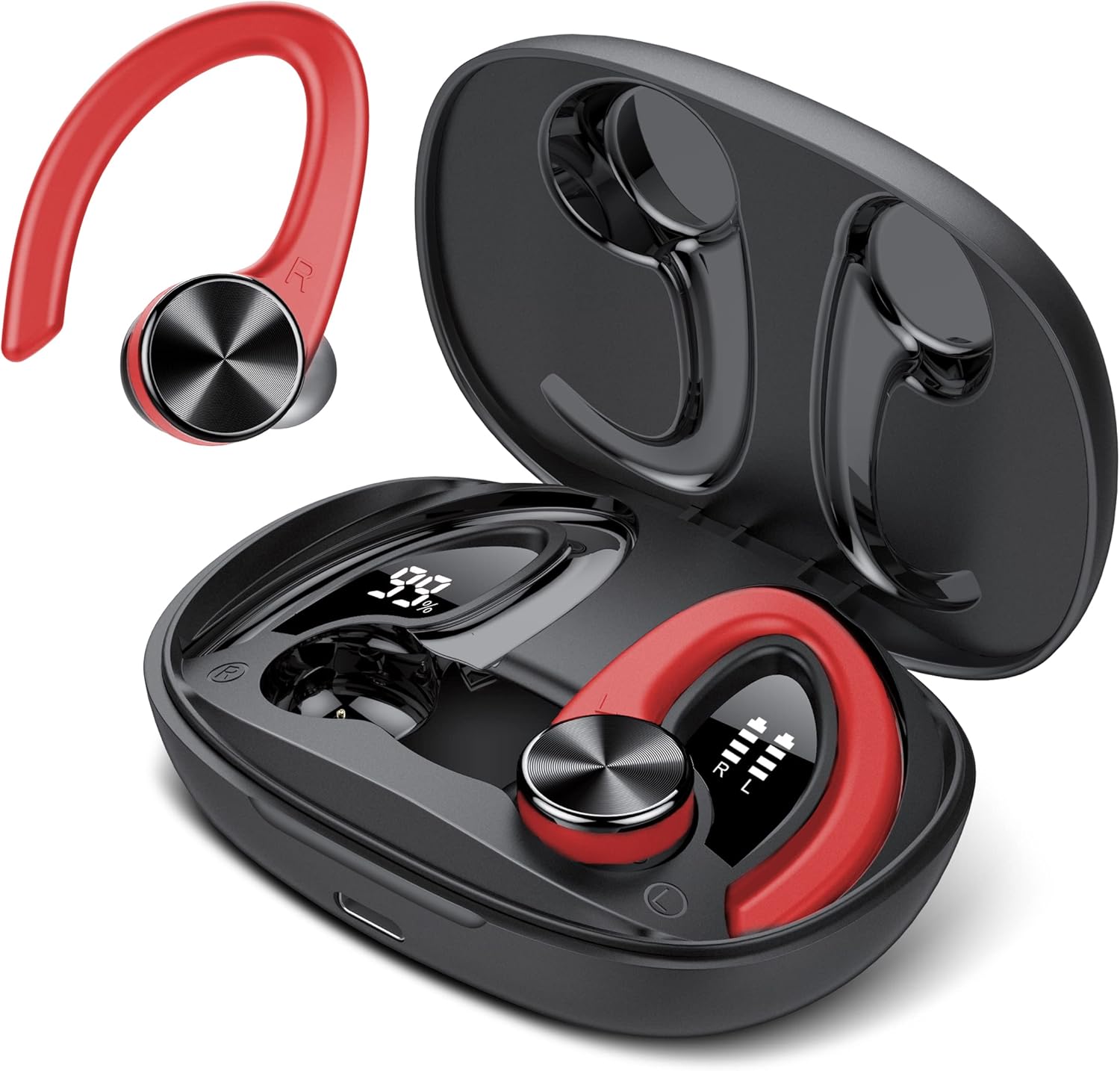
Image: The coioc U89 Bluetooth Sport Headphones, featuring a red and black design, shown alongside their open charging case. The earbuds have ear hooks for a secure fit during physical activity.
2. Packungsinhalt
Bitte prüfen Sie das Paket auf folgende Artikel:
- coioc U89 Bluetooth Sport Headphones (Left and Right)
- Ladeetui
- USB-C-Ladekabel
- Ear Tips (Multiple Sizes: S, M, L)
- Bedienungsanleitung

Image: A visual representation of the package contents, including the headphones, charging case, USB-C cable, and ear tips.
3. Einrichtung
3.1. Aufladen der Kopfhörer und des Ladecase
Before first use, fully charge the headphones and the charging case. Connect the provided USB-C cable to the charging port on the case and a power source. The LED display on the charging case will show the battery percentage of the case and individual battery levels for each earbud.
- A single charge provides up to 6 hours of playtime for the earbuds.
- The charging case provides multiple recharges, extending total playtime up to 45 hours.

Image: Illustration showing the 45-hour ultra-long playtime, with 6 hours from earbuds and additional charges from the case, highlighting Type-C fast charging.

Image: The charging case with its dual LED digital display, showing the charging case capacity (99%) and the individual earbud power levels (R and L).
3.2. Koppeln mit Ihrem Gerät
The coioc U89 headphones feature one-step pairing for convenience.
- Öffnen Sie das Ladecase und nehmen Sie beide Ohrhörer heraus. Sie wechseln automatisch in den Kopplungsmodus.
- Aktivieren Sie Bluetooth auf Ihrem Gerät (Smartphone, Tablet, Laptop).
- Suchen nach "U89" in the list of available Bluetooth devices and select it to connect.
- Sobald die Verbindung hergestellt ist, hören Sie einen Bestätigungston, und die Kopfhörer sind einsatzbereit.
The headphones are compatible with almost all Bluetooth-enabled devices, including iPhone, Samsung, Android, and iOS devices.

Image: A smartphone screen showing Bluetooth settings with "U89" available for connection, illustrating the one-step pairing process.

Image: Icons representing iOS, Android, tablet, and laptop, indicating the wide compatibility of the headphones with various devices.
3.3. Tragen der Kopfhörer
Für optimale Klangqualität und Tragekomfort ist eine korrekte Passform wichtig.
- Choose the correct size of ear tips (S, M, L) that provide a snug seal in your ear canal.
- Stecken Sie den Ohrhörer in Ihr Ohr.
- Position the ear hook over your ear to secure the headphone in place. Adjust for comfort.
The bionic 3D ergonomic design ensures a stable and comfortable fit, especially during sports activities.

Image: A woman wearing the coioc U89 headphones during a workout, demonstrating the comfortable and unshakable fit.

Image: A step-by-step guide showing how to choose the right ear tip size, place the earbud, and adjust the ear hook for a secure and comfortable fit.
4. Bedienungsanleitung
The coioc U89 headphones feature smart touch controls on each earbud for easy operation.

Image: A detailed diagram illustrating the various touch controls on the earbud, including playback, volume, track skipping, call management, and voice assistant activation.
4.1. Musikwiedergabe
- Abspielen/Pause: Tippen Sie zweimal auf den linken (L) oder rechten (R) Ohrhörer.
- Lautstärke erhöhen: Einmaliges Tippen auf den rechten (R) Ohrhörer.
- Lautstärke runter: Einmaliges Tippen auf den linken (L) Ohrhörer.
- Nächster Titel: Den rechten (R) Ohrhörer 2 Sekunden lang gedrückt halten.
- Vorheriges Lied: Den linken (L) Ohrhörer 2 Sekunden lang gedrückt halten.
4.2. Anrufverwaltung
- Anruf annehmen/beenden: Tippen Sie zweimal auf den linken (L) oder rechten (R) Ohrhörer.
- Anruf ablehnen: Halten Sie entweder den linken (L) oder den rechten (R) Ohrhörer 2 Sekunden lang gedrückt.
4.3. Sprachassistent
- Sprachassistenten aktivieren: Triple-tap either the Left (L) or Right (R) earbud.
5. Wartung und Pflege
5.1. Reinigung
Regelmäßige Reinigung trägt zur Aufrechterhaltung optimaler Leistung und Hygiene bei.
- Wischen Sie die Ohrhörer und das Ladecase mit einem weichen, trockenen, fusselfreien Tuch ab.
- Entfernen Sie die Ohrstöpsel und reinigen Sie sie mit milder Seife und Wasser. Stellen Sie sicher, dass sie vollständig trocken sind, bevor Sie sie wieder anbringen.
- Verwenden Sie keine Scheuermittel, Alkohol oder chemische Lösungsmittel.
5.2. Wasserbeständigkeit (IPX7)
The coioc U89 headphones are rated IPX7 waterproof, meaning they can withstand immersion in water up to 1 meter for 30 minutes. This makes them suitable for workouts and protection against sweat and rain.
- Do not intentionally submerge the charging case in water, as it is not waterproof.
- Um Beschädigungen zu vermeiden, stellen Sie sicher, dass die Ohrhörer trocken sind, bevor Sie sie wieder in das Ladecase legen.

Image: An earbud with water splashing around it, visually representing its IPX7 waterproof rating.
5.3. Speicherung
Bewahren Sie die Kopfhörer bei Nichtgebrauch im Ladeetui auf, um sie vor Staub und Beschädigungen zu schützen.
6. Fehlerbehebung
If you encounter any issues with your coioc U89 headphones, please refer to the following common solutions:
| Problem | Lösung |
|---|---|
| Kopfhörer lassen sich nicht koppeln |
|
| Kein Ton von einem Ohrhörer |
|
| Ladeprobleme |
|
| Schlechte Tonqualität |
|
7. Spezifikationen
| Besonderheit | Detail |
|---|---|
| Marke | coioc |
| Modellnummer | U89 |
| Konnektivitätstechnologie | Kabellos (Bluetooth 5.3) |
| Bluetooth-Version | 5.3 |
| Formfaktor | Over-Ear (with ear hooks) |
| Wasserdichtigkeit | IPX7 |
| Ohrhörer-Spielzeit | Bis zu 6 Stunden |
| Gesamtspielzeit (mit Hülle) | Bis zu 45 Stunden |
| Ladeetui-Akku | 500 mAh |
| Ladeanschluss | USB-C |
| Technische Daten | 8.8 x 6.1 x 3.2 cm; 132 Gramm |
| Material | Plastik |
| Kompatible Geräte | iPhone, Samsung, Android, iOS |
8. Garantie und Support
coioc products are designed and manufactured to the highest quality standards. For any warranty claims or technical support, please contact coioc customer service through the retailer where you purchased the product or visit the official coioc brand store online. Please retain your proof of purchase for warranty purposes.
Weitere Informationen finden Sie im coioc Brand Store.